1. Introduction
The Ezona Heated Eye Mask is designed to provide soothing warm therapy for various eye discomforts. Utilizing far infrared technology, this USB-powered eye mask offers adjustable temperature and timer settings to help alleviate symptoms associated with dry eyes, eye fatigue, sinus migraines, blepharitis, styes, and MGD.

Image: The Ezona Heated Eye Mask in indigo color, with its control unit and packaging.
2. Safety Information
- Avoid use if you have difficulty breathing or removing the mask by yourself.
- Do not use the mask while sleeping unless the timer is set for a safe duration.
- If the mask feels too hot or causes discomfort, discontinue use immediately.
- Keep out of reach of children.
- Do not modify or disassemble the device.
- Ensure the USB power source is a standard 5V/1-2A outlet.
3. Package Contents
Please verify that all items are present in your package:
- Heated Eye Mask (x1)
- Controller (x1)
- Washable Cover (x1)
- Packing box (x1)
- User Manual (x1)

Image: Contents of the Ezona Heated Eye Mask package, including the mask, controller, washable cover, and user manual.
4. Product Features
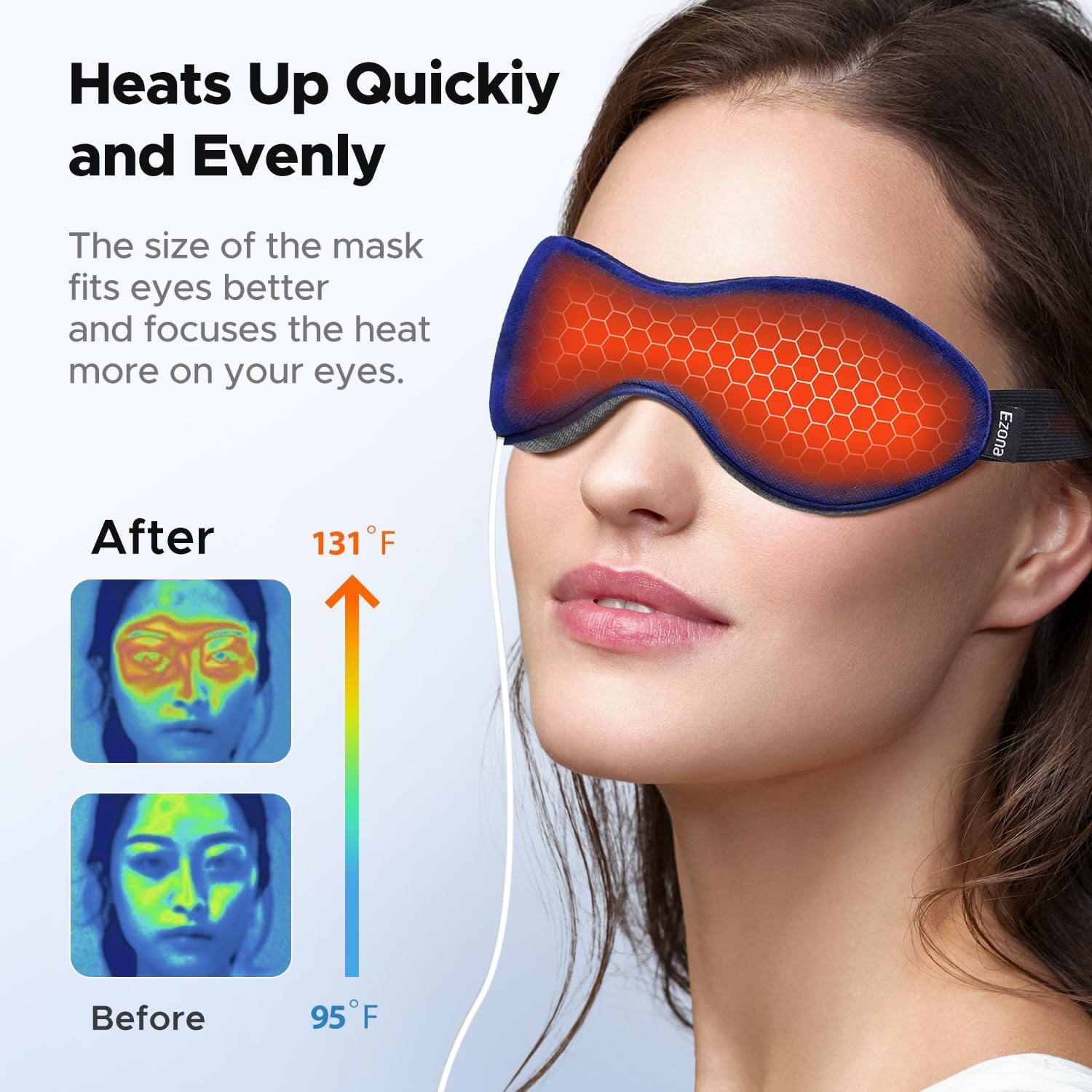
- Relieve Eye Discomfort: Uses far infrared technology for effective relief of dry eyes, eye fatigue, sinus migraines, dark circles, blepharitis, styes, puffiness, and MGD.
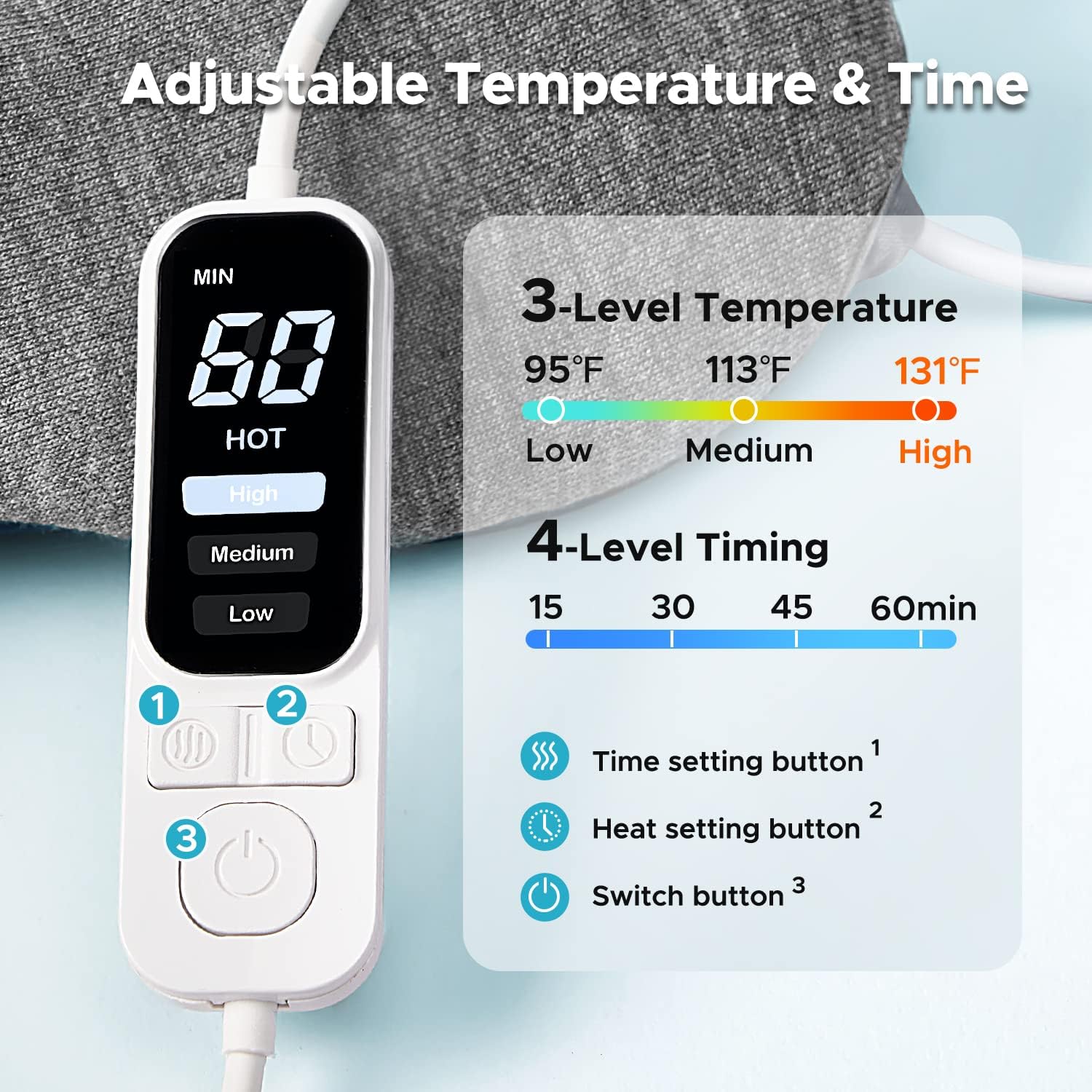
- Adjustable Temperature & Timer: Features 3 heat levels (104℉ to 140℉) and 4 timer settings (15-60 minutes) for personalized therapy.
- Washable Cover & Soft Eye Touch: Includes a removable, hand-washable cotton cover for hygiene and comfort. The mask itself is made of soft, breathable cotton fabric.
- Easy to Power: USB-powered (5V/1-2A) compatible with wall chargers, laptops, power banks, and car chargers.
- Even Heat and Weight Distribution: Gravity beads provide slight pressure and promote blood circulation, ensuring uniform heat distribution for comfort and improved sleep.



5. Setup
Follow these steps to set up your Ezona Heated Eye Mask:
- Connect the DC Plug: Insert the DC plug from the controller into the DC socket located on the eye mask.
- Connect to Power: Insert the USB plug from the controller into a standard 5V/1A or 5V/2A USB outlet. This can be a wall charger, a laptop's USB port, or a portable power bank.
- Prepare for Use: Ensure the washable cover is properly fitted over the heating eye mask.
- Adjust Fit: Use the adjustable strap to ensure a comfortable and secure fit around your head.

Image: Visual guide demonstrating the four steps for connecting the mask to power and preparing it for use.
6. Operating Instructions
Once the mask is connected to a power source, use the inline controller to operate it:
- Power On/Off: Press the power button (labeled '3' on the controller image) to turn the mask on or off. The display will illuminate.
- Set Temperature: Press the heat setting button (labeled '2' on the controller image) to cycle through the three temperature levels: Low (approx. 104℉), Medium (approx. 113℉), and High (approx. 131℉). Select the desired heat level for your comfort.
- Set Timer: Press the time setting button (labeled '1' on the controller image) to choose a duration: 15, 30, 45, or 60 minutes. The mask will automatically shut off after the selected time.
- Apply Mask: Place the heated eye mask over your eyes, ensuring a comfortable fit with the adjustable strap.
- Enjoy: Relax and allow the warm compress to provide relief.
Image: The control unit displaying temperature and timer options, with buttons for adjustment.
7. Maintenance and Care
- Washable Cover: The removable cotton cover can be hand-washed with mild soap and water. Allow it to air dry completely before reattaching to the mask. This helps maintain hygiene and prevents infection.
- Mask Cleaning: The main heating eye mask should not be submerged in water. If cleaning is necessary, gently wipe the surface with a damp cloth and allow it to air dry.
- Storage: Store the eye mask in a clean, dry place when not in use.
- Cord Care: Avoid bending or twisting the USB cord excessively to prevent damage.

Image: The removable washable cover being cleaned, emphasizing its hygiene benefits.
8. Troubleshooting
| Problem | Possible Cause | Solution |
|---|---|---|
| Mask does not heat up. | Not properly connected to power; faulty USB port/adapter; power button not pressed. | Ensure DC plug is fully inserted. Try a different USB port or power adapter (5V/1-2A). Press the power button on the controller. Unplug and re-plug the USB cable to reset the connection. |
| Heat is uneven or too weak. | Incorrect temperature setting; mask not positioned correctly. | Increase the temperature setting on the controller. Adjust the mask's position on your eyes to ensure proper contact. |
| Mask shuts off unexpectedly. | Timer setting reached; unstable power connection. | This is normal if the timer has expired. If it shuts off prematurely, check the USB connection and try a different power source. |
| Mask feels too hot. | Temperature setting is too high for personal comfort. | Lower the temperature setting on the controller. Remove the mask if discomfort persists. |
9. Specifications
- Model: B0CJDSKCHG
- Power Input: USB 5V/1-2A
- Material: Cotton
- Color: Indigo
- Temperature Settings: 3 levels (approx. 104℉, 113℉, 131℉)
- Timer Settings: 4 levels (15, 30, 45, 60 minutes)
- Special Feature: Adjustable Strap, Gravity Beads
- Package Dimensions: 9.29 x 3.5 x 1.34 inches
- Item Weight: 7.83 ounces
- Manufacturer: Ezona
10. Warranty and Support
Ezona products are designed for quality and reliability. For any questions, concerns, or support needs regarding your Ezona Heated Eye Mask, please refer to the contact information provided with your purchase or visit the official Ezona website. Please note that statements regarding dietary supplements have not been evaluated by the FDA and are not intended to diagnose, treat, cure, or prevent any disease or health condition.

