
Introduction
Thank you for choosing the LIVIVOX Portable Under Desk Walking Pad Treadmill, Model LX-22-2B. This manual provides detailed instructions for the safe and efficient operation of your new fitness equipment. Please read this manual thoroughly before first use and retain it for future reference.

Image: The LIVIVOX Walking Pad Treadmill in its operational state with a user, and a smaller inset image showing the unit folded for storage.
Safety Information
To ensure your safety and prolong the life of your treadmill, please observe the following precautions:
- Always place the treadmill on a flat, stable surface.
- Ensure adequate clearance around the treadmill (at least 2 feet on all sides).
- Do not operate the treadmill if it is damaged or malfunctioning.
- Keep children and pets away from the treadmill during operation.
- Wear appropriate athletic footwear.
- Do not exceed the maximum weight capacity of 265 lbs (120 kg).
- Always use the safety key during operation.
- Consult a physician before starting any new exercise program.
Package Contents
Verify that all items are present in the package:
- LIVIVOX Walking Pad Treadmill
- Remote Control
- Power Cord (6.56 ft Electric wire)
- Hex Tool
- Lubricant (x2)
- Safety Key
- User Manual (this document)

Image: A visual representation of all items included in the LIVIVOX Walking Pad Treadmill package.
Setup Instructions
The LIVIVOX Walking Pad Treadmill is designed for installation-free setup. Simply follow these steps:
- Unpack: Carefully remove the treadmill and all accessories from the packaging.
- Position: Place the treadmill on a flat, hard surface. Ensure there is enough space around the unit for safe operation.
- Connect Power: Plug the power cord into the treadmill's power port and then into a grounded electrical outlet.
- Power On: Locate the main power switch on the treadmill (usually at the front or rear near the power cord) and flip it to the 'ON' position. The LED display should illuminate.
- Remote Control: Ensure the remote control has batteries installed. It is ready for use once the treadmill is powered on.
Operating Instructions
Your LIVIVOX Walking Pad Treadmill is controlled via the included remote. Familiarize yourself with its functions:
- Power Button (Red): Press to start or stop the treadmill.
- Speed Adjustment (+/-): Use the '+' button to increase speed and '-' to decrease speed. The speed range is 0.5 to 4.0 MPH.
- Mode Button (M): Cycle through different display modes (Time, Distance, Calories, Steps).
- Reset Button (Curved Arrow): Reset workout data.
- Mute Button (Speaker Icon): Toggle sound on/off.
Starting a Workout:
- Step onto the treadmill belt.
- Press the red Power button on the remote. The display will show a countdown (3-2-1) before the belt starts moving at the lowest speed.
- Adjust the speed using the '+' or '-' buttons to your desired pace.
Ending a Workout:
- Press the red Power button on the remote to gradually slow down and stop the treadmill.
- Step off the treadmill once the belt has completely stopped.
- For complete power off, use the main power switch on the treadmill.
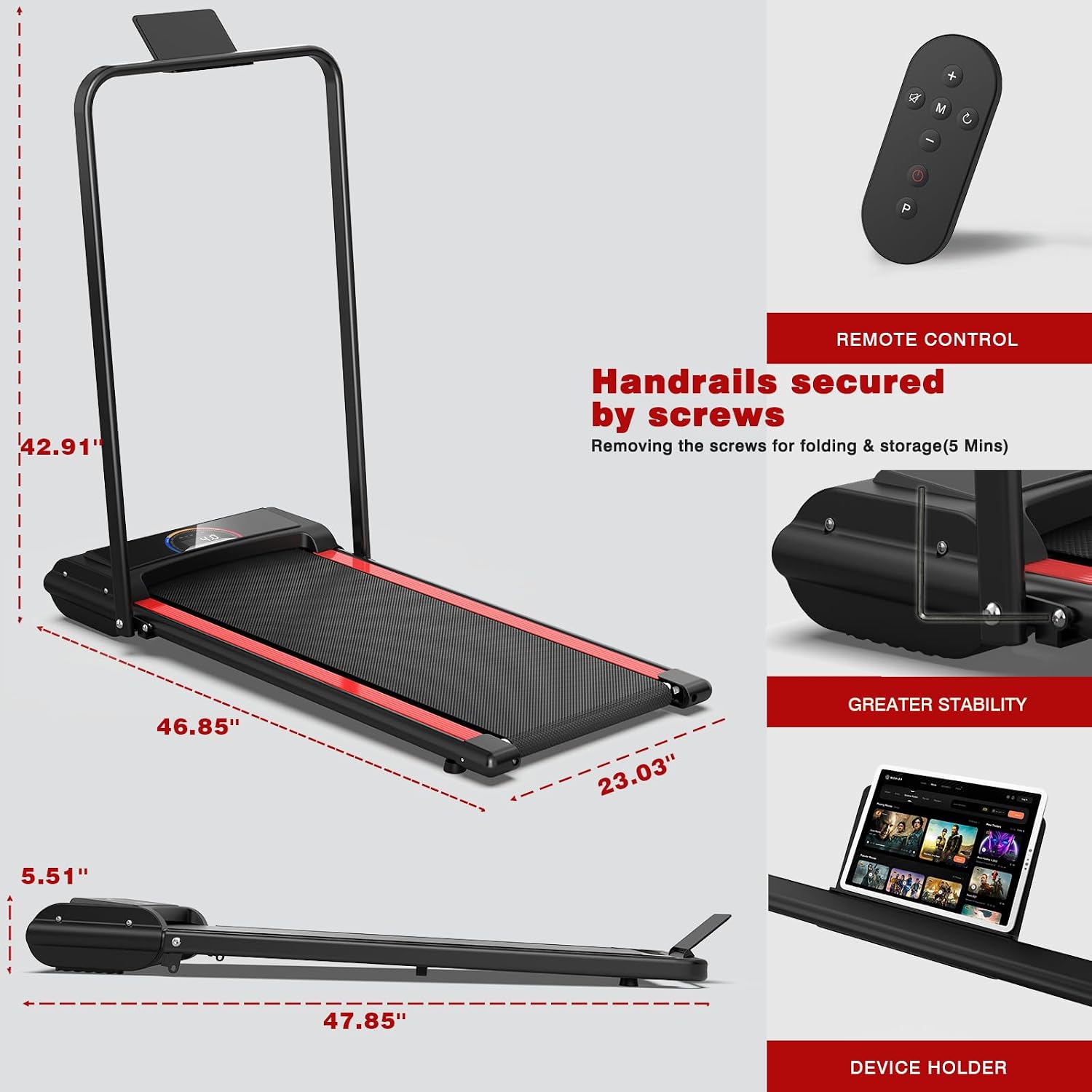
Image: Overview of the treadmill's dimensions, remote control, and integrated device holder.

Image: Close-up of the multi-function LED display, indicating various workout metrics.
Features
- Powerful & Quiet Motor: Equipped with a 2.5 HP ultra-quiet motor, allowing for workouts without significant noise disruption.
- High Weight Capacity: Supports users up to 265 lbs (120 kg).
- Speed Range: Adjustable speed from 0.5 MPH to 4.0 MPH, suitable for walking.
- LED Display: Integrated LED display tracks time, distance, speed, and calories burned.
- Remote Control: Conveniently adjust settings without bending down.
- Space-Saving Design: Compact and portable, designed to fit under desks or be stored easily under furniture. Features transportation wheels for effortless movement.
- Low-Impact Running Belt: Features a non-slip, cushioned deck with integrated shock absorbers to minimize joint strain.
- 5-Layer Running Belt: Constructed with multiple layers for durability, wear resistance, sound insulation, high strength support, shock absorption, and compression.


Maintenance
Regular maintenance ensures optimal performance and longevity of your treadmill:
- Cleaning: Wipe down the treadmill with a damp cloth after each use to remove sweat and dust. Do not use abrasive cleaners.
- Lubrication: The running belt requires periodic lubrication to reduce friction and wear. Use the provided lubricant and follow the instructions on the lubricant bottle or packaging. Typically, lubrication is needed every 3-6 months depending on usage.
- Belt Adjustment: If the running belt feels loose or off-center, use the hex tool to adjust the tension or alignment as per the detailed instructions in the separate user manual provided with the product.
- Storage: When not in use, store the treadmill in a dry, cool place. Its compact design allows for storage under a bed or sofa.
Troubleshooting
If you encounter any issues with your LIVIVOX Walking Pad Treadmill, refer to the following common solutions:
| Problem | Possible Cause | Solution |
|---|---|---|
| Treadmill does not power on. | Power cord not connected, main switch off, power outlet issue. | Check power cord connection, ensure main power switch is ON, test outlet with another device. |
| Belt does not move. | Treadmill is OFF, safety key not in place, remote control battery low. | Press Power button on remote, ensure safety key is correctly inserted, replace remote battery. |
| Unusual noise during operation. | Lack of lubrication, loose belt, foreign object. | Lubricate the running belt, check belt tension/alignment, inspect for foreign objects. |
| Speed is inconsistent. | Motor issue, power supply fluctuation. | Ensure stable power supply. If problem persists, contact customer support. |
If the issue persists after attempting these solutions, please contact LIVIVOX customer support.
Specifications
| Feature | Detail |
|---|---|
| Brand | LIVIVOX |
| Model Name | LX-22-2B |
| Product Dimensions (LxWxH) | 49"D x 24.9"W x 6.5"H |
| Item Weight | 44 Pounds |
| Maximum Weight Recommendation | 265 Pounds |
| Maximum Horsepower | 2.5 HP |
| Minimum Speed | 0.5 Miles per Hour |
| Maximum Speed | 4 Miles per Hour |
| Deck Length | 40 Inches |
| Deck Width | 16.5 Inches |
| Material | Acrylonitrile Butadiene Styrene (ABS), Alloy Steel, Aluminum, Carbon Steel, Iron, Metal, Stainless Steel |
| Display Type | LED |
| Connectivity Technology | Bluetooth |
| Assembly Required | No |
Warranty and Support
Warranty: The LIVIVOX Walking Pad Treadmill comes with a 1-year warranty from the date of purchase.
Customer Support: For any questions, concerns, or technical assistance, please contact our dedicated customer service team. We offer 24-hour online service to address your needs promptly.
Contact information can typically be found on the product packaging or the official LIVIVOX website.