
PERLESMITH PSLFK11-24
PERLESMITH Full Motion TV Wall Mount
Model: PSLFK11-24
Introduction
Welcome to the PERLESMITH Full Motion TV Wall Mount instruction manual. This mount is designed to securely hold your 32-75 inch television, providing flexible viewing angles and saving space. Please read this manual carefully before installation and use to ensure safe and proper operation.
Safety Information
Important Safety Instructions
- WARNING: Do not install on drywall alone. Ensure installation into wood studs or solid concrete walls.
- Verify your TV's weight and VESA pattern are within the mount's specifications (Max 60kg, VESA 200x200mm to 600x400mm).
- Use only the provided hardware. If any parts are missing or damaged, contact PERLESMITH support.
- Always have at least two people for installation to prevent injury or damage.
- Ensure the wall structure can support the combined weight of the mount and the TV.
- Do not overtighten screws.
- Keep children and pets away during installation.
Package Contents
Please check that all components are included and undamaged.
Main Components:
- Wall Plate Assembly
- TV Brackets (2)
- Mounting Hardware Kit (various screws, washers, spacers, anchors)
Tools Required (Not Included):
- Drill
- Stud Finder
- Level
- Phillips Head Screwdriver
- Socket Wrench
- Pencil
- Measuring Tape
Installation Guide
Step 1: Verify TV Compatibility
This mount is compatible with TVs from 32 to 75 inches, weighing up to 60kg. Check your TV's VESA pattern (the distance between the mounting holes on the back of your TV). Compatible VESA patterns range from 200x200mm to 600x400mm. (Note: 100x100mm is not supported).

This image illustrates the compatible TV sizes (32-75 inches) and various VESA mounting patterns supported by the wall mount, including 200x100mm, 200x200mm, 200x300mm, 200x400mm, 300x200mm, 300x300mm, 300x400mm, 400x200mm, 400x300mm, 400x400mm, 500x300mm, and 600x400mm.
Step 2: Choose Your Wall Type
This mount is designed for installation on wood stud walls or solid concrete walls. DO NOT install on drywall alone.

This diagram shows the two compatible wall types for installation: wood stud walls (with stud spacing of 406mm, 457mm, or 610mm) and solid concrete walls. It also includes a warning not to install on drywall without studs.
For Wood Stud Walls:
- Locate the center of the wood studs using a stud finder. Mark the drilling locations.
- Drill pilot holes (refer to manual for drill bit size).
- Attach the wall plate to the studs using the provided lag bolts and washers. Ensure it is level.
For Solid Concrete Walls:
- Mark the drilling locations on the concrete wall.
- Drill pilot holes (refer to manual for drill bit size).
- Insert concrete anchors into the drilled holes.
- Attach the wall plate to the wall using the provided lag bolts and washers. Ensure it is level.
Step 3: Attach TV Brackets to TV
Carefully place your TV face down on a soft, clean surface.
Attach the two TV brackets to the back of your TV using the appropriate screws, washers, and spacers from the hardware kit. Ensure the brackets are centered and securely fastened. If your TV has an uneven back, use spacers to create a flat mounting surface.

This image shows the TV brackets being attached to the back of a television, illustrating the connection points and the overall appearance of the mounted brackets.
Step 4: Hang TV on Wall Plate
With assistance, carefully lift the TV and hook the TV brackets onto the wall plate. Ensure the TV is securely seated on the wall plate. Engage the safety locks on the TV brackets to prevent accidental dislodging.
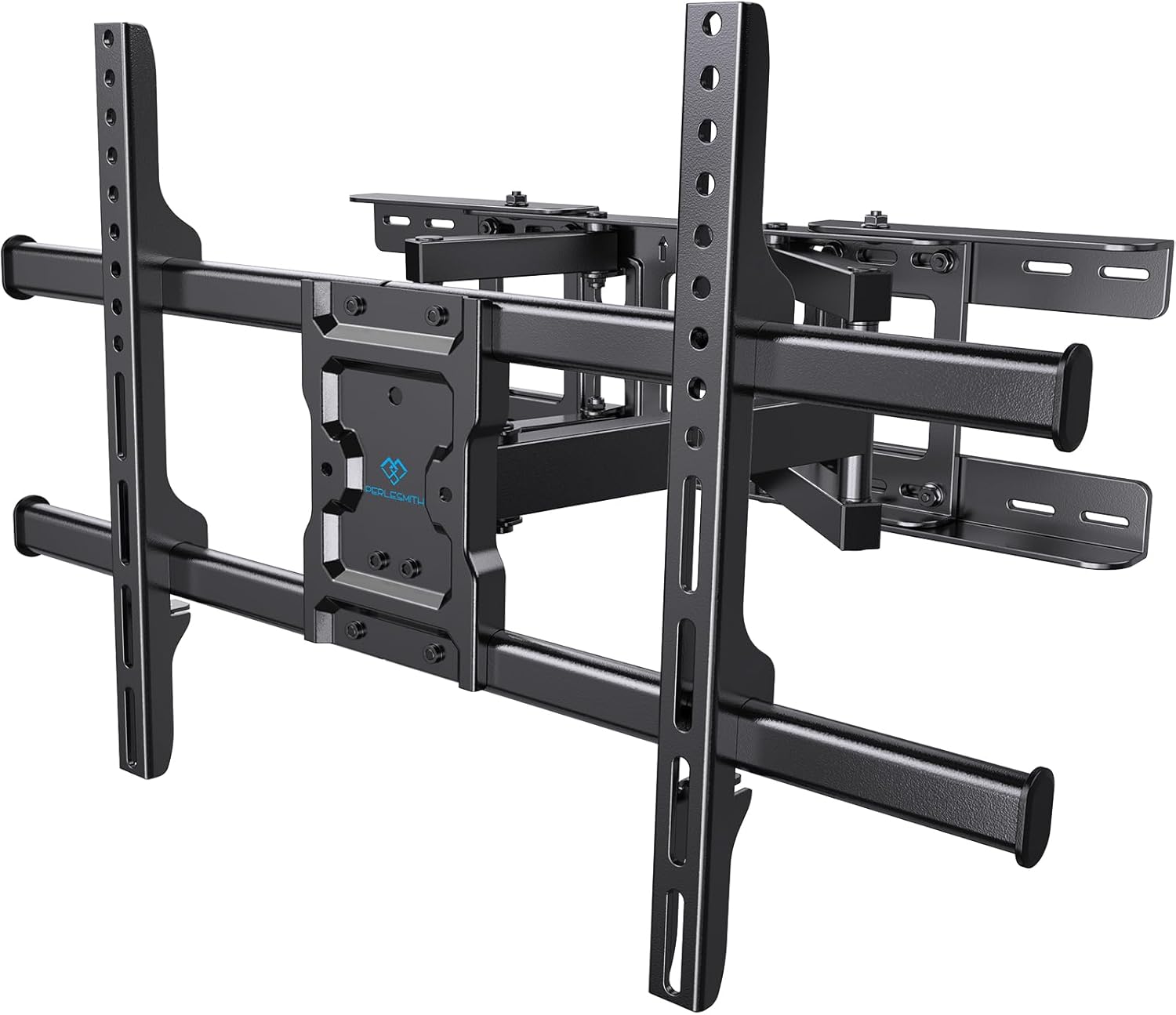
This image displays the PERLESMITH full-motion TV wall mount itself, ready for a television to be attached. It highlights the robust dual-arm design and the VESA mounting plate.
Operating Instructions
Adjusting Your TV Position
This full-motion mount allows for various adjustments to achieve optimal viewing angles:
- Tilt: Tilt the TV up to 5° upwards and down to 15° downwards to reduce glare and improve viewing from different heights.
- Swivel: Swivel the TV up to 45° left or right to direct the screen towards your viewing area.
- Extension: Extend the TV from the wall from 76mm (3 inches) up to 391mm (15.4 inches) for flexible positioning.
- Level Adjustment: Fine-tune the horizontal level of the TV after installation.

This image demonstrates the multi-angle adjustment capabilities of the TV mount, including upward tilt (5°), downward tilt (15°), and left/right swivel (±45°), allowing for flexible viewing positions.

This image illustrates the extension range of the TV mount, showing how it can be pulled out from the wall up to 391mm and retracted to 76mm, providing flexibility for viewing and space-saving.
Maintenance
- Periodically check that all screws and connections are secure.
- Clean the mount with a soft, dry cloth. Avoid abrasive cleaners.
- Do not hang objects from the mount or TV.
Troubleshooting
Common Issues and Solutions:
- TV is not level after installation:
- Use the level adjustment feature on the mount to fine-tune the horizontal position. Refer to the installation guide for specific instructions.
- Mount feels unstable:
- Ensure all lag bolts are securely fastened to the wall studs or concrete. Recheck the wall type and installation method. If issues persist, contact PERLESMITH support.
- TV does not fit the mount:
- Verify your TV's weight and VESA pattern against the specifications. This mount supports 32-75 inch TVs up to 60kg with VESA patterns from 200x200mm to 600x400mm.
- Missing or damaged parts:
- Do not proceed with installation. Contact PERLESMITH support immediately for replacement parts.
Specifications
| Feature | Detail |
|---|---|
| Model Number | PSLFK11-24 |
| Screen Size Compatibility | 32 - 75 inches |
| Weight Capacity | Up to 60 kg (132 lbs) |
| VESA Compatibility | 200x200mm to 600x400mm (Horizontal x Vertical) |
| Tilt Angle | +5° / -15° |
| Swivel Angle | ±45° |
| Extension from Wall | 76mm - 391mm (3 - 15.4 inches) |
| Material | Cold-rolled steel |
| Color | Black |
Warranty and Support
PERLESMITH offers a 3-year quality assurance service from the date of purchase for all its products. If you encounter any issues or have questions, please do not hesitate to contact PERLESMITH support. We are committed to providing excellent service and ensuring your satisfaction.
For support, please visit the official PERLESMITH website or contact our customer service team via the contact information provided with your product packaging.
Official Product Videos
No official product videos are available for embedding at this time.
Related documentsPSLFK11-24


Ask a question about this manual
Ask about setup, troubleshooting, compatibility, parts, safety, or missing instructions. Manuals+ will review the question and use this page’s manual context to help answer it.