
1. Introduction and Overview
The LangYi KUQIBAO Motorcycle Helmet Headset is designed to enhance your riding experience with advanced communication features. It utilizes BT5.1 technology for stable and high-quality audio transmission, incorporates intelligent noise reduction for clear calls, and features a durable, waterproof design. With a large-capacity battery and versatile installation options, it serves as an excellent partner for your rides.
2. Package Contents
Please verify that all items listed below are included in your package:
- 1 x Host Unit
- 1 x Headphone and Microphone Assembly
- 3 x Headphone Adhesive Stickers
- 2 x Headphone Pads
- 1 x Adhesive Base
- 1 x Clip-on Base
- 2 x Wiring Stickers
- 1 x USB Cable
- 1 x User Manual

3. Key Features
3.1. Excellent Performance
The helmet headset is equipped with a premium BT5.1 chip, ensuring energy efficiency, low latency, and noise-free, stable, high-quality audio transmission.
3.2. Noise Reduction Technology
Intelligent noise reduction processing, combined with an ultra-high-sensitivity anti-noise silicon microphone and a wind-proof microphone cover, guarantees clear call quality and enhances voice clarity, even in noisy environments.

3.3. Powerful Functionality
This headset supports simultaneous connection to two mobile phones. It offers voice assistant support and allows control over basic functions such as answering calls and playing music. It also features automatic call answering, with the option to reject calls by pressing a button.


3.4. Long-lasting Battery
Equipped with a built-in 1200mAh large-capacity battery, the headset offers low power consumption and extended endurance. It supports power display on most smartphones and can be charged while in use for added convenience.
3.5. Reliable and Durable Quality
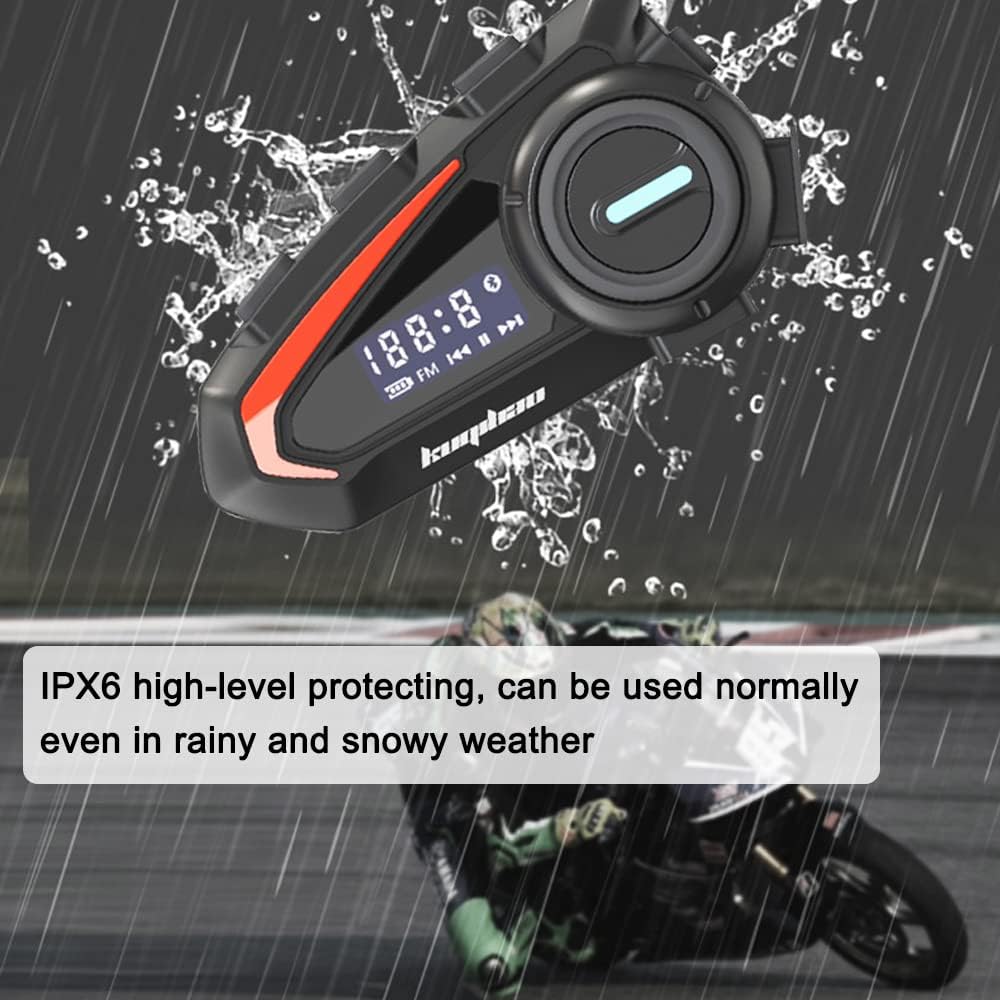
The headset features a premium ABS housing with surface rubber oil processing and an internal silicone inlay structure, providing deep waterproofing and sun resistance. With an IPX6 high-level protection rating, it can be used normally even in rainy and snowy weather conditions.
4. Setup and Installation
The LangYi KUQIBAO headset offers flexible installation options to suit various helmet types. It supports both a base clip and adhesive mounting methods, ensuring convenient and quick setup.
4.1. Choosing Your Microphone
The product comes with an optional hard microphone or soft microphone. Select the one that best fits your helmet type and preference.

4.2. Mounting the Headset
You can attach the main unit to your helmet using either the provided clip-on base or the adhesive base. Ensure the chosen location allows for easy access to controls and optimal microphone placement.
4.3. Headphone and Microphone Placement
Install the headphones inside the helmet, aligning them with your ears for optimal sound. Position the microphone close to your mouth for clear voice transmission. Use the provided adhesive stickers and pads to secure the headphones.
4.4. Helmet Compatibility
This headset is suitable for a wide range of helmet types, including most full-face helmets, open-face helmets, half helmets, and retro helmets.

5. Operating Instructions
Once installed, the headset provides intuitive controls for various functions:
- Power On/Off: Press and hold the power button (specific button not detailed in input, assume main button) for a few seconds.
- Bluetooth Pairing: When powered on for the first time or in pairing mode, the headset will be discoverable. Search for "KUQIBAO" or similar on your device's Bluetooth settings and connect.
- Answering Calls: The headset supports automatic answering of incoming calls. Alternatively, press the main button to answer a call manually.
- Rejecting Calls: If you do not wish to answer an incoming call, press the main button to reject it.
- Music Playback: Control music playback (play/pause, next/previous track) using the integrated buttons.
- Voice Assistant: Activate your smartphone's voice assistant (e.g., Siri, Google Assistant) through the headset for hands-free commands.
- Multi-Device Connection: The headset can connect to two phones simultaneously, allowing seamless switching between devices.
6. Maintenance
To ensure the longevity and optimal performance of your LangYi KUQIBAO headset, follow these maintenance guidelines:
- Cleaning: Wipe the headset's exterior with a soft, damp cloth. Avoid using harsh chemicals or abrasive cleaners.
- Water Resistance: The headset has an IPX6 rating, meaning it is protected against powerful water jets. While it can withstand rain and snow, avoid submerging it in water. Ensure the charging port cover is securely closed when not charging.
- Storage: Store the headset in a cool, dry place away from direct sunlight and extreme temperatures when not in use.
- Charging: Use the provided USB cable for charging. Avoid overcharging the battery.
7. Troubleshooting
If you encounter any issues with your headset, please refer to the following common troubleshooting steps:
| Problem | Possible Cause | Solution |
|---|---|---|
| No Power | Battery is depleted. | Charge the headset fully using the provided USB cable. |
| Cannot Pair Bluetooth | Headset not in pairing mode; Bluetooth disabled on device; interference. | Ensure headset is in pairing mode (check indicator light). Turn off and on Bluetooth on your phone. Move away from other wireless devices. |
| Poor Audio Quality / Noise | Microphone not positioned correctly; environmental noise; low battery. | Adjust microphone closer to your mouth. Ensure wind-proof cover is properly installed. Charge the headset. |
| Cannot Control Functions | Not properly connected; software glitch. | Reconnect Bluetooth. Restart both the headset and your connected device. |
8. Specifications
Detailed technical specifications for the LangYi KUQIBAO Helmet Headset:
| Specification | Value |
|---|---|
| Model | Hard Microphone / Soft Microphone (Optional) |
| Color | Black |
| Material | ABS |
| Bluetooth Version | BT5.1 |
| Distortion | <1% |
| Signal-to-Noise Ratio (SNR) | >80dB |
| Input Voltage | 5V |
| Battery | Built-in 3.7V, 1200mAh Lithium Battery |
| Working Time | 30 hours |
| Standby Time | 180 hours |
| IP Rating | IPX6 |
| Product Size | 88 * 50 * 24mm (3.4 * 2.0 * 0.9 inches) |
| Package Size | 180 * 140 * 30mm (7.1 * 5.5 * 1.2 inches) |
| Package Weight | 200g (7.1 ounces) |
9. Warranty and Support
Specific warranty details and direct support contact information are not provided in this manual. For warranty claims, technical assistance, or further inquiries, please refer to the product packaging, the seller's website, or contact the manufacturer directly using the contact information provided at the point of purchase.