
1. Introduction
This manual provides detailed instructions for the installation, operation, and maintenance of your SPORTARC SVP-688W WiFi Energy Meter. Please read this manual thoroughly before using the device to ensure safe and efficient operation. Keep this manual for future reference.
2. Product Overview
2.1 Key Features
- LCD display for real-time viewing of current, voltage, leakage current, and total power (kWh).
- Adjustable protection settings for overvoltage, undervoltage, overcurrent, and leakage current.
- Adjustable overtemperature protection (for WiFi models only).
- Configurable reconnection time delay.
- Memory function: Retains kilowatt-hour data and protection settings even after power loss.
- Single-phase remote control capability.
- Compatible with Tuya power monitoring systems.
2.2 Product Components

Figure 1: Front view of the SVP-688W WiFi Energy Meter. This image displays the device's LCD screen, which shows voltage, current, power, and leakage readings, along with the 'SET', 'UP', 'DOWN', 'WIFI', and 'POWER' buttons.

Figure 2: Angled view of the SVP-688W. This perspective provides a clearer look at the LCD interface and the tactile buttons for configuration and control.

Figure 3: Side view of the SVP-688W. This image illustrates the side profile, typically where electrical input and output terminals are located for wiring connections.
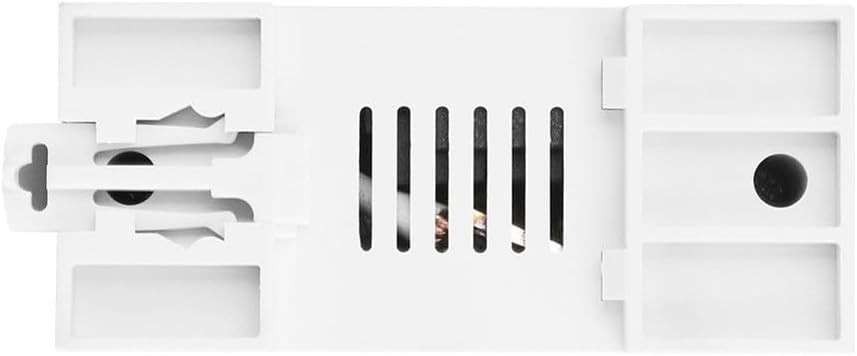
Figure 4: Back view of the SVP-688W. This view shows the mounting mechanism, such as DIN rail clips, and ventilation slots for heat dissipation.
3. Technical Specifications
| Parameter | Value/Range | Default Setting |
|---|---|---|
| Undervoltage Protection | 140-210 V (Adjustable) | 175 V |
| Overvoltage Protection | 240-300 V (Adjustable) | 275 V |
| Overcurrent Protection | 1 A-63 A (Adjustable) | 63 A |
| Overtemperature Protection | 10-85 °C (Adjustable for WiFi models, fixed 85 °C for non-WiFi) | N/A (Adjustable) |
| Reconnection Time Delay | 10s-99s (Adjustable) | 30s |
| Leakage Protection | 10-99 mA (Adjustable) | 50 mA |
| Electricity Display Range | 0-99999.9 kWh | N/A |
| Dimensions | 12 x 10 x 7 cm | N/A |
| Model Number | 1401882111 | N/A |
4. Setup and Installation
Important: Installation of this device should only be performed by a qualified electrician or professional. Ensure all power is disconnected from the main supply before beginning any installation work to prevent electric shock or damage to the device.
4.1 Wiring Instructions
- Mount the SVP-688W device onto a standard DIN rail in your electrical panel.
- Connect the incoming live (L) and neutral (N) wires to the designated input terminals on the device.
- Connect the outgoing live (L) and neutral (N) wires to the load from the designated output terminals on the device.
- Ensure all connections are secure and properly insulated.
The device is designed for single-phase electrical systems.
5. Operation
5.1 LCD Display Information
The LCD screen provides real-time data:
- V: Voltage (Voltmeter)
- A: Current (Ammeter)
- kWh: Total Energy Consumption (Energy Meter)
- mA: Leakage Current
- PULSE: Indication of energy consumption pulses
- WIFI: WiFi connection status indicator
- LEAKAGE: Leakage protection status indicator
5.2 Parameter Settings
To view and adjust the device parameters:
- View Data: Briefly press the SET button to cycle through various data displays (e.g., voltage, current, kWh).
- Enter Configuration Mode: Press and hold the SET button for 5 seconds to enter the configuration mode.
- Select Parameter: Once in configuration mode, press the SET button again to cycle through the adjustable parameters (e.g., Undervoltage, Overvoltage, Overcurrent, Leakage, Reconnection Time, Overtemperature).
- Adjust Setting: Use the ▲ (Up) and ▼ (Down) buttons to adjust the value of the selected parameter.
- Save and Exit: The device will automatically save the settings after a few seconds of inactivity in configuration mode, or you can press and hold SET again to exit.
Refer to the 'Technical Specifications' section for default values and adjustable ranges for each parameter.
6. Maintenance
The SPORTARC SVP-688W is designed for minimal maintenance. However, regular checks can ensure optimal performance and safety.
- Cleaning: Gently wipe the device with a dry, soft cloth. Do not use abrasive cleaners or solvents. Ensure the device is powered off before cleaning.
- Connection Checks: Periodically inspect the wiring connections to ensure they remain tight and free from corrosion.
- Software Updates: For WiFi-enabled features, check the associated Tuya application for any available firmware updates to ensure the device operates with the latest features and security enhancements.
6.1 kWh Data Reset
The accumulated kWh value can be reset. Refer to the device's specific menu options or the Tuya app for instructions on how to clear the kWh data.
7. Troubleshooting
- Device Not Reconnecting After Leakage Trip: If the device trips three times consecutively due to leakage protection, it will enter a manual reset state. It will not automatically reconnect. This is a safety feature. The user must manually inspect the electrical system to identify and repair the cause of the leakage before manually resetting the device. Other protection types (overvoltage, undervoltage, overcurrent) will allow automatic reconnection for more than 99,999 times.
- Incorrect Readings: Ensure all wiring connections are correct and secure. Verify that the device settings (e.g., current limits) are appropriate for your electrical system.
- WiFi Connection Issues: Check your router's internet connection. Ensure the device is within range of your WiFi network. Follow the pairing instructions in the Tuya app for reconnection.
- Device Not Powering On: Verify that the main power supply is active and correctly connected to the device's input terminals.
8. Safety Information
- Always disconnect power at the main circuit breaker before installing, servicing, or cleaning the device.
- This device is intended for indoor use only. Do not expose it to moisture, direct sunlight, or extreme temperatures.
- Do not attempt to open or modify the device. There are no user-serviceable parts inside.
- Ensure proper grounding according to local electrical codes.
- Keep the device out of reach of children.
- In case of malfunction, disconnect power immediately and contact a qualified technician.
9. Warranty and Support
For technical support, warranty inquiries, or service, please contact SPORTARC customer service through your point of purchase or the official SPORTARC website. Please have your model number (SVP-688W) and purchase information ready when contacting support.