
ANCHEER TR5993-121-1
ANCHEER Under Desk Treadmill User Manual
Model: TR5993-121-1
Brand: ANCHEER
Introduction
Thank you for choosing the ANCHEER Under Desk Treadmill. This manual provides essential information for the safe and efficient operation, setup, maintenance, and troubleshooting of your new treadmill. Please read this manual thoroughly before using the product and retain it for future reference.

Figure 1: ANCHEER Under Desk Treadmill in a home setting.
Safety Information
To ensure safe operation, please adhere to the following guidelines:
- Always place the treadmill on a flat, stable surface.
- Keep children and pets away from the treadmill during operation.
- Ensure adequate clearance around the treadmill (at least 2 feet on all sides).
- Do not use the treadmill if it is damaged or malfunctioning.
- Wear appropriate athletic footwear during use.
- Do not exceed the maximum user weight capacity of 300 lbs.
- Unplug the treadmill from the power outlet when not in use or before cleaning/maintenance.
- Avoid placing the treadmill in direct sunlight or in areas with high humidity.
Package Contents
Verify that all components are present in the package:
- Electric Treadmill (x1)
- User Manual (x1)
- Remote Control (x1)
- Lubricant Oil (x2 bottles)
- Wrench (x1)

Figure 2: Included components of the ANCHEER Under Desk Treadmill package.
Setup
The ANCHEER Under Desk Treadmill comes fully assembled, requiring minimal setup before first use.
- **Unpacking:** Carefully remove the treadmill from its packaging.
- **Placement:** Place the treadmill on a flat, hard surface. Ensure there is enough space for safe operation.
- **Adjusting Stability:** The rear of the walking treadmill is designed with adjustable height swivel feet. Adjust these feet to ensure the treadmill remains stable and balanced on uneven surfaces.
- **Power Connection:** Connect the power cord to the treadmill and then to a grounded electrical outlet.
- **Remote Control:** The remote control is essential for operating the treadmill. Ensure it is easily accessible. The treadmill features a dedicated remote control storage slot.

Figure 3: Adjustable height swivel foot for stability.
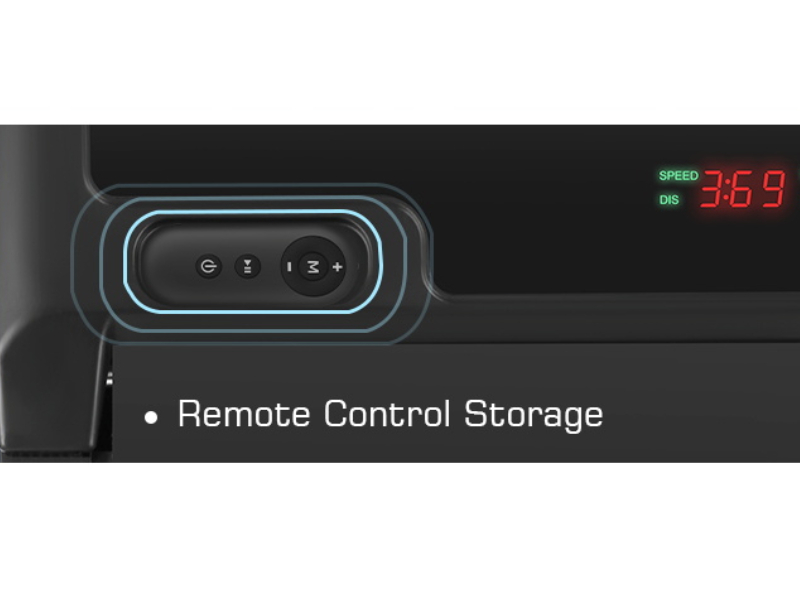
Figure 4: Remote control storage for convenience.
The compact design and built-in transport wheels allow for easy movement and storage under a sofa, bed, or desk when not in use.

Figure 5: Portability and storage options for the treadmill.
Operating Instructions
Your ANCHEER Under Desk Treadmill is designed for simple and intuitive operation using the remote control.
Remote Control Functions

Figure 6: Overview of the remote control buttons.
- **Power Button:** Press to turn the treadmill ON or OFF.
- **Start/Pause Button:** Press to start or pause the treadmill.
- **Speed + / - Buttons:** Adjust the walking/running speed. The maximum speed is 4 MPH.
- **Mode (M) Button:** Activate goal-setting modes (time, distance, calories).
LED Display
The multi-functional LED display clearly shows real-time exercise data:
- Time elapsed
- Calories burned
- Current speed
- Distance covered

Figure 7: Treadmill LED display and remote control.
Starting a Workout
- Ensure the treadmill is plugged in and the power switch (if present) is ON.
- Stand on the treadmill belt.
- Press the Power button on the remote control to turn on the display.
- Press the Start/Pause button to begin the belt movement. The treadmill will start at a low speed.
- Use the Speed + / - buttons to adjust to your desired walking or jogging pace.
The treadmill features a powerful 2.5HP quiet motor, ensuring a smooth and stable workout experience with low noise levels (below 45 dB).

Figure 8: Quiet operation for an undisturbed environment.
Goal Setting Mode
The treadmill includes a goal-setting mode to help you achieve specific workout targets:
- Press the "M" (Mode) button on the remote control.
- Cycle through the available goal settings: Time, Distance, and Calories.
- Once a goal type is selected, use the Speed + / - buttons to set your desired value.
- Press Start/Pause to begin your goal-oriented workout.

Figure 9: Customized goal countdown design for targeted workouts.
Ending a Workout
To stop the treadmill, press the Start/Pause button on the remote control. The belt will gradually slow down and stop. For safety, always step off the treadmill once the belt has come to a complete stop.
Usage Scenarios
The 2-in-1 design allows for versatile use, whether for walking under a standing desk or for general exercise.

Figure 10: Using the treadmill as an under-desk walking pad.
Video 1: Demonstration of the 2-in-1 walking pad treadmill for home and office use, showcasing its compact design and ease of setup and use for both walking and jogging, as well as under a standing desk.
Maintenance
Regular maintenance ensures the longevity and optimal performance of your treadmill.
Cleaning
- Wipe down the treadmill with a damp cloth after each use to remove sweat and dust.
- Do not use abrasive cleaners or solvents.
- Keep the area around the treadmill clean and free of obstructions.
Lubrication
The running belt requires periodic lubrication to reduce friction and extend its lifespan. Use the provided lubricant oil.
- Unplug the treadmill from the power outlet.
- Lift the edge of the running belt.
- Apply a small amount of lubricant oil evenly along the center of the deck, underneath the belt.
- Plug in the treadmill and run it at a low speed (e.g., 1 MPH) for 2-3 minutes to distribute the oil.
- Lubricate every 3-6 months depending on usage frequency.
Troubleshooting
This section addresses common issues you might encounter with your treadmill.
| Problem | Possible Cause | Solution |
|---|---|---|
| Treadmill does not power on. | Power cord not properly connected; Power switch OFF; Circuit breaker tripped. | Ensure power cord is securely plugged in. Turn power switch ON. Check household circuit breaker. |
| Belt stops or slips during use. | Belt needs lubrication; Belt is too loose; Overload (user weight exceeds limit). | Lubricate the running belt. Refer to maintenance section. Reduce user weight. |
| Unusual noise from the treadmill. | Loose parts; Lack of lubrication; Treadmill not on a level surface. | Check for and tighten any loose screws. Lubricate the belt. Adjust swivel feet to level the treadmill. |
| Remote control not responding. | Battery low or dead; Remote control out of range or obstructed. | Replace remote control battery. Ensure direct line of sight to the treadmill's receiver. |
If the problem persists after attempting these solutions, please contact ANCHEER customer support for assistance.
Specifications
| Feature | Detail |
|---|---|
| Brand | ANCHEER |
| Model Name | TR5993-121-1 |
| Color | Grey white |
| Product Dimensions (LxWxH) | 45.27"D x 20"W x 4.17"H |
| Item Weight | 40 Pounds |
| Material | Alloy Steel |
| Maximum Speed | 4 Miles per Hour |
| Minimum Speed | 0.6 Miles per Hour |
| Maximum Horsepower | 2.5 Horsepower |
| Maximum Weight Recommendation | 300 Pounds |
| Deck Length | 40 Inches |
| Deck Width | 15 Inches |
| Display Type | LED |
| Power Source | Corded Electric |
| Assembly Required | No |
Warranty and Support
ANCHEER offers a 1-year warranty for this product. For any issues, replacement parts, or support inquiries, please contact ANCHEER customer service. Your satisfaction is our top priority.
For additional support and product information, you may visit the official ANCHEER Store on Amazon: ANCHEER Store