
1. Introduction
Thank you for choosing the ICE-WATCH ICE Chrono wristwatch. This manual provides essential information for the proper setup, operation, and maintenance of your new timepiece. The ICE Chrono combines a sporty design with modern functionality, featuring a bioplastic case and a durable plastic strap. It is designed for daily wear and various activities, including swimming.
2. Product Overview
The ICE Chrono watch features an analog display with chronograph functions, a 24-hour display, and a stopwatch. Its robust construction includes a plastic case, mineral glass crystal, and a comfortable plastic strap with a foldover clasp.
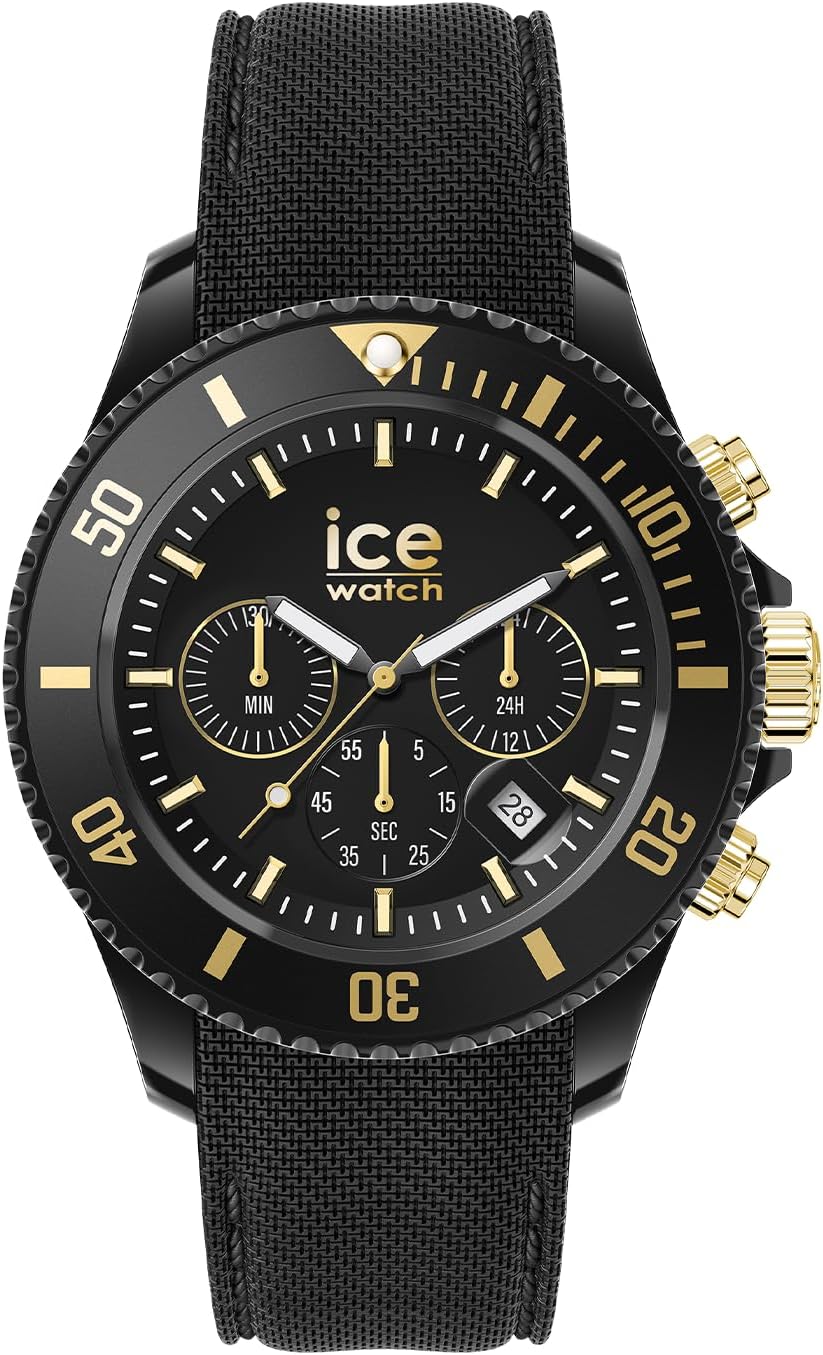
Figure 2.1: Front view of the ICE-WATCH ICE Chrono, highlighting the dial and main features.

Figure 2.2: Side view of the watch, illustrating the crown and pushers for time and chronograph adjustments.

Figure 2.3: Rear view of the watch, displaying the caseback details including model number and water resistance rating.
3. Setup
3.1 Setting the Time
- Pull the crown (center knob on the right side of the watch) out to the second click position.
- Turn the crown to set the hour and minute hands to the correct time.
- Push the crown back into the normal position to start the watch.
3.2 Adjusting the Strap and Clasp
The watch features a foldover clasp. Adjust the strap length to ensure a comfortable and secure fit on your wrist. Ensure the clasp is fully engaged to prevent accidental opening.
4. Operating Instructions
4.1 Using the Chronograph (Stopwatch)
The chronograph function allows you to measure elapsed time. The watch has two pushers located above and below the crown.
- Start: Press the upper pusher to start the chronograph. The chronograph second hand will begin to move.
- Stop: Press the upper pusher again to stop the chronograph. The elapsed time will be indicated by the chronograph hands.
- Reset: After stopping the chronograph, press the lower pusher to reset all chronograph hands to their zero positions.
4.2 24-Hour Display
The 24-hour sub-dial indicates the current time in a 24-hour format, synchronized with the main hour hand. This is useful for distinguishing between AM and PM hours.
5. Maintenance
5.1 Water Resistance
Your ICE Chrono watch is water resistant up to 10 ATM (100 meters). This means it is suitable for immersion and watersports like swimming. However, it is not suitable for diving. Do not operate the crown or pushers while the watch is wet or submerged, as this can compromise the water resistance.
5.2 Cleaning
To maintain the appearance of your watch, clean the case and strap regularly with a soft, damp cloth. For stubborn dirt, a mild soap solution can be used, followed by rinsing with clean water and drying thoroughly. Avoid using harsh chemicals or abrasive materials.
5.3 Battery Replacement
The watch is powered by a quartz movement and requires one unknown battery (included). When the battery runs low, the watch may stop or the second hand may move erratically. Battery replacement should be performed by a qualified watch technician to ensure proper sealing and maintain water resistance.
6. Troubleshooting
- Watch not running: Check if the crown is pushed in completely. If it is, the battery may need replacement.
- Incorrect time: Ensure the time is set correctly as described in Section 3.1.
- Chronograph hands not resetting to zero: This may indicate a need for calibration or service.
If you experience persistent issues, please contact customer support or a certified watch repair center.
7. Specifications
| Feature | Detail |
|---|---|
| Model Number | 021602 |
| Display Type | Analog |
| Movement Type | Quartz |
| Case Material | Plastic |
| Case Diameter | 40 Millimeters |
| Case Thickness | 12 Millimeters |
| Crystal Material | Mineral Glass |
| Strap Material | Plastic |
| Band Width | 20 Millimeters |
| Clasp Type | Foldover Clasp |
| Water Resistance Depth | 100 Meters (10 ATM) |
| Additional Features | 24-hour Display, Stop Watch |
| Item Weight | 60 Grams |
| Batteries | 1 Unknown battery (included) |
8. Warranty and Support
Your ICE-WATCH ICE Chrono is shipped with an instruction manual and presentation box. For specific warranty information, please refer to the documentation included with your purchase or visit the official ICE-WATCH website. For technical support or service inquiries, please contact the manufacturer directly through their official channels.


