
1. Introduction
Thank you for purchasing the FENIX E03R V2.0 Rose Red Rechargeable Keychain Flashlight. This compact and powerful device is designed for everyday carry, offering versatile lighting options and robust construction. Please read this manual thoroughly before use to ensure proper operation, maintenance, and to maximize the product's lifespan.
Safety Warning: This flashlight is a high-intensity lighting device capable of causing eye damage. Avoid shining the light directly into anyone's eyes. Keep out of reach of children.
2. Product Overview
2.1 Key Features
- Compact and Portable: Weighs only 30 grams and measures 5.3 cm, ideal for keychain carry.
- Powerful Illumination: Delivers a maximum output of 500 lumens with a beam distance of up to 90 meters.
- Versatile Lighting Modes: Offers four white light brightness levels, red light, red flash, and a unique 'breathing' pulse light.
- Effortless Charging: Equipped with USB-C charging and a built-in 400mAh Li-ion battery.
- Durable Construction: Made from A6061-T6 aluminum with HAIII hard-anodized finish, providing IP66 dustproof and heavy rain/splash protection.
2.2 Package Contents
The FENIX E03R V2.0 package includes:
- FENIX E03R V2.0 Keychain Flashlight (Rose Red)
- USB-C Charging Cable
- Keychain Split Ring
- User Manual
- Warranty Card
- Gift Box

Image: The FENIX E03R V2.0 flashlight shown alongside its open gift box, illustrating the product and its presentation.
3. Setup
3.1 Charging the Battery
The FENIX E03R V2.0 features a built-in 400mAh Li-ion battery and a USB-C charging port.
- Locate the USB-C charging port on the side of the flashlight.
- Connect the provided USB-C cable to the flashlight's port and the other end to a USB power source (e.g., computer, wall adapter, power bank).
- The charging indicator light will illuminate during charging. Refer to the indicator status for charging progress:
- Red: Charging in progress.
- Green: Charging complete.
- Charging typically takes approximately 1 hour from empty to full.
Note: For optimal battery life, charge the flashlight fully before first use and recharge when the light output becomes dim or the indicator shows low battery.
4. Operating Instructions
The FENIX E03R V2.0 is operated by a single side switch.
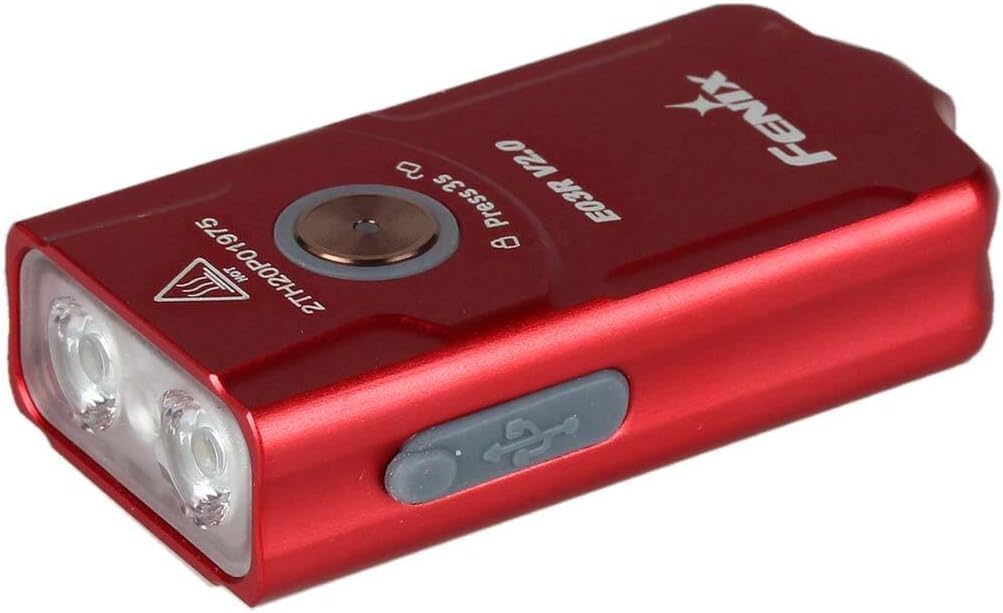
Image: The FENIX E03R V2.0 flashlight, highlighting its compact design and the single operational switch on its side.
4.1 Power On/Off
- Turn On: Press and hold the switch for 0.5 seconds.
- Turn Off: Press and hold the switch for 0.5 seconds.
4.2 Mode Switching (White Light)
When the light is on, single-click the switch to cycle through the white light modes in the following order: Eco → Low → Med → High.
4.3 Red Light and Special Modes
When the light is off, double-click the switch to activate the red light mode. Single-click to cycle through Red → Red Flash → Pulse Light.
4.4 Lockout Function
The lockout function prevents accidental activation.
- Lock: With the light off, double-click the switch within 0.5 seconds. The light will flash twice to indicate it is locked.
- Unlock: With the light locked, double-click the switch within 0.5 seconds. The light will flash twice and then turn on to the previously used white light mode.
5. Maintenance
5.1 Cleaning
- Clean the flashlight body with a soft cloth.
- For stubborn dirt, use a mild detergent and water, then dry thoroughly.
- Keep the lens clean to ensure optimal light output. Use a lens cleaning cloth if necessary.
5.2 Battery Care and Storage
- Recharge the battery regularly, even if not in frequent use, to maintain battery health.
- Avoid fully discharging the battery for extended periods.
- Store the flashlight in a cool, dry place away from direct sunlight and extreme temperatures.
6. Troubleshooting
If your FENIX E03R V2.0 is not functioning correctly, please refer to the following common issues and solutions:
| Problem | Possible Cause | Solution |
|---|---|---|
| Flashlight does not turn on. | Battery is depleted. | Charge the battery using the USB-C cable. |
| Flashlight is locked. | Accidental activation of lockout function. | Double-click the switch to unlock. |
| Light output is dim or flickers. | Low battery level. | Recharge the battery. |
| Charging indicator not working. | USB-C cable or power source issue. | Try a different USB-C cable or power source. Ensure the cable is fully inserted. |
If the problem persists after trying these solutions, please contact FENIX customer support.
7. Specifications
| Feature | Detail |
|---|---|
| Maximum Output | 500 Lumens |
| Maximum Beam Distance | 90 Meters |
| Maximum Runtime | 30 Hours |
| Battery Type | Built-in 400mAh Lithium-ion Polymer Battery |
| Charging Port | USB-C |
| Dimensions (L x W x H) | 5.3 cm x 2.6 cm x 1.3 cm |
| Weight | 30 Grams |
| Waterproof Rating | IP66 (Dustproof, heavy rain/splash resistant) |
| Material | Durable A6061-T6 Aluminum |
| Light Source | High-performance LED |
| Color | Rose Red |
| Compliance | ANSI, CE, FCC, UKCA |
8. Warranty and Support
8.1 Warranty Information
The FENIX E03R V2.0 comes with a warranty against defects in materials and workmanship. Please refer to the included Warranty Card for specific terms, conditions, and duration of your product's warranty. Keep your purchase receipt as proof of purchase for warranty claims.
8.2 Customer Support
For technical assistance, warranty claims, or any questions regarding your FENIX E03R V2.0 flashlight, please contact your authorized FENIX dealer or visit the official FENIX website for support contact information.