
1. Introduction
The Daytech Wireless Caregiver Pager System is designed to provide prompt assistance for individuals who may require immediate help, such as the elderly, seniors, patients, or disabled persons. This system includes a plug-in receiver and wireless call buttons, enabling a simple and effective way to alert caregivers.

Image 1.1: Daytech Wireless Caregiver Pager System components.
2. Product Components
Your Daytech Wireless Caregiver Pager System package includes the following items:
- 1 x Plug-in Receiver
- 2 x Wireless Call Buttons
- 2 x Neck Straps (for call buttons)
- Double-sided Adhesive Stickers (for call buttons)
- 2 x 12V Batteries (pre-installed in call buttons)
3. Setup and Installation
3.1 Receiver Setup
- Unpack the receiver from its packaging.
- Plug the receiver into a standard electrical outlet in a central location where the alert can be easily heard by the caregiver. Ensure the outlet is easily accessible.

Image 3.1: Receiver plugged into an electrical outlet.
3.2 Call Button Setup and Placement
The call buttons come with pre-installed 12V batteries. There are multiple options for attaching and placing the call buttons:
- Neck Strap: Attach the included neck strap to the call button. This allows the user to wear the button as a pendant, keeping it readily accessible.
- Double-sided Adhesive: Use the provided double-sided adhesive stickers to mount the call button on a flat surface. Common placements include beside a bed, in a bathroom, or near a chair.
The call button is designed to be waterproof and dustproof (IP55 rated), making it suitable for use in environments like bathrooms where splashes may occur. However, it should not be immersed in water.

Image 3.2: Attaching the neck strap to the call button.

Image 3.3: Using double-sided adhesive for wall mounting.

Image 3.4: Versatile placement options for the call button.
4. Operating Instructions
4.1 Initiating a Call
To alert the caregiver, simply press the large red 'CALL' button on the wireless call button. The receiver will then sound an alarm and flash its LED indicator.

Image 4.1: Pressing the call button for assistance.
4.2 Receiver Functions
The receiver offers customizable settings for alerts:
- Ringtone Selection: The receiver has 20 unique ringtones to choose from. The default ringtone is "Ding-Dong". Use the 'Forward' and 'Backward' buttons on the side of the receiver to cycle through the available tones.
- Volume Adjustment: There are 5 adjustable volume levels, ranging from 0 dB (mute mode) to 110 dB. Use the 'Volume Control' button on the side of the receiver to adjust the loudness.
- LED Indicator: The receiver features an LED light that flashes when an alert is received, providing a visual notification even if the volume is set low or in mute mode.
- Memory Function: The receiver retains your selected ringtone and volume settings even after being unplugged.
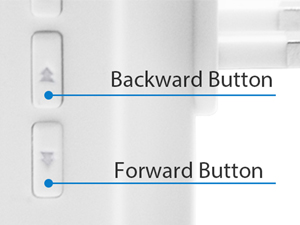
Image 4.2: Ringtone selection buttons.

Image 4.3: Volume control button.

Image 4.4: Overview of receiver features.
4.3 Wireless Range
The system operates with a wireless range of over 300 feet (approximately 150 meters) in an open area. This allows for reliable communication between the call button and receiver across different rooms or floors within a home, hospital, or nursing home setting.

Image 4.5: Wireless range illustration.
5. Maintenance
5.1 Battery Replacement (Call Button)
The call button uses a 12V battery. If the call button stops functioning or its range decreases significantly, the battery may need replacement. To replace the battery:
- Carefully open the back casing of the call button.
- Remove the old 12V battery.
- Insert a new 12V battery, ensuring correct polarity.
- Close the casing securely.
5.2 Cleaning
To clean the receiver and call buttons, use a soft, dry cloth. For stubborn dirt, a slightly damp cloth can be used, but ensure no moisture enters the devices. Do not use abrasive cleaners or solvents.
5.3 Water Resistance
While the call button is IP55 waterproof and dustproof, it is designed to withstand splashes and light rain. It is not intended for submersion in water. Avoid prolonged exposure to heavy rain or direct water jets.
6. Troubleshooting
| Problem | Possible Cause | Solution |
|---|---|---|
| Receiver does not sound when button is pressed. | Receiver unplugged or power outage. Call button battery is low or dead. Call button is out of range. | Ensure receiver is securely plugged into a working outlet. Replace the 12V battery in the call button. Move the call button closer to the receiver. |
| Receiver volume is too low or silent. | Volume setting is too low or in mute mode. | Adjust the volume using the 'Volume Control' button on the receiver. |
| Interference or reduced range. | Thick walls, metal objects, or other electronic devices causing interference. | Relocate the receiver or call button to minimize obstructions. Avoid placing near large metal structures or strong electromagnetic fields. |
7. Specifications
| Feature | Detail |
|---|---|
| Model Number | B0CJB971BF |
| Control Method | Touch |
| Noise Level | Up to 110 dB |
| Mounting Type | Wall Mount (for call button) |
| Maximum Wireless Range | 500 Feet (150 meters) in open area |
| Sensor Technology | Manual (button press) |
| Manufacturer | Daytech |
| Package Dimensions | 4.37 x 3.7 x 3.62 inches |
| Item Weight | 7.9 ounces |
| Call Button Batteries | 2 x 12V batteries (included) |
| Receiver Power Source | Plug-in (AC powered) |
| Color | White |
| Water Resistance | IP55 (Call Button) |
8. Product Videos
The following videos provide additional visual guidance on the Daytech Wireless Caregiver Pager System:
Receiver Features Overview
This video demonstrates the various features of the receiver unit, including ringtone selection and volume adjustment.
Call Button Functionality
This video illustrates how to use the call button and its immediate response from the receiver.
Installation Guide
This video provides a step-by-step guide on installing the call button using the neck strap and adhesive options.
Waterproof Test
This video demonstrates the IP55 water resistance of the call button.
Range Test
This video showcases the effective wireless range of the Daytech Caregiver Pager System.
9. Customer Support
Daytech is committed to providing reliable products and support. If you encounter any issues or have questions regarding your Wireless Caregiver Pager System, please contact Daytech customer service. We aim to provide round-the-clock assistance to resolve your concerns.


