
1. Introduction
Thank you for choosing the Noirot Amaroc Ceramic Electric Radiator. This manual provides essential information for the safe and efficient use of your new heater. Please read all instructions carefully before installation and operation, and retain this manual for future reference.
The Noirot Amaroc radiator features ceramic inertia technology, providing gentle and permanent heat for optimal comfort. It is certified 'Origine France Garantie' and NF, ensuring high quality and safety standards.
2. Safety Instructions
Always observe the following safety precautions to reduce the risk of fire, electric shock, or injury:
- Ensure the power supply voltage matches the rating label on the appliance.
- Do not cover the radiator. Overheating can occur.
- Keep flammable materials (curtains, furniture, etc.) at a safe distance from the radiator.
- Do not operate the radiator with a damaged cord or plug.
- Avoid placing the radiator directly below an electrical outlet.
- This appliance is not intended for use by persons (including children) with reduced physical, sensory or mental capabilities, or lack of experience and knowledge, unless they have been given supervision or instruction concerning use of the appliance by a person responsible for their safety.
- Unplug the radiator from the power outlet before cleaning or maintenance.
3. Setup and Installation
3.1 Unpacking
Carefully remove the radiator from its packaging. Check for any signs of damage. Retain the packaging for future transport or storage.
3.2 Mounting the Radiator
The Noirot Amaroc radiator is designed for wall mounting. Ensure the wall is suitable to support the weight of the appliance (approximately 18.7 kg). Follow these general steps:
- Choose a suitable location, away from direct drafts and at least 15 cm from any furniture or curtains.
- Mark the drilling points on the wall using the provided mounting bracket as a template.
- Drill holes and insert appropriate wall plugs.
- Secure the mounting bracket to the wall.
- Carefully hang the radiator onto the mounting bracket, ensuring it is securely seated.

Image: The Noirot Amaroc electric radiator seamlessly integrated into a modern living room, mounted on a wall beneath a window. This illustrates a typical installation scenario, highlighting its compact design and placement flexibility.
3.3 Electrical Connection
Connect the radiator to a grounded electrical outlet. Ensure the electrical circuit is capable of handling the 1500 Watt power consumption of the radiator. If in doubt, consult a qualified electrician.
4. Operating Instructions
4.1 Control Panel Overview
The radiator features an intuitive control panel for easy temperature and mode adjustments. Familiarize yourself with the buttons and display indicators.
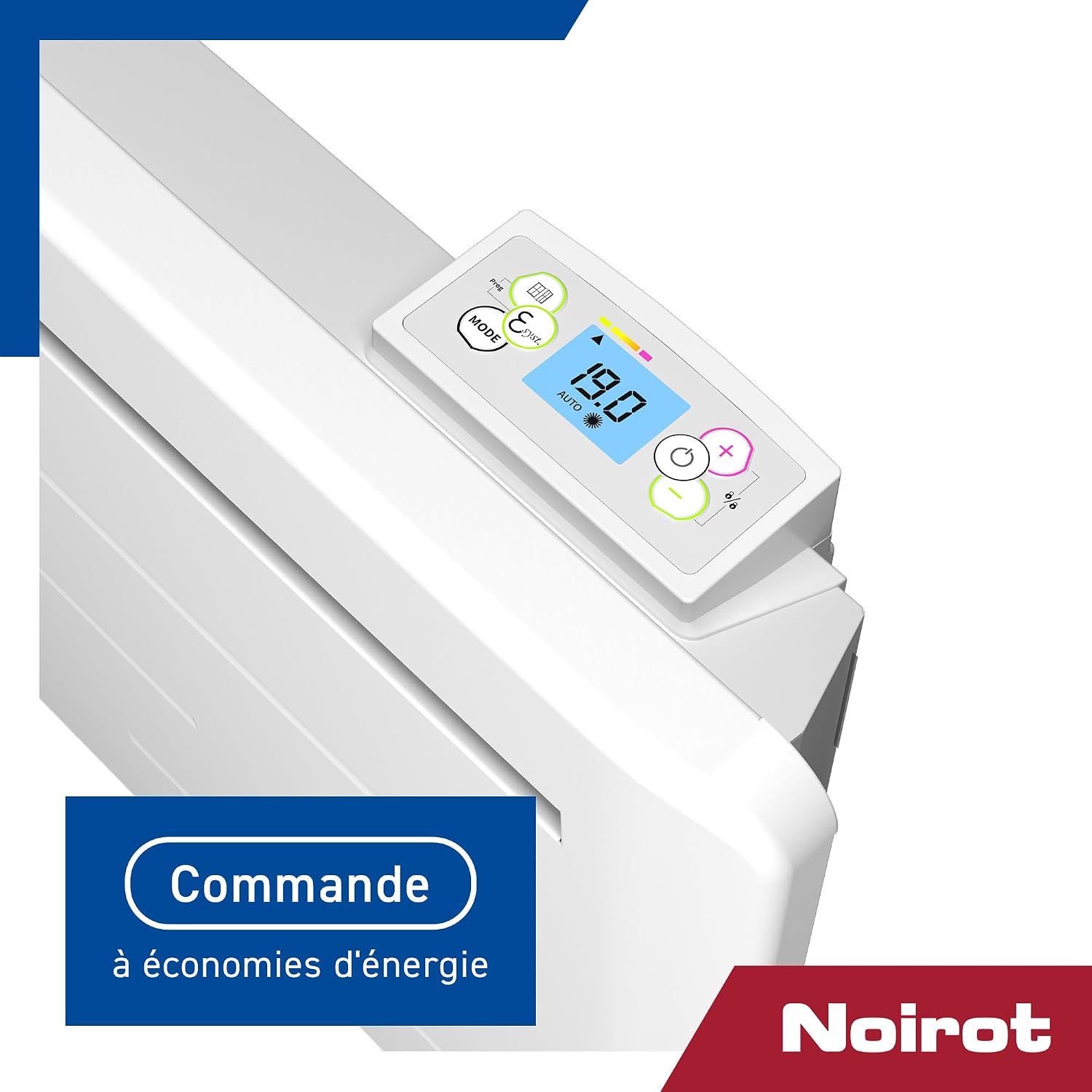
Image: A detailed view of the Noirot Amaroc radiator's digital control panel. The display shows '19.0' degrees Celsius and 'AUTO' mode, with various icons for settings and energy-saving features, indicating precise temperature control and operational modes.
4.2 Setting the Temperature
Use the '+' and '-' buttons on the control panel to adjust the desired room temperature. The digital display will show the set temperature.
4.3 Operating Modes
Press the 'MODE' button to cycle through the available operating modes. Common modes include:
- Auto Mode: Automatically adjusts heating based on programmed settings or ambient temperature.
- Comfort Mode: Maintains a constant, comfortable temperature.
- Eco Mode: Operates at a slightly lower temperature to save energy.
- Frost Protection Mode: Maintains a minimum temperature (e.g., 7°C) to prevent freezing.
The Noirot Amaroc is designed with energy-saving commands to optimize consumption while maintaining comfort.
4.4 Ceramic Inertia Technology
The radiator utilizes a ceramic heating core that stores heat and releases it gradually, providing a consistent and gentle warmth. This inertia ensures stable temperatures and enhanced comfort.

Image: An illustrative close-up showing the internal ceramic inertia core of the Noirot Amaroc radiator. This highlights the natural stone ceramic material responsible for storing and diffusing gentle, long-lasting heat.
5. Maintenance
5.1 Cleaning
To maintain the appearance and efficiency of your radiator:
- Always unplug the radiator from the power outlet and allow it to cool completely before cleaning.
- Wipe the exterior surfaces with a soft, damp cloth. Do not use abrasive cleaners, solvents, or harsh chemicals, as these can damage the finish.
- Ensure no water enters the internal components.
- Dust the air vents regularly to ensure proper airflow.
5.2 Storage
If storing the radiator for an extended period, unplug it, clean it thoroughly, and store it in a dry, dust-free location, preferably in its original packaging.
6. Troubleshooting
If you encounter issues with your Noirot Amaroc radiator, refer to the following common problems and solutions:
| Problem | Possible Cause | Solution |
|---|---|---|
| Radiator does not turn on. | No power supply; power cord not properly plugged in; circuit breaker tripped. | Check power outlet and plug connection. Reset circuit breaker if necessary. |
| Radiator is on but not heating. | Temperature setting too low; mode not set to heating; safety cut-off activated. | Increase the set temperature. Ensure the correct operating mode is selected. Unplug, wait 10 minutes, then plug back in. |
| Unusual noises or odors. | Dust accumulation; internal component issue. | Unplug and clean the radiator. If noises or odors persist, discontinue use and contact customer support. |
If the problem persists after attempting these solutions, please contact Noirot customer support or a qualified technician.
7. Specifications
- Brand: NOIROT
- Model Number: DCN3295FDEC
- Power: 1500 Watt
- Heating Technology: Ceramic Inertia
- Certifications: Origine France Garantie, NF
- Item Weight: 18.7 Kilograms
- Package Dimensions: 77 x 63 x 15 cm
- Date of First Availability (Amazon.com.be): 5 July 2024
8. Warranty and Support
For information regarding the warranty period and terms for your Noirot Amaroc radiator, please refer to the warranty card included with your product or visit the official Noirot website. Keep your proof of purchase for warranty claims.
For technical support, spare parts, or service, please contact Noirot customer service through their official channels. Do not attempt to repair the appliance yourself.