
Introduction
This manual provides comprehensive instructions for the installation, operation, and maintenance of your ClimaTek Honeywell FocusPro 6000 Programmable Thermostat, model TH6320U1000. This thermostat is designed to provide reliable temperature control for your heating and cooling system, offering programmable schedules for energy efficiency and comfort.
Please read this manual thoroughly before installation and operation to ensure proper use and to maximize the benefits of your new thermostat.
Setup and Installation
Important: Installation should be performed by a qualified technician. Ensure power to the HVAC system is turned off at the circuit breaker before beginning installation to prevent electrical shock or equipment damage.
1. Mounting the Thermostat
- Turn off power to your heating/cooling system at the circuit breaker or fuse box.
- Remove the old thermostat from the wall.
- Mount the new thermostat's wall plate using the provided screws and anchors.
- Connect the wiring from your HVAC system to the appropriate terminals on the new thermostat's wall plate. Refer to your HVAC system's wiring diagram for specific connections.
- Snap the thermostat body onto the wall plate.
- Restore power to your heating/cooling system.
2. Initial Power-Up and Basic Settings
Upon initial power-up, the thermostat will guide you through basic setup steps.
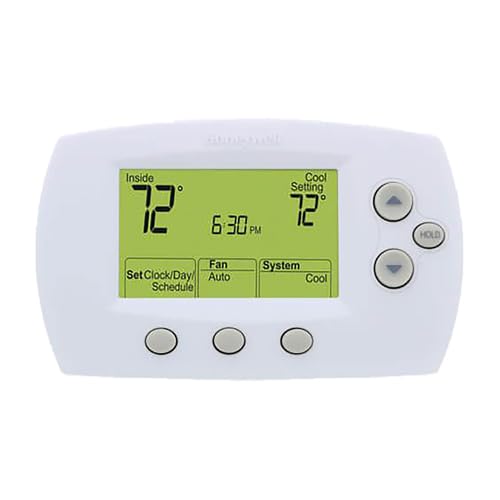
Figure 1: Front view of the ClimaTek Honeywell FocusPro 6000 Thermostat display.
- Set Clock/Day: Press the "Set Clock/Day/Schedule" button. Use the Up/Down arrows to adjust the time and day. Press "Set Clock/Day/Schedule" again to confirm each setting.
- System Type: The thermostat will prompt you to select your system type (e.g., Conventional, Heat Pump). Follow the on-screen instructions.
- Fan Operation: Select your preferred fan operation (e.g., Gas or Electric furnace).
Operating Your Thermostat
1. System Modes
Press the "System" button to cycle through the available modes:
- Cool: Activates the cooling system.
- Heat: Activates the heating system.
- Off: Turns off both heating and cooling systems.
- Auto: Automatically switches between heating and cooling to maintain the set temperature range.
- Em Heat (Emergency Heat): For heat pump systems, activates auxiliary heat.
2. Fan Modes
Press the "Fan" button to cycle through the available fan modes:
- Auto: The fan runs only when the heating or cooling system is active. This is the most common setting.
- On: The fan runs continuously, regardless of whether the heating or cooling system is active.
3. Adjusting Temperature
Use the ▲ (Up) and ▼ (Down) arrow buttons on the right side of the thermostat to adjust the desired temperature setting. The display will show both the current room temperature ("Inside") and your desired "Setting" temperature.
4. Temporary Hold
Press the "HOLD" button to temporarily override the programmed schedule. The thermostat will maintain the current temperature setting until you press "HOLD" again to resume the schedule, or until the next scheduled program period begins (depending on the specific model's hold function). To cancel a temporary hold, press the "HOLD" button again.
5. Programming a Schedule (5/1/1 Program)
The FocusPro 6000 allows for a 5/1/1 programming schedule, meaning you can set one schedule for weekdays (Monday-Friday), one for Saturday, and one for Sunday. Each day can have up to four time periods (Wake, Leave, Return, Sleep).
- Press the "Set Clock/Day/Schedule" button until "Set Schedule" appears.
- Use the ▲ (Up) and ▼ (Down) arrows to adjust the start time and temperature for the "Wake" period for Monday-Friday.
- Press "Set Clock/Day/Schedule" to advance to the next period (Leave, Return, Sleep) and repeat the adjustment process.
- After setting all four periods for Monday-Friday, the thermostat will advance to Saturday, then Sunday. Repeat the process for each day.
- Press "Run Schedule" to save and exit programming.
Maintenance
1. Battery Replacement
The thermostat is battery-powered. When the low battery indicator appears on the display, replace the batteries immediately to ensure continuous operation. Typically, two AA alkaline batteries are required.
- Gently pull the thermostat body away from the wall plate to access the battery compartment.
- Remove the old batteries.
- Insert new batteries, ensuring correct polarity (+/-).
- Snap the thermostat body back onto the wall plate.
2. Cleaning
Clean the thermostat's exterior with a soft, damp cloth. Do not use abrasive cleaners or solvents, as these can damage the display or casing.
Troubleshooting
| Problem | Possible Cause | Solution |
|---|---|---|
| Thermostat display is blank. | Dead batteries. No power to the system. | Replace batteries. Check circuit breaker for HVAC system. |
| Heating/Cooling system not responding. | Incorrect system mode. Wiring issue. Blown fuse in HVAC system. | Ensure thermostat is in Heat or Cool mode. Check wiring connections. Consult an HVAC technician. |
| Temperature reading seems inaccurate. | Thermostat located near heat source/draft. | Ensure thermostat is not exposed to direct sunlight, drafts, or heat sources. |
| Schedule not working as programmed. | Temporary hold active. Incorrect programming. | Cancel "HOLD" function. Re-check programming steps. |
If you continue to experience issues, please contact a qualified HVAC technician.
Specifications
| Feature | Detail |
|---|---|
| Brand | ClimaTek |
| Model Number | TH6320U1000 |
| Controller Type | Touchscreen, Smart Home Platforms |
| Special Feature | Programmable |
| Color | White |
| Temperature Control Type | Programmable, Smart/Remote |
| Power Source | Battery Powered |
| Display Type | Graphical LCD |
| Control Method | Touch |
| Mounting Type | Wall Mount |
| Item Weight | 15 Ounces |
| Product Dimensions | 11 x 15 x 1 inches |
Warranty and Support
For warranty information and technical support, please refer to the documentation provided with your purchase or contact ClimaTek customer service. Keep your purchase receipt as proof of purchase for warranty claims.
Online Resources: For additional support and frequently asked questions, visit the ClimaTek official website or the Honeywell support pages for FocusPro series thermostats.