
1. Introduction
This manual provides essential instructions for the safe and effective use of your Makita DML817 18V LXT Compact LED Flashlight. Please read this manual thoroughly before operation and retain it for future reference. The Makita DML817 is designed to provide portable illumination and features a USB charging port for compatible devices.
2. Safety Information
Always observe the following safety precautions to prevent personal injury and damage to the flashlight.
- Do not look directly into the LED light. The intense light can cause eye injury.
- Do not expose the flashlight to rain or wet conditions. Water entering the flashlight will increase the risk of electric shock.
- Do not use the flashlight if the battery terminal is damaged or corroded.
- Ensure the battery is securely installed before use.
- Use only genuine Makita 18V LXT Lithium-Ion batteries. Use of other batteries may cause injury or fire.
- Keep the flashlight out of reach of children.
- Disconnect the battery pack when not in use or when performing maintenance.
3. Package Contents
Verify that all items are present upon unpacking:
- Makita DML817 18V LXT Compact LED Flashlight (Tool Only)
- Warm White Lamp Shade (Diffuser)
- Instruction Manual
Note: Battery and charger are sold separately and are not included with this product.
4. Product Features
The Makita DML817 LED Flashlight offers several features for versatile illumination:
- Compact and Ergonomic Design: Low profile at under 4 inches long for easy handling and placement.
- Neutral White LED Light: Provides clear illumination suitable for various tasks.
- 3-Mode Operation:
- Top/Side lights: Up to 300 lumens
- 2nd Press: Top light only (150 lumens)
- 3rd Press: Side light only (150 lumens)
- USB Charging Port: Allows charging of compatible USB devices (5V/2.4A).
- Extended Illumination: Up to 29 hours of continuous illumination with an 18V LXT 6.0Ah Lithium-Ion battery (sold separately).
- Rubberized Soft Grip: Enhances comfort and secure handling.

5. Setup
5.1 Battery Installation
The Makita DML817 is powered by an 18V LXT Lithium-Ion battery (sold separately).
- Align the battery pack with the battery housing on the bottom of the flashlight.
- Slide the battery into the housing until it clicks securely into place. Ensure it is fully seated.
- To remove the battery, press the release button on the battery pack and slide it out.

5.2 Attaching the Warm White Lamp Shade
The included warm white lamp shade (diffuser) can be attached to soften the light output.
- Locate the small hinge points on the flashlight's light panel.
- Align the lamp shade with these hinge points and gently snap it into place over the LED panel.
- To remove, gently pull the shade away from the flashlight.


6. Operating Instructions
6.1 Power On/Off and Mode Selection
The flashlight features a single power button for controlling illumination.
- To Turn On: Press the power button once. The flashlight will illuminate in the default mode (Top/Side lights, 300 lumens).
- To Change Modes: Press the power button repeatedly to cycle through the illumination modes:
- 1st Press: Top/Side lights (300 lumens)
- 2nd Press: Top light only (150 lumens)
- 3rd Press: Side light only (150 lumens)
- To Turn Off: Press and hold the power button for approximately 1-2 seconds, or cycle through all modes until the light turns off.
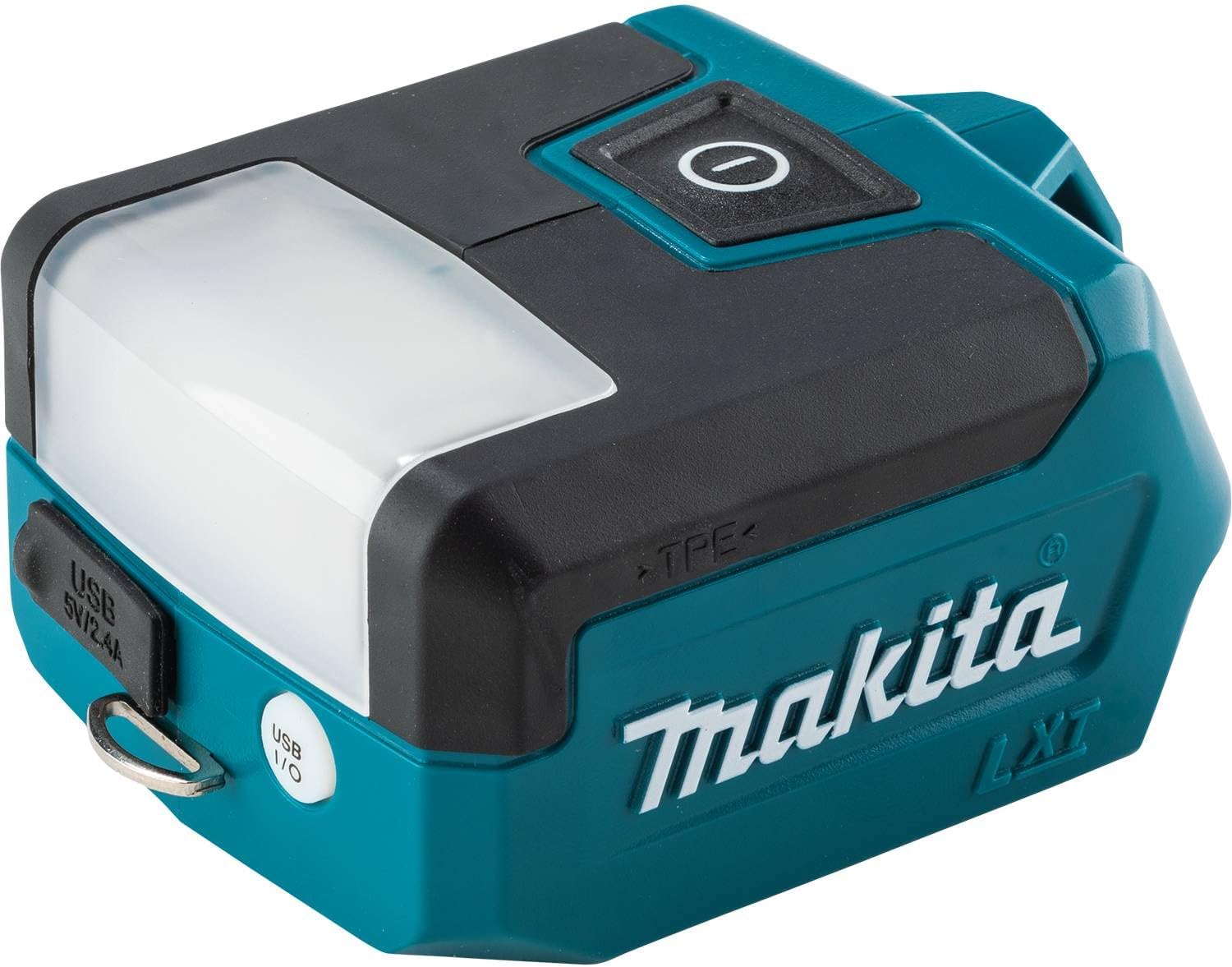
6.2 USB Charging Function
The integrated USB port allows you to charge compatible electronic devices using the flashlight's battery power.
- Ensure a charged 18V LXT battery is installed in the flashlight.
- Open the rubber cover protecting the USB port (labeled "USB 5V/2.4A").
- Connect your device's USB charging cable to the flashlight's USB port.
- Charging will begin automatically. The flashlight does not need to be turned on for the USB charging function to operate.
- Close the rubber cover when not in use to protect the port from dust and moisture.
7. Maintenance
Regular maintenance ensures optimal performance and extends the lifespan of your flashlight.
- Cleaning: Wipe the flashlight with a soft, damp cloth. Do not use harsh chemicals or abrasive cleaners.
- Storage: When not in use for extended periods, remove the battery and store the flashlight in a dry, cool place, away from direct sunlight and moisture.
- Battery Care: Follow the battery manufacturer's instructions for charging, storage, and disposal of 18V LXT Lithium-Ion batteries.
- Inspection: Periodically inspect the flashlight for any signs of damage, loose parts, or wear. Do not operate if damaged.
8. Troubleshooting
Refer to the table below for common issues and their solutions.
| Problem | Possible Cause | Solution |
|---|---|---|
| Flashlight does not turn on. | Battery not installed correctly. Battery is discharged. Flashlight is damaged. | Ensure battery is fully seated and clicked into place. Charge the battery. Contact Makita service center. |
| Light output is dim. | Battery is low. Lens is dirty. | Charge the battery. Clean the LED lens with a soft cloth. |
| USB charging not working. | Battery is low or discharged. USB cable is faulty. Device is incompatible. | Ensure battery is sufficiently charged. Try a different USB cable. Verify device compatibility with 5V/2.4A output. |
9. Specifications
| Feature | Detail |
|---|---|
| Model Number | DML817 |
| Power Source | 18V LXT Lithium-Ion Battery (sold separately) |
| Voltage | 18 Volts |
| Bulb Type | LED |
| Brightness (Top/Side) | 300 Lumens |
| Brightness (Top Only) | 150 Lumens |
| Brightness (Side Only) | 150 Lumens |
| USB Output | 5V / 2.4A |
| Dimensions (L x W x H) | Approx. 11.43 x 7.62 x 5.08 cm (4.5 x 3 x 2 inches) |
| Weight (without battery) | Approx. 210 g (0.4 lbs) |
| Material | Plastic |
| Included Components | Tool Only (battery and charger not included); Warm white lamp shade |
10. Warranty and Support
Makita products are manufactured under strict quality control standards. For detailed warranty information, please refer to the warranty card included with your purchase or visit the official Makita website. For technical support or service, please contact your local authorized Makita service center.
Official Makita Website: www.makita.ca


