1. Introduction
The Trade Shop Slim Power Bank 8000 mAh is a portable backup battery designed to provide emergency power for your mobile devices. Its compact and ultra-thin design, combined with integrated 3-in-1 cables, makes it an ideal companion for charging smartphones, MP3 players, cameras, and other compatible devices on the go. This manual provides essential information on how to set up, operate, and maintain your power bank to ensure optimal performance and longevity.
2. Safety Information
Please read all safety instructions carefully before using the power bank. Failure to follow these instructions may result in electric shock, fire, or damage to the product.
- Do not expose the power bank to extreme temperatures (above 60°C / 140°F or below -10°C / 14°F), direct sunlight, or high humidity.
- Do not disassemble, open, or attempt to repair the power bank yourself. This will void the warranty and may cause harm.
- Keep the power bank away from water and other liquids.
- Do not drop, puncture, or apply excessive force to the power bank.
- Use only compatible charging cables and adapters.
- Keep out of reach of children.
- Dispose of the power bank responsibly according to local regulations. Do not dispose of it in household waste.
3. Product Overview
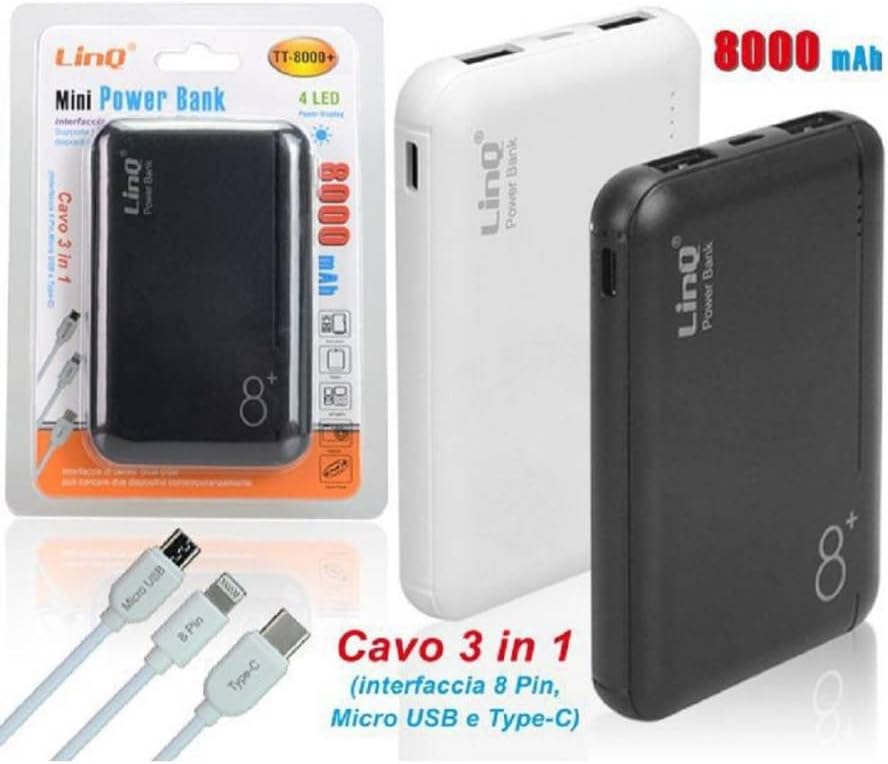
The Trade Shop Slim Power Bank features a durable, non-slip, and scratch-resistant plastic casing, housing an 8000mAh Lithium-Polymer (Li-Po) battery. It is equipped with multiple output options for broad compatibility.
3.1 Components
- Trade Shop Slim Power Bank (Model: Tt-8000+)
- Integrated 3-in-1 Charging Cable (Type-C, iOS/Lightning, Micro USB)
- Dual USB Output Ports
- LED Battery Indicator Lights (typically 4 LEDs)
3.2 Features
- 8000mAh Capacity: Provides sufficient power for emergency charges.
- Dual USB Output: Allows charging of two devices simultaneously.
- Integrated 3-in-1 Cable: Built-in cable with Type-C, iOS (8-pin), and Micro USB connectors for universal compatibility.
- Lithium-Polymer Battery: Offers a higher number of charging cycles compared to traditional Lithium-Ion batteries.
- Compact and Slim Design: Easy to carry and store.
- Durable Casing: Made from non-slip and scratch-resistant plastic.
3.3 Product Images



4. Setup
4.1 Initial Charging of the Power Bank
Before first use, it is recommended to fully charge your power bank. This ensures optimal battery performance and longevity.
- Locate the input port on your power bank (usually a Micro USB or Type-C port).
- Connect a compatible USB charging cable (not explicitly mentioned as included for charging the power bank itself, but standard for power banks) to the power bank's input port.
- Connect the other end of the USB cable to a USB wall adapter (e.g., from your smartphone charger) or a computer's USB port.
- The LED indicator lights will illuminate, typically blinking to show charging progress. All lights will be solid when fully charged.
4.2 Connecting Devices for Charging
The power bank features integrated 3-in-1 cables and dual USB output ports for connecting your devices.
- Identify the correct connector for your device from the integrated 3-in-1 cable (Type-C, iOS/Lightning, or Micro USB).
- Alternatively, use your device's original USB charging cable and connect it to one of the power bank's standard USB output ports.
- Plug the appropriate connector into your mobile device's charging port.
- The power bank should automatically begin charging your device. If not, press the power button (if present) to initiate charging.
5. Operating Instructions
5.1 Charging Your Device
To charge your mobile device:
- Ensure the power bank has sufficient charge.
- Connect your device to the power bank using either the integrated 3-in-1 cable or your device's own USB cable plugged into one of the power bank's USB output ports.
- Charging will typically start automatically. Monitor your device's screen to confirm it is charging.
- Disconnect your device once it is fully charged or when you no longer need to charge it.
5.2 Checking Battery Level
The power bank is equipped with LED indicator lights to show its remaining battery capacity. Typically, there are four LEDs, each representing approximately 25% of the battery charge.
- Press the power button (if available) briefly to activate the LED indicators.
- 4 LEDs lit: 75-100% charge remaining.
- 3 LEDs lit: 50-75% charge remaining.
- 2 LEDs lit: 25-50% charge remaining.
- 1 LED lit (possibly blinking): 0-25% charge remaining, recharge soon.
6. Maintenance
Proper maintenance helps extend the life of your power bank.
- Cleaning: Wipe the power bank with a soft, dry cloth. Do not use harsh chemicals or abrasive cleaners.
- Storage: Store the power bank in a cool, dry place away from direct sunlight and extreme temperatures. If storing for extended periods, charge it to about 50-75% every 3-6 months to prevent deep discharge.
- Avoid Over-Discharge: Do not let the power bank completely drain its battery frequently, as this can reduce its lifespan.
7. Troubleshooting
If you encounter issues with your power bank, refer to the following common problems and solutions:
| Problem | Possible Cause | Solution |
|---|---|---|
| Power bank not charging. | Loose cable connection, faulty cable/adapter, power bank fully charged, internal issue. | Check all cable connections. Try a different charging cable or wall adapter. Ensure the power bank is not already full. If problem persists, contact support. |
| Device not charging from power bank. | Power bank is empty, loose cable connection, incompatible cable, device issue, power bank in standby. | Recharge the power bank. Ensure cables are securely connected. Try a different cable or device. Press the power button on the power bank to activate output. |
| Slow charging. | Low power bank charge, high power consumption by device, non-optimal cable. | Ensure power bank is fully charged. Close unnecessary apps on your device. Use the integrated cables or high-quality cables. |
| LED indicators not working. | Power bank completely drained, internal fault. | Try charging the power bank for a few hours. If still unresponsive, contact support. |
8. Specifications
Technical specifications for the Trade Shop Slim Power Bank Tt-8000+:
| Model | Tt-8000+ |
| Battery Type | Lithium-Polymer (Li-Po) |
| Capacity | 8000 mAh |
| Input | Standard USB input (details not specified, typically 5V/2A) |
| Output | Dual USB Output, Integrated 3-in-1 Cable (Type-C, iOS/Lightning, Micro USB) |
| Material | Non-slip and scratch-resistant plastic |
| Dimensions | Ultra-thin and compact (specific dimensions not provided) |
9. Warranty and Support
For warranty information or technical support, please refer to the product packaging or contact the retailer/manufacturer directly. Keep your purchase receipt as proof of purchase.
Manufacturer: OISE ART STORE
ASIN: B0CJ9RHHLC


