
Introduction
This manual provides essential information for the safe and efficient operation of your new TCL TWA70-F3G 7 kg Fully-Automatic Top Load Washing Machine. Please read these instructions carefully before using the appliance and retain them for future reference.
Safety Information
WARNING: To reduce the risk of fire, electric shock, or injury to persons, read all instructions before operating this appliance.
- Ensure the washing machine is properly grounded.
- Do not install or store the appliance where it will be exposed to the weather or to freezing temperatures.
- Do not repair or replace any part of the appliance or attempt any servicing unless specifically recommended in this manual.
- Keep flammable materials and vapors away from the washing machine.
- Supervise children when they are near the appliance.
- Always unplug the washing machine from the power supply before cleaning or performing any maintenance.
Setup and Installation
Proper installation is crucial for the performance and longevity of your washing machine. Refer to the included components and follow these steps.
Unpacking
Carefully remove all packaging materials. Ensure all included components are present:
- 1 Washing Machine
- 1 User Manual
- 1 Tapping Screw
- 1 Water Inlet Hose
- 1 Bottom Cover
- 1 Drain Hose Component
Location Requirements
Place the washing machine on a firm, level surface. Avoid direct sunlight or excessively humid environments.
Leveling the Appliance
Use a spirit level to ensure the machine is perfectly level. Adjust the leveling feet as necessary to prevent vibration and noise during operation.

Image: Front view of the TCL TWA70-F3G washing machine with key dimensions (51.5cm width, 51.5cm depth, 87cm height) indicated, illustrating its compact design suitable for various spaces.

Image: Rear view of the TCL TWA70-F3G washing machine, showing the water inlet and drain hose connections, and the power cord outlet.
Water Connection
Connect the water inlet hose to a cold water tap and to the inlet valve on the back of the washing machine. Ensure connections are tight to prevent leaks.
Drain Hose Installation
Securely attach the drain hose to the drain outlet at the back of the machine and position it into a standpipe or laundry tub, ensuring it is not kinked or blocked.
Power Connection
Plug the power cord into a grounded electrical outlet. Ensure the voltage matches the appliance's requirements (230 Volts).
Operating Instructions
Your TCL TWA70-F3G washing machine features a user-friendly control panel and multiple wash programs for various fabric types.
Control Panel Overview

Image: Detailed view of the TCL TWA70-F3G washing machine's push-button control panel, displaying program options, water level indicators, and digital display for delay time.
The control panel features push buttons for program selection, water level, and special functions. The digital display shows remaining time or delay settings.
Loading Laundry
Open the top lid and load clothes loosely into the drum. Do not overload the machine. For optimal results, ensure clothes are evenly distributed.

Image: Interior view of the washing machine's stainless steel Honeycomb Crystal Drum, designed for gentle yet effective washing.
Adding Detergent and Softener
Add appropriate amounts of detergent and fabric softener to their respective dispensers before starting a wash cycle.
Selecting a Wash Program
Your washing machine offers 10 wash programs:
- Mixed: For general laundry with mixed fabric types.
- Quick: For lightly soiled clothes requiring a fast wash.
- Delicate: Gentle wash for sensitive fabrics.
- Energy Saver: Optimized for lower energy consumption.
- Jeans: Specific program for denim items.
- Aqua Save: Reduces water consumption.
- Soak Wash: For heavily soiled items requiring pre-soaking.
- Blanket: Suitable for washing larger, bulky items like blankets.
- Drum Clean: Self-cleaning program for the washing machine drum.
- Baby: Gentle and thorough wash for baby clothes.
Press the "Program" button to cycle through the available options until your desired program is selected.
Special Features
- Fuzzy Logic: The machine automatically detects the load weight and adjusts the water level and wash cycle for optimal performance.
- Child Lock: Prevents accidental changes to settings during operation. To activate/deactivate, refer to the control panel instructions.
- 24 Hours Delay: Allows you to set a delayed start time for your wash cycle.
- Memory Backup: In case of a power outage, the machine will resume the cycle from where it left off once power is restored.
- One Key Dehydration (One Click Spinning): Simplifies the spin cycle operation.
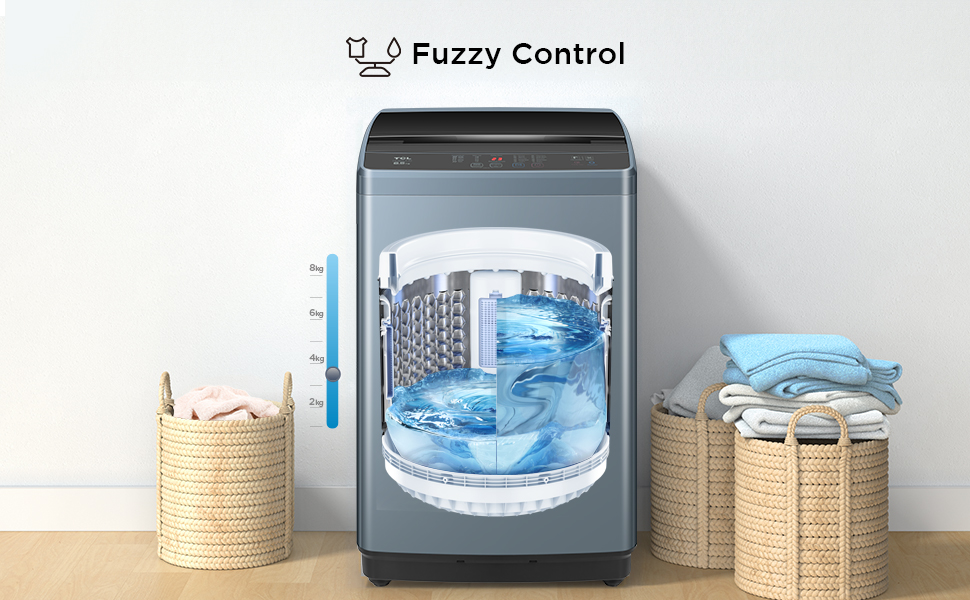
Image: Illustration of Fuzzy Control, showing a scale balancing clothes and water, representing the automatic adjustment of wash parameters based on load.

Image: A child standing next to the washing machine, with a lock icon overlayed on the machine, symbolizing the Child Lock safety feature.

Image: Graphic illustrating the 24 Hours Delay function, showing a clock icon with '24' and a hand pointing to a digital display, indicating scheduled wash times.

Image: Icon representing the Memory Backup feature, showing a power plug with a 'no' symbol, indicating protection against power interruptions.

Image: Graphic depicting 'One Click Spinning', with a finger pressing a button, illustrating the ease of initiating the spin cycle.
Starting a Wash Cycle
After selecting the program and any desired options, press the "Start/Pause" button to begin the wash cycle.
Maintenance and Care
Regular maintenance ensures optimal performance and extends the lifespan of your washing machine.
Cleaning the Magic Filter
The Magic Filter collects lint and debris during washing. Clean it regularly (e.g., once a week or every few washes) to maintain washing efficiency.
- Open the lid and locate the Magic Filter inside the drum.
- Remove the filter by pulling it upwards or unlatching it.
- Open the filter and remove any accumulated lint or debris.
- Rinse the filter under running water.
- Reinsert the clean filter securely into its position.

Image: Illustration of the Magic Filter, showing particles being captured, highlighting its function in collecting lint and debris.
Drum Clean Program
Use the dedicated "Drum Clean" program periodically to clean the washing machine drum and prevent odor buildup. Follow the instructions on the control panel for this cycle.

Image: Graphic representing the Drum Clean function, showing water jets cleaning the interior of the washing machine drum.
Exterior Cleaning
Wipe the exterior of the washing machine with a soft, damp cloth. Do not use abrasive cleaners or solvents.
Water Inlet Filter Cleaning
Periodically check and clean the filter screen at the water inlet hose connection to prevent blockages.
Troubleshooting
Before contacting customer service, refer to the following common issues and solutions.
| Problem | Possible Cause | Solution |
|---|---|---|
| Machine does not start | Power cord unplugged; Lid not closed properly; Power outage. | Check power connection; Ensure lid is fully closed; Check household power supply. |
| Water does not fill | Water tap closed; Water inlet hose kinked or blocked; Water pressure too low. | Open water tap; Straighten hose; Check water supply pressure. |
| Water does not drain | Drain hose kinked or blocked; Drain pump filter clogged. | Straighten drain hose; Clean drain pump filter (refer to full manual for location). |
| Excessive vibration/noise | Machine not level; Shipping bolts not removed; Uneven load. | Adjust leveling feet; Ensure shipping bolts are removed; Redistribute laundry evenly. |
| Clothes not clean | Overloading; Insufficient detergent; Magic Filter clogged. | Reduce load size; Use correct amount of detergent; Clean Magic Filter. |
Specifications
Key technical specifications for the TCL TWA70-F3G washing machine.
| Feature | Detail |
|---|---|
| Brand | TCL |
| Model Name | TWA70-F3G |
| Capacity | 7 Kilograms |
| Operation Mode | Fully Automatic |
| Access Location | Top Load |
| Product Dimensions (D x W x H) | 51.5D x 51.5W x 87H Centimeters |
| Item Weight | 23 Kilograms |
| Voltage | 230 Volts |
| Number of Standard Cycles | 10 |
| Controls Type | Push Button |
| Drum Material | Stainless Steel (Honeycomb Crystal Drum) |
| Special Features | Drum clean, Child lock, 24 hours delay, One key dehydration, Fuzzy logic, Memory back-up |
| Energy Rating | 5 Star |

Image: Energy efficiency label for the TCL TWA70-F3G washing machine, indicating a 5-star rating and energy consumption details.
Warranty and Support
Your TCL TWA70-F3G washing machine comes with a comprehensive warranty and dedicated customer support.
Warranty Information
The product is covered by a 2-year comprehensive warranty on the appliance and a 10-year warranty on the motor from the date of purchase.

Image: Graphic displaying the warranty details for TCL Fully-Automatic Top Load Washing Machines, highlighting a 2-year comprehensive warranty and a 10-year motor warranty.
Please retain your purchase receipt as proof of purchase for warranty claims.
Customer Support
For technical assistance, service requests, or warranty claims, please contact TCL customer support. Refer to the contact information provided in your warranty card or on the official TCL website.
Manufacturer: TCL home appliance(Hefei) Co. Ltd.
Included Components: 1 Washing Machine, 1 User Manual, 1 Tapping Screw, 1 Water Inlet hose, 1 Bottom cover, 1 Drain hose component.


