
BOSGAME P3 Lite
BOSGAME P3 Lite Mini PC Instruction Manual
Model: P3 Lite
1. Product Overview
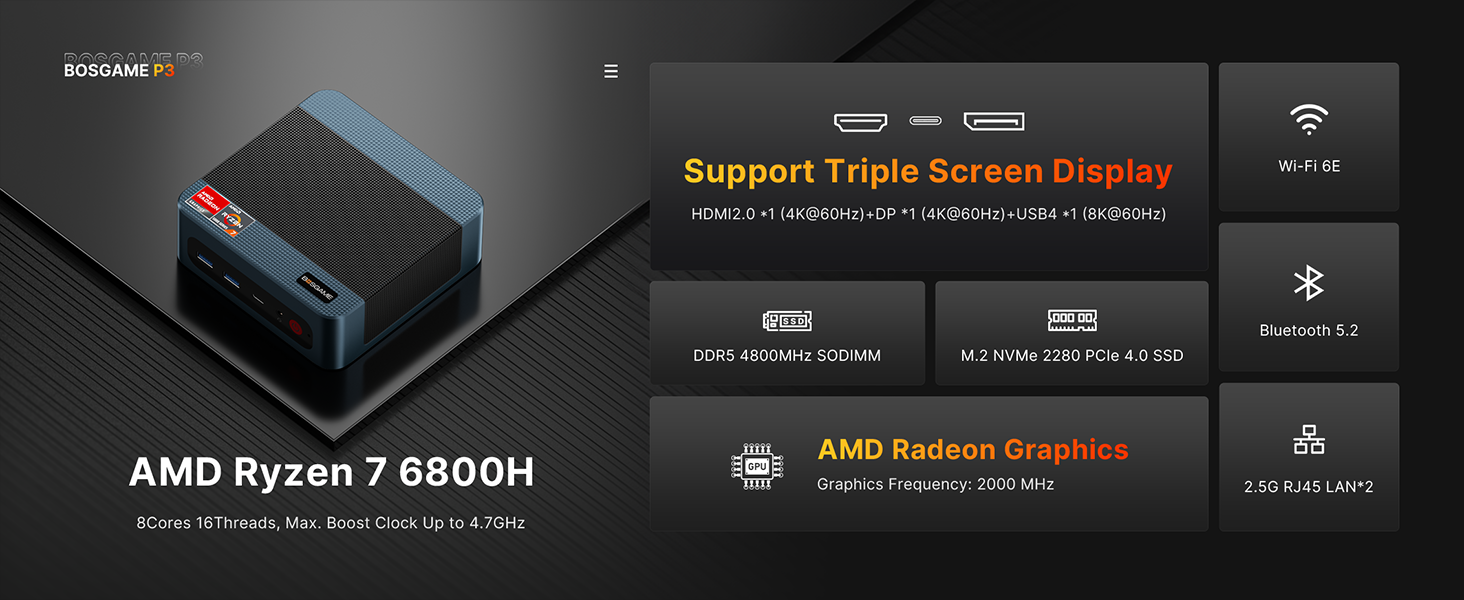
The BOSGAME P3 Lite Mini PC is a compact yet powerful computing solution designed for a wide range of applications, from gaming and multimedia to office productivity and creative work. Featuring an AMD Ryzen 7 6800H processor, 24GB DDR5 memory, and a 1TB NVMe SSD, it delivers high performance in a small form factor. Its versatile connectivity options and support for multiple displays make it an ideal choice for diverse user needs.

Key Features:
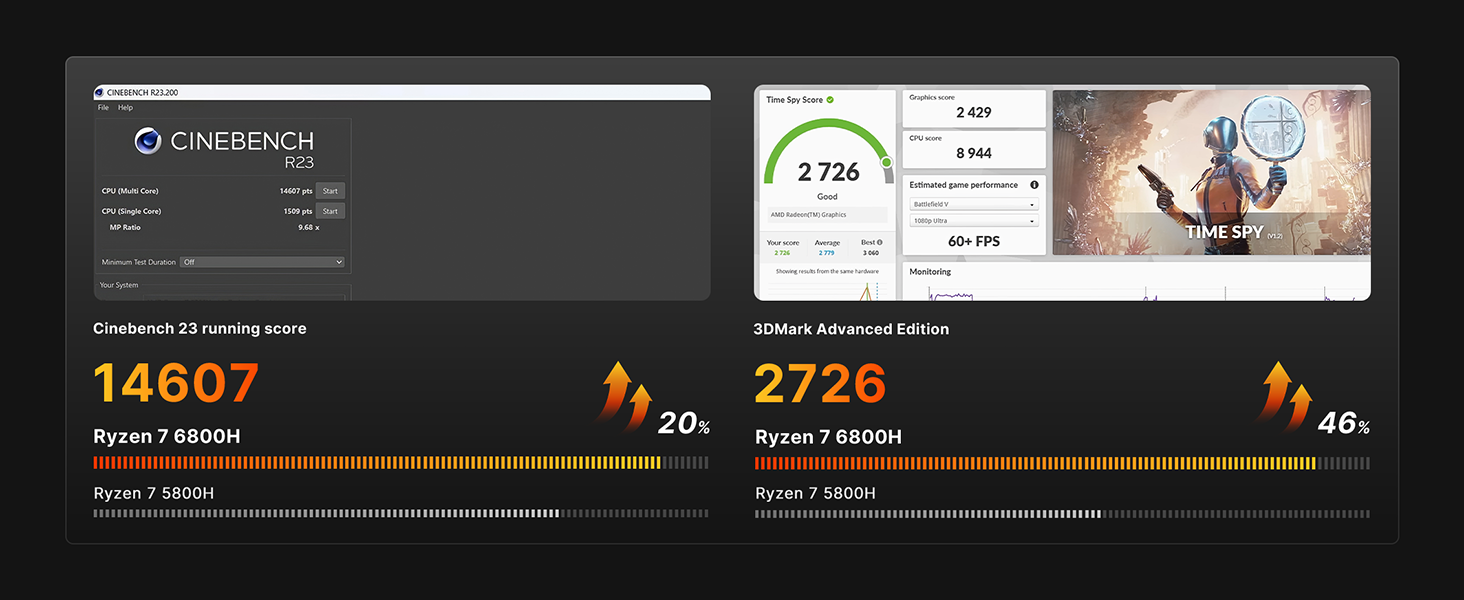
- Powerful Multi-core Performance: Equipped with AMD Ryzen 7 6800H processor (8 cores, 16 threads, up to 4.7 GHz) for efficient multitasking and demanding applications.
- Excellent Gaming Performance: Integrated RDNA 2 graphics (AMD Radeon 680M) provides significant graphics performance for light gaming and graphic design tasks.
- High-Speed Memory & Storage: Comes with 24GB DDR5 4800MHz memory and a 1TB NVMe PCIe 4.0 SSD for faster data processing and ample storage.
- Versatile Connectivity: Features USB4 (40Gbps, PD 100W, DP1.4), USB 3.2 Gen2, HDMI 2.0, dual 2.5G Ethernet, Wi-Fi 6E, and Bluetooth 5.2.
- Multiple Operating System Support: Pre-installed with Windows 11 Pro, also compatible with Ubuntu and Linux.
- Enhanced User Convenience: Supports auto power-on, Wake-on-LAN, TPM 2.0 security, and real-time clock functionality.
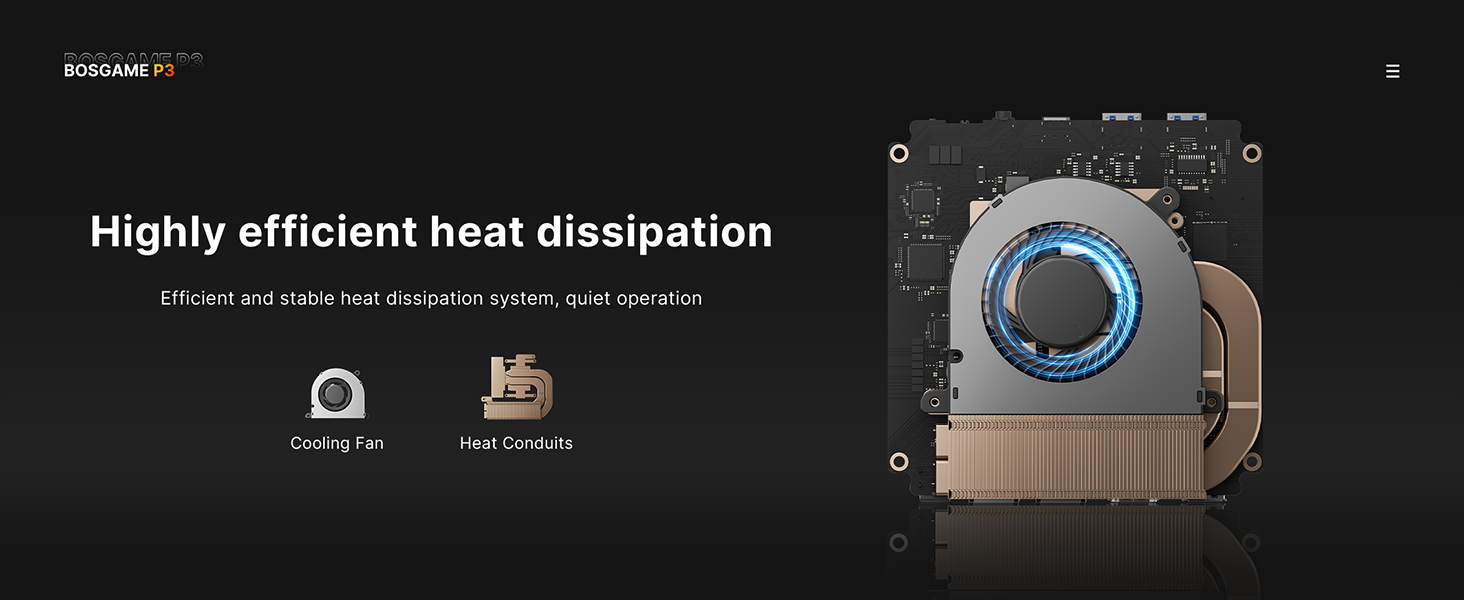
- Energy-Efficient and Quiet: Advanced thermal management ensures powerful performance with minimal energy consumption and noise.
Product Presentation Video:
This video provides a general overview and presentation of the BOSGAME P3 Lite Mini PC, highlighting its design and key features.
2. Getting Started
2.1. What's in the Box
- 1 x BOSGAME Mini PC P3 Lite
- 1 x Power Adapter
- 1 x VESA Mount with Screws
- 1 x HDMI cable
- 1 x User Manual

2.2. Hardware Connection
Follow these steps to connect your Mini PC to a display and peripherals:
- Connect the power adapter to the DC-in port on the Mini PC and plug it into a power outlet.
- Connect your monitor(s) to the HDMI or DisplayPort (DP) outputs on the Mini PC using the provided HDMI cable or your own DP cable.
- Connect your keyboard and mouse to the available USB ports.
- For wired network access, connect an Ethernet cable to one of the 2.5G RJ45 LAN ports.
- Press the power button on the front of the Mini PC to turn it on.

2.3. Initial Operating System Setup (Windows 11 Pro)
Upon the first boot, you will be guided through the Windows 11 Pro setup process. This includes selecting your language, region, keyboard layout, connecting to a network, and creating a user account.
This video demonstrates the user setup process for Windows 11 Pro on the Mini PC, guiding you through initial configuration steps.
3. Operation
3.1. Multi-Display Configuration
The BOSGAME P3 Lite supports triple display output, allowing for an expanded workspace or immersive multimedia experience. Connect up to three monitors using the available HDMI, DisplayPort, and USB4 ports.

3.2. Advanced Connectivity Features
Leverage the advanced connectivity options of your Mini PC for high-speed networking and versatile data transfer:
- Dual 2.5G Ethernet: Provides network transmission rates up to 2.5Gbps for fast and stable internet connections.
- Full-featured USB4 Port: Supports 40Gbps data transfer, 100W Power Delivery (PD 3.0), and DisplayPort 1.4 for 8K@60Hz video output.
- Wi-Fi 6E & Bluetooth 5.2: Ensures robust and high-speed wireless connectivity for all your devices.
4. Maintenance and Upgrades
4.1. Memory (RAM) and Storage (SSD) Expansion
The BOSGAME P3 Lite Mini PC allows for easy upgrades of its DDR5 memory and NVMe SSD. This can enhance overall system performance and storage capacity.
This video provides a step-by-step guide on how to install DDR memory and SSD storage in your BOSGAME P Series Mini PC.
4.2. Thermal Management and Noise
The P3 Lite is designed with an efficient heat dissipation system, including a dual fan setup, to maintain optimal operating temperatures and ensure quiet performance even under load.

5. Troubleshooting Common Issues
- No Power: Ensure the power adapter is securely connected to both the Mini PC and a working power outlet. Check if the power button illuminates.
- No Display: Verify that the HDMI/DisplayPort cables are firmly connected to both the Mini PC and the monitor. Try a different port or cable. Ensure the monitor is set to the correct input source.
- Operating System Not Loading: If the OS fails to boot, you may need to reinstall it. Refer to the "Initial Operating System Setup" section for guidance.
- Slow Performance: Check for excessive background applications. Ensure all drivers (especially graphics drivers) are up to date. Consider upgrading RAM or SSD if performance issues persist.
- Network Connectivity Issues: For wired connections, check the Ethernet cable and router. For Wi-Fi, ensure the correct network is selected and the password is entered correctly. Restarting the router and Mini PC can often resolve temporary issues.
- Overheating: Ensure the Mini PC's vents are not obstructed. Operate the device in a well-ventilated area. If issues persist, contact support.
6. Technical Specifications
| Feature | Specification |
|---|---|
| Processor | AMD Ryzen 7 6800H (8 Cores, 16 Threads, 3.2 GHz Base, 4.7 GHz Max Boost) |
| Graphics | AMD Radeon 680M (Integrated) |
| RAM | 24GB DDR5 4800MHz SODIMM (Expandable up to 64GB) |
| Storage | 1TB NVMe PCIe 4.0 SSD (Two NVMe SSD Slots) |
| Operating System | Windows 11 Pro (Supports Win/Ubuntu/Linux) |
| Video Output | 1x HDMI 2.0 (4K@60Hz), 1x DisplayPort (4K@60Hz), 1x USB4 (8K@60Hz) - Triple Display Support |
| USB Ports | 1x USB4 (40Gbps, PD 100W), 4x USB 3.2 Gen2, 2x USB 2.0 |
| Network | Dual 2.5G RJ45 LAN, Wi-Fi 6E, Bluetooth 5.2 |
| Dimensions (LxWxH) | 4.96 x 4.41 x 1.61 inches (126 x 112 x 41 mm) |
| Weight | 2.64 pounds (1.2 kg) |
| Color | Black |

7. Warranty and Support
BOSGAME is committed to providing high-quality products and excellent customer service. For any questions, technical support, or warranty claims, please refer to the following options:
- Contact via Amazon: Log in to your Amazon buyer account, find your order, click "Get Help," and then "Ask a question."
- Email Support: You can also reach out to BOSGAME directly via email at support@bosgamepc.com. We aim to reply as soon as possible on working days.

Ask a question about this manual
Ask about setup, troubleshooting, compatibility, parts, safety, or missing instructions. Manuals+ will review the question and use this page’s manual context to help answer it.