
1. Introduction
The DROK DC 8-120V 0.02-100A 6-in-1 Multi-meter is a versatile device designed to monitor various electrical parameters of DC power systems. It provides real-time measurements of voltage, current, power, capacity, temperature, and run time, offering comprehensive insights into battery health and performance. This manual provides essential information for the safe and effective operation of your multi-meter.

Image 1: The DROK DC 8-120V 0.02-100A 6-in-1 Multi-meter, showing the display unit and the accompanying Hall sensor.
2. Product Features
- Wide Measurement Range: Supports DC voltage from 8V to 120V and current from 0.02A to 100A.
- Multi-functional Display: Simultaneously shows voltage, current, power, remaining capacity (AH and percentage), temperature, and run time.
- Clear LCD Interface: Features a 128x64 LCD for comprehensive and easy-to-read data.
- Broad Battery Compatibility: Suitable for various battery types including lead-acid, LiFePO4, and lithium-ion batteries.
- Durable Construction: Made from high-quality industrial ABS material with a PVC flame-retardant casing for impact resistance and low-temperature tolerance.
- Low Power Consumption: Operates efficiently with 0.2W consumption with backlight on and 0.05W with backlight off.
- Automatic Sleep Function: Activates during low current conditions to conserve power.
- Non-contact Current Measurement: Utilizes a Hall sensor for safe and convenient current detection without direct wiring interruption.
- Low Voltage Warning: Provides alerts for low voltage conditions.

Image 2: Visual representation of the multi-meter's key features, highlighting its low power consumption LCD, automatic sleep function, non-contact sensor measurement, 24-hour run time display, low voltage warning, and real-time capacity detection.
3. Specifications
| Parameter | Value |
|---|---|
| Voltage Range | DC 8V to 120V |
| Current Range | 0.02A to 100A |
| Capacity Range | 0.1AH to 999AH |
| Power Range | 60KW |
| Voltage Accuracy | ±1% + 2 digits |
| Current Accuracy | ±0.5% + 2 digits |
| Temperature Range | -20℃ to 150℃ (-4℉ to 302℉) |
| Display Type | 128x64 LCD Interface |
| Power Consumption (Backlight On) | 0.2W |
| Power Consumption (Backlight Off) | 0.05W |
| Measurement Speed | 20 times/second |
| Communication Baud Rate | 9600bps |
| Display Head Dimensions | 78mm x 42mm x 25mm |
| Hall Sensor Dimensions | 45mm x 18mm x 41mm |
| Compatible Batteries | Lead-acid, LiFePO4, Lithium-ion |
| Material | ABS |
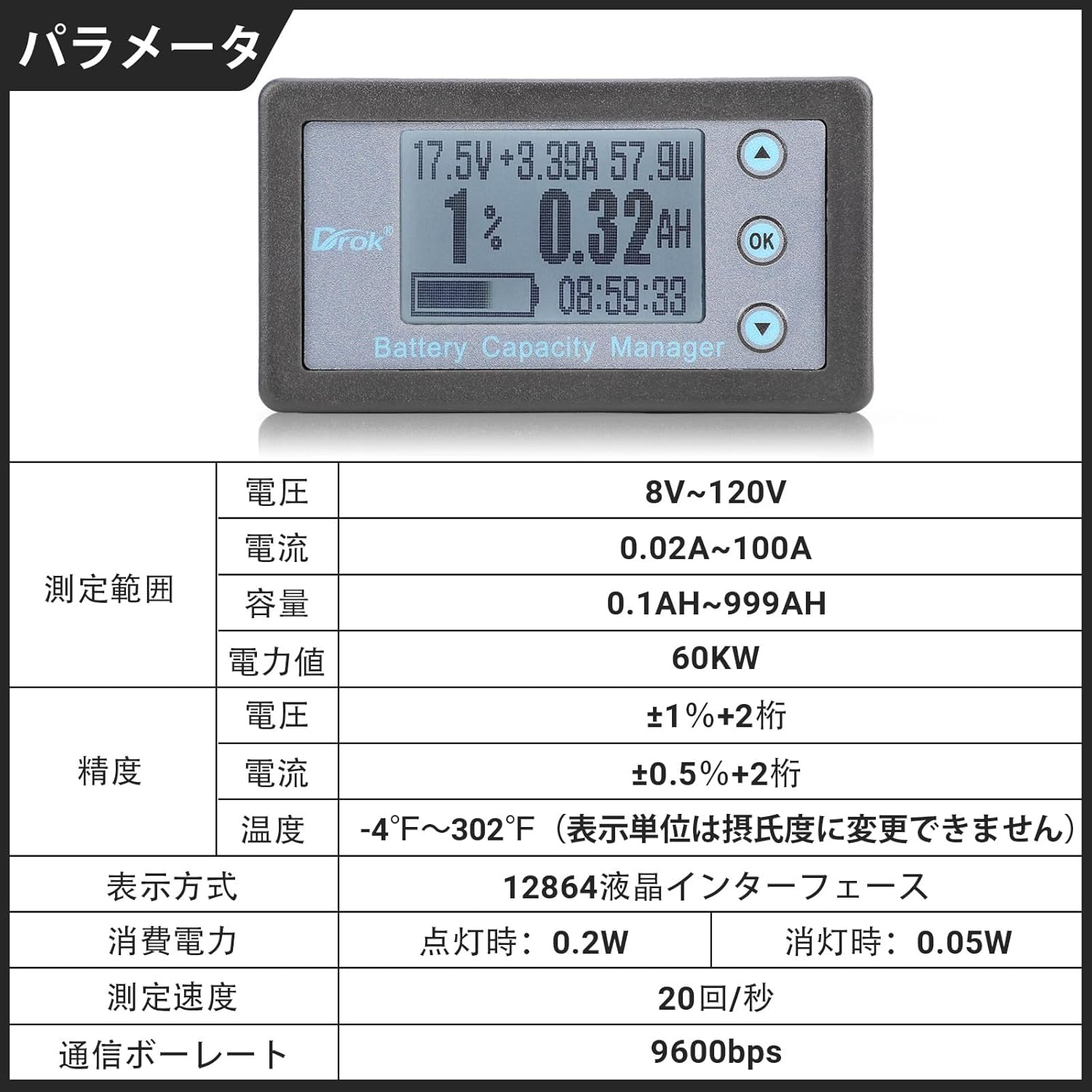
Image 3: Detailed technical specifications of the DROK multi-meter, including measurement ranges, accuracy, and display characteristics.
4. Package Contents
Upon opening the package, please verify that all the following components are included:
- 1x DROK DC 8-120V 0.02-100A Multi-meter Display Unit
- 1x Hall Sensor (100A)
- 1x 50cm Data Transfer Cable
- 1x 50cm H2.54 Red/Black Power Cable

Image 4: The multi-meter's main unit and Hall sensor dimensions, along with the included 50cm data transfer cable and 50cm red/black power cable.
5. Setup and Installation
Proper installation is crucial for accurate measurements and safe operation. Follow the wiring diagram carefully.
- Connect the Hall Sensor: Install the Hall sensor in series with the main DC power line between your battery and the load/charger. Ensure the arrow on the Hall sensor points in the direction of current flow from the battery to the load, or from the charger to the battery during charging.
- Connect Sensor to Display: Use the provided 50cm data transfer cable to connect the Hall sensor to the display unit.
- Power the Display Unit: Connect the 50cm H2.54 red/black power cable to the display unit. Connect the red wire to the positive (+) terminal of your battery (or a separate power source within the 8-120V range) and the black wire to the negative (-) terminal.
- Verify Connections: Double-check all connections to ensure they are secure and correctly polarized before applying power.
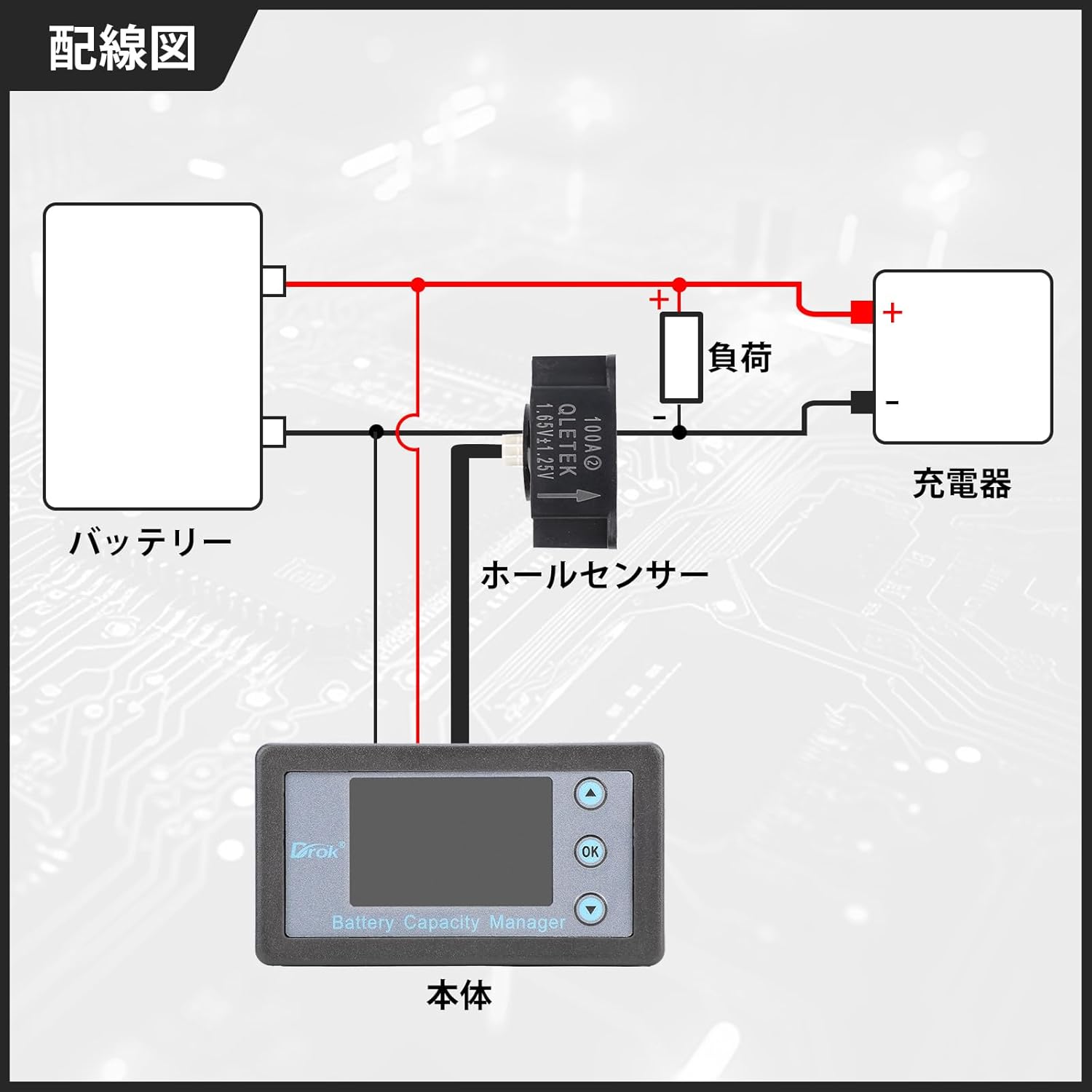
Image 5: Wiring diagram illustrating the connection of the multi-meter's display unit and Hall sensor to a battery, load, and charger. The Hall sensor is placed in the main current path, and the display unit is powered directly from the battery.
6. Operating Instructions
Once properly installed and powered, the multi-meter will automatically display real-time measurements on its LCD screen.
6.1 Display Modes
The multi-meter features a comprehensive display that shows multiple parameters simultaneously. The main screen typically includes:
- Measured Voltage (V): Displays the current DC voltage.
- Measured Current (A): Shows the current flowing through the Hall sensor.
- Real-time Power (W): Calculates and displays the instantaneous power consumption or generation.
- Remaining Capacity Percentage (%): Indicates the estimated remaining battery capacity as a percentage.
- Remaining Capacity (AH): Shows the remaining battery capacity in Ampere-hours.
- Run Time: Displays the accumulated operating time.
- Temperature: Shows the ambient temperature (note: displayed in Fahrenheit only, not user-configurable to Celsius).
- Remaining Capacity Progress Bar: A visual indicator of battery charge level.

Image 6: The multi-meter's multi-function display, clearly labeling measured voltage, current, real-time power, remaining capacity percentage, remaining capacity in AH, run time, and a progress bar for battery level.
6.2 Button Functions
The display unit typically includes navigation buttons (Up, Down, OK) for potential settings adjustments or cycling through display modes. Refer to the on-screen prompts or a more detailed digital manual if available for specific button functionalities.
7. Maintenance
To ensure the longevity and accurate performance of your DROK multi-meter, follow these general maintenance guidelines:
- Cleaning: Use a soft, dry cloth to clean the display and casing. Avoid abrasive cleaners or solvents.
- Environmental Conditions: Operate and store the device within its specified temperature and humidity ranges. Avoid direct sunlight, extreme temperatures, and high moisture environments.
- Connections: Periodically check all wiring connections for tightness and signs of wear or corrosion.
- Physical Protection: Protect the device from physical shocks and impacts.
8. Troubleshooting
If you encounter issues with your multi-meter, consider the following troubleshooting steps:
- Display Flickering or Resetting: Ensure all power and data connections are secure. Verify that the input voltage is within the specified 8-120V range and stable. If the issue persists, it may indicate a device malfunction.
- Incorrect Readings: Check the Hall sensor installation, ensuring the arrow points in the correct current direction. Verify that the sensor is properly connected to the display unit.
- Temperature Display in Fahrenheit Only: This device displays temperature in Fahrenheit (℉) by default. There is no user-configurable option to change the unit to Celsius (℃).
- No Display/Backlight: Check the power cable connection to the display unit and ensure the power source is active and within the voltage range.
For persistent issues not resolved by these steps, please contact customer support.
9. Application Scenarios
The DROK 6-in-1 Multi-meter is suitable for a wide range of applications, including but not limited to:
- Monitoring battery status in electric bikes and scooters.
- Testing and monitoring solar panel power generation systems.
- Use in research and student experiments for electrical parameter analysis.
- Electronic maintenance and DIY electronics projects.

Image 7: Examples of diverse applications for the multi-meter, including electric bikes, solar panel monitoring, scientific research, and electronic maintenance.
10. Warranty and Support
For warranty information, please refer to the documentation provided with your purchase or contact your retailer. For technical support, product inquiries, or assistance with troubleshooting, please reach out to DROK customer service or the seller from whom you purchased the product. Contact details can typically be found on the product packaging or the seller's official website.