
1. Product Overview
The MagTool Aquarium Heater is designed to maintain a stable and optimal temperature for aquatic environments. It features a durable heating element, precise temperature control, and multiple safety mechanisms suitable for both freshwater and saltwater tanks. This manual provides essential information for the safe and effective use of your aquarium heater.

Image: MagTool Aquarium Heater and Digital Controller.
Key Features:
- Efficient and Stable Heating Element: Utilizes a nickel-chromium heating wire for rapid and consistent heat transfer.
- Precision Adjustable Temperature: Wide temperature range from 59°F to 93°F (15°C to 34°C) with a built-in high-precision sensor.
- Multiple Safety Measures: Includes over-temperature protection and water-off protection to prevent overheating and dry running.
- External Digital Controller: Features an LED display for real-time temperature monitoring and easy adjustment, supporting both Celsius and Fahrenheit.
- Power Failure Memory: Retains the last set temperature after a power interruption.
- Robust Protective Design: Crafted with thickened high-temperature-resistant quartz glass and an external PC plastic cover to protect aquatic life.
2. Components
The MagTool Aquarium Heater package includes the following main components:
- Heater Unit (containing heating core and temperature sensor)
- Digital Temperature Controller
- Suction Cups (typically three)
- Controller Bracket/Hook
- User Manual

Image: Exploded view of the MagTool Aquarium Heater showing the heater shell, heater core, and temperature sensor.
3. Specifications
Detailed specifications for the MagTool 300W Aquarium Heater:
| Feature | Specification |
|---|---|
| Model | 300W |
| Recommended Tank Size | 40-94 Gallons (150-360 Liters) |
| Temperature Adjustment Range | 59°F to 93°F (15°C to 34°C) |
| Temperature Accuracy | ±1°F / ±1°C |
| Heater Dimensions (approx.) | 11 x 2.4 x 1 inches |
| Material | Thickened quartz glass, explosion-proof quartz sand, PC plastic cover |
| Power Cord Length | Approximately 5.9 ft (1.8 m) |
| Item Weight | 1.98 pounds |

Image: Diagram illustrating the dimensions and wattage specifications for various MagTool Aquarium Heater models, including the 300W unit.
4. Setup and Installation
- Submersion: Ensure the heater unit is fully submerged in water before connecting it to any power source. The entire heating element must be covered by water to prevent damage and ensure safe operation.
- Placement: Place the heater in an area of the tank with good water circulation. This helps to distribute heat evenly throughout the aquarium. Avoid placing it directly in front of a filter output or in a stagnant corner.
- Secure Attachment: Use the provided suction cups to securely attach the heater unit to the inside wall of the aquarium. Ensure it is firmly in place and cannot easily detach.
- Controller Placement: Mount the digital controller outside the tank using the provided controller bracket or hook. It is crucial that the controller remains dry and is not submerged in water.
- Power Connection: Connect the heater unit's cable to the digital controller. Then, plug the digital controller's power cord into a suitable electrical outlet.

Image: Proper installation of the MagTool Aquarium Heater, fully submerged in the tank with the external controller mounted.
5. Operating Instructions
Follow these steps to operate your MagTool Aquarium Heater:
- Power On: Once plugged in, the LED display on the digital controller will illuminate, showing the current water temperature (top display) and the set temperature (bottom display).
- Adjusting Temperature: To change the desired set temperature, press the button on the controller. Each short press will increase the set temperature by 1 degree. The temperature setting will cycle between 59°F and 93°F (15°C and 34°C).
- Temperature Unit Conversion: To switch between Fahrenheit (°F) and Celsius (°C), press and hold the button for approximately 5 seconds.
- Indicator Lights:
- The red indicator light (HEAT) will be on when the current water temperature is below the set temperature, indicating that the heater is actively heating.
- The blue indicator light (KEEP) will be on when the current water temperature has reached or exceeded the set temperature, indicating that the heater is not actively heating.
- Power Failure Memory: The controller is equipped with a power failure memory function. In the event of a power outage, the last set temperature will be retained once power is restored, eliminating the need for manual reconfiguration.

Image: Detailed view of the MagTool digital controller, explaining the current temperature, set temperature, and indicator lights.
6. Safety Precautions
Adhere to the following safety guidelines to ensure safe operation and longevity of your MagTool Aquarium Heater:
- Full Submersion: Always ensure the heater unit is completely submerged in water before plugging it into a power outlet. Operating the heater out of water will cause it to overheat rapidly, leading to damage and potential safety hazards.
- Controller Dry: The digital controller is not waterproof. Keep it dry and away from water splashes or submersion.
- Cool-Down Period: Before handling or removing the heater from the tank, always unplug the power cord and wait for at least 5 minutes to allow the heating element to cool down. The heater can be very hot immediately after operation.
- Proper Placement: Place the heater in an open area within the aquarium to facilitate proper heat dissipation and prevent localized overheating.
- Regular Inspection: Periodically inspect the heater unit, power cords, and controller for any signs of damage, cracks, or wear. Discontinue use immediately if any damage is observed and contact customer support.
- Children and Pets: Keep the heater and its cords out of reach of children and pets to prevent accidental damage or injury.
7. Maintenance
Proper maintenance ensures optimal performance and extends the lifespan of your aquarium heater:
- Cleaning: Regularly clean the heater unit to prevent algae or mineral buildup. Accumulation can reduce heating efficiency. Use a soft brush or cloth and aquarium-safe cleaning solutions if necessary.
- Pre-Removal Cooling: As mentioned in safety precautions, always unplug the heater and wait at least 5 minutes for it to cool down before removing it from the water for cleaning or relocation.
- Cord and Plug Check: Periodically check the power cord and plug for any signs of fraying, cuts, or damage. Never use a heater with a damaged cord or plug.
8. Troubleshooting
If you encounter issues with your MagTool Aquarium Heater, refer to the following troubleshooting guide:
| Fault Code / Symptom | Explanation / Solution |
|---|---|
| E1 | Heater running dry alert: The heating rod is not fully submerged in water. Solution: Unplug the heater, ensure it is fully submerged, wait 5 minutes for it to cool, then plug it back in. |
| HH | Over-temperature alert: The tank temperature has reached 94°F (35°C). Solution: Check your set temperature. If the ambient temperature is high, consider methods to cool the tank. The heater will stop heating automatically. |
| "BB" Sound | Heater not submerged: The heater is not fully submerged in water. Solution: Same as E1. Unplug, submerge fully, cool, then restart. |
| Heater not heating | Check if the red HEAT indicator light is on. Ensure the set temperature is higher than the current water temperature. Verify power connection. |
| Inaccurate temperature reading | Ensure the temperature sensor (part of the heater unit) is in an area with good water flow and not obstructed. Compare with a separate, calibrated thermometer. |
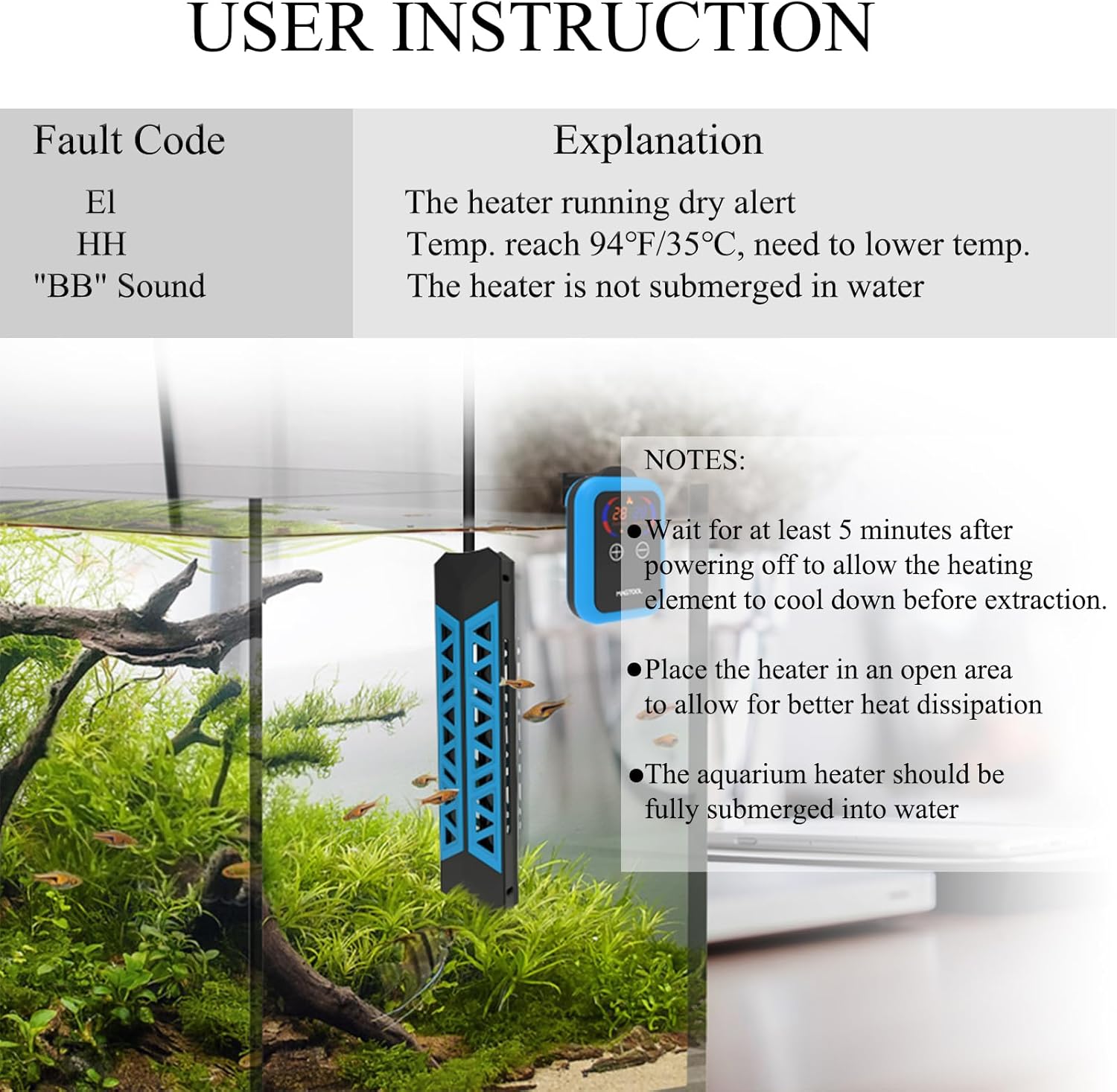
Image: Troubleshooting guide for MagTool Aquarium Heater fault codes, including E1 for out of water and HH for over-temperature.
If the issue persists after attempting these troubleshooting steps, please contact customer support.
9. Warranty and Support
The MagTool Aquarium Heater comes with a 12-month quality guarantee from the date of purchase, covering manufacturing defects and malfunctions under normal use.
For technical assistance, warranty claims, or any further inquiries regarding your product, please contact MagTool customer support through the retailer where the product was purchased. You may also visit the official MagTool brand store for more information and contact options: