1. Introduction
Thank you for choosing the NMY N300 GPS Drone. This drone is designed for both beginners and experienced users, offering exceptional image quality with its 4K camera and Electronic Image Stabilization (EIS). Equipped with GPS for precise and secure flight, it features intelligent flight modes and a lightweight, foldable design for easy transport. This manual provides essential information for safe operation, setup, maintenance, and troubleshooting.
2. Safety Guidelines
Always prioritize safety when operating your drone. Failure to follow these guidelines may result in injury, damage to property, or legal consequences.
- Read the Manual: Familiarize yourself with all features and instructions before flight.
- Local Regulations: Always comply with local aviation laws and regulations. Check if registration is required in your area (this drone is under 249g, which may exempt it in some regions).
- Pre-Flight Check: Ensure the drone, remote controller, and batteries are in good working condition.
- Flight Environment: Fly in open areas, away from people, buildings, trees, and power lines. Avoid flying over crowds or private property.
- Weather Conditions: Do not fly in strong winds, rain, snow, or fog.
- Line of Sight: Maintain visual line of sight with the drone at all times.
- Battery Safety: Use only approved chargers and batteries. Do not overcharge or puncture batteries.
- Respect Privacy: Be mindful of others' privacy when using the camera.
3. Package Contents
Verify that all items listed below are included in your package:

Image: The NMY N300 GPS Drone, remote controller, two batteries, spare propellers, charging cables, and instruction manual are neatly arranged in their carrying case.
- NMY N300 GPS Drone
- Remote Controller
- Intelligent Flight Batteries (x2)
- Spare Propellers (multiple sets)
- USB Charging Cable
- Screwdriver
- User Manual
- Carrying Case
4. Product Overview
4.1 Drone Components

Image: The NMY N300 drone in flight, showcasing its 4K camera with Electronic Image Stabilization (EIS) for clear, steady shots.
- Propellers: Four foldable arms with propellers for flight.
- Brushless Motors: High-efficiency motors providing stable and powerful flight.
- 4K Camera: Front-facing camera with 120° motorized adjustment and EIS for high-quality photo and video capture.
- GPS Module: Enables precise positioning, stable hovering, and intelligent return functions.
- Battery Compartment: Located at the rear for inserting the intelligent flight battery.
- LED Indicators: Provide status information (e.g., GPS signal, battery level).

Image: A detailed view of the drone's powerful brushless motor, designed for efficient and reliable performance.
4.2 Remote Controller Components

Image: The remote controller with a smartphone attached, showing the live view from the drone's camera, indicating user-friendly controls.
- Control Sticks: Left stick for throttle/yaw, right stick for forward/backward/left/right movement.
- Phone Holder: Adjustable clamp to secure your smartphone for FPV viewing.
- Power Button: To turn the remote controller on/off.
- Return-to-Home Button: Initiates automatic return to the takeoff point.
- Photo/Video Button: To capture images or start/stop video recording.
- Speed Mode Switch: Toggles between different flight speeds.
- LED Display: Shows flight information such as battery level, GPS status, and flight mode.
5. Setup
5.1 Battery Charging
Charge both the drone's intelligent flight batteries and the remote controller battery before first use. Use the provided USB charging cable.
- Connect the USB charging cable to a USB power adapter (5V/2A recommended).
- Connect the other end to the battery charging port.
- Charging indicators will show the charging status. Once fully charged, disconnect the cable.

Image: The drone, remote, and two batteries are shown, illustrating the extended flight time of up to 40 minutes provided by the two included batteries.
5.2 Battery Installation
- Ensure the drone is powered off.
- Insert the intelligent flight battery into the battery compartment at the rear of the drone until it clicks into place.
- For the remote controller, open the battery cover and insert the batteries according to the polarity markings.
5.3 Propeller Installation
- Identify propellers marked 'A' and 'B'.
- Match 'A' propellers to motor shafts marked 'A' and 'B' propellers to motor shafts marked 'B'.
- Press down and rotate the propeller in the direction indicated on the motor base until it locks securely.
- Ensure all propellers are firmly attached before flight.
5.4 Remote Controller Pairing
- Power on the drone first, then the remote controller.
- The remote controller will automatically attempt to pair with the drone.
- Once paired, the indicator lights on both devices will become solid.
- Download the official NMY drone app on your smartphone and connect to the drone's Wi-Fi network for live video feed and advanced controls.
6. Operating the Drone
6.1 Pre-Flight Checklist
- Ensure batteries are fully charged.
- Propellers are correctly installed and secure.
- Flight area is clear of obstacles and people.
- GPS signal is strong (indicated by solid GPS light on drone/remote).
- Smartphone is connected to the drone's Wi-Fi and the app is running.
6.2 Takeoff and Landing
- Automatic Takeoff: Press the one-key takeoff button on the remote controller or in the app. The drone will automatically ascend to a safe height and hover.
- Manual Takeoff: Push both control sticks down and outwards to arm the motors. Then, slowly push the left stick up to ascend.
- Automatic Landing: Press the one-key landing button. The drone will descend and land automatically.
- Manual Landing: Slowly pull the left stick down to descend. Once landed, push both sticks down and inwards to disarm the motors.
6.3 Basic Flight Controls
- Left Stick (Throttle/Yaw): Up/Down controls altitude. Left/Right controls rotation (yaw).
- Right Stick (Pitch/Roll): Up/Down controls forward/backward movement (pitch). Left/Right controls sideways movement (roll).
6.4 Intelligent Flight Modes
The NMY N300 offers several intelligent flight modes for enhanced flight experience:
- GPS Return to Home (RTH): The drone automatically returns to its takeoff point if the battery is low, signal is lost, or the RTH button is pressed.

Image: The drone's automatic return feature is depicted, showing its GPS-guided path back to the user's takeoff location, ensuring safety in case of low battery or signal loss.
- Tracking Mode: The drone can automatically follow a designated subject.
- Trajectory Flight Mode: Draw a path on your smartphone screen, and the drone will fly along the specified route.
- Stationary Flight Mode: The drone maintains a stable position, ideal for capturing still images or videos.
6.5 Camera Operation
The 4K camera with EIS ensures high-quality media capture.

Image: A side-by-side comparison demonstrating the effectiveness of Electronic Image Stabilization (EIS), showing stable drone footage with EIS ON versus blurry footage with EIS OFF.
- Photo/Video Capture: Use the dedicated buttons on the remote controller or the app interface to take photos or start/stop video recording.
- Camera Angle Adjustment: Adjust the camera's tilt angle (120° motorized) via the remote controller or app for optimal viewing.
- Media Storage: Photos and videos are typically saved to your smartphone via the app, or to an inserted SD card (if supported by the drone).
6.6 Portability
The NMY N300 drone is designed for convenience.
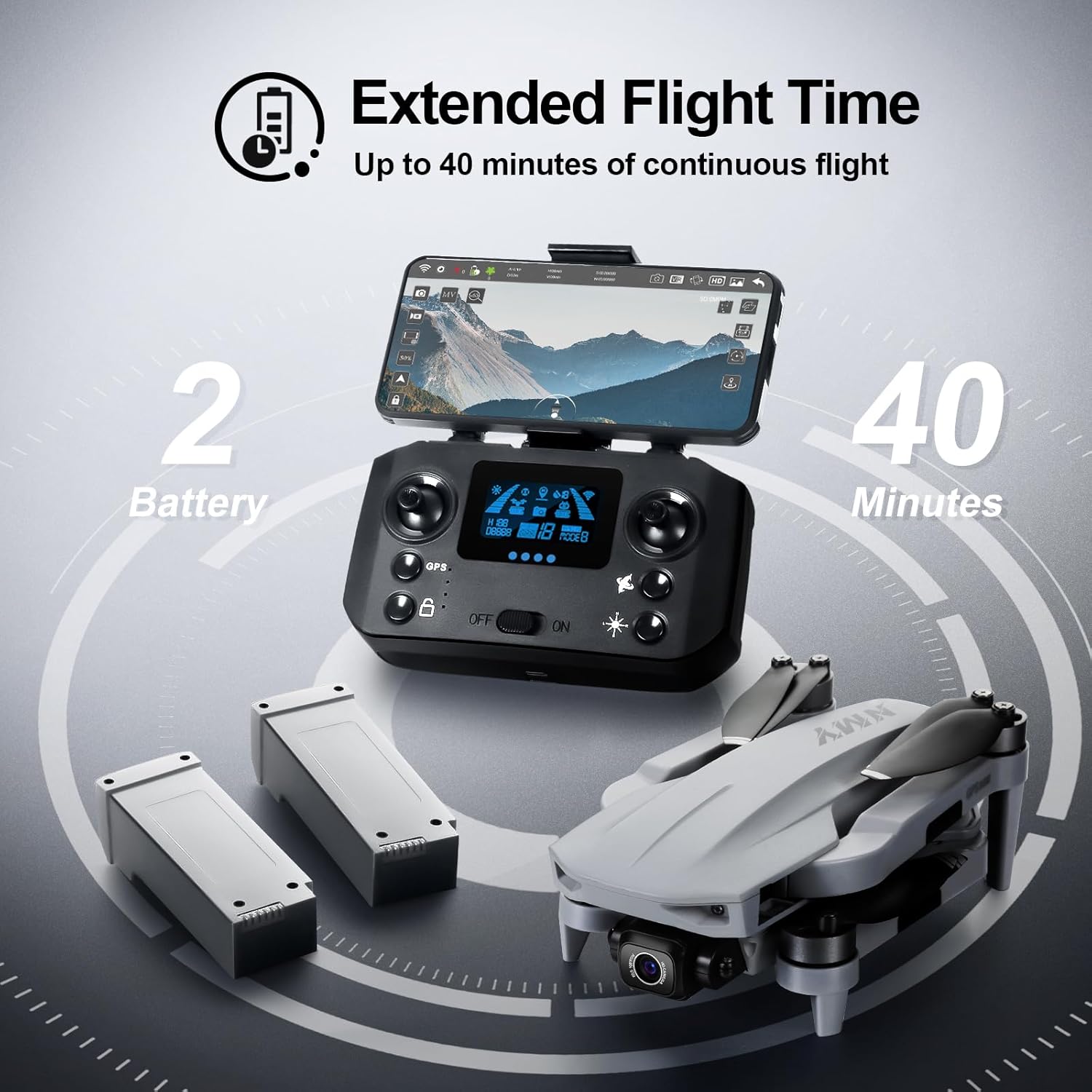
Image: The NMY N300 drone resting in a hand, illustrating its compact and lightweight design (under 249g), which often exempts it from registration requirements in many regions.
- Foldable Design: The drone arms fold inward, making it compact and easy to store in the included carrying case.
- Lightweight: Weighing under 249 grams, it is highly portable and may not require registration in certain jurisdictions.
7. Maintenance
Regular maintenance ensures the longevity and optimal performance of your drone.
- Cleaning: Use a soft, dry cloth to clean the drone and remote controller after each flight. Avoid using liquids or solvents.
- Propeller Inspection: Regularly check propellers for cracks, bends, or damage. Replace damaged propellers immediately using the provided spares.
- Motor Care: Keep motors free from dust and debris. Do not attempt to lubricate them.
- Battery Storage: Store batteries in a cool, dry place, away from direct sunlight and extreme temperatures. For long-term storage, charge batteries to about 50-60% capacity.
- Firmware Updates: Check the official NMY website or app for any available firmware updates to ensure optimal performance and new features.
8. Troubleshooting
Refer to the table below for common issues and their solutions:
| Issue | Possible Cause | Solution |
|---|---|---|
| Drone does not power on | Low battery; Battery not installed correctly | Charge battery fully; Reinstall battery securely |
| Remote controller not connecting | Remote battery low; Not paired correctly; Interference | Charge remote battery; Re-pair drone and remote; Move to an area with less interference |
| Drone drifts during flight | Not calibrated; Strong wind; Propellers damaged | Perform gyroscope calibration; Fly in calm conditions; Replace damaged propellers |
| Poor camera image quality | Lens dirty; Insufficient light; EIS off; SD card issue | Clean lens; Fly in well-lit conditions; Ensure EIS is active; Check/replace SD card |
| GPS signal weak/lost | Flying indoors; Obstructions; Magnetic interference | Fly outdoors in an open area; Avoid areas with tall buildings or strong magnetic fields |
9. Specifications
Detailed technical specifications for the NMY N300 GPS Drone:
| Feature | Value |
|---|---|
| Brand | NMY |
| Model Name | N300 |
| Special Feature | GPS, 4K Camera, Multiple Flight Modes |
| Age Range (Description) | Adult |
| Color | Grey |
| Video Capture Resolution | 4K |
| Connectivity Technology | Wi-Fi |
| Skill Level | Beginner |
| Battery Capacity | 2000 Milliamp Hours |
| Flight Time | Up to 40 minutes (with 2 batteries) |
| Video Capture Format | MP4 |
| Remote Control Technology | Wi-Fi |
| Control Type | Remote Control |
| Material | Plastic |
| Item Weight | 1.92 pounds (under 249 grams) |
| Product Dimensions | 10"L x 8"W x 2"H (folded) |
| Optical Sensor Technology | CMOS |
| Supported Image Format | JPEG |
10. Warranty and Support
NMY is committed to your satisfaction. Our professional after-sales support team is available to guide you through any questions or issues you may encounter, whether you are a novice or an experienced drone user. For support, please refer to the contact information provided with your product packaging or visit the official NMY website.
Please retain your proof of purchase for warranty claims. Our no-questions-asked return policy underscores our dedication to ensuring your satisfaction.