
1. Introduction
The TELESIN 360° Waterproof Selfie Stick, Model CA-WSS, is designed for capturing dynamic footage in various environments, including underwater. Constructed from durable, corrosion-resistant materials, this extendable monopod offers wide compatibility with popular action cameras and smartphones, providing stability and ease of use for your adventures.
2. Product Overview

Image Description: A composite image displaying the TELESIN 360° Waterproof Selfie Stick in its compact form, fully extended, and with various mounting options for different cameras. It highlights the textured non-slip grip and the universal mounting screw.
2.1 Key Features
- Extendable Design: Extends from 9.13 inches (23.2 cm) to 25.75 inches (65.4 cm) for versatile shooting angles.
- Waterproof Construction: Made from marine-grade, salt-resistant, and anti-corrosion aluminum alloy and silica gel, suitable for diving and water sports.
- Secure Grip: Features a textured non-slip handle and an anti-lost wrist strap for secure handling in wet conditions.
- Lightweight & Portable: Weighs only 5.1 ounces (150g), making it easy to carry.
- Wide Compatibility: Includes adapters for GoPro and Insta360 cameras, and a 1/4-inch screw port for other action cameras, digital compacts, and smartphone clips (phone clip not included).
- Rotation Lock: One-touch locking mechanism ensures stability at any desired angle.
2.2 Components

Image Description: The product packaging for the TELESIN Selfie Stick, alongside the stick itself, a 1/4 adapter mount, a screw, and a wrist strap. The image also details the product size, material, and weight.
- TELESIN Selfie Stick
- 1/4 Adapter Mount
- Mounting Screw
- Wrist Strap
3. Setup
3.1 Attaching Your Camera
The selfie stick comes with two primary adapters: one for GoPro-style mounts and another for Insta360 cameras. It also features a standard 1/4-inch screw port for broader compatibility.
- For GoPro/Action Cameras: Use the provided three-jaw adapter. Align your camera's mounting tabs with the adapter and secure it using the long thumb screw.
- For Insta360/Other Cameras: The stick features a 1/4-inch screw at the top. Directly screw your camera onto this thread. If your Insta360 requires a specific adapter, ensure it is securely attached.
- For Smartphones: A separate smartphone clip (not included) with a 1/4-inch screw thread is required. Attach the smartphone clip to the 1/4-inch screw port on the selfie stick.

Image Description: An illustration demonstrating the wide compatibility of the selfie stick with different action cameras like GoPro, DJI Osmo Action, and Insta360. It shows both the standard 1/4-inch bolt interface and the detachable three-jaw adapter.
3.2 Extending and Retracting the Stick
To extend the selfie stick, gently twist the handle counter-clockwise to unlock the sections. Pull the sections to your desired length. To lock, twist the handle clockwise until secure. This mechanism allows for flexible adjustment and stable positioning.
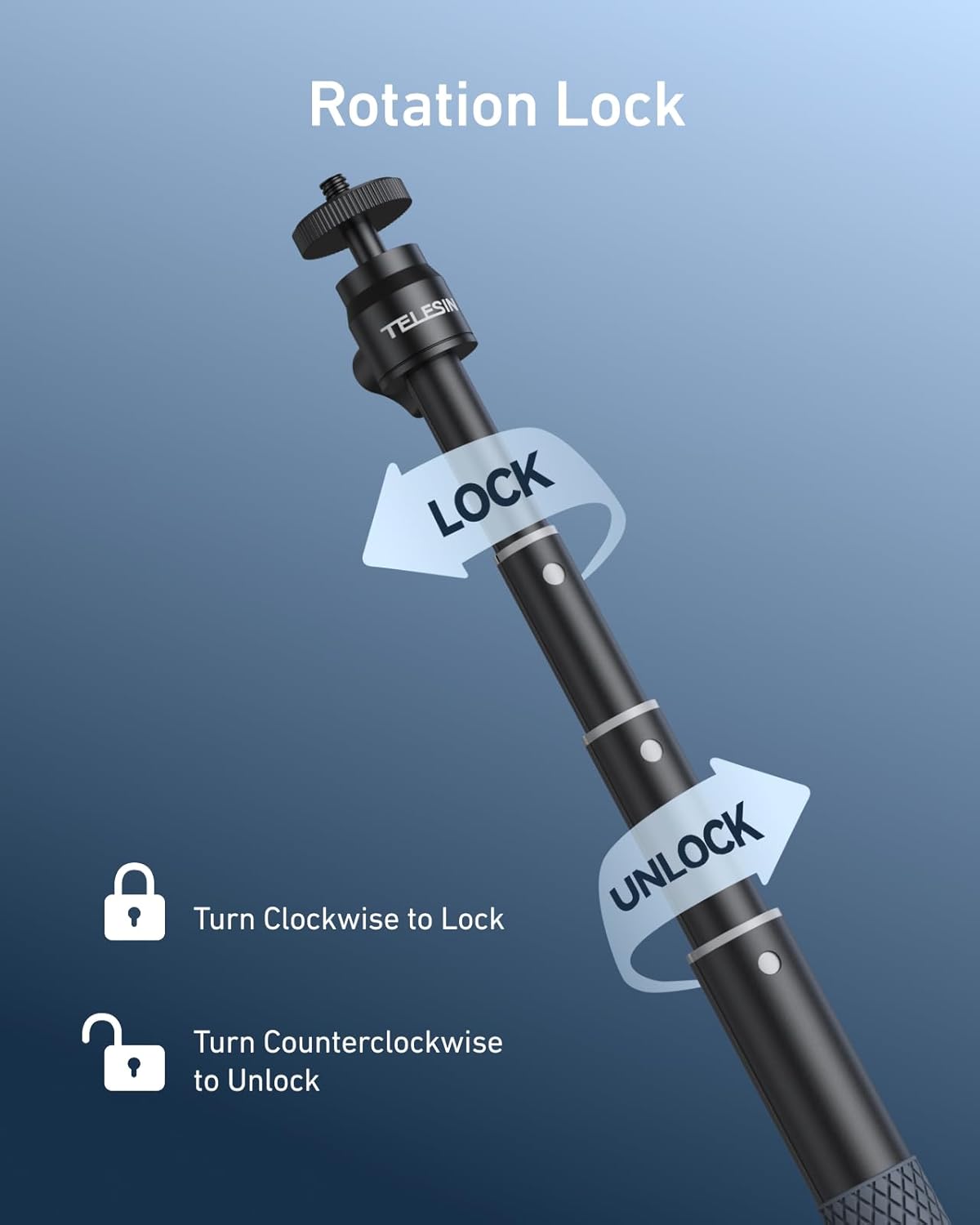
Image Description: A visual guide showing how to use the rotation lock feature of the selfie stick. Arrows indicate twisting clockwise to lock and counter-clockwise to unlock, allowing for length adjustment.
3.3 Attaching the Wrist Strap
Thread the anti-lost wrist strap through the designated loop at the base of the handle. Secure it to your wrist during use, especially in dynamic environments, to prevent accidental drops.
4. Operating Instructions
4.1 General Use
Hold the selfie stick firmly by its non-slip handle. Extend it to achieve the desired framing for your photos or videos. The rotation lock ensures your camera remains stable during use.

Image Description: A man and a woman hiking on a mountain, using the TELESIN selfie stick to capture a wide-angle shot of themselves and the scenic background, demonstrating its use in outdoor activities.
4.2 Underwater Use
The TELESIN selfie stick is designed for underwater environments. Its salt-resistant and anti-corrosion properties ensure durability. Always ensure your action camera is properly sealed in its waterproof housing before submerging. The non-slip handle and wrist strap provide extra security.

Image Description: A person snorkeling underwater, holding the TELESIN selfie stick with an attached action camera, capturing marine life. This illustrates the product's intended use in aquatic environments.
4.3 Using with a Tripod
The 1/4-inch screw port at the bottom of the selfie stick allows it to be connected to any standard tripod (tripod not included). This enables hands-free shooting for stable time-lapses, group photos, or vlogging.

Image Description: The TELESIN selfie stick is shown attached to a compact tripod, positioned on a rocky surface with a scenic background. This highlights the 1/4-inch threaded hole at the bottom for tripod compatibility.
4.4 Official Product Video Overview
Video Description: An official product video from TELESIN providing a general overview of the Waterproof Selfie Stick, showcasing its features and various applications with GoPro and Insta360 cameras.
4.5 Adapter Installation Guide
Video Description: An official video demonstrating the installation process for an Insta360 Ace Pro adapter onto the selfie stick, providing clear visual steps for users.
5. Maintenance
To ensure the longevity and optimal performance of your TELESIN 360° Waterproof Selfie Stick, especially after exposure to water:
- Rinse After Use: After each use in saltwater or chlorinated water, thoroughly rinse the entire selfie stick with fresh water. This helps prevent salt residue buildup and corrosion.
- Dry Properly: Dry the selfie stick completely in a cool, well-ventilated area before storing. Ensure all sections are extended during drying to allow moisture to escape.
- Avoid Harsh Chemicals: Do not use abrasive cleaners or harsh chemicals, as these can damage the materials and coatings.
6. Specifications
| Attribute | Detail |
|---|---|
| Model Number | CA-WSS |
| Brand | TELESIN |
| Material | Aluminum Alloy, Silica Gel |
| Extendable Length | 9.13 inches (23.2 cm) to 25.75 inches (65.4 cm) |
| Folded Size | 12 x 2 x 2 inches |
| Item Weight | 6.7 ounces (150g) |
| Compatibility | GoPro Max, Hero 13/12/11/10/9/8/7/6/5 Black, Session; DJI Osmo Nano, Osmo 360, Osmo Action 3/4/5 Pro/6, Osmo Pocket 2/3; Insta360 One R, X2, X3, X4, X5, Go 2, Go 3, Ace Pro; AKASO; other action cameras & digital compacts; smartphones (with separate clip). |
7. Troubleshooting
If you encounter any issues with your TELESIN 360° Waterproof Selfie Stick, please consider the following:
- Difficulty Extending/Retracting: Ensure the rotation lock is fully disengaged (twisted counter-clockwise). Clean any sand or debris from the telescoping sections.
- Camera Instability: Verify that all mounting screws and adapters are tightened securely. The rotation lock should be fully engaged (twisted clockwise) when the stick is at the desired length.
- Corrosion/Damage: Always follow the maintenance instructions, especially rinsing with fresh water after saltwater use, to prevent corrosion.
For further assistance, please contact TELESIN customer support.
8. Warranty and Support
For information regarding warranty coverage and customer support for your TELESIN 360° Waterproof Selfie Stick, please refer to the official TELESIN website or contact their customer service directly. Keep your proof of purchase for any warranty claims.
TELESIN Official Website: Visit the TELESIN Store on Amazon