
1. Introduction
This manual provides essential information for the safe and efficient operation of your DEWIN 1.5kW 220V Single-Phase Input Three-Phase Output Variable Frequency Drive (VFD). This VFD is designed to control the speed of three-phase motors by varying the frequency and voltage of the power supplied to the motor. It features a unique control method for high torque, precision, and a wide speed range, ensuring high performance and adaptability in various industrial applications.
Please read this manual thoroughly before installation, operation, or maintenance to ensure proper usage and to prevent damage to the unit or injury to personnel.
2. Safety Information
WARNING: Risk of electrical shock. Wait 10 minutes after removing power before servicing.
Always observe the following safety precautions:
- Ensure the VFD is installed by qualified personnel only.
- Disconnect all power before performing any wiring, inspection, or maintenance.
- Verify that the input voltage matches the VFD's specifications (220V single-phase).
- Properly ground the VFD to prevent electrical shock.
- Do not touch internal components immediately after power-off, as residual voltage may be present.
- The VFD includes comprehensive protection measures against overcurrent, overvoltage, overheating, undervoltage, and short circuits. However, external safety devices may still be required depending on the application.
- Avoid operating the VFD in environments with excessive dust, moisture, or corrosive gases.
3. Product Overview
The DEWIN VFD is a compact and efficient motor speed controller designed for ease of use and high reliability. Its robust design ensures good anti-aging and anti-trip performance, with excellent adaptability to sudden power fluctuations, temperature changes, humidity, and dust.
3.1 Key Features
- Unique Control Method: Achieves high torque, high precision, and a wide speed range.
- Comprehensive Protection: Built-in safeguards against overcurrent, overvoltage, overheating, undervoltage, and short circuits.
- User-Friendly Design: Small size, easy to install, with quick start/stop response and significant low-speed torque.
- High Performance: Excellent anti-aging and anti-trip capabilities, stable operation in varying conditions.
- Efficient Cooling: Equipped with a radiator for effective heat dissipation, ensuring stable long-term operation.
- Detachable Control Panel: Allows for flexible installation and easier wiring via screw terminals.
3.2 Product Views and Features


4. Setup and Installation
4.1 Mounting
The VFD should be mounted vertically in a well-ventilated area, away from direct sunlight, excessive heat, moisture, and vibration. Ensure sufficient clearance around the unit for proper airflow and heat dissipation.
4.2 Wiring Instructions
Before wiring, ensure all power is disconnected. Refer to the wiring diagrams below for correct connections. Incorrect wiring can cause damage to the VFD, motor, or pose a safety hazard.

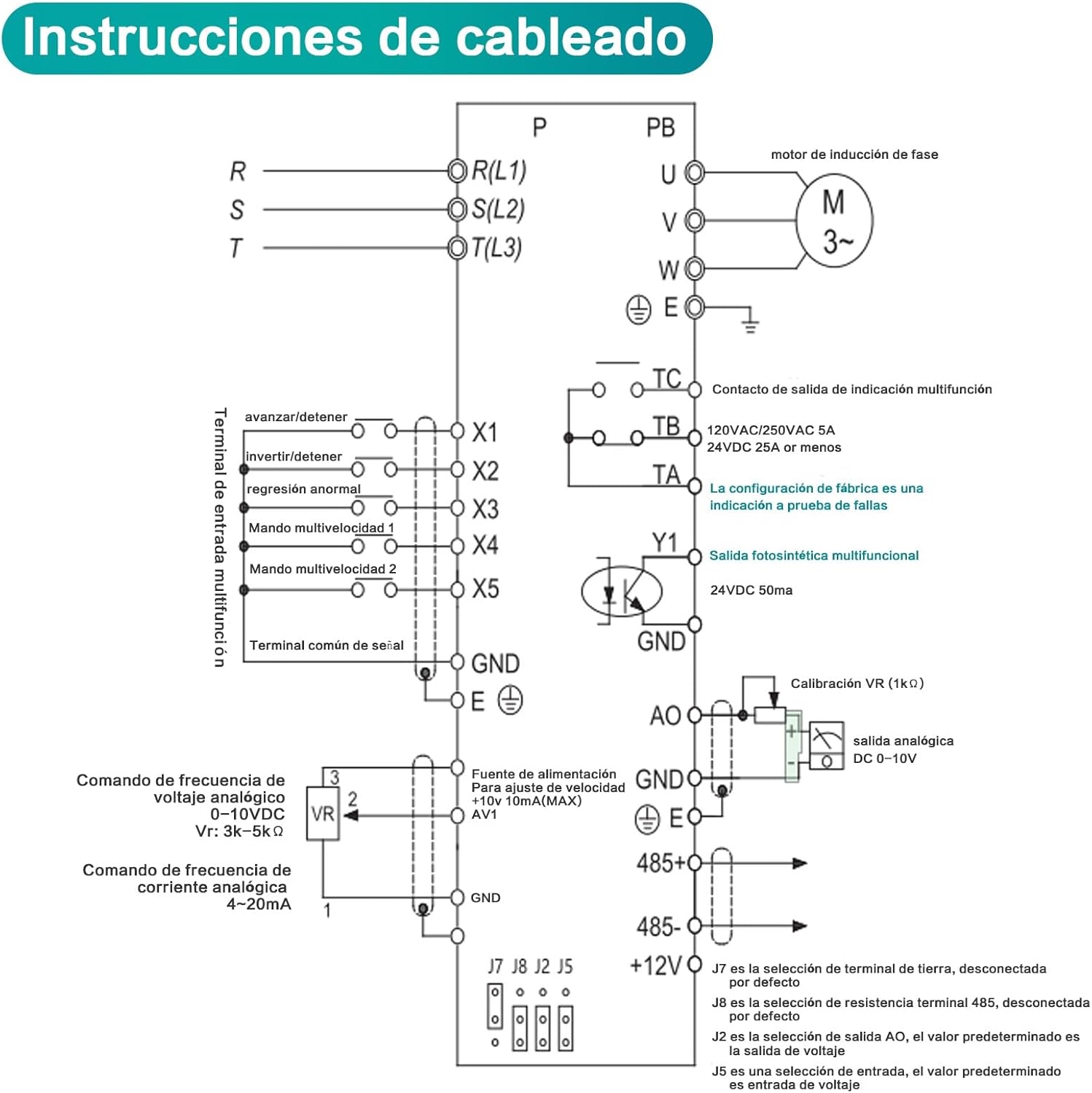
Input Power (L1, L2): Connect the 220V single-phase power supply to terminals L1 and L2.
Ground (P, PB): Connect the ground wire to the designated ground terminal. This is crucial for safety.
Motor Output (U, V, W): Connect the three-phase motor to terminals U, V, and W. Ensure correct phase sequence for desired motor rotation.
Control Terminals: For advanced control, refer to the detailed wiring diagram. These terminals allow for external control signals such as start/stop, forward/reverse, multi-speed settings, and analog frequency commands.
5. Operating Instructions
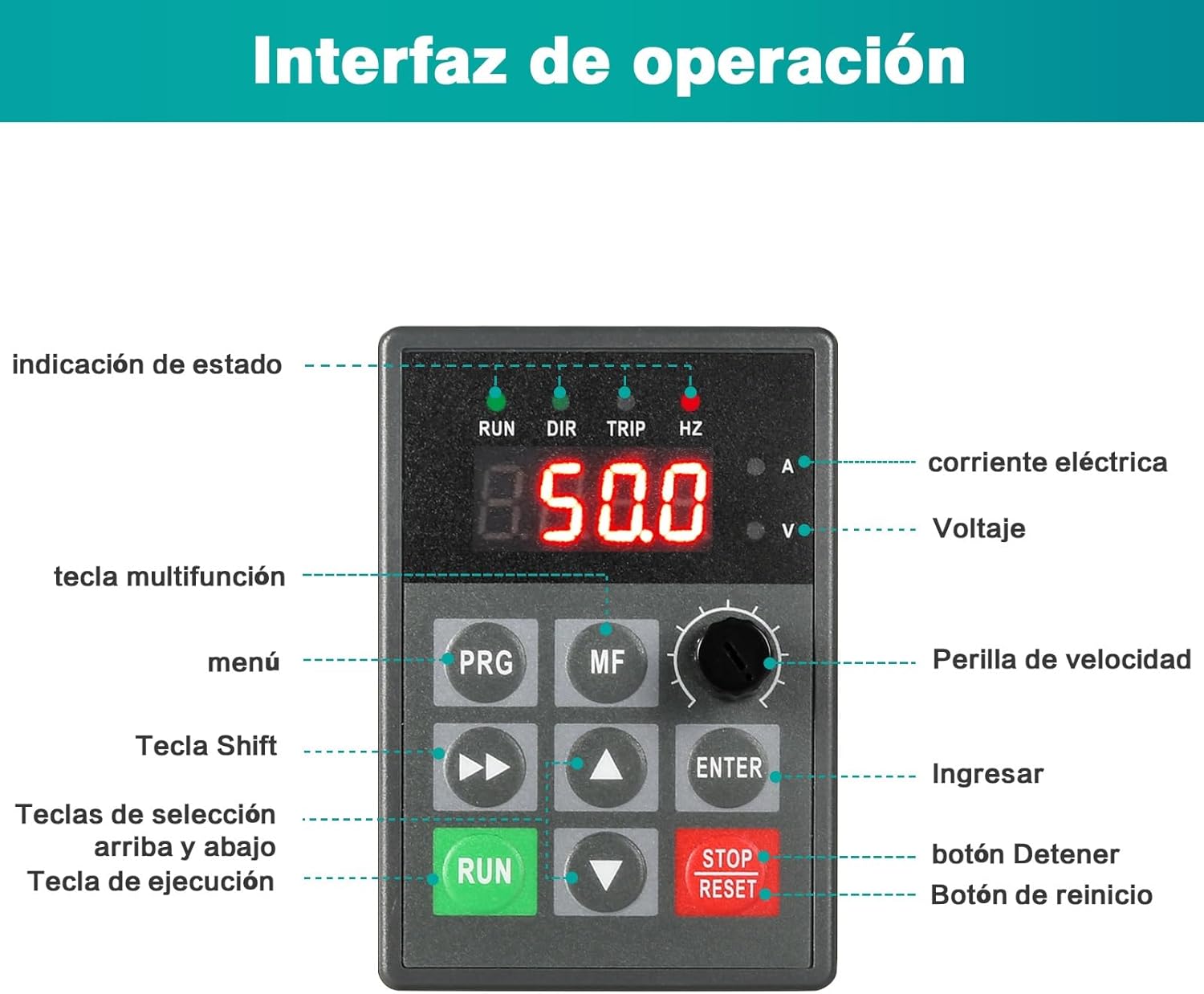
The VFD features an intuitive control panel for easy operation. The detachable panel allows for remote mounting if needed.
5.1 Control Panel Interface
5.2 Basic Operation
- Power On: After ensuring all wiring is correct and secure, apply power to the VFD. The display will light up.
- Set Frequency/Speed: Use the Speed Knob to adjust the desired output frequency, which directly controls the motor speed. The display will show the current frequency (Hz).
- Start Motor: Press the green RUN button to start the motor. The 'RUN' indicator will illuminate.
- Stop Motor: Press the red STOP/RESET button to stop the motor. The 'RUN' indicator will turn off.
- Parameter Adjustment: Use the PRG (Program) button to enter the parameter setting menu. Navigate through parameters using the Up/Down Selection Keys and modify values using the Speed Knob or Shift Key. Press ENTER to confirm changes. Refer to the detailed programming manual (if provided separately) for specific parameter functions.
6. Maintenance
Regular maintenance ensures the longevity and optimal performance of your DEWIN VFD.
- Cleaning: Periodically clean the VFD's exterior and ventilation grilles to prevent dust accumulation, which can hinder heat dissipation. Use a soft, dry cloth. Do not use liquid cleaners.
- Fan Inspection: Check the cooling fan for proper operation and ensure it is free from obstructions. The VFD is equipped with a radiator for efficient heat reduction.
- Terminal Check: Annually, inspect all wiring terminals for tightness. Loose connections can lead to overheating or intermittent operation.
- Environmental Conditions: Ensure the operating environment remains within specified temperature and humidity ranges.
- Storage: If storing the VFD, keep it in a dry, dust-free environment within the recommended temperature range.
7. Troubleshooting
This section provides basic troubleshooting steps for common issues. For more complex problems, contact technical support.
| Problem | Possible Cause | Solution |
|---|---|---|
| VFD does not power on | No input power; incorrect wiring; internal fault | Check power supply; verify wiring connections; contact support if fault persists. |
| Motor does not start | Incorrect start command; motor wiring error; VFD in fault state (TRIP indicator on) | Check RUN command; verify motor wiring (U, V, W); check for fault codes on display and clear fault (press STOP/RESET). |
| Motor runs erratically or at wrong speed | Incorrect frequency setting; motor parameters not configured; external interference | Adjust speed knob/frequency setting; verify motor parameters in VFD settings; check for stable power supply. |
| Overcurrent/Overload trip | Motor overloaded; short circuit in motor wiring; VFD output current limit exceeded | Reduce motor load; inspect motor and wiring for shorts; check VFD current limits and motor parameters. |
| Overvoltage/Undervoltage trip | Unstable input voltage; regenerative braking issue | Check input power supply stability; consider adding braking resistor if applicable. |
| Overheating trip | Insufficient ventilation; clogged fan/radiator; ambient temperature too high | Ensure proper ventilation; clean fan and radiator; reduce ambient temperature. |
8. Specifications
| Specification | Value |
|---|---|
| Brand | DEWIN |
| Model Number | IRAYIYEAY-GS109479-02-DEWZZQ-02 |
| Power Rating | 1.5kW |
| Input Voltage | 220V Single-Phase |
| Output Voltage | 220V Three-Phase |
| Product Weight | 1.12 kg |
| Package Dimensions | 22.8 x 16.5 x 15.7 cm |
| ASIN | B0CJ8TDCTM |
| First Available | September 18, 2023 |
8.1 Dimensions

9. Warranty and Support
For warranty information, technical support, or service inquiries, please contact your seller or the manufacturer directly. Keep your purchase receipt as proof of purchase.
For further assistance, you may visit the DEWIN Brand Store.