
Motorola G54
Motorola G54 5G User Manual
Model: G54
Introduction
This manual provides essential information for setting up, operating, and maintaining your Motorola G54 5G smartphone. Please read it carefully to ensure optimal performance and longevity of your device.
The Motorola G54 5G is a powerful smartphone featuring a MediaTek Dimensity 7020 processor, 12GB RAM, and 256GB internal storage. It boasts a 50MP OIS camera with UltraPixel Technology and is powered by a 6000mAh battery with 30W Turbocharging capability.
Getting Started
Package Contents
Ensure your package contains the following items:
- Motorola G54 5G Smartphone
- 30W TurboPower Charger
- USB Type-C Cable
- SIM Ejector Tool
- Quick Start Guide (this manual)
Device Layout
Familiarize yourself with the key components of your device.

Image: Front and back view of the Motorola G54 5G smartphone, highlighting its sleek design and camera module. The screen displays "moto g54 5G" along with "12GB + 256GB, 50MP OIS, 6000mAh".

Image: Close-up of the back of the Motorola G54 5G, showing the dual camera setup with 50MP OIS and Quad Pixel technology, and the Motorola logo.

Image: Side view of the Motorola G54 5G, illustrating the placement of the power button and volume rocker.
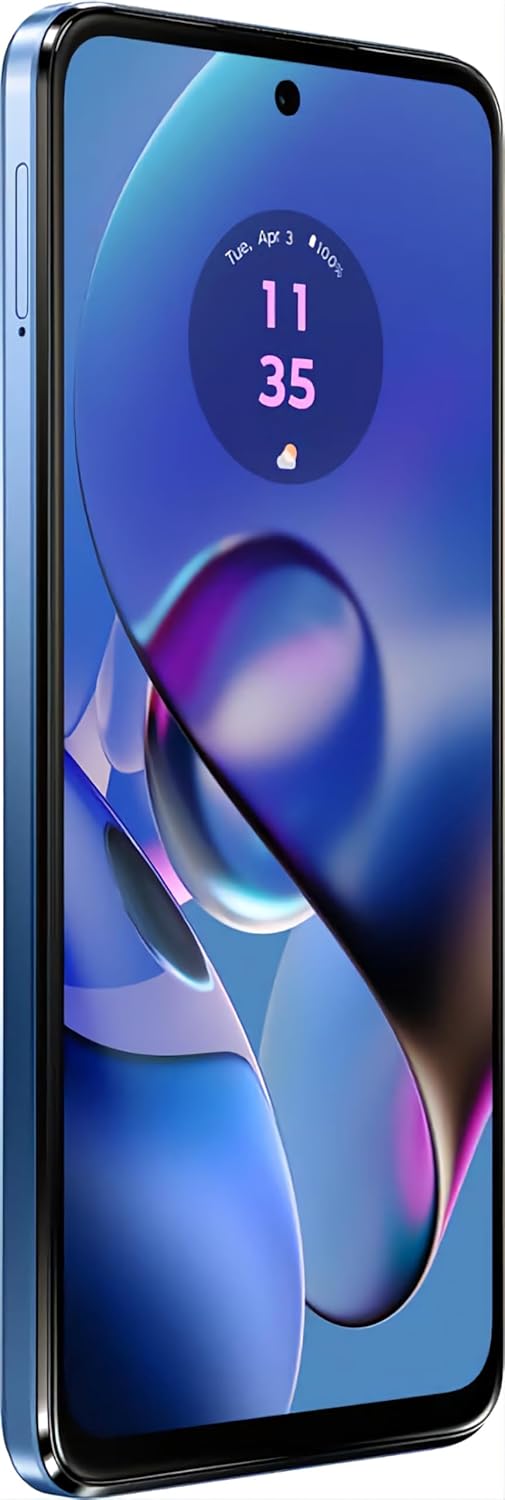
Image: Bottom view of the Motorola G54 5G, displaying the USB Type-C charging port, microphone, and speaker grille.
Inserting SIM Card and Charging
- Locate the SIM tray on the side of your device.
- Insert the SIM ejector tool into the small hole next to the tray and push gently until the tray pops out.
- Place your Nano-SIM card(s) and/or microSD card into the tray with the gold contacts facing down.
- Carefully push the tray back into the slot.
- Connect the USB Type-C cable to your phone and the 30W TurboPower charger. Plug the charger into a power outlet.
- Allow the phone to charge fully before first use.
Operating Your Device
Power On/Off
- To power on: Press and hold the Power button until the Motorola logo appears.
- To power off: Press and hold the Power button, then tap "Power off" on the screen.
- To restart: Press and hold the Power button, then tap "Restart" on the screen.
Basic Navigation
Your Motorola G54 5G runs on Android 13.0, offering an intuitive user experience.
- Home Screen: Swipe left or right to access different home screens.
- App Drawer: Swipe up from the bottom of the screen to view all installed applications.
- Notifications & Quick Settings: Swipe down from the top of the screen to access notifications and quick settings toggles.
- Back, Home, Recents: Use the on-screen navigation buttons or gestures (if enabled) to navigate.
Making Calls and Sending Messages
- Calls: Tap the Phone icon, enter the number, and tap the call button.
- Messages: Tap the Messages icon, start a new conversation, enter the recipient and your message.
Camera Features
The Motorola G54 5G is equipped with advanced camera systems to capture your moments with clarity.
- Rear Camera: 50MP (OIS) Main Camera with f/1.8 aperture and UltraPixel Technology for enhanced low-light performance, plus an 8MP Ultra-Wide Angle Camera (f/2.2 aperture, 118-degree FOV) which also supports Macro and Depth sensing.
- Front Camera: 16MP Selfie Shooter.
- Camera Features: Ultra Res, Dual Capture, Spot Color, Night Vision, Macro Vision, Portrait, Live Filter, Panorama, AR Stickers, Pro Mode (with Long Exposure), Smart Composition, Auto Smile Capture, Google Lens Integration, Active Photos, Timer.

Image: Graphic illustrating the camera capabilities of the Motorola G54 5G, including the 50MP OIS main camera and 8MP ultra-wide camera.
Display and Audio
Experience vibrant visuals and immersive audio with your device.
- Display: 6.5-inch (16.51 cm) Full HD+ IPS LCD display with a 120Hz refresh rate for smooth scrolling and gaming.
- Resolution: 1920 x 1080 pixels.
- Audio: Stereo Speakers with Dolby Atmos support for rich, clear sound.

Image: Visual representation of the Motorola G54 5G's display and design features, including the 120Hz 6.5" FHD+ display, Premium Acrylic Glass Design, Stereo Speakers with Dolby Atmos, Android 13, and IP52 Water Repellent Design.
Battery and Performance
Your Motorola G54 5G is designed for long-lasting performance.
- Battery: 6000mAh battery for extended usage.
- Charging: Supports 30W TurboCharging for quick power-ups.
- Processor: MediaTek Dimensity 7020 octa-core processor for smooth multitasking and gaming.
- RAM: 12GB RAM ensures seamless app switching and performance.
- Storage: 256GB internal storage, expandable up to 1TB with a microSD card.
Video: An official product video showcasing the key features and technical specifications of the Motorola G54 5G, including its processor, RAM, storage, camera, and battery life.
Specifications
| Feature | Detail |
|---|---|
| Brand | Motorola |
| Model Number | G54 |
| Operating System | Android |
| RAM | 12 GB |
| Internal Storage | 256 GB |
| Processor | MediaTek Dimensity 7020 (Octa-core) |
| Display Size | 6.5 inches (16.51 cm) |
| Display Type | IPS LCD |
| Resolution | 1920 x 1080 (Full HD+) |
| Refresh Rate | 120 Hz |
| Rear Camera | 50 MP (OIS) + 8 MP (Ultra-Wide/Macro/Depth) |
| Front Camera | 16 MP |
| Battery Capacity | 6000 mAh |
| Charging | 30W TurboCharging (USB Type-C) |
| Connectivity | 5G, Bluetooth, Wi-Fi, USB |
| Audio Jack | No headphone jack |
| Color | Blue |
| Item Weight | 400 g |
| Water Resistance | IP52 Water Repellent Design |
Maintenance and Care
To ensure the longevity and optimal performance of your Motorola G54 5G, follow these care guidelines:
- Cleaning: Use a soft, lint-free cloth to clean the screen and body. Avoid abrasive materials or harsh chemicals.
- Water Resistance: The device features an IP52 water-repellent design, meaning it is protected against light splashes and dust. It is not waterproof; do not immerse it in water.
- Temperature: Avoid exposing your phone to extreme temperatures (hot or cold) as this can affect battery life and internal components.
- Software Updates: Regularly check for and install software updates to ensure your device has the latest features, security patches, and performance improvements.
- Battery Care: For optimal battery health, avoid frequently draining the battery completely or keeping it at 100% charge for extended periods.
Troubleshooting
Here are solutions to common issues you might encounter:
- Device Not Turning On: Ensure the battery is charged. Connect the charger and wait a few minutes before attempting to power on again. If unresponsive, press and hold the Power button for 10-15 seconds to force a restart.
- Apps Crashing/Freezing: Close the app and reopen it. If the issue persists, clear the app's cache and data in Settings > Apps. As a last resort, uninstall and reinstall the app.
- Poor Battery Life: Reduce screen brightness, disable unnecessary background apps, turn off Wi-Fi/Bluetooth/GPS when not in use, and limit push notifications.
- Network Connectivity Issues: Toggle Airplane Mode on and off. Restart your device. Check if your SIM card is properly inserted. Contact your network provider if the issue persists.
- Slow Performance: Free up storage space by deleting unnecessary files and apps. Restart your device regularly. Limit the number of apps running in the background.
Warranty and Support
Your Motorola G54 5G comes with a standard manufacturer's warranty. Please refer to the warranty card included in your package for specific terms and conditions.
For further assistance, technical support, or to view frequently asked questions, please visit the official Motorola support website or the product page on Amazon.in:
Related documentsG54


Ask a question about this manual
Ask about setup, troubleshooting, compatibility, parts, safety, or missing instructions. Manuals+ will review the question and use this page’s manual context to help answer it.