
1. Introduction
The VTOMAN V6 Pro and X5 are powerful, portable devices designed to provide reliable assistance for vehicle emergencies. The V6 Pro functions as a 2000A peak current jump starter and power bank, while the X5 combines a 3500A peak current jump starter with a 160 PSI air compressor. This manual provides detailed instructions for the safe and effective use of both units.

Figure 1.1: VTOMAN V6 Pro and X5 Jump Starter and Air Compressor Combo. The image displays both the V6 Pro and X5 units, along with their respective accessories such as jumper cables, USB cables, and air nozzles.
2. Safety Information
Always observe the following safety precautions when operating the VTOMAN V6 Pro and X5 to prevent injury or damage to the device and vehicle.
- Read all instructions before use.
- Do not expose the device to rain or wet conditions.
- Do not operate the device if it has been dropped or damaged.
- Keep out of reach of children.
- Ensure proper ventilation during use and charging.
- Do not short-circuit the output terminals.
2.1 Advanced Safety Protections
The VTOMAN V6 Pro and X5 are equipped with 10 advanced safety protections to ensure safe operation:
- Over-Charge Protection
- Over-Current Protection
- Short-Circuit Protection
- Reverse-Polarity Protection
- Low-Temp Protection
- High-Temp Protection
- Spark-Proof Protection
- Over-Voltage Protection
- Over-Load Protection
- Reverse-Charge Protection

Figure 2.1: The 10 Advanced Safety Protections. This image illustrates the various safety features integrated into the VTOMAN jump starters, including protection against over-charge, over-current, short-circuit, reverse-polarity, low-temp, high-temp, spark-proof, over-voltage, over-load, and reverse-charge.
3. Package Contents
Verify that all items are present in your package:
- 1 x V6 Pro Jump Starter
- 1 x Smart Jumper Cable
- 1 x USB-A to Type-C Cable
- 1 x Carrying Bag
- 1 x User Manual
- Lifetime Tech Support Information

Figure 3.1: What's in the Box. This image displays the V6 Pro jump starter, smart jumper cable, USB-A to Type-C cable, carrying bag, and user manual, indicating all included components.
4. Setup and Charging
4.1 Initial Charge
Before first use, fully charge your VTOMAN V6 Pro and X5 units. Use the provided USB-A to Type-C cable and a compatible USB wall adapter (not included). The battery indicator lights will show charging progress.
- Connect the USB-C end of the cable to the input port on the jump starter.
- Connect the USB-A end to a power source.
- Charging typically takes several hours.

Figure 4.1: USB Charge and Recharge. This image shows the VTOMAN X5 unit connected via USB-C to a laptop, demonstrating its charging capability and function as a power bank.
5. Operating Instructions
5.1 Jump Starting a Vehicle (V6 Pro & X5)
Ensure the jump starter is sufficiently charged before attempting to jump start a vehicle. The V6 Pro is rated for up to 7L gas and 5L diesel engines, while the X5 handles up to 9L gas and 8L diesel engines.
Regular Mode:
- Insert: Plug the smart jumper cable into the jump starter's port.
- Connect: Attach the red clamp to the positive (+) terminal of the vehicle battery and the black clamp to the negative (-) terminal. The smart cable indicator should show a solid green light.
- Start: Start your vehicle.
- Remove: Once the vehicle starts, immediately remove the clamps from the battery and then disconnect the smart cable from the jump starter.

Figure 5.1: Regular Mode Jump Start. This image illustrates the three steps for jump starting a vehicle in regular mode: inserting the cable, connecting the clamps (green light), and starting the vehicle.
Boost Mode (for totally dead batteries):
If your car battery is completely dead or the voltage is too low to detect, use Boost Mode.
- Insert: Plug the smart jumper cable into the jump starter's port.
- Connect: Attach the red clamp to the positive (+) terminal of the vehicle battery and the black clamp to the negative (-) terminal.
- Activate Boost: Press and hold the "BOOST" button on the smart cable until the indicator light flashes green.
- Start: Start your vehicle within 30 seconds.
- Remove: Once the vehicle starts, immediately remove the clamps from the battery and then disconnect the smart cable from the jump starter.

Figure 5.2: Boost Mode Jump Start. This image illustrates the four steps for jump starting a vehicle in boost mode: inserting the cable, connecting the clamps, pressing the BOOST button (flashing green light), and starting the vehicle.
5.2 Using the Air Compressor (X5 only)
The VTOMAN X5 features a 160 PSI digital air compressor for inflating tires and other inflatables.
- Connect Hose: Screw the air hose onto the X5's air output port.
- Attach Nozzle: Select the appropriate nozzle for your item (car tire, bicycle, ball, etc.) and attach it to the air hose.
- Set Pressure: Power on the X5. The digital display will show the current pressure. Use the '+' and '-' buttons to set the desired PSI, KPA, or BAR.
- Start Inflation: Press the inflation button to begin inflation. The compressor will automatically shut off when the preset pressure is reached.

Figure 5.3: 160 PSI Cordless Tire Inflator. This image demonstrates the VTOMAN X5 inflating a car tire, highlighting its digital display and various applications for bicycles, balls, inflatable boats, and cars/motorcycles.
5.3 Additional Features (V6 Pro & X5)
LED Flashlight:
Both units feature a multi-mode LED flashlight. Press the flashlight button to cycle through modes: constant on, SOS signal, and strobe light.

Figure 5.4: Multipurpose LED Lights. This image illustrates the V6 Pro's LED light functionality, including flashlight, SOS, and strobe modes, useful for various situations.
Power Bank Function:
The V6 Pro and X5 can also serve as portable power banks to charge your electronic devices via their USB output ports.
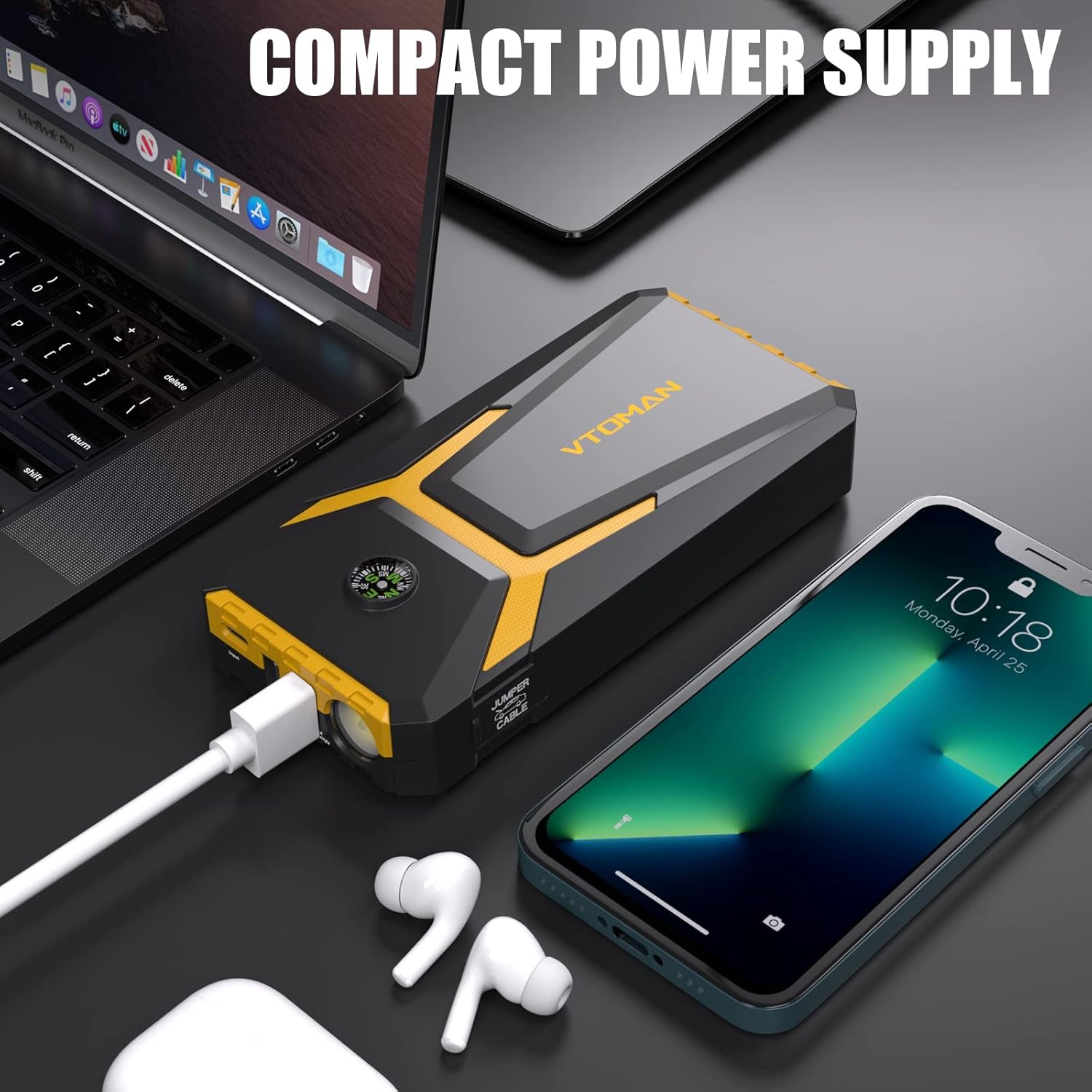
Figure 5.5: Compact Power Supply. This image shows the V6 Pro charging a smartphone and wireless earbuds, demonstrating its utility as a portable power bank.
6. Maintenance and Storage
Proper maintenance ensures the longevity and performance of your VTOMAN jump starter.
- Recharge Regularly: Although the units have a 24-month standby time, it is recommended to recharge them every 3-6 months to maintain optimal battery health.
- Storage Temperature: Store the device in a cool, dry place, away from direct sunlight and extreme temperatures. The operating temperature range is typically between -4°F and 140°F (-20°C and 60°C).
- Cleaning: Wipe the device with a soft, dry cloth. Do not use harsh chemicals or abrasive cleaners.

Figure 6.1: 24 Months Standby. This image highlights the extended standby capability of the jump starter, indicating it can hold a charge for up to 24 months.

Figure 6.2: Wide Operating Temperature Range. This image visually represents the jump starter's ability to operate effectively in both high (140°F) and low (-4°F) temperatures.
7. Troubleshooting
If you encounter issues with your VTOMAN V6 Pro or X5, refer to the following common problems and solutions:
| Problem | Possible Cause | Solution |
|---|---|---|
| Unit does not turn on | Battery is depleted | Recharge the unit fully. |
| Vehicle does not start (Regular Mode) | Battery is completely dead; incorrect connection | Try Boost Mode; ensure clamps are securely connected to correct terminals. |
| Air compressor not inflating | Hose not securely attached; incorrect pressure setting | Ensure hose is tightly screwed on; verify desired pressure is set above current pressure. |
| Smart cable indicator shows red light | Reverse polarity; short circuit | Disconnect immediately and re-connect clamps to correct battery terminals. |
If issues persist, contact VTOMAN customer support for assistance.
8. Specifications
| Feature | Specification |
|---|---|
| Brand | VTOMAN |
| Model | V6 Pro & X5 |
| V6 Pro Peak Output Current | 2000A |
| X5 Peak Output Current | 3500A |
| X5 Air Compressor Pressure | 160 PSI |
| V6 Pro Dimensions (D x W x H) | 1.2"D x 6.8"W x 1.2"H |
| V6 Pro Weight | 0.8 pounds |
| Engine Compatibility (V6 Pro) | Up to 7L Gas, 5L Diesel |
| Engine Compatibility (X5) | Up to 9L Gas, 8L Diesel |
| Standby Time | Up to 24 months |
| Operating Temperature | -4°F to 140°F (-20°C to 60°C) |
9. Warranty and Support
VTOMAN is committed to providing high-quality products and customer service.
- Warranty: The product comes with an 18-month warranty from the date of purchase.
- Money-Back Guarantee: A 30-day money-back guarantee is offered for any reason.
- Customer Service: Quick replies within 24 hours.
- Technical Support: Lifetime technical support is available.
For support, please refer to the contact information provided with your product or visit the official VTOMAN website.

Figure 9.1: Customer Support and Warranty. This image outlines the support services provided by VTOMAN, including 24-hour replies, a 30-day money-back guarantee, an 18-month warranty, and lifetime technical support.


