
1. Introduction
Thank you for choosing the Billboard Chroma Clear Wireless Speaker, model BB-S11747. This portable speaker is designed to provide a clear audio experience with the added visual appeal of LED lights. It features Bluetooth wireless connectivity, an integrated FM radio, and an IPX4 water-resistant rating, making it suitable for various environments. This manual provides detailed instructions for the proper use and maintenance of your speaker.
2. Package Contents
Please check the package for the following items:
- Billboard Chroma Clear Wireless Speaker (BB-S11747)
- Power Cable
- User Manual (this document)

Image: The Billboard Chroma Clear Wireless Speaker shown in its retail packaging, highlighting the brand and key features.
3. Product Overview
Familiarize yourself with the speaker's components and controls.

Image: Side view of the speaker, displaying the control panel with power, mode, light, volume up, and volume down buttons, along with the carrying strap.
- Power Button: Press and hold to turn on/off. Short press for play/pause.
- Mode Button (M): Short press to switch between Bluetooth, FM Radio, and Micro SD modes.
- Light Button: Short press to cycle through LED light modes.
- Volume Up (+): Short press to increase volume. Long press for next track (in Bluetooth/Micro SD mode) or next station (in FM mode).
- Volume Down (-): Short press to decrease volume. Long press for previous track (in Bluetooth/Micro SD mode) or previous station (in FM mode).
- Charging Port: For connecting the power cable.
- Micro SD Card Slot: For playing music directly from a Micro SD card.
- AUX Input: For wired audio connection (3.5mm).
4. Setup
4.1 Charging the Speaker
Before first use, fully charge the speaker.
- Connect the provided power cable to the speaker's charging port.
- Connect the other end of the cable to a compatible USB power adapter (not included) or a computer's USB port.
- The charging indicator light will illuminate. It will turn off or change color once charging is complete.
- A full charge provides approximately 8 hours of playback time.
4.2 Power On/Off
- To turn on: Press and hold the Power Button until you hear an audible prompt or see the LED lights activate.
- To turn off: Press and hold the Power Button again until the speaker powers down.
4.3 Bluetooth Pairing
To connect your speaker to a Bluetooth-enabled device:
- Ensure the speaker is powered on and in Bluetooth mode. If not, short press the Mode Button (M) until you hear the Bluetooth pairing prompt. The LED lights may flash to indicate pairing mode.
- Enable Bluetooth on your device (smartphone, tablet, computer).
- Search for available Bluetooth devices. The speaker will appear as "Billboard Chroma Clear" or similar.
- Select the speaker from the list to pair. Once connected, you will hear a confirmation sound.
- The speaker will automatically attempt to reconnect to the last paired device when powered on.
4.4 FM Radio Operation
To use the integrated FM radio:
- Turn on the speaker.
- Short press the Mode Button (M) to switch to FM Radio mode.
- To auto-scan and save available stations, press and hold the Power Button (Play/Pause button in this context). The speaker will scan and store stations.
- To switch between saved stations, long press the Volume Up (+) or Volume Down (-) buttons.
5. Operating Instructions
5.1 Music Playback (Bluetooth/Micro SD)
- Play/Pause: Short press the Power Button.
- Volume Control: Short press Volume Up (+) to increase, short press Volume Down (-) to decrease.
- Next Track: Long press Volume Up (+).
- Previous Track: Long press Volume Down (-).
5.2 LED Light Modes
The speaker features dynamic LED lights.
- Short press the Light Button to cycle through different light patterns and colors.
- Continue pressing to find your preferred light mode or to turn the lights off.

Image: The Billboard Chroma Clear Wireless Speaker illuminated with vibrant, multi-colored LED lights, showcasing its aesthetic feature.
5.3 Hands-Free Calling
When connected via Bluetooth, the speaker can be used for hands-free calls.
- Answer Call: Short press the Power Button when an incoming call rings.
- End Call: Short press the Power Button during a call.
- Reject Call: Long press the Power Button when an incoming call rings.
6. Maintenance
6.1 Cleaning
- Ensure the speaker is turned off and disconnected from any power source before cleaning.
- Wipe the exterior with a soft, damp cloth. Do not use abrasive cleaners, alcohol, or solvents.
- Avoid getting moisture into any ports or openings.
6.2 Water Resistance (IPX4)
The speaker has an IPX4 rating, meaning it is resistant to splashing water from any direction.
- Do not submerge the speaker in water.
- Ensure all port covers are securely closed to maintain water resistance.
- If the speaker gets wet, wipe it dry thoroughly before charging or using it again.
6.3 Storage
- Store the speaker in a cool, dry place away from direct sunlight and extreme temperatures.
- If storing for an extended period, charge the battery periodically to maintain its lifespan.
7. Troubleshooting
| Problem | Solution |
|---|---|
| Speaker does not turn on. | Ensure the battery is charged. Connect the speaker to a power source using the provided cable. |
| Cannot pair via Bluetooth. |
|
| No sound or low volume. |
|
| FM radio reception is poor. |
|
8. Specifications
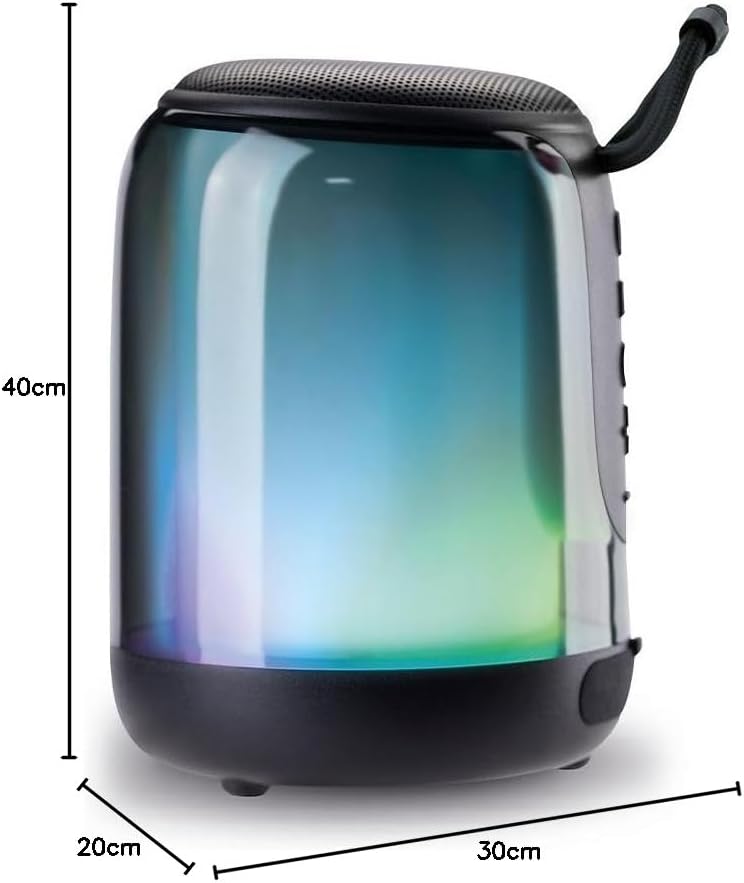
Image: The Billboard Chroma Clear Wireless Speaker with its approximate dimensions (40cm depth, 20cm width, 30cm height) indicated.
| Feature | Detail |
|---|---|
| Model Name | BB-S11747 |
| Speaker Type | Atmospheric |
| Special Features | Wireless Connectivity, Water Resistant (IPX4), LED Lights, FM Radio |
| Recommended Use | Portable, Outdoor |
| Color | Transparent |
| Dimensions (Depth x Width x Height) | 40cm x 20cm x 30cm |
| Waterproof Rating | IPX4 (Splash Resistant) |
| Control Method | Tactile Buttons |
| Wireless Technology | Bluetooth |
| Power Source | Battery |
| Average Battery Life | 8 Hours |
| Supported Radio Bands | FM |
| Material | Plastic or metal casing, synthetic components |
| Audio Output Mode | Stereo |
9. Warranty and Support
The Billboard Chroma Clear Wireless Speaker BB-S11747 comes with a limited warranty. Please refer to the warranty card included in your package for specific terms and conditions.
For technical support, troubleshooting assistance, or warranty claims, please contact Billboard customer service through their official website or the retailer where the product was purchased.
Online Resources: For additional information and FAQs, visit the official Billboard product support page.