Important Safety Information
 Image: A warning label in multiple languages, primarily cautioning against suffocation hazards from plastic bags, advising to keep them away from babies and children.
WARNING: To avoid suffocation hazard, keep all plastic packaging away from babies and children.
Ensure all components are handled with care and installed according to instructions to prevent damage or malfunction.
Product Overview
The Splenssy WIFI GSM Home Alarm Security System is a comprehensive 13-piece DIY kit designed for smart home security. It features a 2.4-inch TFT LCD screen with voice prompts for easy operation. This system supports both WIFI and GSM connectivity, allowing for remote control via a smartphone app, SMS, and dialing alarm functions. It is compatible with popular voice assistants like Amazon Alexa and Google Home, offering versatile control options. The system can manage up to 100 wireless defense zones and includes a built-in rechargeable lithium battery for continued operation during power outages.

Image: The main alarm panel with a family in the background, illustrating the system's role in protecting a home. The image highlights the 433MHz Wireless WIFI + GSM Auto-dial Alarm Security System capabilities.
Package Contents
The 13-piece kit includes the following components:
- 1 x Wireless Alarm Panel
- 1 x Wired Siren
- 2 x Wireless PIR Motion Sensor
- 2 x Wireless Door/Window Sensor
- 2 x Remote Controller
- 2 x Bracket for PIR Sensor
- 2 x Neck Strap (for RFID cards)
- 5 x RFID Card
- 6 x Screws & Anchors
- 1 x USB Charging Cable

Image: A detailed layout of all components included in the Splenssy 13-piece security system kit, including the alarm panel, PIR sensors, door/window sensors, remote controls, RFID cards, wired siren, and mounting hardware.
Setup Guide
Follow these steps to set up your Splenssy Home Alarm Security System.
1. Alarm Panel Installation
- Power Connection: Connect the alarm panel to a power source using the provided USB charging cable. Ensure the built-in Li-ion battery is charged.
- Placement: Place the alarm panel in a central location within your home, away from direct sunlight and moisture, and within range of your Wi-Fi network.
- SIM Card (Optional): If using GSM functionality, insert a valid GSM SIM card into the designated slot on the alarm panel.

Image: The main alarm panel displayed alongside a door/window sensor and a PIR motion sensor, illustrating the core components of the wireless system.
2. Wireless Sensor Installation (PIR Motion Sensor & Door/Window Sensor)
- Battery Insertion: Insert the specified batteries into each sensor (2*AAA for PIR, 1*CR2032 for Door Sensor).
- PIR Motion Sensor Placement: Mount PIR sensors in corners of rooms or hallways, ensuring they cover the desired detection area. Use the provided brackets and screws. Avoid placing near heat sources or direct sunlight.
- Door/Window Sensor Placement: Attach the two parts of the door/window sensor to the frame and the movable part of a door or window, ensuring they are aligned and close to each other when closed.
- Pairing: Follow the alarm panel's instructions to pair each wireless sensor with the main system. Refer to the on-screen menu for "Add Detector" or similar options.
3. Wired Siren Connection
- Connection: Plug the wired siren into the designated siren port on the alarm panel.
- Placement: Place the siren in a location where its 110dB alarm sound can be effectively heard throughout the property.
4. Remote Controllers & RFID Cards
- Remote Controller Batteries: Ensure the CR2025 3V battery is inserted correctly in each remote controller.
- Pairing: Remote controllers are typically pre-paired or can be easily added through the alarm panel's menu.
- RFID Cards: RFID cards can be registered with the system for convenient disarming without a password. Follow the panel's instructions to add new RFID cards.
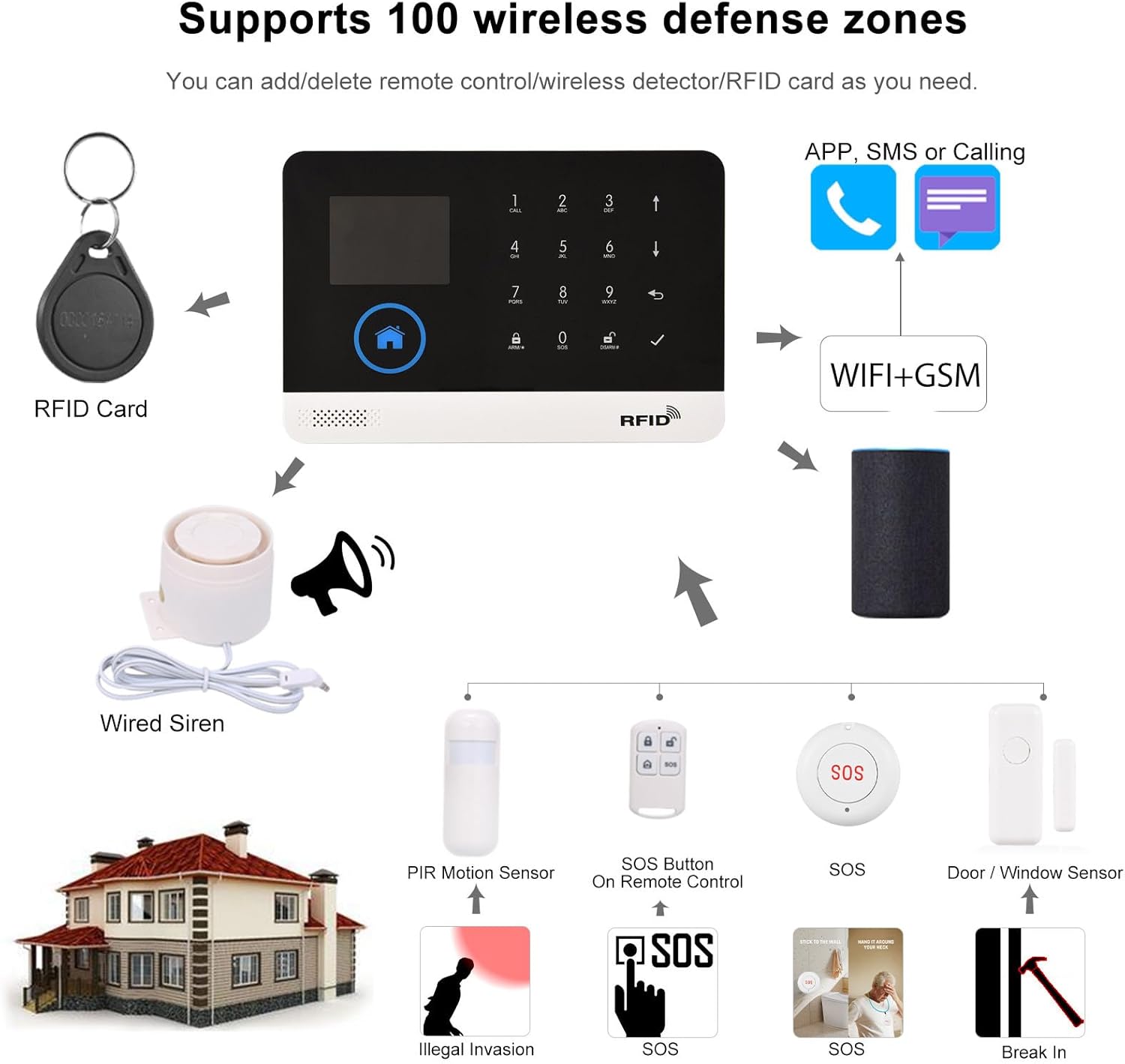
Image: A comprehensive diagram showing the alarm panel as the central hub, connected wirelessly to various sensors (PIR, door/window), remote controls, RFID cards, and a wired siren, all integrated within a home environment.
Operating Instructions
1. Arming and Disarming the System
- Away Arm: Activates all sensors. Ideal when leaving the property. Can be done via panel, remote, app, or phone call.
- Home Arm: Activates perimeter sensors (e.g., door/window sensors) while allowing movement inside.
- Disarm: Deactivates the alarm system. Can be done via panel (user password), remote, app, or RFID card.
- Timing Arm/Disarm: Set schedules for automatic arming and disarming through the alarm panel's menu.

Image: The alarm panel shown with images of a house, shops, villas, and apartments, illustrating that the system can be remotely armed or disarmed by phone, and includes intercom and voice monitoring functions, suitable for various property types.
2. Smartphone App Control
Download the dedicated smartphone application (refer to the product packaging or quick start guide for app name/QR code). The app allows for:
- Remote arm/disarm
- Parameter settings
- Accessory management (add/delete sensors, remotes, RFID cards)
- Receiving push notifications for arm/disarm messages and alarms
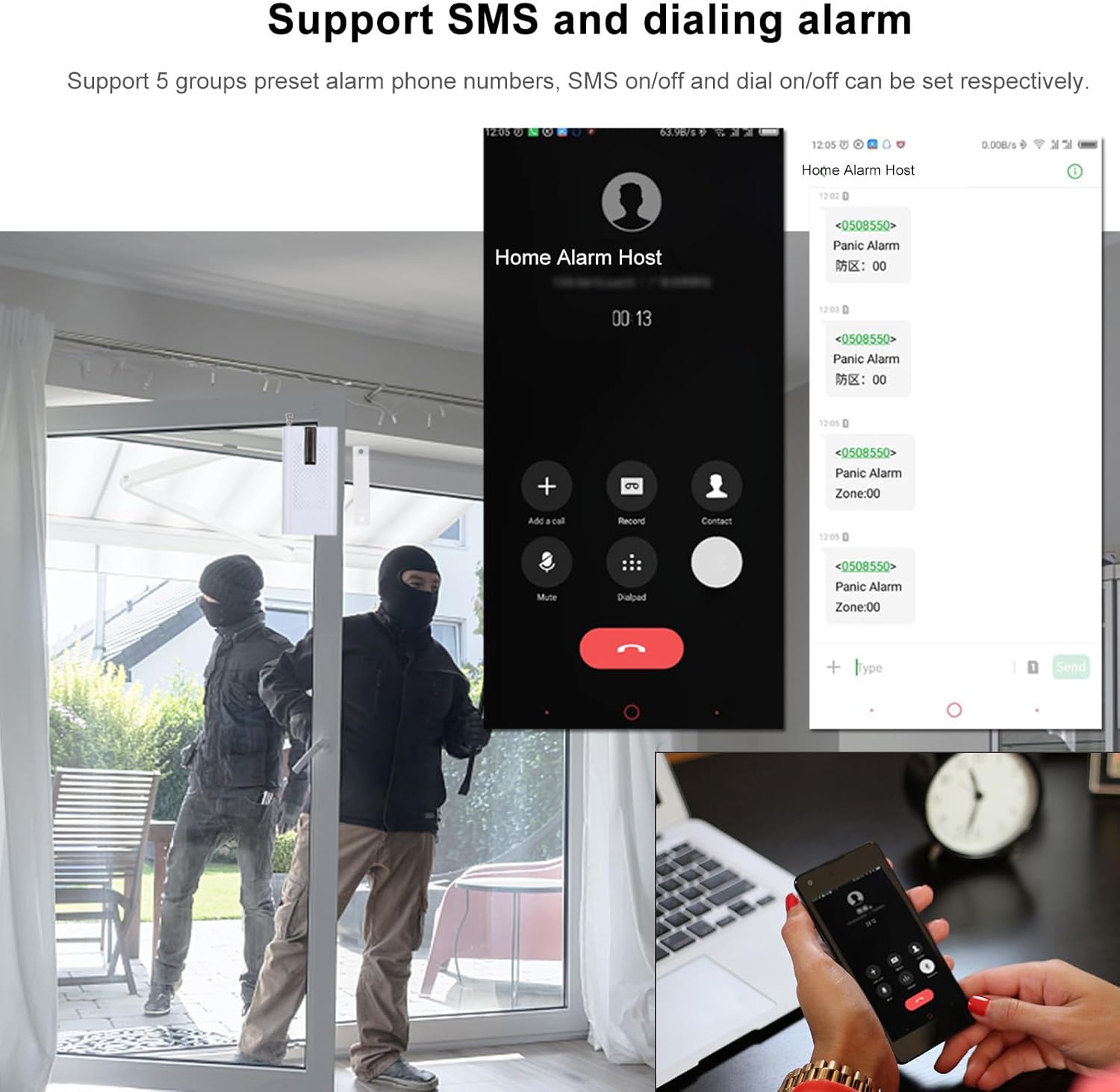
Image: A hand holding a smartphone displaying the mobile application interface for the Splenssy alarm system, demonstrating remote control capabilities.
3. Voice Control (Alexa & Google Home)
The system is compatible with Amazon Alexa and Google Home. To enable voice control:
- Ensure your alarm panel is connected to your Wi-Fi network.
- Enable the Splenssy skill/action in your Alexa or Google Home app.
- Follow the on-screen instructions to link your alarm system account.
- You can then use voice commands to arm or disarm your system (e.g., "Alexa, arm my home security").
4. SMS and Dialing Alarm
The system supports SMS and dialing alarms to preset phone numbers:
- Preset Numbers: Configure up to 5 groups of alarm phone numbers in the system settings.
- SMS/Dialing On/Off: You can set whether SMS notifications and/or calls are sent for each preset number.
- Alarm Trigger: When an alarm is triggered, the system will automatically send SMS messages and/or dial the preset numbers.

Image: Multiple smartphone screens showing incoming calls and text messages from the "Home Alarm Host," demonstrating the system's SMS and dialing alarm capabilities when an event is triggered.
5. SOS Function
In case of emergency, press the SOS button on the remote controller. The system will immediately trigger an alarm and automatically call the preset phone numbers for assistance.
6. RFID Function
RFID cards provide a convenient way to disarm the system without entering a password. Simply tap the RFID card on the designated area of the alarm panel to disarm. This feature is particularly useful for children or caregivers.
Maintenance
- Battery Replacement:
- PIR Sensor: Replace 2*AAA 1.5V batteries when low battery indicator appears.
- Door Sensor: Replace 1*CR2032 battery when low battery indicator appears.
- Remote Control: Replace 1*CR2025 3V battery when low battery indicator appears or range decreases.
- Alarm Panel: The built-in Li-ion DC 3.7V 500mAh battery is rechargeable. Ensure it is regularly charged to maintain backup power.
- Cleaning: Use a soft, dry cloth to clean the alarm panel and sensors. Do not use abrasive cleaners or solvents.
- Firmware Updates: Check the smartphone app or manufacturer's website periodically for any available firmware updates to ensure optimal performance and security.
Troubleshooting
| Problem | Possible Cause | Solution |
|---|---|---|
| System not powering on. | No power, dead internal battery. | Check USB power connection. Ensure internal battery is charged. |
| Sensors not triggering alarm. | Low sensor battery, sensor not paired, sensor out of range, incorrect zone setting. | Replace sensor batteries. Re-pair sensor with panel. Relocate sensor closer to panel. Check zone settings in panel menu. |
| No app control or push notifications. | No Wi-Fi connection, incorrect app settings, app not updated. | Verify Wi-Fi connection on panel and phone. Check app permissions and notification settings. Update app to latest version. |
| No SMS or calls on alarm. | No GSM SIM card, SIM card issues, incorrect preset numbers, SMS/dialing disabled. | Ensure SIM card is inserted and active. Check signal strength. Verify preset numbers and enable SMS/dialing in settings. |
| False alarms. | Improper sensor placement, environmental factors (pets, drafts), sensor malfunction. | Adjust sensor sensitivity or relocate. Ensure PIR sensors are not facing heat sources or windows with direct sunlight. Clean sensors. |
Specifications
| Feature | Detail |
|---|---|
| Material | ABS |
| Working Current | <120mA |
| Standby Current | <80uA |
| Wireless Frequency | 433MHz |
| Encoded Mode | 1527 |
| Wireless Standard | IEEE802.11b/g/n 2.4G |
| Alarm Panel Battery | Li-ion DC 3.7V 500mAh (Included) |
| PIR Sensor Battery | 2*AAA 1.5V (Included) |
| Door Sensor Battery | 1*CR2032 (Included) |
| Remote Control Battery | 1*CR2025 3V (Included) |
| Siren Volume | 110dB |
| Temperature Range | 0℃~55℃ |
| Humidity Range | <80% RH (No freezing) |
| Alarm Panel Size | 185 * 125 * 14mm / 7.28 * 4.92 * 0.55in |
| Alarm Panel Weight | 222g / 7.84oz |
| Maximum Wireless Range | 100 Meters (open area) |
| Compatible Devices | Smartphone, Alexa, Google Home |
| Control Method | App, Remote, Voice, Keypad |
Warranty and Support
This Splenssy product comes with a standard manufacturer's warranty. For specific warranty terms and conditions, please refer to the documentation included with your purchase or contact Splenssy customer support.
For technical support, troubleshooting assistance, or warranty claims, please contact Splenssy customer service through their official website or the contact information provided in your product packaging. Please have your model number (WPV5336418657735AC) and purchase details ready when contacting support.
Online resources, including FAQs and additional guides, may be available on the Splenssy support portal.