
Introduction
This user manual provides comprehensive instructions for the safe and effective operation of your AUVON 3-in-1 TENS Unit Muscle Stimulator. This device is designed to offer pain relief, muscle conditioning, and body relaxation through Transcutaneous Electrical Nerve Stimulation (TENS), Electrical Muscle Stimulation (EMS), and Massage functions. Please read this manual thoroughly before first use and retain it for future reference.
Important Safety Information and Legal Disclaimer
WARNING: This product is not suitable for individuals with certain medical conditions or circumstances. Please read the following points carefully before using this product.
- Do not use this product if you have an implanted defibrillator, cardiac pacemaker, or any other implanted metallic or electronic device.
- Do not use this product if you have heart rhythm problems, epilepsy, brain diseases, or neurological disorders.
- Do not use this product if you have undiagnosed chronic pain.
- Do not use this product if you are pregnant or in labor.
- Do not use this product if you have cancer.
- Do not use this product if you are sensitive to electrotherapy.
- Do not use this product excessively.
- Do not use this product above the neck, especially on the head or neck area.
- Do not use this product if you are under 22 years of age.
Individual symptoms, situations, circumstances, and results may vary. The information provided is not intended to be used for medical diagnosis or treatment or as a substitute for professional medical advice. Please consult your physician or qualified health care provider regarding your condition and appropriate medical treatment.
What's Included
Your AUVON 3-in-1 TENS Unit package includes the following items:
- 1 x Dual Channel TENS machine
- 8 x Square 2" Pads
- 4 x Large Rectangular 2"x4" Pads
- 3 x Lead Wires
- 2 x Pads Holders
- 1 x Type-C Cable (No Adapter)
- 1 x TENS Storage Case
- 1 x Box
- 1 x User Manual (this document)
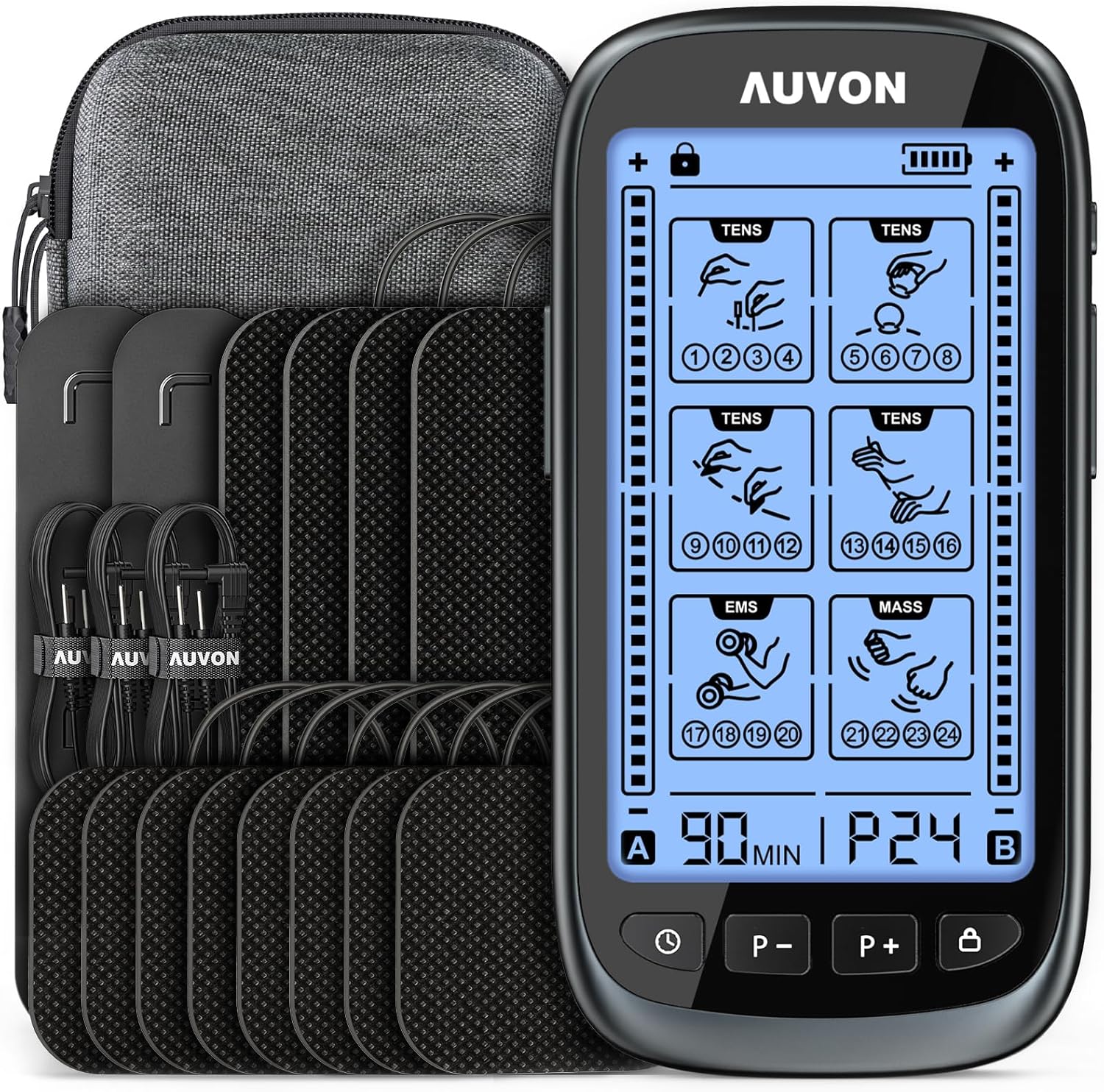
Image: Contents of the AUVON 3-in-1 TENS Unit package, including the device, various electrode pads, lead wires, and a storage case.
Product Overview
The AUVON 3-in-1 TENS Unit is a versatile device offering TENS, EMS, and Massage functions for comprehensive pain relief and muscle management. It features a dual-channel design, allowing for simultaneous use of two or four pads with independent intensity control.

Image: The device's screen displaying the three main options: TENS for pain relief (P1-P16), EMS for muscle conditioning (P17-P20), and Massage for body relaxation (P21-P24).

Image: The 3.8" LCD backlit large screen provides clear reading and easy operation, suitable for all users.
Setup
- Charge the Device: Before first use, fully charge the TENS unit. Connect the provided Type-C cable to the device and a compatible USB power source (wall charger, power bank, or laptop USB port). The 300mAh battery provides up to 40 hours of continuous use on a full charge.

Image: The TENS unit being charged via its Type-C port, emphasizing its 40-hour battery life.
- Attach Lead Wires: Insert the lead wires into the output ports (A and B) on the top of the TENS unit.
- Connect Electrode Pads: Attach the electrode pads to the pins on the end of the lead wires. Ensure a secure connection.

Image: A close-up of an electrode pad, highlighting its American-made adhesive gel for durability and reusability.
- Prepare Skin: Clean and dry the skin area where you intend to place the electrode pads. Avoid applying pads over broken skin, open wounds, or areas with excessive hair.
- Place Pads: Apply the electrode pads firmly to the desired treatment area. Ensure good contact with the skin.
Operating Instructions
- Power On: Press and hold the power button to turn on the device.
- Select Mode (Step 1): Press the "P+/P-" buttons to cycle through the 24 available modes (P1-P24). The modes are categorized into TENS (P1-P16), EMS (P17-P20), and Massage (P21-P24).
- Adjust Intensity (Step 2):
- For Channel A, press the "A +/-" buttons to increase or decrease the intensity.
- For Channel B, press the "B +/-" buttons to increase or decrease the intensity.
- Set Timer: Press the "Clock" button to set the treatment duration.
- Lock Function: Long press the "Lock" button to lock the screen and prevent accidental changes during treatment. Long press again to unlock.
- Power Off: Press and hold the power button to turn off the device after your session.

Image: Visual guide for setting up the TENS unit, showing button functions for mode, intensity, and timer/lock.

Video: A demonstration of how to get started with the AUVON TENS unit, covering basic setup and initial operation.

Video: A guide on using the AUVON Dual Channel TENS Unit Muscle Stimulator, demonstrating its functions in practice.
Maintenance
- Cleaning the Device: Wipe the TENS unit with a soft, damp cloth. Do not use abrasive cleaners or immerse the device in water.
- Caring for Electrode Pads:
- After each use, place the electrode pads back onto the provided pads holders or the plastic film they came with to preserve their adhesive quality.
- Store pads in the sealed bag to extend their lifespan.
- The medical-grade electrode pads are reusable for approximately 45 times with proper care.
- Storage: Store the TENS unit and all accessories in the included EVA travel case when not in use. This case is designed to be drop-proof, water-proof, and dust-resistant, ensuring a longer lifespan for your device.

Image: The professional EVA travel case designed for easy storage and protection of the TENS unit and its accessories.
Troubleshooting
| Problem | Possible Cause | Solution |
|---|---|---|
| Device does not turn on. | Battery is depleted. | Charge the device using the provided Type-C cable. |
| No sensation or weak sensation. |
|
|
| Sensation is uncomfortable or painful. | Intensity level too high. | Decrease the intensity immediately. |
| Pads do not stick well. |
|
|
Specifications
- Model: B0CJ55LH2N
- Manufacturer: AUVON
- Battery: 1 Lithium Ion battery (included), 300mAh capacity
- Continuous Usage: Up to 40 hours
- Modes: 24 (TENS, EMS, Massage)
- Intensity Levels: 30
- Channels: Dual (A/B)
- Package Dimensions: 7.44 x 4.69 x 2.68 inches
- Weight: 1.08 Pounds
- Date First Available: September 15, 2023
Warranty and Support
AUVON provides a 24-month warranty for this product, along with technical support and friendly customer service. For any inquiries or assistance, please contact AUVON customer support through the official channels provided with your purchase or visit the AUVON store on Amazon.