
Hisense AP1022HW1GD
Hisense 4-in-1 Portable Air Conditioner User Manual
Model: AP1022HW1GD
1. Safety Information
Please read all instructions carefully before using your Hisense Portable Air Conditioner. Keep this manual for future reference.
- Ensure the unit is placed on a flat, stable surface to prevent tipping.
- Do not block air inlets or outlets. Maintain at least 20cm clearance around the unit.
- Do not operate the unit with a damaged cord or plug. Contact qualified service personnel for repairs.
- Unplug the unit before cleaning or performing any maintenance.
- This appliance is not intended for use by persons (including children) with reduced physical, sensory or mental capabilities, or lack of experience and knowledge, unless they have been given supervision or instruction concerning use of the appliance by a person responsible for their safety.
- Do not use the unit in wet environments such as bathrooms or laundry rooms.
- Only use accessories recommended by the manufacturer.
2. Product Overview
The Hisense AP1022HW1GD is a versatile 4-in-1 portable air conditioner designed to provide comfort in various conditions. It functions as an Air Conditioner, Heater, Dehumidifier, and Fan, covering areas up to 550 square feet with 10,000 BTU cooling power.

Figure 2.1: Front view of the Hisense Portable Air Conditioner, showcasing its sleek black design and compact form factor.
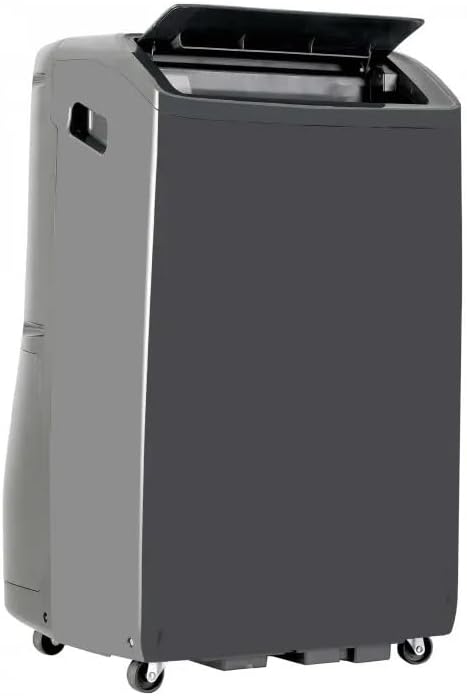
Figure 2.2: Side view of the unit with the top panel slightly open, revealing the internal air outlet.
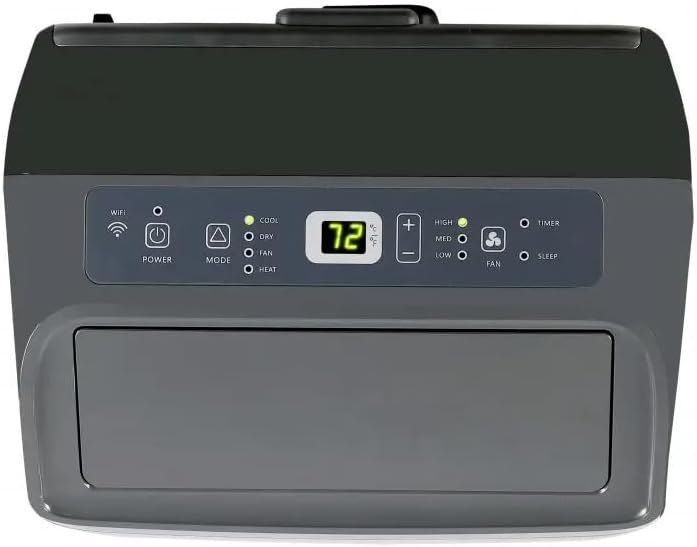
Figure 2.3: Close-up of the intuitive control panel, featuring LED display, mode selection, fan speed, and timer/sleep options.
3. Setup
Proper setup is crucial for optimal performance. Follow these steps to install your portable air conditioner.
3.1 Window Kit Installation
- Assemble the window slider kit according to the instructions provided in the separate assembly guide.
- Open the window and place the assembled window slider kit into the window opening. Extend the slider to fit the window width or height and secure it.
3.2 Exhaust Hose Connection
- Attach the exhaust hose adapter to one end of the exhaust hose.
- Connect the other end of the exhaust hose to the exhaust outlet on the back of the unit.
- Insert the exhaust hose adapter into the opening in the window slider kit, ensuring a secure fit to prevent air leakage.

Figure 3.1: Rear view of the unit showing the two exhaust hose connections, essential for proper air circulation and heat dissipation.

Figure 3.2: Another rear view, highlighting the overall design and placement of the power cord and drainage points.
4. Operating Instructions
Your Hisense portable air conditioner can be operated using the control panel on the unit or the included remote control.
4.1 Control Panel Functions
Figure 4.1: The control panel with various buttons and indicators for operation.
- Power Button: Press to turn the unit ON or OFF.
- Mode Button: Cycle through operating modes: COOL, DRY (Dehumidify), FAN, HEAT.
- Temperature Adjustment Buttons (+/-): Adjust the desired temperature setting.
- Fan Speed Button: Select fan speed: HIGH, MEDIUM, LOW.
- Timer Button: Set a timer for automatic ON/OFF operation.
- Sleep Button: Activates sleep mode for quiet operation and energy saving.
- Wi-Fi Indicator: Shows Wi-Fi connectivity status for app control.
4.2 Remote Control Operation
The remote control provides convenient access to all functions from a distance.
- Point the remote control directly at the unit's receiver.
- All functions available on the control panel are also accessible via the remote.
- Ensure batteries are correctly inserted and replaced when needed.
4.3 Wi-Fi Connectivity
The unit features Wi-Fi compatibility, allowing remote control via a dedicated smartphone application. Refer to the separate Wi-Fi setup guide for detailed instructions on connecting your unit to your home network and using the app.
5. Maintenance
Regular maintenance ensures efficient operation and extends the lifespan of your unit.
5.1 Air Filter Cleaning
The air filter should be cleaned every two weeks or more frequently depending on usage and air quality.
- Turn off and unplug the unit.
- Locate and remove the air filter from the back of the unit.
- Wash the filter with warm, soapy water. Rinse thoroughly and allow it to air dry completely before reinserting.
- Do not operate the unit without the air filter.
5.2 Water Drainage
The unit will accumulate condensate during cooling and dehumidifying operations. It features an auto-evaporation system, but manual drainage may be required in high humidity conditions or when the unit indicates a full water tank.
- Turn off and unplug the unit.
- Place a shallow pan or tray under the drainage port at the bottom rear of the unit.
- Remove the drain plug to allow water to flow out.
- Once drained, replace the drain plug securely.

Figure 5.1: Underside view of the unit, illustrating the caster wheels for mobility and the location of the drainage points.
6. Troubleshooting
Refer to this section for common issues and their solutions before contacting customer support.
| Problem | Possible Cause | Solution |
|---|---|---|
| Unit does not turn on. | No power; Power cord not plugged in; Circuit breaker tripped. | Ensure unit is plugged into a working outlet. Check circuit breaker. |
| Unit does not cool/heat effectively. | Room too large; Doors/windows open; Air filter dirty; Exhaust hose not properly installed. | Ensure room size is within unit's capacity. Close all openings. Clean air filter. Check exhaust hose connection. |
| Unit is noisy. | Unit not on a level surface; Air filter dirty; Obstruction in fan. | Place unit on a flat surface. Clean air filter. Check for obstructions. |
| Water leakage. | Drain plug loose; Drainage hose blocked; Water tank full. | Secure drain plug. Clear any blockages. Drain water tank. |
7. Specifications
- Brand: Hisense
- Model: AP1022HW1GD (CRT2HISAP1022HW1GDRB)
- Cooling Power: 10,000 BTU
- Heating Power: Included (4-in-1 functionality)
- Coverage Area: Up to 550 Square Feet
- Dimensions (D x W x H): 14.69 x 17.4 x 28.27 inches
- Item Weight: 80 pounds
- Noise Level: 53 dB
- Voltage: 127 Volts
- Wattage: 2930.71 watts
- Special Features: Auto-restart, Removable Filter, Quiet Operation, Wi-Fi Compatibility, Built-in Sleep Mode, Easy to Use Remote and Control Panel.
8. Warranty and Support
For warranty information, technical support, or service inquiries, please refer to the warranty card included with your product or visit the official Hisense website. Keep your purchase receipt as proof of purchase for warranty claims.
Online Support: www.hisense-usa.com/support
Customer Service: Refer to your product's specific warranty documentation for contact numbers.
Ask a question about this manual
Ask about setup, troubleshooting, compatibility, parts, safety, or missing instructions. Manuals+ will review the question and use this page’s manual context to help answer it.