
1. Introduction
The Viconor Red Infrared Light Therapy Shoe is designed to provide targeted red light and near-infrared light therapy to your feet and ankles. This device combines 660nm red light and 880nm near-infrared (NIR) light to deliver therapeutic benefits. It features a quick-heating pad, adjustable modes, and a timed controller for a personalized and convenient at-home experience.

Image: The Viconor Red Infrared Light Therapy Shoe, a black boot-like device with red lights visible inside, shown on a red couch.
2. Safety Information
- Consult a healthcare professional before using this device if you have any pre-existing medical conditions, are pregnant, or are taking medications that may increase light sensitivity.
- Do not stare directly into the LED lights during operation. Protective eyewear is recommended.
- Keep the device dry. Do not immerse in water or use in wet environments.
- Keep out of reach of children and pets.
- Do not use on broken skin or open wounds.
- Discontinue use if you experience any discomfort, irritation, or adverse reactions.
- Ensure the power adapter and cables are not damaged before use.
3. Package Contents
Your Viconor Red Infrared Light Therapy Shoe package should include:
- 1 x Viconor Red Infrared Light Therapy Shoe
- 1 x Wired Controller
- 1 x Power Adapter
- 1 x USB Power Cable (for power bank option, power bank not included)
- User Manual
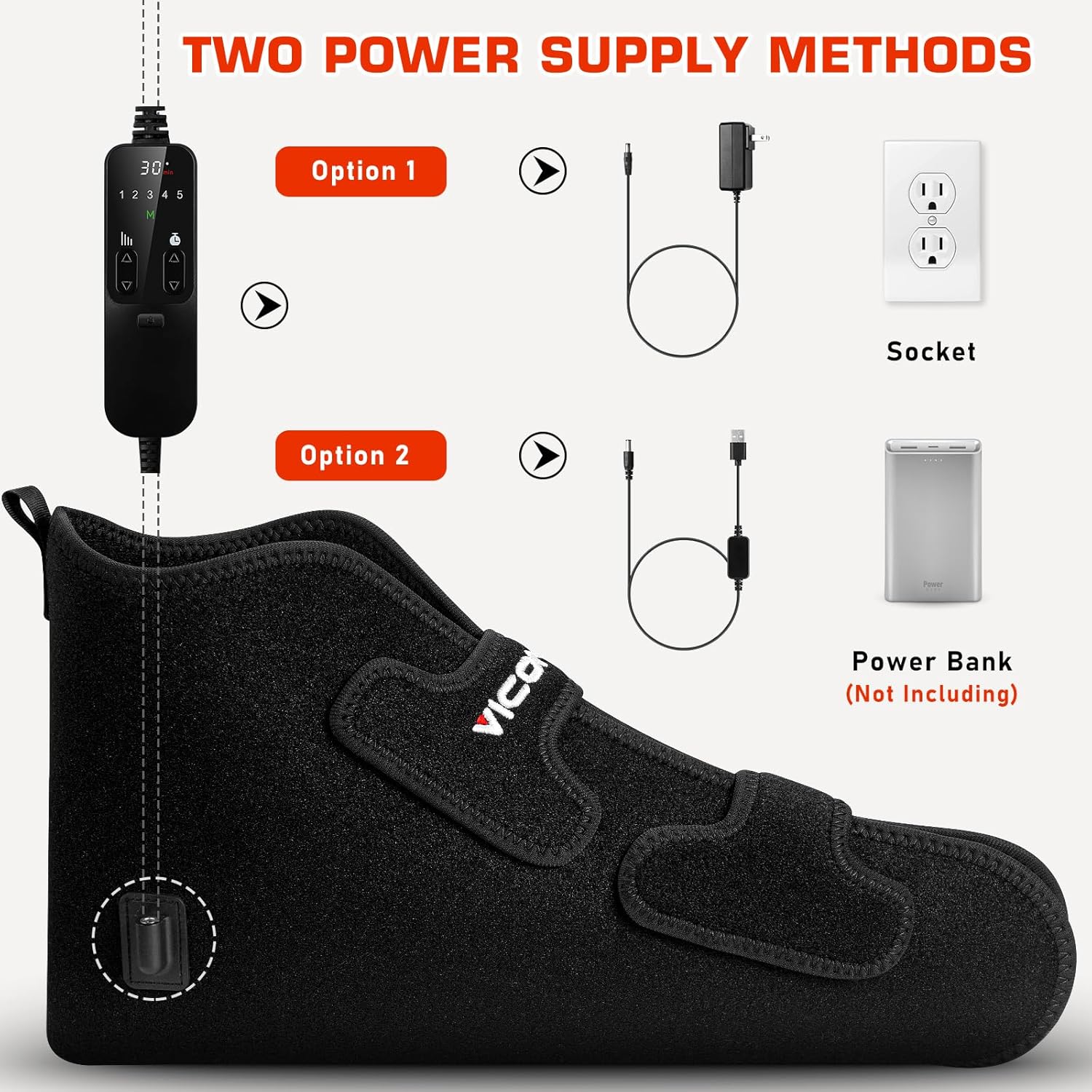
Image: The Viconor Red Infrared Light Therapy Shoe laid flat, showing the wired controller and power adapter connected, along with additional straps.
4. Setup
- Connect the Controller: Plug the wired controller into the designated port on the therapy shoe.
- Power Connection:
- For wall outlet use: Connect the power adapter to the controller, then plug the adapter into a standard electrical outlet.
- For portable use: Connect the USB power cable to the controller, then plug the USB end into a compatible power bank (not included).
- Wearing the Device:
- Ensure your feet are clean and dry before use.
- Place your foot inside the therapy shoe.
- Secure the shoe around your foot and ankle using the adjustable Velcro straps for a comfortable fit. The flexible design allows for use on various foot and ankle sizes.
Video: A demonstration of how to wear the Viconor Red Infrared Light Therapy Shoe, showing the placement of the foot and securing the straps, followed by a close-up of the controller buttons.
5. Operating Instructions
- Power On: Press and hold the power button on the wired controller for a few seconds until the lights illuminate.
- Select Mode: Use the 'M' (Mode) button to cycle through the available light therapy modes (660nm Red Light, 880nm Near-Infrared Light, or a combination of both).
- Adjust Intensity: Use the intensity buttons (up/down arrows) to select your desired light intensity level (1-5).
- Set Timer: Use the timer buttons (up/down arrows) to set the duration of your session (10, 20, or 30 minutes). The device will automatically shut off after the set time.
- Pulse Mode: If desired, activate the pulse mode using the 'P' button for intermittent light delivery.
- Power Off: Press and hold the power button again to turn off the device.
Video: A demonstration of the LX24 Red Light Therapy for Feet, showing the device being unboxed, connected, and operated with its various settings and modes.
6. Modes and Settings
The Viconor Red Infrared Light Therapy Shoe offers multiple settings to customize your therapy session:
- Light Modes:
- Red Light (660nm): Visible red light.
- Near-Infrared (880nm): Invisible light that penetrates deeper.
- Combined Mode: Both Red Light and Near-Infrared operate simultaneously.
- Intensity Levels: 5 adjustable intensity levels to suit your comfort and therapeutic needs.
- Timer Settings: Choose from 10, 20, or 30-minute sessions.
- Pulse Mode: An optional setting for pulsed light delivery.

Image: A close-up of the Viconor Red Infrared Light Therapy Shoe's controller, highlighting buttons for power, intensity, wavelength settings, pulse settings, and timer.
7. Usage Recommendations
- For optimal results, use the device for 10-30 minutes per session.
- Frequency of use can vary based on individual needs. Many users find daily or several times a week beneficial.
- The device is designed for comfortable use while relaxing, reading, or working.
Video: A short demonstration of the Red Light Therapy Boots, showing the product being unboxed and used on a foot, highlighting its ease of use and portability.
8. Maintenance and Care
- Clean the device regularly with a soft, dry cloth.
- Do not use abrasive cleaners or immerse the device in water.
- Store the device in a cool, dry place away from direct sunlight when not in use.
- Ensure the device is completely dry before storing.
9. Troubleshooting
| Problem | Possible Cause | Solution |
|---|---|---|
| Device does not turn on. | Not properly connected to power source or power button not held long enough. | Ensure all cables are securely connected. Press and hold the power button for 3-5 seconds. Check power outlet or power bank. |
| Lights are dim or flickering. | Low power or incorrect intensity setting. | Ensure the device is fully charged or connected to a stable power source. Adjust intensity setting to a higher level. |
| Device gets too hot. | High intensity setting or prolonged use. | Reduce intensity level or shorten session duration. Allow device to cool down between uses. |
10. Specifications
- Product Dimensions: 0.1 x 0.1 x 0.1 inches; 1.41 Pounds
- Item Model Number: lighttherapyproduct Ball-of-FootCushions
- Manufacturer: Viconor
- ASIN: B0CJ2PDCZB
- Wavelengths: 660nm (Red Light) + 880nm (Near-Infrared)
- Intensity Levels: 5
- Timer Settings: 10, 20, 30 minutes
11. Warranty and Support
Viconor offers a positive user experience and provides a 90-day hassle-free support for this product. For customized light therapy advice or any issues, please contact the Viconor After-Sales Service Team. Contact information can be found in the product packaging or on the official Viconor website.
12. Important Legal Disclaimer
Statements regarding dietary supplements have not been evaluated by the FDA and are not intended to diagnose, treat, cure, or prevent any disease or health condition.