
1. Introduction
This manual provides detailed instructions for the safe and effective operation of your Viconor Red Infrared Light Therapy Shoe Wraps. This device is designed to deliver red and infrared light therapy to the feet and ankles. Please read this manual thoroughly before first use and retain it for future reference.
2. Safety Information
Important Safeguards
- Consult a healthcare professional before using this device if you have any pre-existing medical conditions, are pregnant, or are taking medications.
- Do not use this device on open wounds, broken skin, or areas with active infections.
- Avoid direct eye exposure to the light.
- Do not use the device for longer than the recommended session duration (30 minutes daily).
- Keep out of reach of children.
- Do not immerse the device in water or other liquids.
- Discontinue use if you experience any discomfort, pain, or adverse reactions.
- This device is for personal, non-medical use. It is not intended to diagnose, treat, cure, or prevent any disease.
3. Package Contents
Your Viconor Red Infrared Light Therapy Shoe Wraps package should include:
- 1 x Viconor Red Infrared Light Therapy Shoe Wrap
- 1 x Controller with Power Cable
- 1 x USB Power Cable (for power bank option)
- 1 x User Manual (this document)
4. Product Overview
The Viconor Red Infrared Light Therapy Shoe Wrap is designed to provide targeted light therapy to your feet and ankles. It features a flexible wrap design with adjustable straps for a secure and comfortable fit.

Image 1: The Viconor Red Infrared Light Therapy Shoe Wrap applied to a foot, showing the red light emitting from the toe and ankle areas. An inset shows the internal light panel.
Key Features:
- Combination of 660nm Red Light (visible) and 850nm Near-Infrared (NIR) Light (invisible).
- Flexible and adjustable wrap design for feet and ankles.
- Integrated controller for timing and mode selection.
- Multiple power supply options.
5. Setup
- Unpack the Device: Carefully remove all components from the packaging.
- Connect Power: The device offers two power supply methods:
- Option 1 (Wall Socket): Connect the controller's power cable to the device, then plug the adapter into a standard wall socket.
- Option 2 (Power Bank): Connect the USB power cable to the device, then plug the USB end into a compatible power bank (not included).
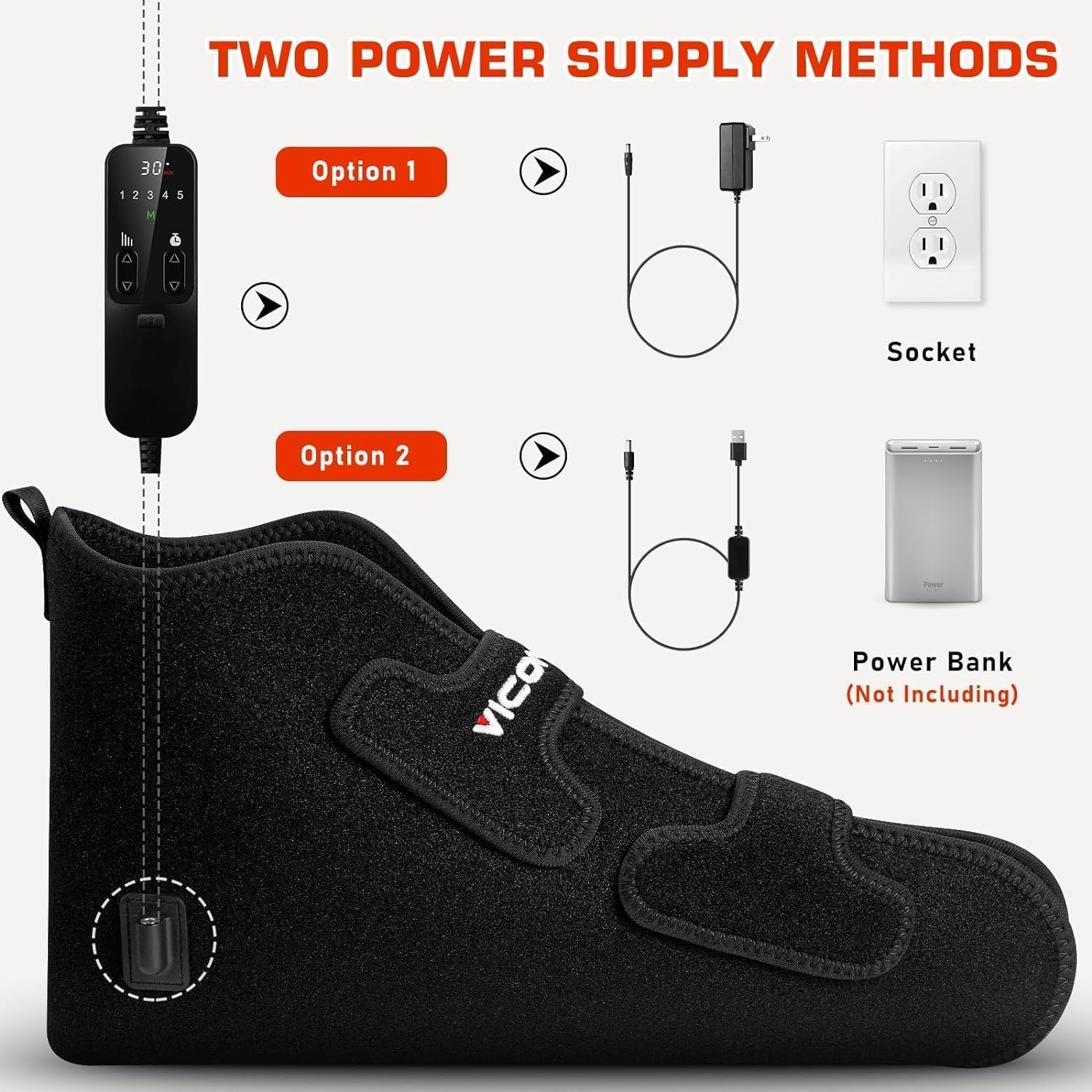
Image 2: Illustration of the two power supply options: direct wall socket connection via adapter or portable power bank connection via USB cable.
- Position the Wrap: Place your foot inside the wrap, ensuring the light panels cover the desired areas of your foot and ankle. Secure the wrap using the adjustable hook-and-loop fasteners for a snug, comfortable fit.
6. Operating Instructions
The Viconor Red Infrared Light Therapy Shoe Wrap features an intuitive controller for easy operation.
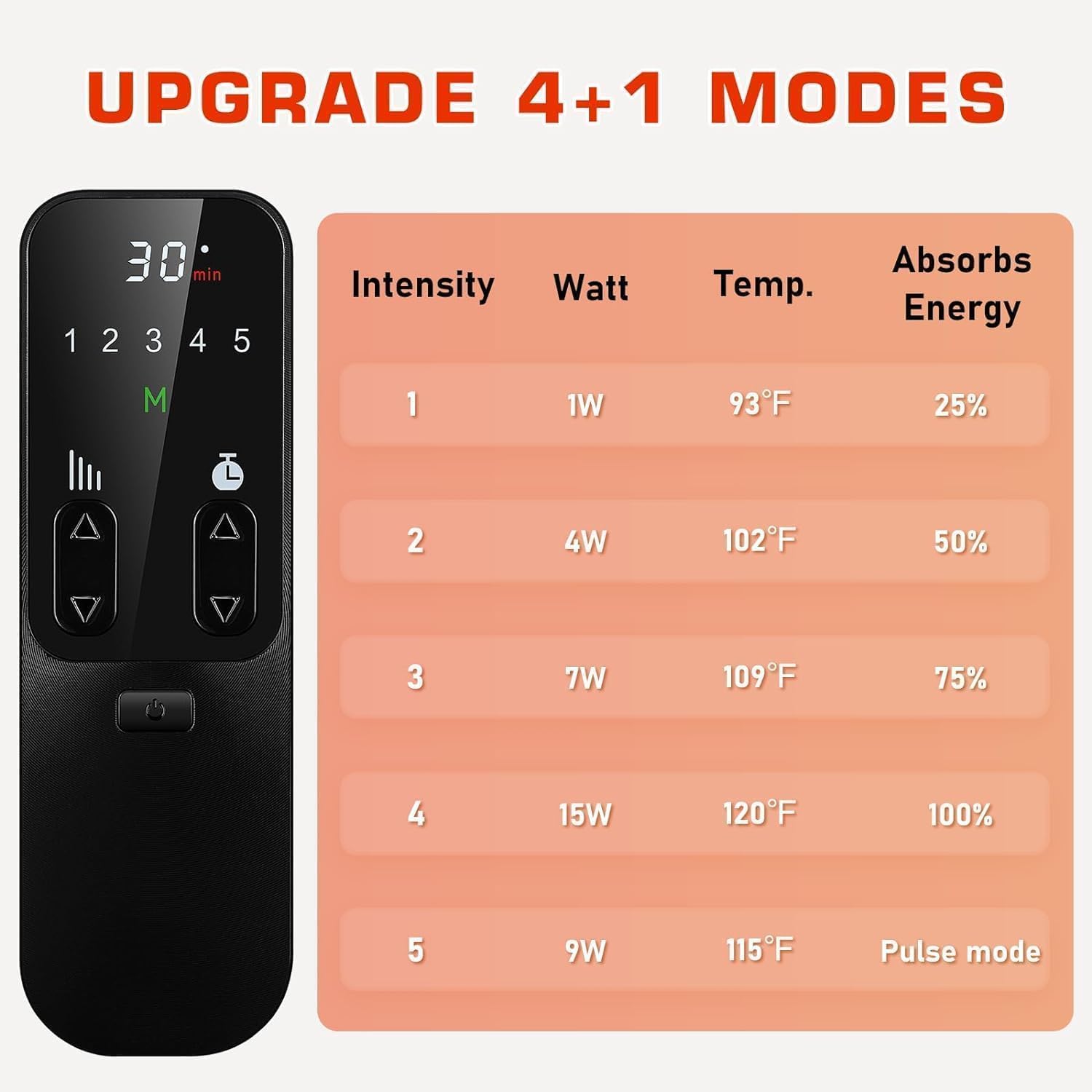
Image 3: The remote control unit displaying timer and mode selection buttons, alongside a table detailing the 5 intensity modes with corresponding wattage, temperature, and energy absorption percentages.
- Power On: Press the power button on the controller to turn on the device. The default timer and mode settings will activate.
- Set Timer: Use the timer buttons (up/down arrows next to "min") to select your desired session duration. The recommended duration is 30 minutes.
- Select Mode/Intensity: The device offers 5 modes. Use the mode selection buttons (up/down arrows next to "M") to cycle through the intensity levels.
Therapy Modes and Specifications Mode Intensity (Watt) Temperature (°F) Energy Absorption (%) 1 1W 93°F 25% 2 4W 102°F 50% 3 7W 109°F 75% 4 15W 120°F 100% 5 9W 115°F Pulse mode - Begin Session: Once the timer and mode are set, the therapy session will begin.
- End Session: The device will automatically turn off after the set time. You can also manually turn it off by pressing the power button.
Recommendation: Viconor recommends a daily session of 30 minutes for at least 4 weeks for optimal results.
7. Maintenance
- Cleaning: Disconnect the device from the power source before cleaning. Wipe the surface of the wrap with a soft, damp cloth. Do not use harsh chemicals or abrasive cleaners.
- Storage: Store the device in a cool, dry place away from direct sunlight and extreme temperatures.
- Care: Do not fold or crease the light panels excessively, as this may damage the internal components.
8. Troubleshooting
| Problem | Possible Cause | Solution |
|---|---|---|
| Device does not turn on. | No power connection or faulty cable. | Ensure the power cable is securely connected to both the device and the power source (wall socket or power bank). Try a different power outlet or power bank. |
| Lights are not visible. | Near-infrared lights are invisible to the naked eye. | The 850nm NIR lights are not visible. Only the 660nm red lights are visible. If red lights are also not visible, check power connection. |
| Device turns off unexpectedly. | Session timer completed or power interruption. | Check the set timer duration. Ensure a stable power connection. If the issue persists, contact customer support. |
| Controller buttons are unresponsive. | Temporary software glitch or power issue. | Disconnect and reconnect the power. If the problem continues, contact customer support. |
9. Specifications
- Light Wavelengths: 660nm (Red Light), 850nm (Near-Infrared Light)
- Number of LEDs: 99 in total
- Power Modes: 5 adjustable intensity modes
- Timer Settings: Adjustable
- Power Input: Standard wall adapter or USB power bank (power bank not included)
- Dimensions: Approximately 14 inches in length
- Manufacturer: Viconor
- Model Number: B0CJ2M7QBJ
10. Warranty and Support
Viconor provides dedicated customer support for its products.
- Return Policy: Enjoy 90-day hassle-free return support from the date of purchase.
- Customer Service: For any questions, concerns, or assistance with your device, please contact the Viconor After-Sales Service Team. They are available to provide customized light therapy advice and handle any issues you may encounter.
- Contact Information: Please refer to the product packaging or the official Viconor website for the most current contact details.