1. Introduction
The Lazmin112 YT800 Electric Pan-Tilt Rotation Head is a versatile accessory designed for photographers, videographers, and content creators. It offers precise control over camera movement, enabling smooth 360-degree horizontal rotation and 50-degree vertical tilt. With its wireless remote control and robust design, it is suitable for various applications including vlogging, live streaming, outdoor photography, and more.
This manual provides detailed instructions on how to set up, operate, and maintain your YT800 Pan-Tilt Head to ensure optimal performance and longevity.
2. Safety Information
- Do not expose the device to water or excessive humidity.
- Avoid dropping or subjecting the device to strong impacts.
- Do not attempt to disassemble or repair the device yourself. Refer to qualified service personnel.
- Keep out of reach of children.
- Ensure the device is placed on a stable surface or tripod before mounting equipment.
- Do not exceed the maximum load capacity of 1 kg.
3. Package Contents
Please check the package contents upon unboxing. If any items are missing or damaged, contact customer support.
- YT800 Electric Pan-Tilt Rotation Head
- 2.4 GHz Wireless Remote Controller
- USB Type-C Charging Cable
- Phone Clamp
- AAA Batteries (for remote controller)

Figure 3.1: Included components in the YT800 package. This image displays the main pan-tilt head unit, a wireless remote control, a USB-C charging cable, a smartphone clamp, and two AAA batteries.
4. Product Overview
4.1. Main Unit Components

Figure 4.1: Labeled diagram of the YT800 Pan-Tilt Head. Key components include the main body, camera mount, battery compartment, base (territory), display screen, control buttons (keys), DC charging port, and power switch.
- Main Body: The primary structure housing the motors and electronics.
- Camera Mount: The platform with a 1/4-inch screw for attaching cameras or phone clamps.
- Battery Compartment: Houses the internal rechargeable battery.
- Display Screen: Shows operational information (e.g., speed, battery level).
- Control Buttons (Keys): M (Mode), -, +, A, B buttons for direct control.
- DC Port (5V2A): USB Type-C port for charging.
- Power Switch (OFF/ON): To turn the device on or off.
- Territory (Base): The stable base of the pan-tilt head.
4.2. Remote Control Overview

Figure 4.2: Labeled diagram of the YT800 remote control. It features a display for horizontal velocity, vertical velocity, channel, and battery level. Control buttons include directional arrows (up, down, left, right), OK, Menu, S (Speed), A, and B.
- Display: Shows current settings like horizontal/vertical velocity, channel, and battery level.
- Directional Buttons (Up/Down/Left/Right): Control the pan and tilt movement.
- OK Button: Confirm selections.
- Menu Button: Access settings.
- S (Speed) Button: Adjust rotation speed (7 levels).
- A/B Buttons: Set and activate A-B point cruise.
5. Setup
5.1. Charging the Device
The YT800 Pan-Tilt Head is equipped with a built-in 2000mAh rechargeable battery. Before first use, fully charge the device.
- Locate the Type-C charging port (5V2A) on the side of the main unit.
- Connect the provided USB Type-C cable to the port and the other end to a 5V/2A USB power adapter (not included).
- The display screen will indicate charging status. A full charge provides long-lasting endurance. The device supports charging while in use.
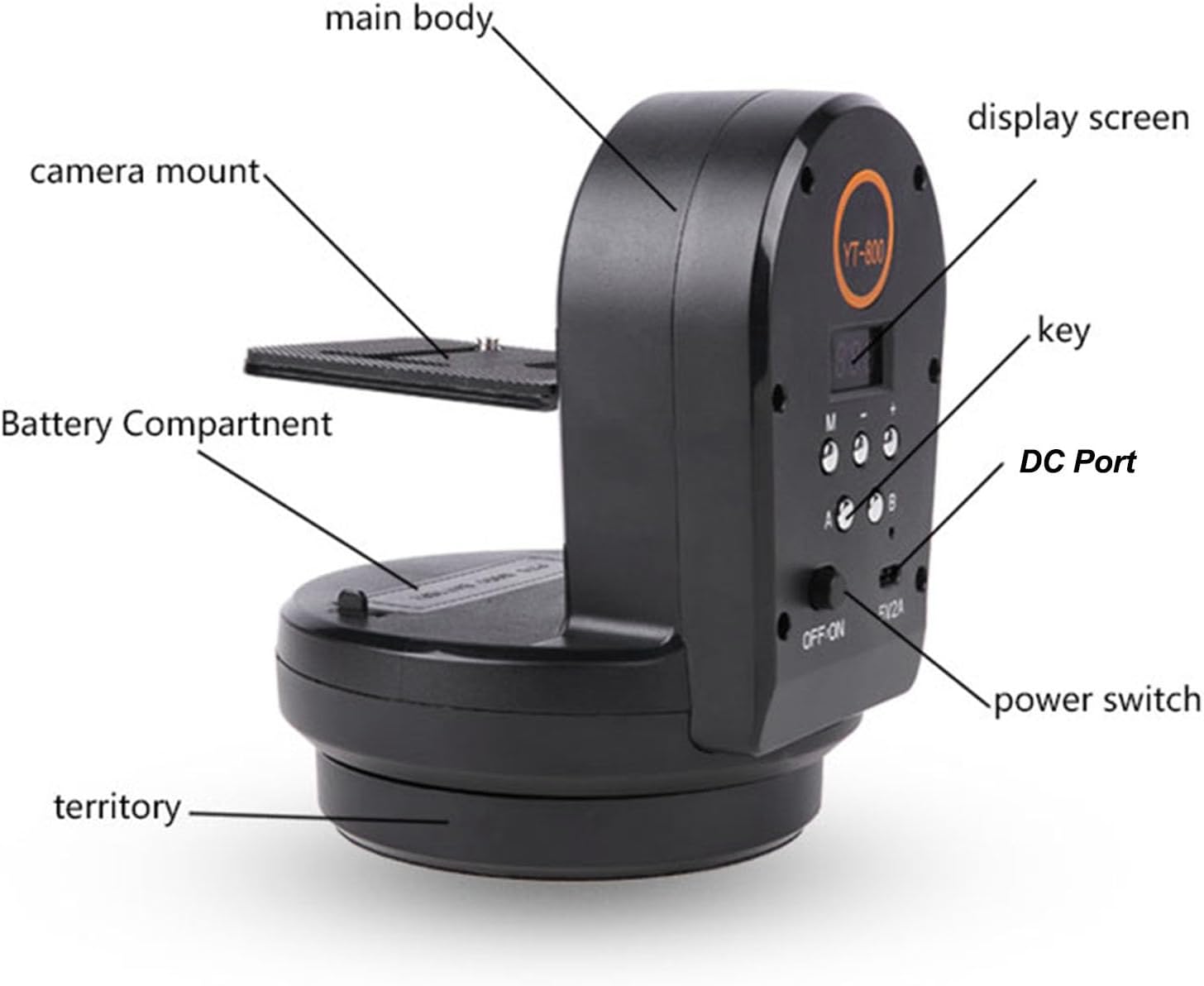
Figure 5.1: USB-C fast charging port for convenient power input.
5.2. Installing Remote Control Batteries
Insert the two AAA batteries into the remote control, ensuring correct polarity.
5.3. Mounting on a Tripod
The YT800 features a 1/4-inch screw hole at its base for easy installation on most tripods or stands.
- Locate the 1/4-inch screw hole on the bottom of the YT800 base.
- Align it with the screw on your tripod's quick release plate or head.
- Securely fasten the YT800 to the tripod by rotating it clockwise until tight.
Figure 5.2: The anti-slip outsole and 1/4-inch screw hole for stable tripod mounting.
5.4. Attaching Camera or Phone
The YT800's camera mount has a 1/4-inch screw compatible with various devices.
- For cameras (mirrorless, DSLR, action cameras): Screw the camera directly onto the 1/4-inch screw on the YT800's camera mount. Ensure it is securely tightened.
- For smartphones: Attach the provided phone clamp to the 1/4-inch screw on the YT800's camera mount. The clamp can hold devices with a width of 5.5 to 8 cm. Insert your smartphone into the clamp, ensuring it is held firmly. The clamp supports both horizontal and vertical shooting orientations.

Figure 5.3: YT800 with a camera mounted, ready for remote-controlled movement.
6. Operating Instructions
6.1. Power On/Off
Slide the OFF/ON switch on the main unit to the ON position to power on the device. Slide it to OFF to power off.
6.2. Basic Movement Control (Remote)
Use the directional buttons on the 2.4 GHz wireless remote control to adjust the pan (left/right) and tilt (up/down) angles.
- Left/Right Arrows: Control horizontal rotation (pan).
- Up/Down Arrows: Control vertical tilt.
6.3. Adjusting Rotation Speed
The YT800 supports 7 levels of adjustable speed for both horizontal and vertical movement.
- Press the S (Speed) button on the remote control.
- Use the Up/Down arrows to cycle through the 7 speed levels.
- Press OK to confirm your selection.

Figure 6.1: Illustrates the 360-degree infinite horizontal rotation and 50-degree vertical tilt capabilities.
6.4. A-B Point Cruise Function
The A-B point cruise function allows you to set two specific points (A and B) and have the pan-tilt head automatically move between them.
- Manually position the camera to your desired starting point (Point A) using the remote control.
- Press the A button on the remote control to set Point A.
- Manually position the camera to your desired ending point (Point B).
- Press the B button on the remote control to set Point B.
- To start the cruise, press the Auto button (or similar function, refer to remote diagram). The head will now move smoothly between Point A and Point B.

Figure 6.2: Illustrates the A-B point cruise function for panoramic shooting, live streaming, and vlogging.
7. Maintenance
- Cleaning: Use a soft, dry cloth to clean the exterior of the device. Do not use liquid cleaners or solvents.
- Storage: Store the device in a cool, dry place away from direct sunlight and extreme temperatures.
- Battery Care: If storing for extended periods, charge the battery to about 50% every three months to maintain battery health.
8. Troubleshooting
| Problem | Possible Cause | Solution |
|---|---|---|
| Device does not power on. | Battery is depleted. | Charge the device using the Type-C cable. |
| Remote control not responding. | Remote batteries are dead or incorrectly inserted. Out of range. | Replace AAA batteries. Ensure correct polarity. Move closer to the device. |
| Movement is jerky or inconsistent. | Overload, low battery, or obstruction. | Ensure mounted equipment does not exceed 1kg. Charge the device. Check for obstructions. |
| Device makes unusual noise. | Possible internal issue or obstruction. | Power off the device and check for any visible obstructions. If the issue persists, contact support. |
9. Specifications
| Feature | Detail |
|---|---|
| Brand | Lazmin112 |
| Model Number | Lazmin112greo6i37zv |
| Compatible Devices | Camera, Mobile Phone, Phones |
| Horizontal Rotation | 360 degrees (Wireless) |
| Vertical Tilt | 50 degrees |
| Adjustable Speed | 7 levels |
| Preset Positions | 2 (A-B point cruise) |
| Max Load Capacity | 1 kg |
| Top Screw | 1/4 inch |
| Bottom Screw Hole | 1/4 inch |
| Phone Clamp Width | 5.5 - 8 cm |
| Remote Control Frequency | 2.4 GHz (16 channels) |
| Battery Capacity | 2000 mAh (Built-in rechargeable) |
| Charging Port | Type-C (5V2A) |
| Item Weight | 923 Grams |
| Package Dimensions | 17.3 x 14.4 x 13 cm |
| Country of Origin | China |
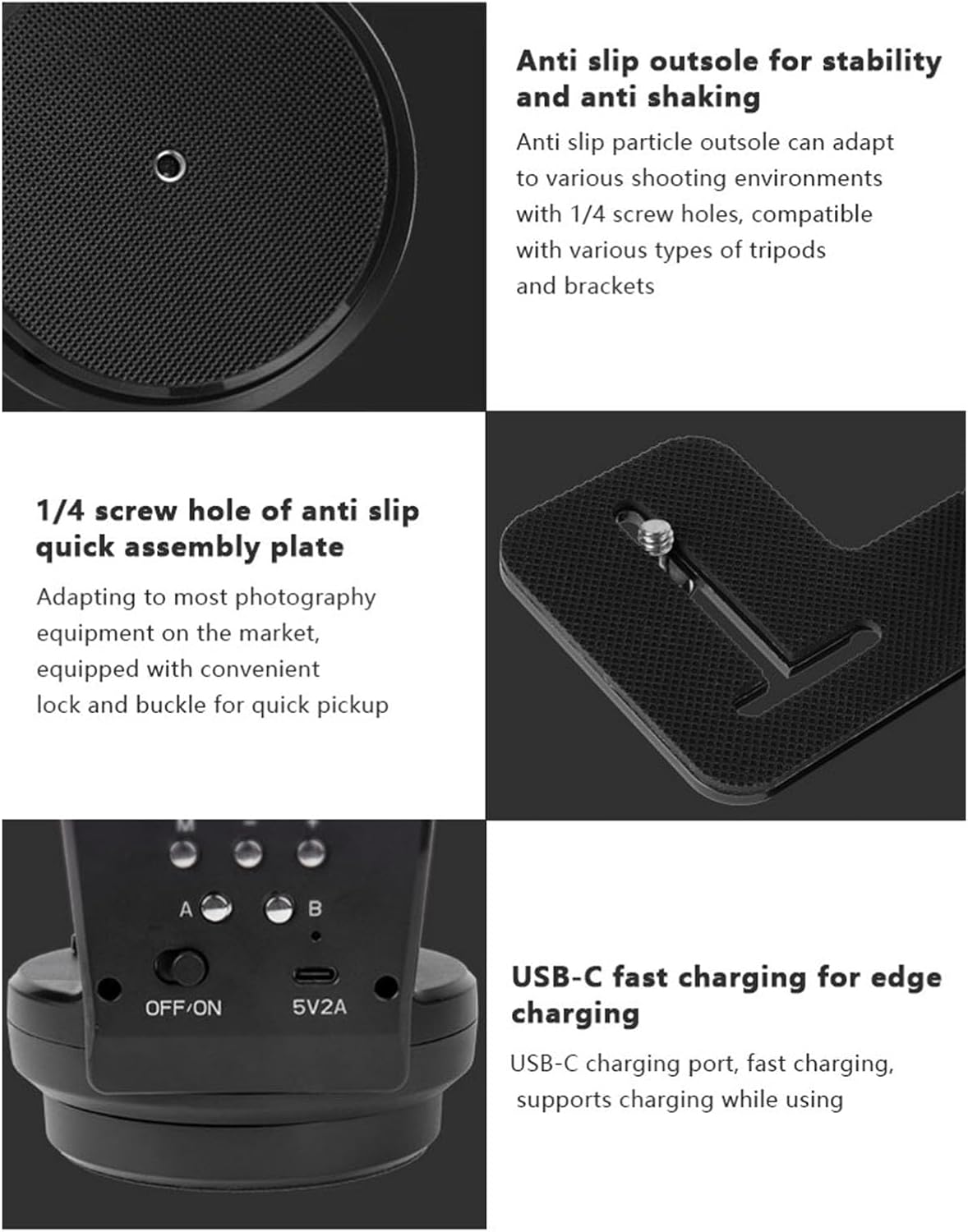
Figure 9.1: Product dimensions of the YT800 Pan-Tilt Head.
10. Warranty Information
This product comes with a 1 Year Warranty Against Manufacturer Defects. Please retain your proof of purchase for warranty claims. The warranty covers defects in materials and workmanship under normal use. It does not cover damage caused by misuse, accident, unauthorized modification, or improper installation.
11. Customer Support
If you encounter any issues or have questions regarding your Lazmin112 YT800 Electric Pan-Tilt Rotation Head, please contact our customer support team. Refer to your purchase documentation for specific contact details or visit the official Lazmin112 website.
For the latest information and support, please visit: Lazmin112 Official Store on Amazon