
PKPOWER 100027813, 100002480
Contents
PKPOWER AC Adapter User Manual
Model: 100027813, 100002480 Compatible
Introduction
This user manual provides essential information for the safe and effective use of your PKPOWER AC Adapter. This adapter is designed to provide reliable power to compatible Onn LED Monitors, specifically models 100027813 (24") and 100002480 (22"). Please read this manual thoroughly before use and retain it for future reference.

Image: The PKPOWER AC Adapter, showing the main adapter unit, the detachable power cord, and the connector for the monitor.
Safety Information
Your safety is paramount. Please observe the following precautions:
- Proposition 65 Warning: This product may contain chemicals known to the State of California to cause cancer and birth defects or other reproductive harm.
- Ensure the adapter's input voltage (100-240V 50-60Hz) matches your local power supply.
- Do not expose the adapter to water, moisture, or extreme temperatures.
- Avoid dropping or subjecting the adapter to strong impacts.
- Do not disassemble or attempt to repair the adapter. Refer servicing to qualified personnel.
- Unplug the adapter from the power outlet when not in use for extended periods.
This PKPOWER adapter is designed with multiple safety protections:

Image: Diagram illustrating the internal safety features of the adapter, including Over Charge, Over Voltage, Short-circuit, Over Current, and Over Temperature Protection.
- OVP (Over Voltage Output Protection): Protects connected devices from excessive voltage.
- OCP (Over Current Output Protection): Prevents damage from excessive current draw.
- SCP (Short Circuit Output Protection): Safeguards against short circuits.
Product Overview and Components
The PKPOWER AC Adapter package includes the following components:
- 1 x PKPOWER AC Adapter Unit
- 1 x AC Power Cable (for wall outlet connection)

Image: Close-up views of the adapter's features, highlighting the heat-resistant materials, the durable 2-pin plug, and the stable copper interface for firm connection.
Key features include:
- Plum Blossom Thread and Special Heat-resistant Materials for durability.
- 2 Pin Plug design for enhanced safety and durability.
- Copper Interface for stable output and a firm connection.
Setup
- Ensure your Onn LED Monitor (models 100027813 or 100002480) is powered off.
- Connect the AC power cable to the 2-pin input port on the PKPOWER AC Adapter unit.
- Plug the other end of the AC power cable into a standard wall power outlet (100-240V).
- Connect the output connector of the PKPOWER AC Adapter to the power input port on your Onn LED Monitor. Ensure a firm and secure connection.

Image: The AC adapter with its cables connected, illustrating the compact design and the ferrite bead on the output cable for noise reduction.
Operating Instructions
Once the adapter is properly connected to both the power outlet and your monitor, you can power on your monitor as usual. The adapter will automatically regulate the power supply to your device.
- The adapter is designed for continuous operation within its specified limits.
- If the monitor does not power on, double-check all connections.
Maintenance
To ensure the longevity and optimal performance of your PKPOWER AC Adapter, follow these simple maintenance guidelines:
- Keep the adapter clean and free from dust. Use a soft, dry cloth for cleaning.
- Do not use liquid cleaners or abrasive materials.
- Store the adapter in a cool, dry place when not in use.
- Avoid bending or crimping the cables excessively, as this can damage the internal wires.
Troubleshooting
| Problem | Possible Cause | Solution |
|---|---|---|
| Monitor does not power on. | Loose connection, no power from outlet, incompatible adapter. |
|
| Adapter feels excessively hot. | Overload, poor ventilation, internal fault. |
|
| Intermittent power to monitor. | Loose connection, damaged cable/adapter. |
|
Specifications
| Feature | Detail |
|---|---|
| Input Voltage | 100-240V AC, 50-60Hz |
| Output Voltage | 19 Volts |
| Product Dimensions | 6 x 4 x 2 inches (Adapter unit: 4.23 x 1.88 x 1.17 inches) |
| Item Weight | 1.56 pounds |
| Color | Black |
| Connector Type | PC (Standard DC barrel connector) |
| Certifications | CE / FCC / RoHS certified |
| Manufacturer | Shenzhen Sunshine Technological Co., Ltd |
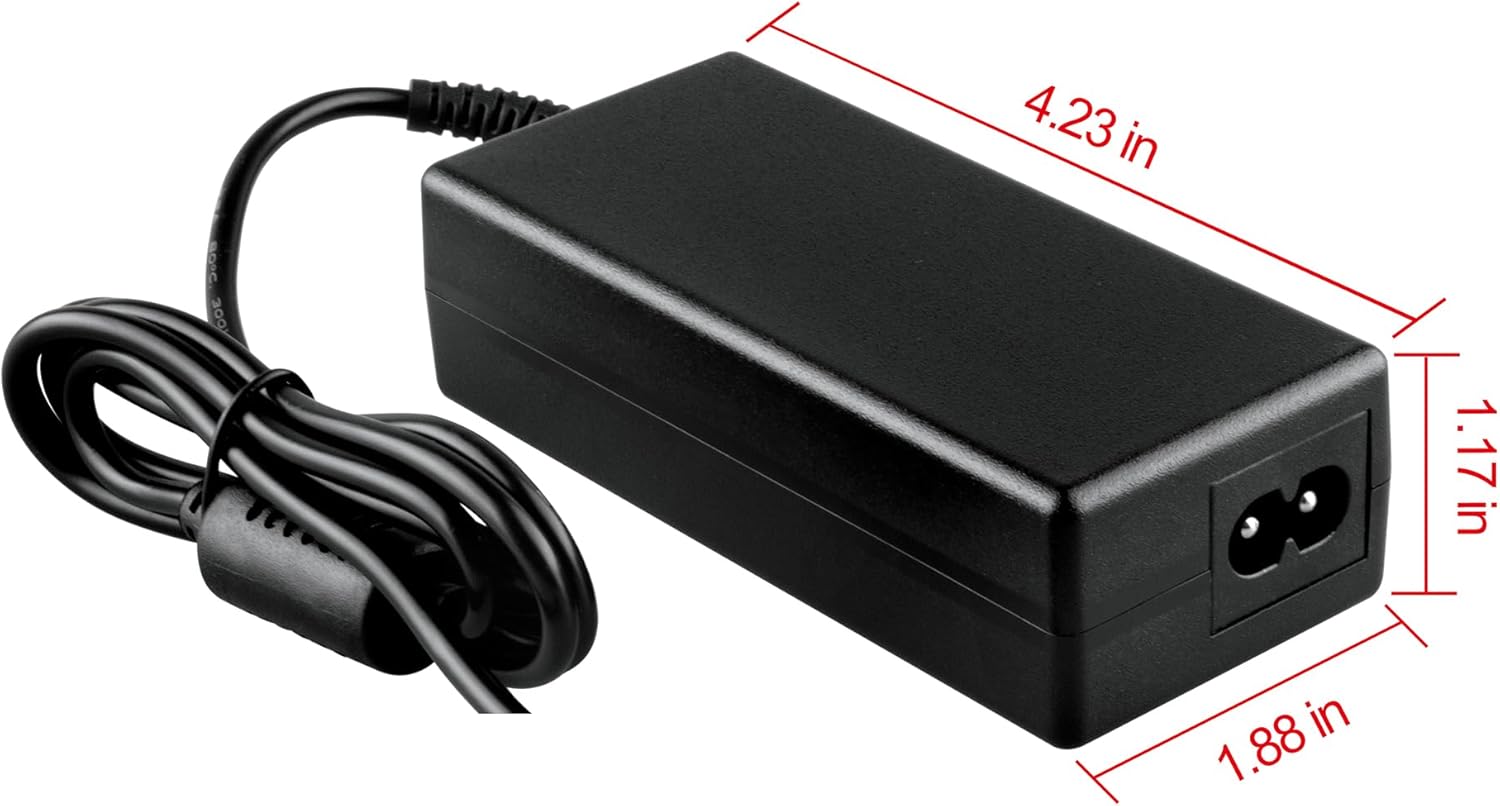
Image: The PKPOWER AC Adapter with its dimensions labeled: 4.23 inches length, 1.88 inches width, and 1.17 inches height.
Compatibility
This PKPOWER AC Adapter is specifically designed and tested for compatibility with the following Onn LED Monitor models:
- Onn 100027813 (24" LED Monitor)
- Onn 100002480 (22" LED Monitor)
It may also be compatible with other devices requiring similar power specifications and connector types. Always verify the voltage and connector type before connecting to any device not listed above.
Warranty and Support
PKPOWER products are manufactured to high standards. For any issues or inquiries regarding your AC adapter, please contact our customer service team.
Contacting Customer Support:
For prompt assistance, you can contact the seller directly through your Amazon account:
- Log in to your Amazon account.
- Navigate to "Your Orders".
- Locate the order for the PKPOWER AC Adapter.
- Click the "Problem with this order?" button.
- Select the "Contact Seller" button to send an e-mail message.
Our friendly and reliable customer service team aims to respond and resolve any issues within 24 hours.
Documents and downloads
Ask a question about this manual
Ask about setup, troubleshooting, compatibility, parts, safety, or missing instructions. Manuals+ will review the question and use this page’s manual context to help answer it.