Introduction
This manual provides detailed instructions for the installation, operation, and maintenance of the LINGXIAO 15FT RS-485 Pool Pump Digital Cable. This cable is specifically designed for use with LINGXIAO variable speed pool pumps and is compatible with PL4/PLS4 Easy Touch Controller Systems. Please read this manual thoroughly before use to ensure proper functionality and safety.
Safety Information
- Always disconnect power to the pool pump and controller system before installing or disconnecting the cable.
- Ensure the cable is not damaged before installation. Do not use if the cable insulation is compromised.
- This cable is designed for specific LINGXIAO variable speed pool pump models (Relaax130-VS, Relaax220-VS, Relaax390-VS) and PL4/PLS4 controller systems. Using it with incompatible equipment may cause damage.
- Keep the cable away from sharp objects, excessive heat, and direct sunlight to prevent damage.
- Ensure all connections are secure and watertight to prevent electrical hazards.
Product Overview
The LINGXIAO 15FT RS-485 Pool Pump Digital Cable facilitates communication between your LINGXIAO variable speed pool pump and a compatible PL4/PLS4 Easy Touch Controller System. It features a durable outer jacket and a 4-pin connector designed for reliable signal transmission.

Figure 1: The LINGXIAO 15FT RS-485 Pool Pump Digital Cable, coiled for storage, showing the robust black cable and the 4-pin connector on one end, with individual wires exposed on the other end for connection.

Figure 2: A close-up view of the 4-pin connector end of the RS-485 cable, highlighting the pin configuration and the secure, threaded design for reliable connection.
Setup and Installation
Follow these steps to properly install the RS-485 digital cable:
- Power Disconnection: Before beginning installation, ensure that all power to the pool pump and the PL4/PLS4 controller system is completely disconnected at the circuit breaker.
- Identify Ports: Locate the RS-485 communication port on your LINGXIAO variable speed pool pump. This is typically a dedicated port for digital communication.
- Connect to Pump: Connect the 4-pin connector end of the RS-485 cable to the corresponding communication port on the pool pump. Ensure it clicks securely into place.
- Connect to Controller: Identify the RS-485 input terminals on your PL4/PLS4 Easy Touch Controller System. The cable's other end has individual wires (yellow and green) that need to be connected to the appropriate terminals.
- Wiring Diagram: Refer to the diagram below for correct wire connections to the PL4/PLS4 controller. The yellow wire typically connects to the data positive (DT+) terminal, and the green wire to the data negative (DT-) terminal. Consult your controller's manual for specific terminal labeling.
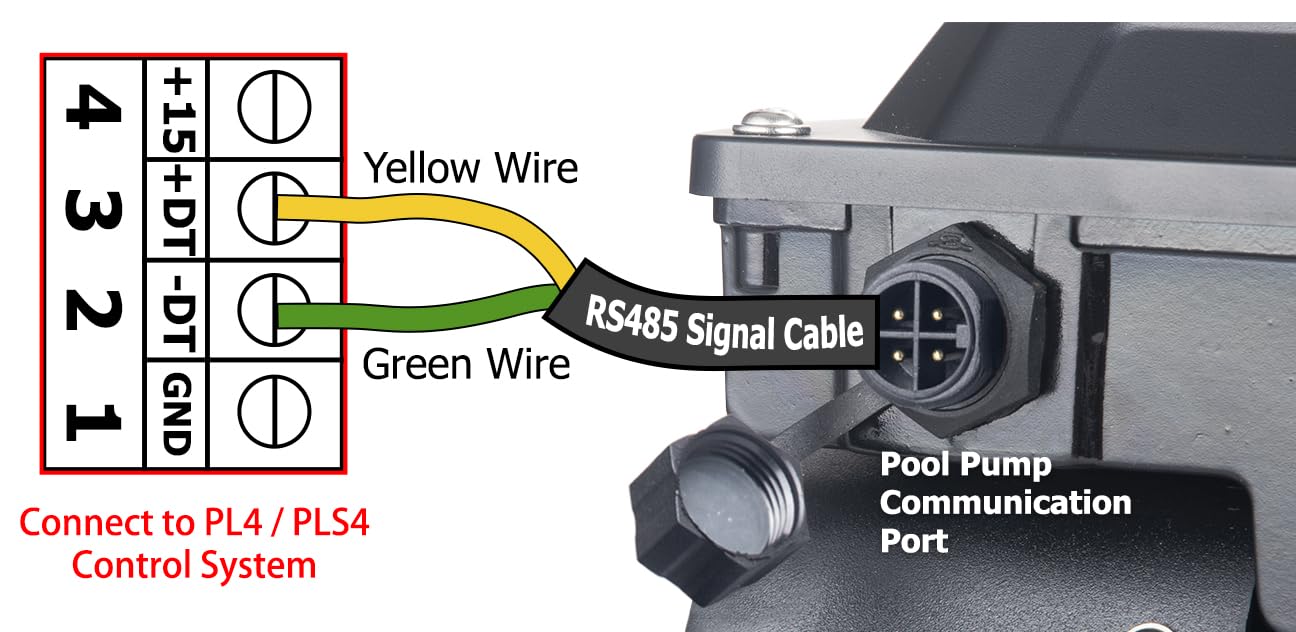
Figure 3: Wiring diagram illustrating the connection of the RS-485 signal cable to a pool pump communication port and the corresponding PL4/PLS4 control system terminals. The yellow wire connects to +15+DT-DT-GND (Pin 4) and the green wire connects to +15+DT-DT-GND (Pin 3).
- Secure Connections: Ensure all wire connections are tight and properly insulated if necessary.
- Cable Routing: Route the cable safely, avoiding areas where it could be pinched, cut, or exposed to excessive foot traffic or machinery.
- Power Restoration: Once all connections are secure and verified, restore power to the pool pump and controller system.
- System Test: Test the communication between the pump and controller to ensure proper operation.
Operating Instructions
The LINGXIAO RS-485 Digital Cable enables the PL4/PLS4 controller system to communicate with and control your LINGXIAO variable speed pool pump. Once connected, the pump's operation (e.g., speed, schedule) will be managed directly through the controller's interface. Refer to your PL4/PLS4 Easy Touch Controller System's user manual for specific operating instructions and programming details.
- Ensure the controller is powered on and properly configured for pump control.
- Verify that the pump is recognized by the controller system.
- Use the controller's interface to adjust pump settings as needed.
Maintenance
The RS-485 digital cable requires minimal maintenance. Regular inspection is recommended to ensure longevity and reliable performance:
- Visual Inspection: Periodically inspect the entire length of the cable for any signs of wear, cuts, abrasions, or damage to the outer jacket.
- Connector Check: Ensure the 4-pin connector remains securely attached to the pump and that the wire connections at the controller are tight and free from corrosion.
- Cleaning: If the cable becomes dirty, wipe it clean with a damp cloth. Do not use harsh chemicals or abrasive cleaners.
- Environmental Protection: Protect the cable from extreme temperatures, direct prolonged sunlight, and physical stress.
Troubleshooting
If you experience issues with the RS-485 digital cable, consider the following troubleshooting steps:
- No Communication:
- Verify that both the pool pump and the PL4/PLS4 controller system are powered on.
- Check all cable connections at both the pump and the controller. Ensure they are secure and correctly wired according to the diagram in the "Setup and Installation" section.
- Inspect the cable for any visible damage. A damaged cable may prevent communication.
- Consult your PL4/PLS4 controller manual for specific communication error codes or troubleshooting steps related to pump connectivity.
- Intermittent Connection:
- Ensure the cable is not being pinched or stressed by other equipment or objects.
- Check for loose connections at either end of the cable.
- Environmental factors or electrical interference can sometimes affect communication. Ensure the cable is routed away from high-voltage lines if possible.
- Incorrect Pump Behavior:
- Confirm that the correct LINGXIAO variable speed pump model is selected or configured within your PL4/PLS4 controller system.
- Review the programming settings on your PL4/PLS4 controller to ensure they match your desired pump operation.
If issues persist after following these steps, contact LINGXIAO customer support for further assistance.
Specifications
| Feature | Detail |
|---|---|
| Model Number | RS-485 |
| Brand | LINGXIAO |
| Cable Type | Digital Signal Cable (RS-485) |
| Length | 15 Feet (approx. 4.57 meters) |
| Connector Type | 4-PIN ATX (Pump End) |
| Compatible Devices | LINGXIAO Variable Speed Pool Pumps (Relaax130-VS, Relaax220-VS, Relaax390-VS), PL4 Pool Controller Easy Touch, PLS4 Pool Controller Easy Touch |
| Recommended Use | Pool pump communication |
| Package Dimensions | 10.04 x 3.03 x 2.91 inches |
| Item Weight | 9.14 ounces |
Warranty and Support
For warranty information and customer support, please refer to the official LINGXIAO website or contact your authorized dealer. LINGXIAO is committed to providing high-quality products and excellent customer service.
Disclaimer: LINGXIAO brand products are not affiliated with or endorsed by Pentair. Our variable speed pool pumps are only compatible with PL4/PLS4 control system equipment.
For further assistance, you may visit the LINGXIAO Store on Amazon or contact their customer service directly.


