
Introduction
This manual provides detailed instructions for the setup, operation, and maintenance of your Lexibook Frozen Electronic Diary, model SD50FZ. Please read this manual thoroughly before using the product to ensure proper function and safety. Keep this manual for future reference.
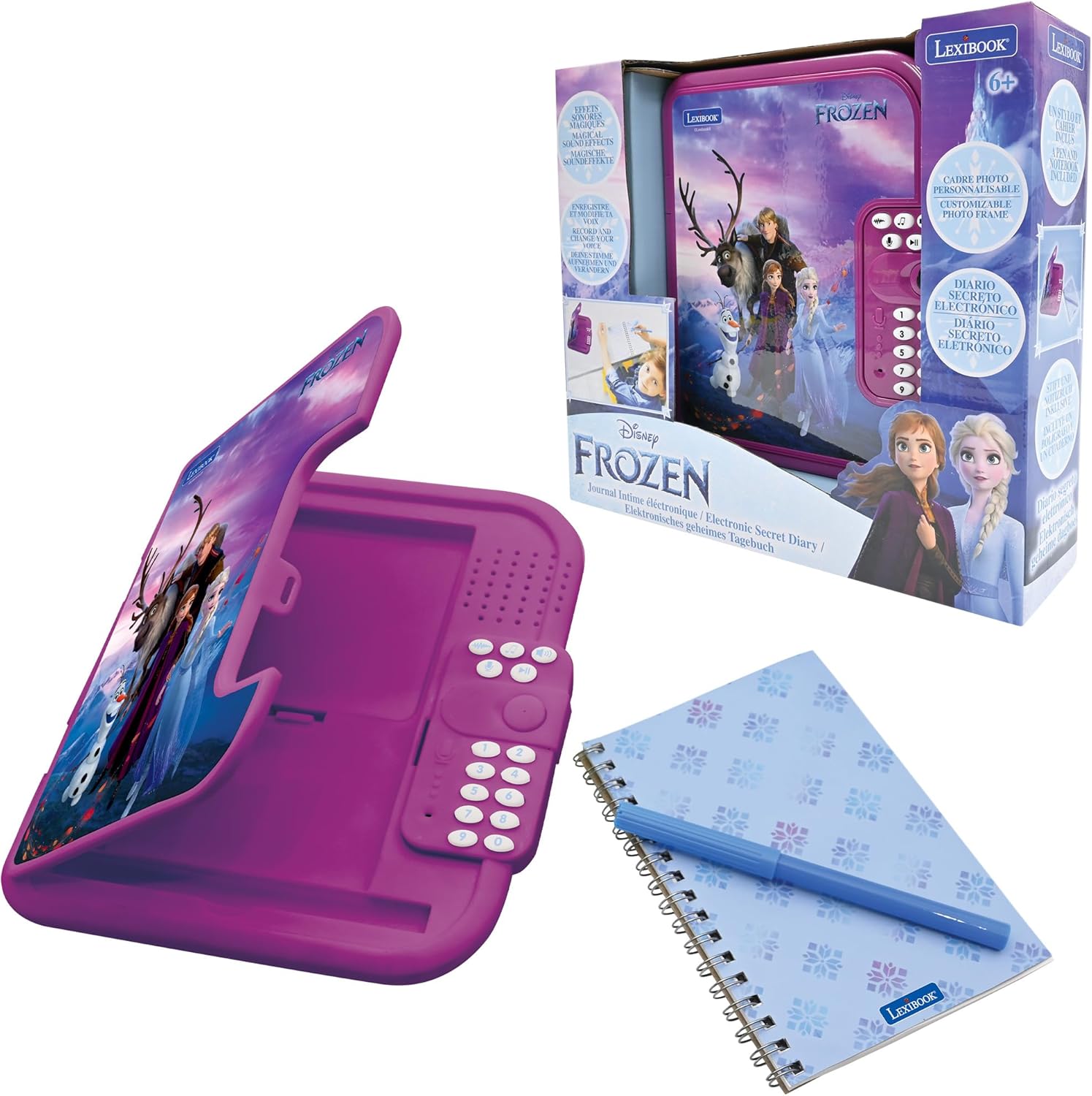
Image: The Lexibook Frozen Electronic Diary, shown with its included pen, notebook, and product packaging. The diary is purple with Frozen characters on the cover.
Safety Information
Warning: Not suitable for children under 3 years due to small parts which may present a choking hazard. Adult supervision is recommended during use.
- Ensure batteries are inserted correctly according to polarity markings.
- Do not mix old and new batteries, or different types of batteries.
- Remove exhausted batteries promptly.
- Do not attempt to recharge non-rechargeable batteries.
- Keep the product away from water and extreme temperatures.
- Clean the product with a soft, dry cloth only.
What's in the Box
Upon opening the package, verify that all components are present:
- 1 x Lexibook Frozen Electronic Diary
- 1 x Notebook
- 1 x Stylus (Pen)
- 1 x User Manual (this document)

Image: The electronic diary opened, revealing the included spiral-bound notebook and a blue stylus pen securely placed within its compartment.
Setup
1. Battery Installation
- Locate the battery compartment on the back of the electronic diary.
- Using a small screwdriver, open the battery compartment cover.
- Insert 3 x AA batteries (not included) according to the polarity indicators (+/-) inside the compartment.
- Replace the battery compartment cover and secure it with the screw.
2. Initial Power On
Press the ON/OFF button to power on the diary. You will hear a welcome sound effect.
3. Setting Your Password
The diary is protected by a 4-digit password. Upon first use, or after a battery change, you will need to set a new password.
- When prompted, enter a 4-digit code using the numeric keypad.
- Press the LOCK button to confirm your password.
- Re-enter the same 4-digit code and press the LOCK button again to confirm.
- Your password is now set. Remember your password, as there is no reset function without removing batteries.

Image: The electronic diary displaying its dimensions and icons representing key features: a lock for password protection, a music note for melodies, and a photo frame slot.
Operating Instructions
1. Opening the Diary
To open the diary, enter your 4-digit password using the numeric keypad and press the LOCK button. The diary will unlock with a sound effect.
2. Writing in the Notebook
Use the included stylus pen to write your thoughts and secrets in the spiral-bound notebook provided inside the diary.

Image: A child is shown from an overhead perspective, writing in the open electronic diary with the blue stylus pen. The diary is placed on a white table.
3. Playing Melodies
The diary features 10 captivating melodies. Press the MUSIC NOTE button to cycle through the available tunes. Press it again to stop the music.
4. Voice Recording and Modification
The diary allows you to record your voice and apply fun modifications.
- Press the RECORD button (microphone icon) to start recording. Speak clearly into the microphone.
- Press the RECORD button again to stop recording.
- Press the PLAY button (triangle icon) to listen to your recording.
- Press the VOICE CHANGER button (person icon) to cycle through different voice effects.
5. Using the Photo Frame
Personalize your diary by inserting a small photo into the integrated photo frame slot located on the left side of the diary when opened.
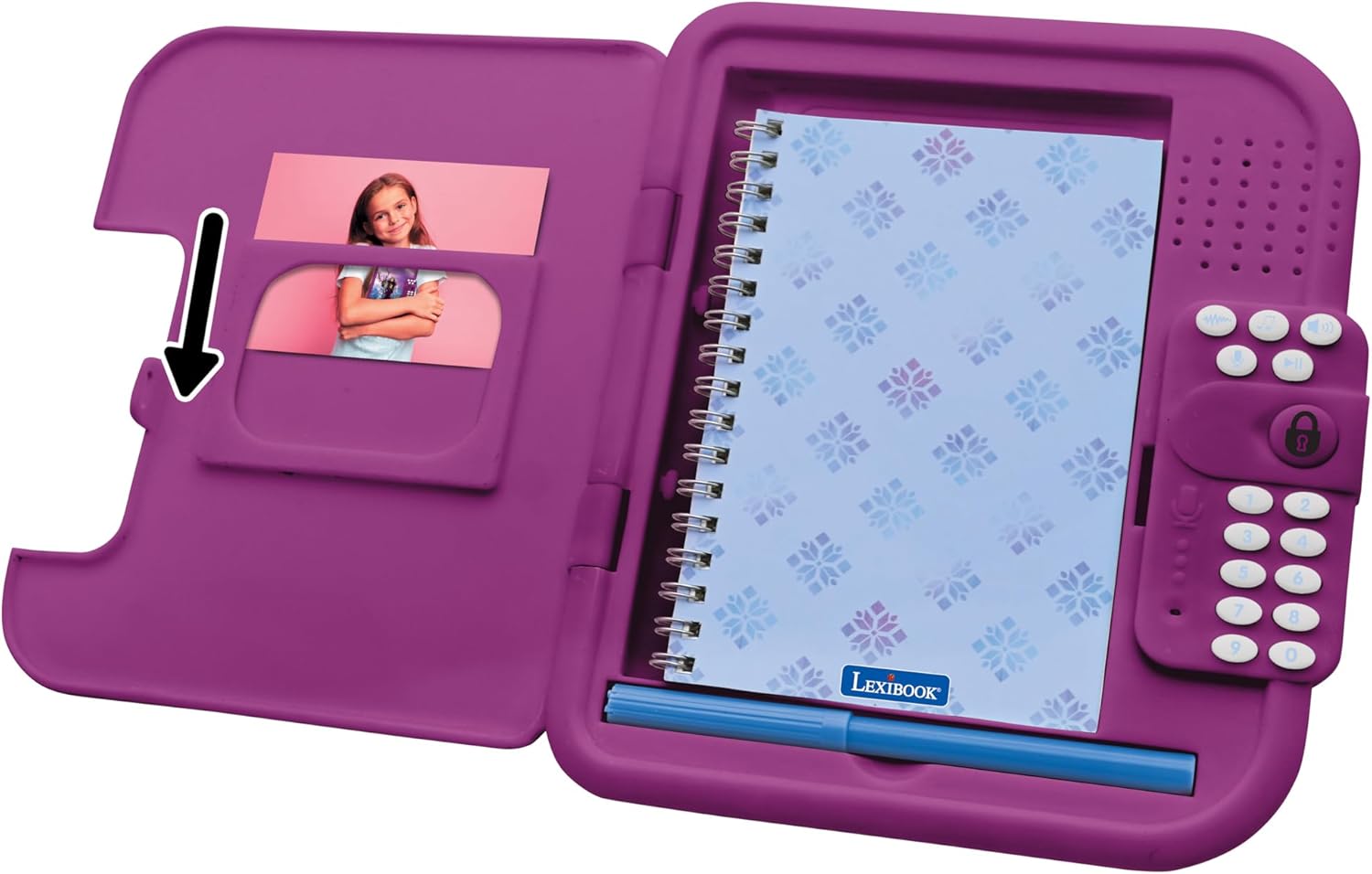
Image: The electronic diary opened, highlighting the photo frame slot on the left side, ready for a personal picture to be inserted.
Maintenance
1. Cleaning
Wipe the exterior of the diary with a soft, dry cloth. Do not use abrasive cleaners or immerse the product in water.
2. Storage
When not in use for extended periods, store the diary in a cool, dry place. Remove batteries if storing for several months to prevent leakage.
3. Notebook and Pen Replacement
The included notebook can be replaced once its pages are filled. Standard small spiral notebooks of similar dimensions can be used. The stylus pen can also be replaced with a compatible writing instrument.
Troubleshooting
| Problem | Possible Cause | Solution |
|---|---|---|
| Diary does not power on. | Batteries are dead or incorrectly inserted. | Check battery polarity. Replace with new AA batteries. |
| Cannot open the diary. | Incorrect password entered. | Ensure the correct 4-digit password is entered. If forgotten, remove and reinsert batteries to reset (this will erase the password). |
| Sound effects or music are distorted/low. | Low battery power. | Replace batteries. |
| Voice recording is unclear. | Microphone too far or background noise. | Speak closer to the microphone in a quiet environment. |
Specifications
- Model: SD50FZ
- Product Dimensions: 7.01 x 7.95 x 1.48 inches (17.8 x 20.2 x 3.7 cm)
- Item Weight: 13.1 ounces (371 grams)
- Power Source: 3 x AA batteries (not included)
- Recommended Age: 6 years and up
- Features: 4-digit password protection, 10 melodies, voice recorder, voice modifier, integrated photo frame.
Warranty and Support
For warranty information or technical support, please refer to the contact details provided on the product packaging or visit the official Lexibook website. Keep your proof of purchase for warranty claims.
Manufacturer: Lexibook
Release Date: September 15, 2023