
1. Introduction
This manual provides detailed instructions for the installation, operation, and maintenance of your BAFANG 600C Intelligent Ebike Display. This display is designed to provide essential riding data and control for your electric bicycle. Please read this manual thoroughly before use to ensure proper function and safety.

Figure 1.1: BAFANG 600C Intelligent Ebike Display
1.1 Key Features
- Backlit display for clear visibility in various lighting conditions.
- Adjustable brightness settings.
- Real-time recording and display of riding data.
- IP65 daily waterproof rating.
- Robust design for handlebar mounting.
1.2 Compatibility Notice
The BAFANG 600C display is exclusively compatible with BAFANG BBS01, BBS02, and BBSHD mid-drive motors that utilize the UART protocol. It is NOT compatible with other motor types, including all kinds of hub motors or BAFANG motors using the CAN protocol.
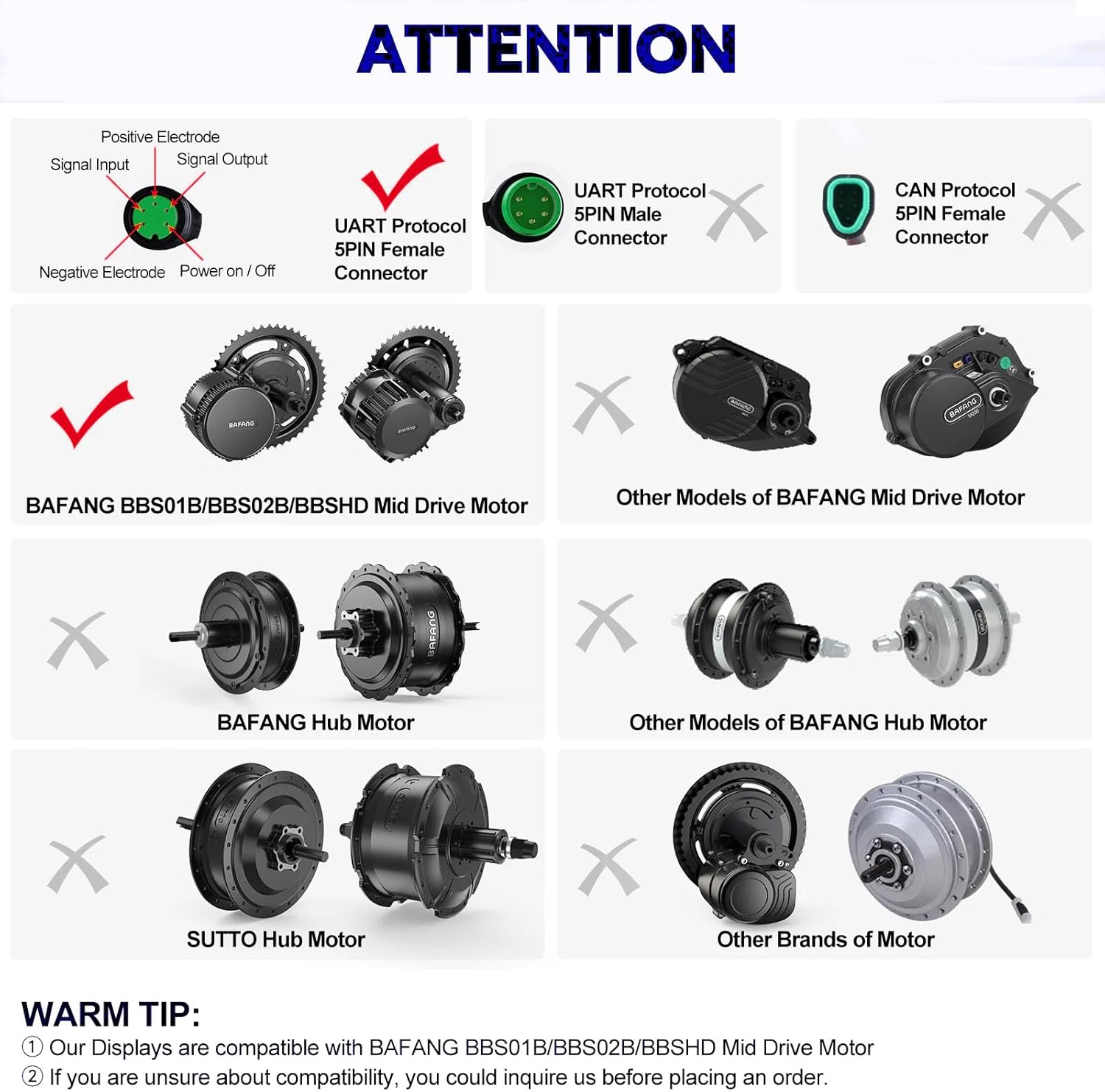
Figure 1.2: Display Compatibility Overview
If you are uncertain about your motor's protocol or compatibility, please consult your motor's documentation or contact BAFANG support before attempting installation.
2. Installation
2.1 Mounting the Display
The display is designed for handlebar mounting. Ensure the mounting position allows for easy visibility and access to controls without obstructing your view or bike operation.

Figure 2.1: Display Mounted on Handlebar
2.2 Screw Lock Torque and Visual Angle Adjustment
When installing the display, pay close attention to the screw lock torque. Overtightening can cause damage to the instrument and is not covered under warranty.
- Standard Torque (STD): 0.50 N.M
- Maximum Torque (MAX): 0.70 N.M
Before fully tightening the lock screw, adjust the visual angle of the display to your preferred position. Once the screw is locked, do not rotate the instrument by force, as this can cause damage and is not covered under warranty.
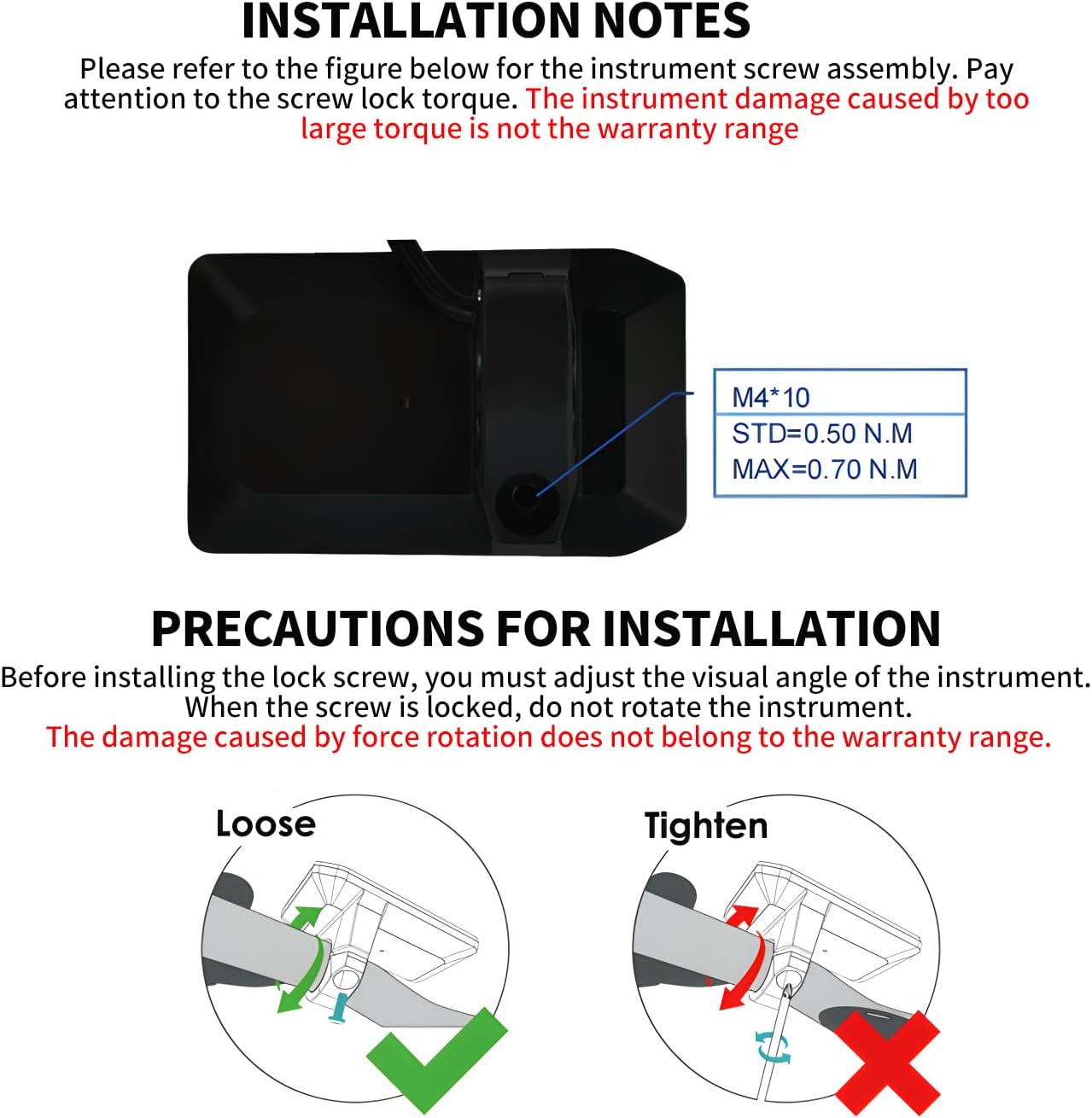
Figure 2.2: Installation Precautions
2.3 Dimensions and Connector
Refer to the diagram below for the physical dimensions of the 600C display and details of its 5-pin UART protocol connector.
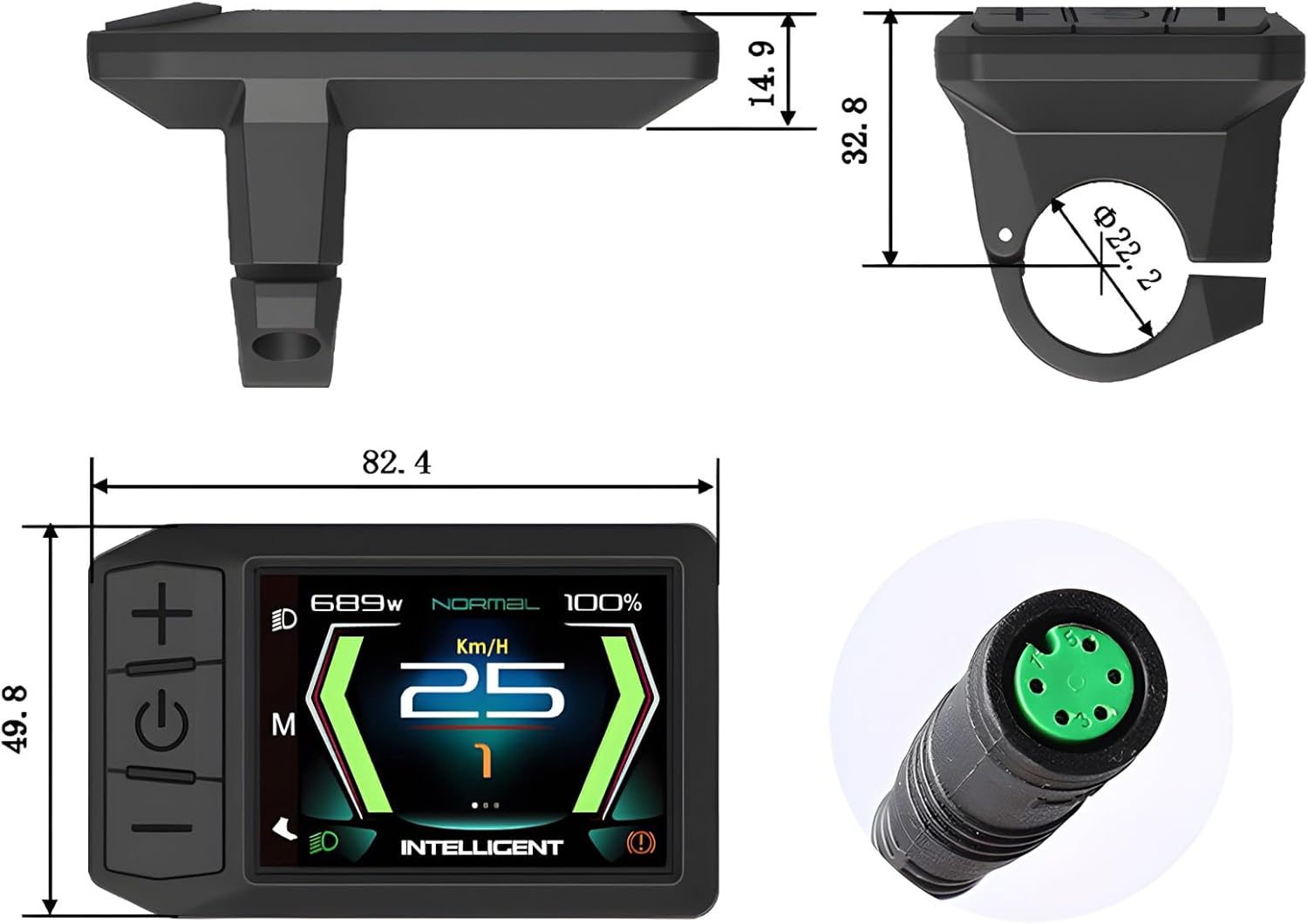
Figure 2.3: Display Dimensions and Connector
3. Operation
The BAFANG 600C display provides a clear and intuitive interface for monitoring your ebike's performance. The display is backlit and its brightness can be adjusted for optimal visibility in various lighting conditions.
3.1 Display Interfaces
The 600C display offers multiple interface views to present riding data. These include a main interface with digital patterns, a simulation mode, a basic information interface, and a detailed information interface.

Figure 3.1: Display Interface Examples
3.2 USB Connectivity
While the 600C model does not feature a USB port, other BAFANG display models like the C18 and 850C include a USB function, and the Touch Screen T1 model features a Type-C interface. These ports are typically used for charging external devices like mobile phones.
4. Maintenance
4.1 Waterproofing
The BAFANG 600C display has an IP65 daily waterproof rating, meaning it is protected against dust ingress and low-pressure water jets from any direction. While it is designed to withstand daily splashes and light rain, please avoid prolonged exposure to heavy rain or submersion in water to prevent damage.
4.2 Cleaning
To clean the display, use a soft, damp cloth. Avoid using abrasive cleaners, solvents, or harsh chemicals, as these can damage the screen or casing. Ensure the display is dry before operation.
5. Troubleshooting
If you encounter any issues with your BAFANG 600C display, please refer to the following common concerns:
5.1 Clock and Trip Meter Reset
Some users have reported that the clock on the display may reset to 00:00 AM when the power is turned off and back on, and the trip meter may not reset as expected or run continuously. This behavior can vary by firmware version. For specific instructions on resetting the trip meter or addressing persistent clock issues, please refer to the detailed manual for your specific display model (if available) or contact BAFANG customer support.
5.2 General Issues
For any other operational issues not covered here, ensure all connections are secure and clean. If the problem persists, it may indicate a more complex issue requiring professional assistance.
6. Specifications
| Feature | Specification |
|---|---|
| Brand | BAFANG |
| Model Name | 600C (UART protocol) |
| Color | 600C (UART protocol) |
| Item Weight | 0.21 Pounds (approx. 95g) |
| Screen Size | 3.2 Inches |
| Display Type | LCD |
| Connectivity Technology | UART Protocol |
| Included Components | Display button |
| Mounting Type | Handlebar Mount |
| Human Interface Input | Buttons |
| Material | Plastic |
| Suggested Users | Unisex-adult |
| Waterproof Grade | IP65 |
6.1 Other BAFANG Display Models Comparison
BAFANG offers a range of intelligent displays. The table below provides a comparison of key features across various models, including the 600C.

Figure 6.1: BAFANG Display Model Comparison
7. Warranty and Support
7.1 Warranty Information
The BAFANG 600C Intelligent Ebike Display comes with a 3-month warranty from the date of purchase. This warranty covers manufacturing defects under normal use. Damage resulting from improper installation, misuse, accidents, or unauthorized modifications is not covered.
7.2 Customer Support
For any questions, technical assistance, or to request a detailed manual for your specific monitor model, please contact HIEBIKE customer support through Amazon. Provide your product details and a clear description of your inquiry to receive prompt assistance.
You can visit the official BAFANG store on Amazon for more information and products: BAFANG Store


