
Introduction
Thank you for purchasing the iJoy Disney Minnie Mouse Ears Bluetooth Shower Speaker. This manual provides essential information for the safe and efficient operation of your device. Please read it thoroughly before use and retain it for future reference.

Image: The iJoy Disney Minnie Mouse Ears Bluetooth Shower Speaker, showcasing its design.
Safety Information
- Do not expose the speaker to extreme temperatures or direct sunlight for extended periods.
- While the speaker is IPX4 splash-proof, do not submerge it in water.
- Keep the speaker away from sharp objects and abrasive materials.
- Use only the provided charging cable or a certified equivalent.
- Do not attempt to disassemble or repair the speaker yourself. Contact qualified service personnel.
- Dispose of the battery and speaker according to local regulations.
Package Contents
- iJoy Disney Minnie Mouse Ears Bluetooth Shower Speaker
- USB Charging Cable
- User Manual

Image: The retail packaging of the Minnie Mouse Shower Speaker, showing the product and key features.
Product Overview
Familiarize yourself with the speaker's components and controls.
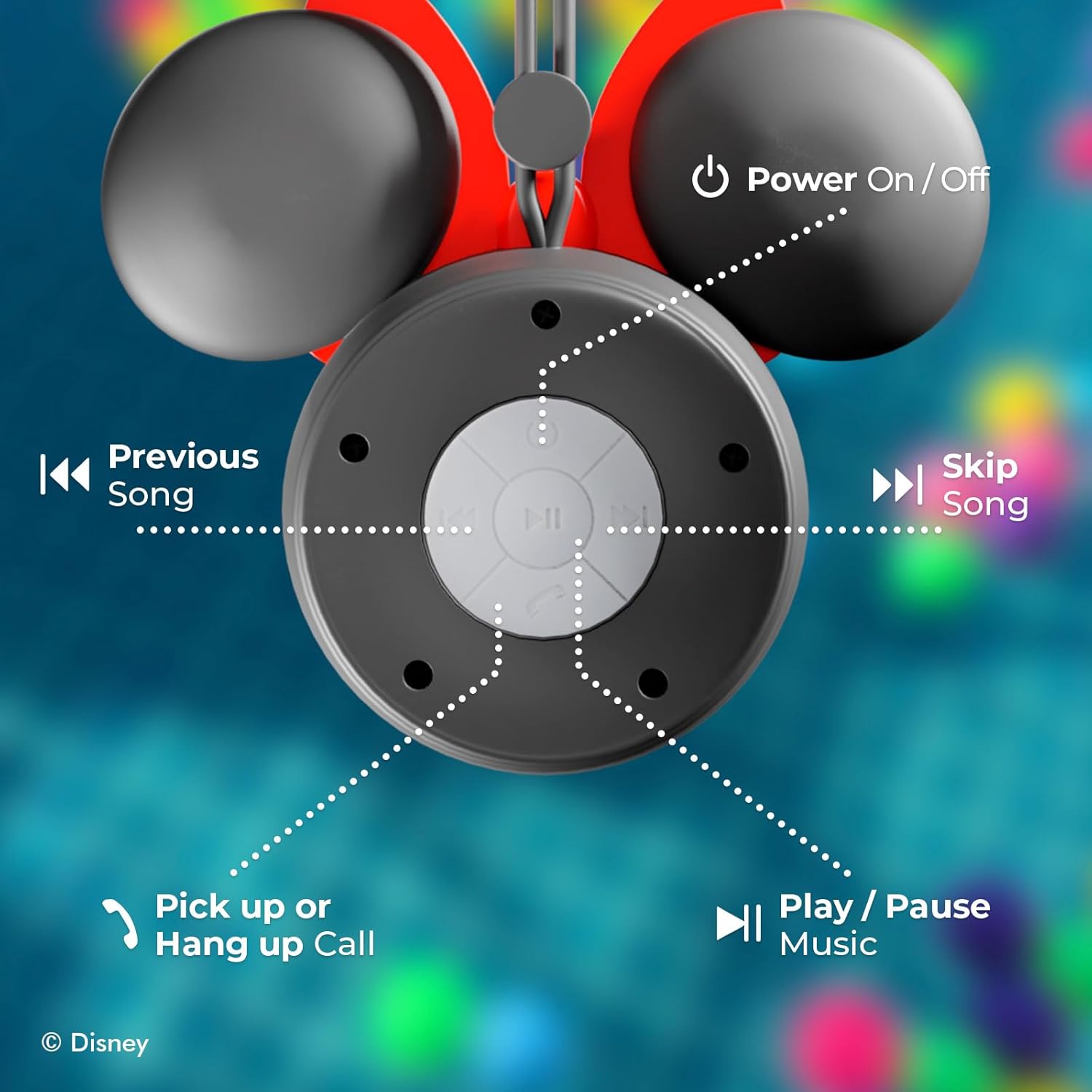
Image: Detailed view of the speaker's control panel, indicating the functions of each button: Power On/Off, Previous Song, Skip Song, Pick up or Hang up Call, and Play/Pause Music.
- Power Button: Turns the speaker on or off.
- Play/Pause Button: Plays or pauses music.
- Previous Track Button: Skips to the previous song.
- Next Track Button: Skips to the next song.
- Volume Up/Down: Adjusts the playback volume.
- Call Button: Answers or ends phone calls.
- Microphone: For hands-free calling.
- Suction Cup: For mounting on smooth surfaces.
Setup
1. Charging the Speaker
- Connect the small end of the USB charging cable to the charging port on the speaker.
- Connect the larger end of the USB charging cable to a USB power adapter (not included) or a computer's USB port.
- The LED indicator will illuminate during charging and turn off when fully charged.
- A full charge typically takes approximately 2-3 hours.
2. Mounting the Speaker
The speaker features a strong suction cup for easy attachment to smooth, non-porous surfaces.
- Ensure the desired surface (e.g., shower wall, tile) is clean, dry, and smooth.
- Press the suction cup firmly against the surface, ensuring no air is trapped underneath.
- Verify the speaker is securely attached before releasing it.

Image: The Minnie Mouse Shower Speaker mounted on a tiled shower wall using its suction cup, demonstrating secure placement.

Image: A close-up illustrating the waterproof suction grip feature of the speaker.
Operating Instructions
1. Powering On/Off
- To power on, press and hold the Power Button until the LED indicator lights up and you hear an audible prompt.
- To power off, press and hold the Power Button again until the LED indicator turns off and you hear an audible prompt.
2. Bluetooth Pairing
- Ensure the speaker is powered on and in pairing mode (LED indicator will flash, indicating it's discoverable).
- On your Bluetooth-enabled device (smartphone, tablet, etc.), go to the Bluetooth settings.
- Search for available devices and select "iJoy Minnie Speaker" (or similar name).
- Once paired, the LED indicator will stop flashing and remain solid, and you will hear a confirmation tone.
- The speaker will automatically attempt to reconnect to the last paired device when powered on.

Image: Illustration of the speaker's effortless Bluetooth 5.0 connection with a mobile device.

Image: The Minnie Mouse Shower Speaker displayed alongside a laptop, tablet, and smartphone, highlighting its wide compatibility with Bluetooth-enabled devices.
3. Music Playback
- Play/Pause: Press the Play/Pause Button once to play or pause music.
- Next Track: Press the Next Track Button once to skip to the next song.
- Previous Track: Press the Previous Track Button once to go to the previous song.
- Volume Adjustment: Use the Volume Up/Down controls on your connected device or the speaker's buttons (if applicable, often integrated with track skip buttons by holding them).
4. Hands-Free Calling
- Answer Call: When a call comes in, press the Call Button once to answer.
- End Call: During a call, press the Call Button once to end the conversation.
- Reject Call: Press and hold the Call Button to reject an incoming call.
Maintenance
- Cleaning: Wipe the speaker with a soft, damp cloth. Do not use harsh chemicals or abrasive cleaners. Ensure the charging port cover is securely closed before cleaning.
- Storage: Store the speaker in a cool, dry place when not in use. Avoid storing it in areas with extreme temperatures or high humidity.
- Battery Care: To prolong battery life, fully charge the speaker before first use and recharge it at least once every three months if not used regularly.

Image: The Minnie Mouse Shower Speaker being splashed with water, illustrating its IPX4 splash-proof rating and resistance to water droplets.
Troubleshooting
| Problem | Solution |
|---|---|
| Speaker does not power on. | Ensure the speaker is fully charged. Connect it to a power source using the USB cable. |
| Cannot pair with Bluetooth device. |
|
| No sound or low volume. |
|
| Suction cup does not hold. | Ensure the surface is clean, dry, and smooth. Avoid porous or textured surfaces. Re-apply firmly. |
Specifications
| Feature | Detail |
|---|---|
| Model Name | Disney Shower Speaker |
| Model Number | RM |
| Brand | iJoy |
| Connectivity Technology | Bluetooth |
| Wireless Communication Technology | Bluetooth |
| Bluetooth Range | Up to 33 feet (10 meters) |
| Water Resistance Rating | IPX4 (Splash-proof) |
| Power Source | Battery Powered |
| Battery Type | Product Specific (included) |
| Battery Capacity | 300 mAh |
| Playtime | Up to 5 hours |
| Control Method | Touch / Button Controls |
| Special Features | Built-in Microphone, Suction Cup, Waterproof |
| Audio Output Mode | Stereo or Mono |
| Product Dimensions | 2"D x 5.5"W x 4.5"H |
| Item Weight | 4 ounces |
| UPC | 810116713875 |
Warranty Information
This product is covered by a limited manufacturer's warranty. Please refer to the warranty card included in your package or visit the manufacturer's website for detailed terms and conditions. The warranty typically covers defects in materials and workmanship under normal use.
Customer Support
For technical assistance, troubleshooting, or warranty inquiries, please contact iJoy customer support:
- Website: iJoy Official Store
- Email: Refer to product packaging or manufacturer's website.
- Phone: Refer to product packaging or manufacturer's website.
