
Brightever HSG-T22LB-A-2PK
Brightever Solar Outdoor Lights HSG-T22LB-A-2PK User Manual
Model: HSG-T22LB-A-2PK
Introduction
This manual provides instructions for the installation, operation, and maintenance of your Brightever Solar Outdoor Lights. These lights are designed to provide efficient and reliable outdoor illumination using solar power and motion sensing technology.

Image: Two Brightever Solar Outdoor Lights, showcasing their design and solar panels.
Product Features
- High Brightness: Equipped with 388 LED beads, providing 4000LM brightness.
- Wide Illumination Angle: 270° wide-angle lighting for extensive coverage.
- Motion Sensor: Built-in PIR motion sensor with 120-degree detection angle and 16-foot range.
- Three Lighting Modes: Offers Stay-on, Dim Light, and Strong Light Sensing modes.
- Solar Powered: Utilizes monocrystalline silicon solar cells for efficient charging (up to 20.5% conversion rate).
- Durable Construction: Made from ABS material, IP65 waterproof, heat-resistant, and frost-resistant.
- Easy Installation: No wiring required, mounts with included screws.

Image: Illustration of the solar light's charging process during the day (6-8 hours) and automatic illumination at night for 15 seconds upon motion detection.
Setup and Installation
- Unpack: Carefully remove the solar lights and mounting hardware from the packaging.
- Choose Location: Select a location where the solar panel can receive direct sunlight for 6-8 hours daily. Avoid shaded areas.
- Mounting:
- Use the included screws to securely mount the light to a wall, fence, or other suitable surface.
- Ensure the light is positioned to cover the desired illumination area.
- Initial Charge: Allow the lights to charge for at least one full day under direct sunlight before first use to ensure optimal battery performance.

Image: Detailed view of the solar light, highlighting its dimensions (8.66in L x 2.6in W x 3.8in H) and key components: Mode Button, Ultra-Bright LED, Sensitive Motion Sensor, and High Efficiency Solar Panel.

Image: Examples of the solar lights installed in various outdoor settings, including fences, stairs, garages, and decks, demonstrating versatile placement options.
Operating Instructions
The solar light features a mode button to cycle through three distinct lighting modes:
- Mode 1: Stay-on Mode
The light automatically turns on at 50% brightness at night and remains on until dawn. It turns off during the day.
- Mode 2: Dim Light Sensor Mode
The light stays at a low brightness (30%) at night. When motion is detected, it switches to full brightness (100%) for 15 seconds, then returns to dim brightness.
- Mode 3: Strong Light Sensing Mode
The light remains off at night. When motion is detected, it turns on at full brightness (100%) for 15 seconds, then turns off completely.
Press the mode button located on the front of the light to switch between these modes. The light will indicate the selected mode.
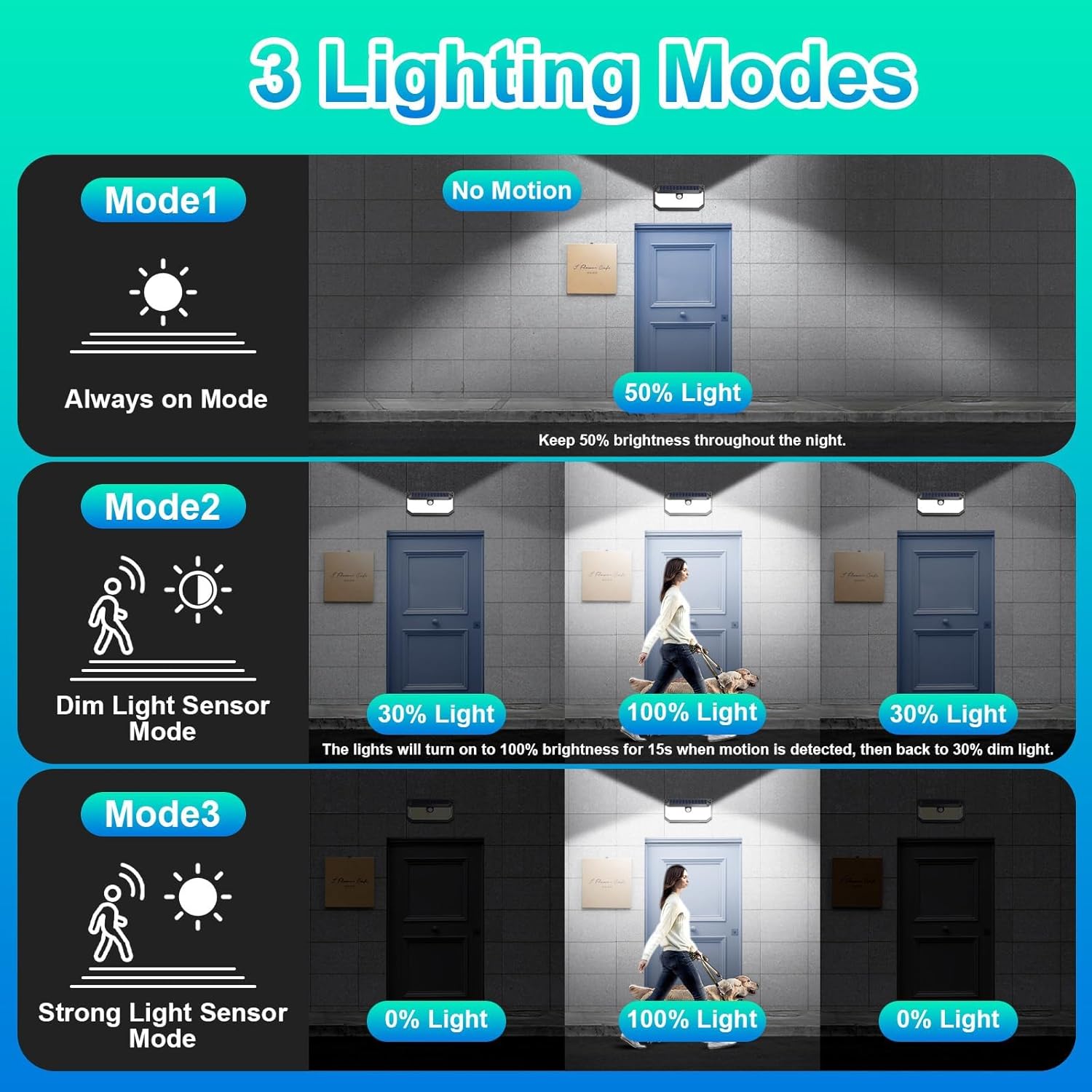
Image: Visual representation of the three operational modes: Always on Mode (50% light at night), Dim Light Sensor Mode (30% light, 100% on motion for 15s), and Strong Light Sensor Mode (0% light, 100% on motion for 15s).
Maintenance
- Cleaning: Periodically wipe the solar panel with a soft, damp cloth to remove dust, dirt, or debris. A clean solar panel ensures efficient charging.
- Weather Resistance: The lights are IP65 waterproof, heat-resistant, and frost-resistant, designed for outdoor use in various weather conditions. No special weather-proofing maintenance is typically required.
- Battery: The integrated Lithium Ion battery is designed for long-term use. No user-serviceable parts inside.

Image: Depiction of the solar light's premium material and all-weather resistance, highlighting its IP65 waterproof, heat-resistant, and frost-resistant properties under rain and snow.
Troubleshooting
- Q: The light does not turn on at night.
- A: Ensure the solar panel receives 6-8 hours of direct sunlight daily. Check for obstructions like shade from trees or buildings. Verify the light is not installed near other strong light sources that might prevent the sensor from activating.
- Q: The light is dim or only stays on for a short period.
- A: This usually indicates insufficient charging. Relocate the light to an area with more direct sunlight. Ensure the solar panel is clean. Allow for a full day of charging before re-evaluating performance.
- Q: The motion sensor is not working correctly.
- A: Confirm the light is in Mode 2 or Mode 3. Ensure the sensor is not obstructed. The detection range is 16 feet and the angle is 120 degrees; ensure motion occurs within this area.
Specifications
| Feature | Detail |
|---|---|
| Model Name | HSG-T22LB-A-2PK |
| Brightness | 4000 Lumens |
| LED Chip Quantity | 388 |
| Color Temperature | 6000 Kelvin (Daylight White) |
| Illumination Angle | 270° |
| Motion Sensor Angle | 120° |
| Motion Detection Distance | 16 feet |
| Power Source | Solar Powered |
| Solar Panel Conversion Rate | Up to 20.5% |
| Charge Time | 6-8 hours (direct sunlight) |
| Housing Material | ABS+PC (Acrylonitrile Butadiene Styrene, Plastic) |
| Waterproof Rating | IP65 |
| Product Dimensions | 8.66"L x 2.6"W x 3.8"H |
| Item Weight | 1.41 pounds |
| Battery | 1 Lithium Ion battery (included) |
| Included Components | Mounting Hardware |
Warranty and Support
Brightever provides a limited warranty for this product. For any questions, concerns, or support needs, please contact Brightever customer service. Your satisfaction is important to us.
For further assistance, please refer to the official Brightever store or contact their support channels.
Ask a question about this manual
Ask about setup, troubleshooting, compatibility, parts, safety, or missing instructions. Manuals+ will review the question and use this page’s manual context to help answer it.