
K&F Concept 8-32X50
Contents
K&F Concept 8-32X50 Zoom Monocular User Manual
Model: 8-32X50
Brand: K&F Concept
1. Introduction
Thank you for choosing the K&F Concept 8-32X50 Zoom Monocular. This high-power, dual-focus prism monocular is designed for clear and detailed observation across various distances, making it ideal for bird watching, hunting, travel, camping, stargazing, and other outdoor activities. It features a compact design, FMC lens, and low-light night vision capabilities. This manual provides essential information for the proper setup, operation, and maintenance of your monocular to ensure optimal performance and longevity.
2. Product Overview and Components
The K&F Concept 8-32X50 Zoom Monocular comes with several components designed to enhance your viewing experience.

Figure 2.1: K&F Concept 8-32X50 Zoom Monocular and included accessories.
Key Features:
- 8 to 32 Magnification & 50mm Objective Lens: Offers flexible magnification from 8x to 32x, allowing clear observation of distant or closer targets. The 50mm objective lens provides ample light and a wide field of view.
- FMC Multi-Coated Green Film Lens: Features BAK4 prism and FMC green film for 99% light transmission, reducing chromatic aberration and ghosting, and improving image clarity.
- Low Light Night Vision: Provides clear images in low-light conditions by collecting and reflecting available light. Note: This monocular does not function in complete darkness.
- Smartphone Adapter: Includes a sturdy phone adapter for securely attaching your smartphone to capture photos and videos through the monocular. Compatible with most Android and iOS phones.
- Durable, Waterproof & Fog Proof: Designed to be shockproof and filled with high-purity nitrogen for waterproof and anti-fog performance, suitable for various humid environments.

Figure 2.2: Infinitely adjustable zoom from 8X to 32X.

Figure 2.3: Internal optical structure with 20mm eyepiece and BAK4 prism for HD optics.

Figure 2.4: The 50mm objective lens allows more light for clearer, more detailed images.
3. Setup
3.1 Unboxing and Initial Inspection
- Carefully remove all contents from the packaging.
- Verify that all listed components are present: Monocular, Phone Adapter, Wrist Strap, Cleaning Cloth, Carrying Pouch.
- Inspect the monocular and accessories for any visible damage.
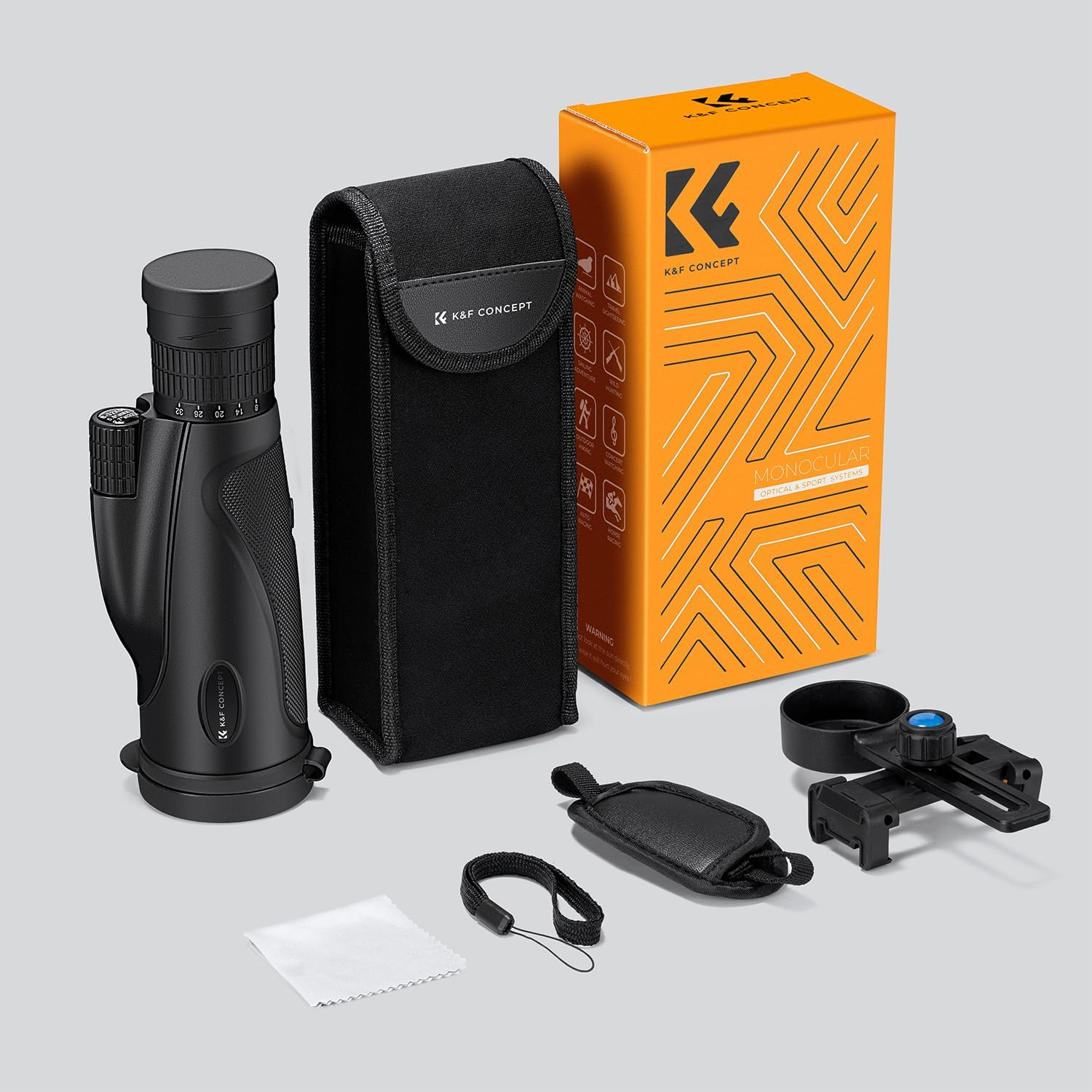
Figure 3.1: All items included in the product package.
3.2 Attaching the Phone Adapter
The included phone adapter allows you to connect your smartphone to the monocular for capturing images and videos.
- Securely attach the phone adapter to the eyepiece of the monocular. Ensure it is snug but do not overtighten.
- Place your smartphone into the phone holder of the adapter. Adjust the clamps to firmly hold your phone.
- Align your phone's camera lens with the monocular's eyepiece. You may need to adjust the phone's position slightly to achieve a full, clear circular view on your phone screen.

Figure 3.2: Demonstrates how to attach and use the smartphone adapter with the monocular.
4. Operating Instructions
4.1 Adjusting Magnification (Zoom)
The monocular features a continuous zoom function from 8x to 32x magnification.
- Locate the zoom ring on the monocular body, typically near the eyepiece.
- Rotate the zoom ring to increase or decrease the magnification. Turn it clockwise to increase magnification and counter-clockwise to decrease it.
- Adjust the magnification to suit your viewing needs, from wide-field observation at lower magnifications to detailed close-ups at higher magnifications.

Figure 4.1: Adjusting the 8-32X continuous zoom for desired magnification.
4.2 Focusing
To achieve a clear image, proper focusing is essential.
- Point the monocular at your desired target.
- Locate the focus wheel, usually on the top or side of the monocular.
- Slowly rotate the focus wheel until the image appears sharp and clear. For dual-focus models, there may be a coarse and fine adjustment.
- If using the phone adapter, ensure the image is clear on your phone screen.
4.3 Low Light Night Vision
The monocular is designed with superior light transmittance efficiency to provide clear images in low-light conditions. Its FMC green film-coated lens helps collect and reflect ambient light.
- This feature enhances visibility in dim environments, such as dawn, dusk, or under moonlight.
- Important Note: The monocular requires some ambient light to function and will not provide an image in complete darkness.

Figure 4.2: Examples of scenes that can be captured and recorded using the monocular.
5. Maintenance
Proper care and maintenance will extend the life and performance of your K&F Concept monocular.
5.1 Cleaning the Lenses
- Use the provided cleaning cloth or a soft, lint-free microfiber cloth specifically designed for optics.
- Gently wipe the lens surfaces to remove dust, smudges, or fingerprints. Avoid using abrasive materials or harsh chemicals.
- For stubborn dirt, a small amount of lens cleaning fluid applied to the cloth (not directly to the lens) can be used.
5.2 Waterproof and Fog Proof Features
The monocular is designed with IP66 waterproof rating and is fog-proof due to nitrogen purging. This allows for use in various weather conditions.
- While waterproof, avoid prolonged submersion.
- After exposure to water, wipe the monocular dry with a clean cloth.

Figure 5.1: The monocular's IP66 waterproof design allows for use in wet conditions.
5.3 Storage
When not in use, store the monocular in its carrying pouch in a cool, dry place, away from direct sunlight and extreme temperatures.
6. Troubleshooting
If you encounter issues with your monocular, refer to the following common problems and solutions:
| Problem | Possible Cause | Solution |
|---|---|---|
| Image is blurry or out of focus. | Improper focus adjustment. | Adjust the focus wheel until the image is sharp. Ensure the eyepiece is clean. |
| Dark edges or vignetting in the view. | Eyepiece not properly positioned against the eye, or phone camera not aligned. | Adjust your eye position relative to the eyepiece. If using a phone adapter, ensure the phone camera is perfectly centered over the monocular's eyepiece. |
| No image in complete darkness. | Monocular is not a true night vision device. | This monocular requires ambient light to function. It will not work in absolute darkness. |
| Difficulty attaching phone adapter. | Incorrect alignment or insufficient adjustment of clamps. | Ensure the adapter is securely fastened to the monocular's eyepiece and the phone clamps are adjusted to fit your phone model. Align the phone camera precisely. |
7. Specifications
| Feature | Specification |
|---|---|
| Brand | K&F Concept |
| Model | 8-32X50 |
| Product Dimensions | 6.89 x 2.95 x 5.91 inches (6.8"D x 2.9"W x 5.9"H) |
| Item Weight | 1.36 pounds |
| Objective Lens Diameter | 50 Millimeters |
| Optical Tube Length | 5 Inches |
| Eye Piece Lens Description | Kent |
| Focus Type | Manual Focus |
| Power Source | NO battery |
| Finderscope | Reflex |
| Compatible Devices | Smartphone |
| Manufacturer | Shenzhen Zhuoer Photograph |
8. Warranty and Support
For warranty information and customer support, please refer to the documentation included with your purchase or contact K&F Concept directly through their official website or the retailer where the product was purchased. K&F Concept offers various protection plans for extended coverage, which can be found at the point of purchase.
Ask a question about this manual
Ask about setup, troubleshooting, compatibility, parts, safety, or missing instructions. Manuals+ will review the question and use this page’s manual context to help answer it.