
OriPure OA-H05
OriPure 5W All Tube Guitar Amplifier Head OA-H05 User Manual
Model: OA-H05 | Brand: OriPure
Introduction
Thank you for choosing the OriPure 5W All Tube Guitar Amplifier Head OA-H05. This amplifier head is designed to deliver versatile and high-quality tube tones for guitarists. Please read this manual thoroughly to understand the features, setup, and operation of your new amplifier.

Image: The OriPure 5W All Tube Guitar Amplifier Head OA-H05, showcasing its compact design and tube layout.
Key Features
- Versatile Sound: Two preamp stages with GAIN/VOLUME controls, BRIGHT/WARM switch, and high/medium/low EQ for diverse tonal options.
- Handcrafted Output Transformer: Features paper insulation and Grain-Oriented Silicon Steel (35Z155-0.35) for improved high-frequency response and low-frequency performance.
- Single-Ended Output Stage: Provides a clean, stable, and moderately powered sound.
- Durable Construction: Housed in a sturdy and stylish cast-aluminum casing.
- Intuitive Controls: Single channel with Volume, Gain, High, Middle, Low knobs, and 8Ω/16Ω output jacks.
Setup Instructions
1. Unpacking and Inspection
Carefully remove the amplifier head from its packaging. Inspect the unit for any signs of damage that may have occurred during shipping. Retain the packaging for future transport or storage.

Image: The amplifier's packaging box, showing its dimensions (315mm x 195mm x 135mm).
2. Tube Overview
The OA-H05 amplifier head utilizes three types of tubes for its operation:
- Preamp Tube: 1 x 12AX7 (ECC83)
- Power Tube: 1 x EL84
- Rectifier Tube: 1 x 6Z4

Image: Labeled diagram of the amplifier's tubes: Rectifier Tube (6Z4), Power Tube (EL84), and Preamp Tube (12AX7).
3. Connecting to a Speaker Cabinet
Before powering on the amplifier, ensure it is connected to a suitable speaker cabinet. The OA-H05 provides two output jacks:
- 8Ω (8 Ohm) Output: For speaker cabinets with an 8 Ohm impedance.
- 16Ω (16 Ohm) Output: For speaker cabinets with a 16 Ohm impedance.
Important: Always connect the amplifier to a speaker cabinet with the correct impedance before turning it on. Operating a tube amplifier without a load can cause severe damage to the output transformer.

Image: Rear panel of the amplifier, highlighting the 8 Ohm and 16 Ohm speaker output jacks and the MAINS SELECT switch.
4. Power Connection and Voltage Selection
Connect the provided power cable to the MAINS input on the rear panel and then to a suitable power outlet. Ensure the MAINS SELECT switch is set to the correct voltage for your region (110V or 220V).
Image: Detail of the amplifier's rear panel, showing the MAINS SELECT switch for 110V or 220V power voltage selection.
5. Guitar Input
Connect your guitar to the IN input jack on the front panel using a standard 6.35mm instrument cable. This is a 1-megohm high-impedance input.

Image: Front panel of the amplifier, illustrating the 6.35mm input jack and a connected guitar cable.
Operating Instructions
1. Powering On and Standby
- Ensure all connections (speaker, power, guitar) are secure.
- Flip the ON switch to the 'ON' position. The power indicator light will illuminate.
- Set the STANDBY switch to 'OFF'. This allows the tubes to warm up with only the filaments heated and no high voltage applied. Wait for approximately 30-60 seconds for the tubes to reach operating temperature.
- After the warm-up period, flip the STANDBY switch to 'ON' for normal operation.
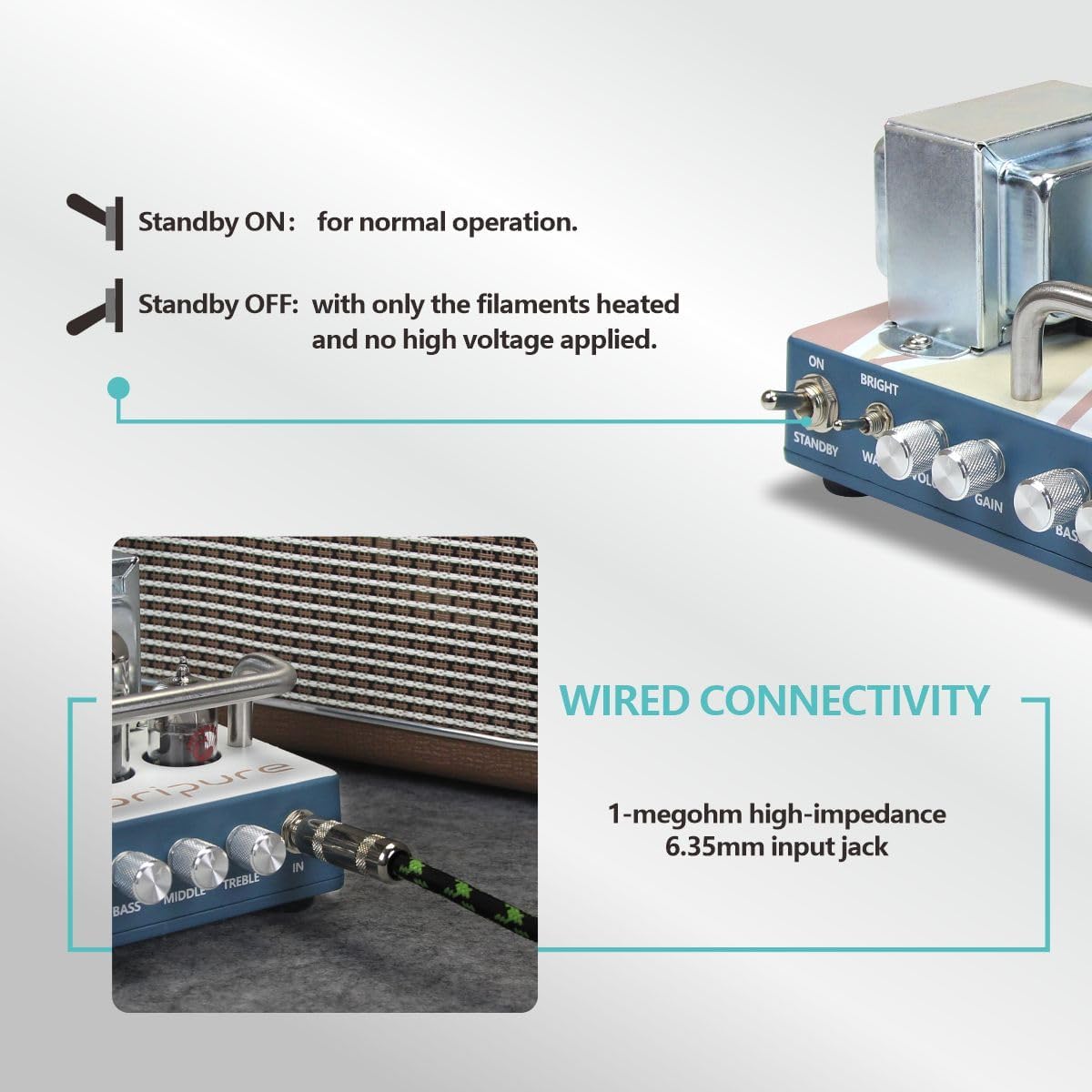
Image: Detail of the amplifier's front panel, showing the ON and STANDBY switches.
2. Controls Overview
The OA-H05 features a single channel with the following controls:
- BRIGHT/WARM Switch: Toggles between a brighter, more articulate tone and a warmer, fuller tone.
- VOLUME: Controls the overall output level of the amplifier.
- GAIN: Adjusts the amount of preamp distortion and sustain. Higher gain settings produce more overdrive.
- BASS: Controls the low-frequency response.
- MIDDLE: Controls the mid-frequency response.
- TREBLE: Controls the high-frequency response.
3. Tone Shaping
Experiment with the GAIN and VOLUME knobs to achieve various tones, from clean to overdriven. The BRIGHT/WARM switch and the 3-band EQ (BASS, MIDDLE, TREBLE) allow for extensive tonal customization to suit different musical styles and preferences.
The amplifier's single-ended output stage provides a distinct tonal character, often praised for its rich harmonics and dynamic response, especially when pushed into natural tube overdrive.

Image: A schematic comparing the signal path of a Single Ended amplifier (like the OA-H05) versus a Push-Pull amplifier, showing how the single power tube processes the entire sine wave.
Maintenance
1. Cleaning
Wipe the amplifier's exterior with a soft, dry cloth. Avoid using abrasive cleaners or solvents, as these can damage the finish. Ensure the amplifier is unplugged before cleaning.
2. Tube Replacement
Tubes have a finite lifespan and may need replacement over time. If you experience a decrease in performance, excessive noise, or inconsistent sound, it may be time to replace one or more tubes. Consult a qualified technician for tube replacement to ensure proper handling and biasing.
When replacing tubes, ensure the amplifier is completely powered off and unplugged, and allow sufficient time for the tubes to cool down. Handle new tubes carefully, avoiding touching the glass with bare hands, as oils can create hot spots and reduce tube life.
Troubleshooting
No Sound
- Check all power connections and ensure the amplifier is plugged into a working outlet.
- Verify that the ON and STANDBY switches are in the correct positions.
- Ensure the speaker cable is securely connected to both the amplifier and the speaker cabinet, and that the speaker impedance matches the amplifier's output.
- Check your guitar cable and guitar's volume knob.
- Allow adequate warm-up time for the tubes.
Weak or Distorted Sound (Unintended)
- Adjust the GAIN and VOLUME controls. High gain settings will naturally produce distortion.
- Check the condition of your tubes. Worn-out tubes can cause weak or muddy sound.
- Ensure the speaker cabinet is functioning correctly.
- Review the Gain Spectrum Schematic to understand how tube amplifiers handle signal clipping compared to solid-state amplifiers.

Image: A schematic illustrating the difference in signal clipping characteristics between tube amplifiers (soft symmetric clipping) and solid-state amplifiers (hard symmetric clipping).
Excessive Noise or Hum
- Ensure all cables are properly shielded and in good condition.
- Try plugging the amplifier into a different power outlet or a power conditioner.
- Move the amplifier away from other electronic devices that might cause interference.
- Faulty tubes can also introduce noise; consider having them checked.
Specifications
| Feature | Detail |
|---|---|
| Product Number | OA-H05 |
| Power Output | 5 Watts |
| Pre-AMP Tube | 1 x 12AX7 (ECC83) |
| Power-AMP Tube | 1 x EL84 |
| Rectifier Tube | 1 x 6Z4 |
| Tone Switch | Bright / Warm |
| Channels | Single Channel |
| Controls | Volume, Gain, Treble, Middle, Bass |
| Output Jacks | 8Ω / 16Ω |
| Item Weight | 6.47 pounds (2.93 kg) |
| Product Dimensions | 5.31 x 7.48 x 4.09 inches (13.5 x 19 x 10.4 cm) |
| Material | Metal (Cast-aluminum casing) |
| Power Source | Corded Electric |

Image: A visual representation of the amplifier's key specifications, including tube types and controls.
Product Video Demonstration
Watch this official video for a demonstration of the OriPure 5W All Tube Guitar Amplifier Head OA-H05, showcasing its features and sound.
Video: Official demonstration of the OriPure 5W Tube Guitar Amplifier Head, highlighting its design and sound capabilities. The background music is a live amplifier demo recording using the OriPure OA-H05 head, an OriPure OA-112 speaker, and a Jerryking electric guitar.
Warranty and Support
For warranty information, technical support, or service inquiries, please contact OriPure customer service. Refer to your purchase documentation for specific warranty terms and contact details.
You can also visit the official OriPure store on Amazon for more information and support: OriPure Store
Related documentsOA-H05


Ask a question about this manual
Ask about setup, troubleshooting, compatibility, parts, safety, or missing instructions. Manuals+ will review the question and use this page’s manual context to help answer it.