
RadioMaster Boxer
RadioMaster Boxer Radio Controller
User Manual
1. Introduction
The RadioMaster Boxer is a compact and ergonomic 2.4GHz radio controller designed for precision control in various RC applications, including FPV drones and other remote-controlled vehicles. It features full-size Hall gimbals and an intuitive button layout, offering a balance of comfort and functionality for pilots on the go.
2. Safety Information
WARNING: Pay attention to polarity when installing cells as they can easily be reversed. Incorrect polarity will damage your radio.
Always ensure the radio controller is powered off before performing any maintenance or battery changes. Keep the device away from moisture, extreme temperatures, and direct sunlight. Do not attempt to disassemble or modify the internal components of the radio controller, as this may void the warranty and cause damage.
3. Package Contents
Upon unboxing your RadioMaster Boxer, please verify that all the following items are included:
- RadioMaster Boxer Radio Controller (Transparent Orange Edition, ELRS)
- Custom RadioMaster Carrying Case
- 18650 Battery Tray (for two 3.7V 18650 Lithium-Ion cells - batteries not included)
- USB-C Cable
- Gimbal Protector
- Assorted Stickers

Image: RadioMaster Boxer Radio Controller, carrying case, and accessories.
4. Product Overview
The RadioMaster Boxer is designed for ease of use and robust performance. Familiarize yourself with its key components:
4.1 Front View

Image: Front view of the RadioMaster Boxer, showing gimbals, display, and control buttons.
The front panel features two full-size Hall gimbals for precise control, a monochrome LCD display (128*64 resolution) for system information and menus, and an array of buttons including SYS, RTN, PAGE, and TELE for navigation. The power button is centrally located above the display.
4.2 Back View

Image: Back view of the RadioMaster Boxer, highlighting the battery compartment and hand grips.
The back of the controller houses the oversized battery compartment, designed to accommodate a 2S 6200mAh pack or two 18650 cells (with adapter). It also features comfortable hand grips for extended use and a strap for secure handling.
4.3 Side View
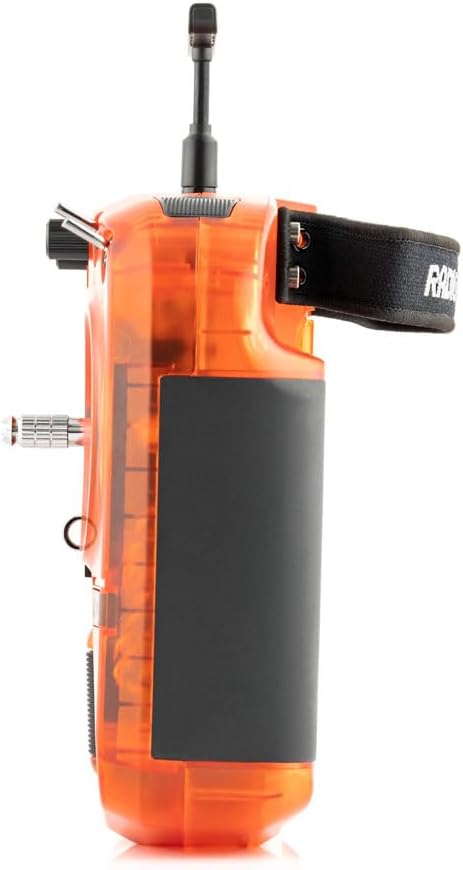
Image: Side view of the RadioMaster Boxer, showing the ergonomic design.
The side profile showcases the compact design and ergonomic contours, making the Boxer comfortable to hold for both thumb and pinch grip styles.
5. Setup
5.1 Battery Installation
- Locate the battery compartment on the back of the RadioMaster Boxer.
- Open the battery compartment cover by sliding the latch.
- Insert your chosen battery (2S Li-Po pack or two 18650 cells in the provided tray) ensuring correct polarity. Refer to the polarity markings inside the compartment.
- Close the battery compartment cover securely until it clicks into place.
5.2 Powering On/Off
- To Power On: Press and hold the central power button until the display illuminates and the boot sequence completes (approximately 5 seconds).
- To Power Off: Press and hold the central power button until the display shows a progress bar and then turns off.
5.3 Gimbal Protection Removal
Before first use, ensure any transit protection or gimbal guards are carefully removed from the gimbals to allow for full range of motion.
6. Operating Instructions
6.1 Basic Controls
- Gimbals (Sticks): Control the primary movements of your RC model (e.g., throttle, yaw, pitch, roll). The Hall gimbals provide smooth and precise input.
- Switches: The Boxer features various switches (e.g., SE, SF) for assigning auxiliary functions such as flight modes, arming, or special actions. Refer to your model's setup for specific assignments.
- Potentiometers/Dials: Used for fine-tuning parameters or continuous control inputs.
6.2 Menu Navigation
The RadioMaster Boxer runs on EdgeTX firmware, offering extensive customization. Navigate the menus using the following controls:
- Scroll Wheel: Located on the right side of the display, used to scroll through menu options. Press to select an option.
- SYS Button: Accesses the system settings menu.
- RTN Button: Returns to the previous screen or exits a menu.
- PAGE Buttons: Navigate between different pages within a menu.
- TELE Button: Accesses telemetry data (if supported by your receiver and model).
6.3 Model Binding
To establish communication between your RadioMaster Boxer and your RC model, you must perform a binding procedure. The exact steps for binding depend on the RF module installed in your Boxer (ELRS or 4-in-1/CC2500) and the receiver in your model. Please refer to the detailed binding instructions provided with your specific RF module and receiver for accurate guidance.
7. Maintenance
- Cleaning: Use a soft, dry cloth to clean the exterior of the radio controller. Avoid using harsh chemicals or abrasive materials.
- Storage: Store the RadioMaster Boxer in its provided carrying case in a cool, dry place, away from direct sunlight and extreme temperatures.
- Battery Care: If storing for an extended period, ensure batteries are charged to a storage voltage (typically around 3.8V per cell for Li-Po) to prolong their lifespan.
- Firmware Updates: Periodically check the official RadioMaster website for firmware updates (EdgeTX) to ensure optimal performance and access to new features. Updates can typically be performed via USB/SD card and EdgeTX Companion PC software.
8. Troubleshooting
| Issue | Possible Cause | Solution |
|---|---|---|
| Controller won't turn on | Low or uncharged battery; Incorrect battery installation | Charge the battery; Check battery polarity and ensure it's securely connected. |
| No signal to model | Not bound to receiver; Incorrect model setup; Antenna not extended | Perform binding procedure; Verify model settings in EdgeTX; Extend the antenna fully. |
| Gimbals feel stiff or unresponsive | Gimbal protector still in place; Dust/debris in gimbals | Remove gimbal protector; Gently clean around gimbals with compressed air. |
| Display is dim or unreadable | Low battery; Contrast settings | Charge the battery; Adjust display contrast in system settings. |
9. Specifications
| Feature | Detail |
|---|---|
| Radio Size | 235 x 178 x 77 mm (9.3 x 7 x 3 inches) |
| Weight | 532.5g (1.17 pounds) |
| Frequency | 2.400GHz - 2.480GHz |
| Internal RF Options | ELRS 2.4GHz (Transparent Orange Edition) / CC2500 multi-protocol / 4-in-1 multi-protocol |
| Transmitting Power (ExpressLRS) | Max 30dBm (international) / Max 20dBm (EU LBT) |
| Voltage Range | 6.6-8.4V DC |
| Radio Firmware | EdgeTX (Transmitter) / Multi-Module (RF module) / ELRS |
| Channels | Max 16 channels (Receiver dependent) |
| Battery | 7.4V 2-cell Lithium-Polymer / Two 3.7V 18650 Lithium-Ion cells (batteries not included) |
| Display | 128*64 Monochrome LCD display |
| Gimbal | High precision 4.0 Hall gimbals as standard (AG01 Optional) |
| External Module | JR/FrSKY/Crossfire compatible |
| Upgrade Method | USB/SD card & EdgeTX Companion PC software |
10. Warranty and Support
The RadioMaster Boxer Radio Controller is covered by a manufacturer's warranty. For detailed information regarding warranty terms, conditions, and duration, please refer to the documentation included with your purchase or visit the official RadioMaster website. For technical support, troubleshooting assistance beyond this manual, or warranty claims, please contact RadioMaster customer service directly through their official channels.
Related documentsBoxer


Ask a question about this manual
Ask about setup, troubleshooting, compatibility, parts, safety, or missing instructions. Manuals+ will review the question and use this page’s manual context to help answer it.