1. Introduction
Thank you for choosing the Merax 270-Degree Power Swivel Recliner. This manual provides essential information for the safe assembly, operation, and maintenance of your new recliner. Please read these instructions thoroughly before use and retain them for future reference.
2. Safety Information
- Ensure all components are securely fastened before use.
- Keep hands and feet clear of moving parts during recline and swivel operations.
- Do not allow children to play on or around the recliner unsupervised.
- Do not exceed the maximum weight capacity of 330 lbs (149 kg).
- Only use the recliner on a stable, level surface.
- Disconnect power before cleaning or performing any maintenance.
3. Package Contents
Verify that all parts are present before beginning assembly. If any parts are missing or damaged, contact customer support.
- Recliner Base
- Recliner Backrest
- Power Adapter
- Swivel Tray Table
- Cell Phone Holder
- Assembly Hardware (if applicable)
4. Assembly Instructions
Assembly is estimated to take approximately 30 minutes. Two people are recommended for easier assembly.
- Carefully unpack all components and place them on a soft, clean surface to prevent scratches.
- Attach the backrest to the seat base, ensuring the connection points align and lock securely.
- Connect the power adapter to the recliner and then to a wall outlet.
- Insert the swivel tray table and cell phone holder into their designated slots on the armrests.
- Confirm all connections are stable and secure before initial use.

5. Operating Instructions
5.1 Power Recline Function
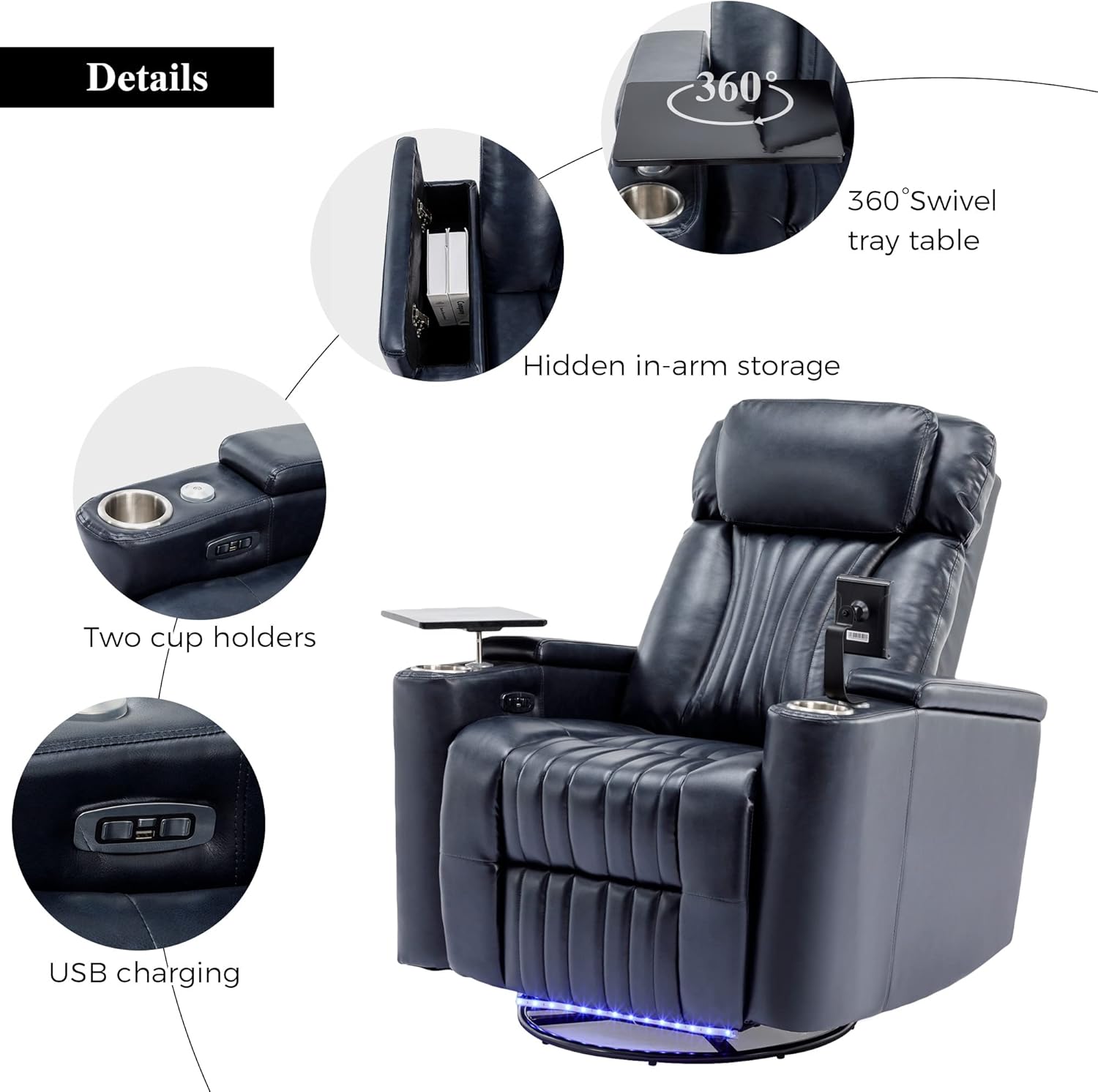
The recliner features electric buttons for adjusting the recline position. Locate the control panel on the side of the armrest.
- Press the forward button to recline the chair from 90 degrees (upright) to approximately 160 degrees (fully reclined).
- Press the backward button to return the chair to the upright position.
5.2 270-Degree Swivel Function
The recliner base allows for a 270-degree swivel motion.
- To swivel, gently push off the floor with your feet or use your hands on the armrests to rotate the chair in the desired direction.

5.3 LED Light Strip
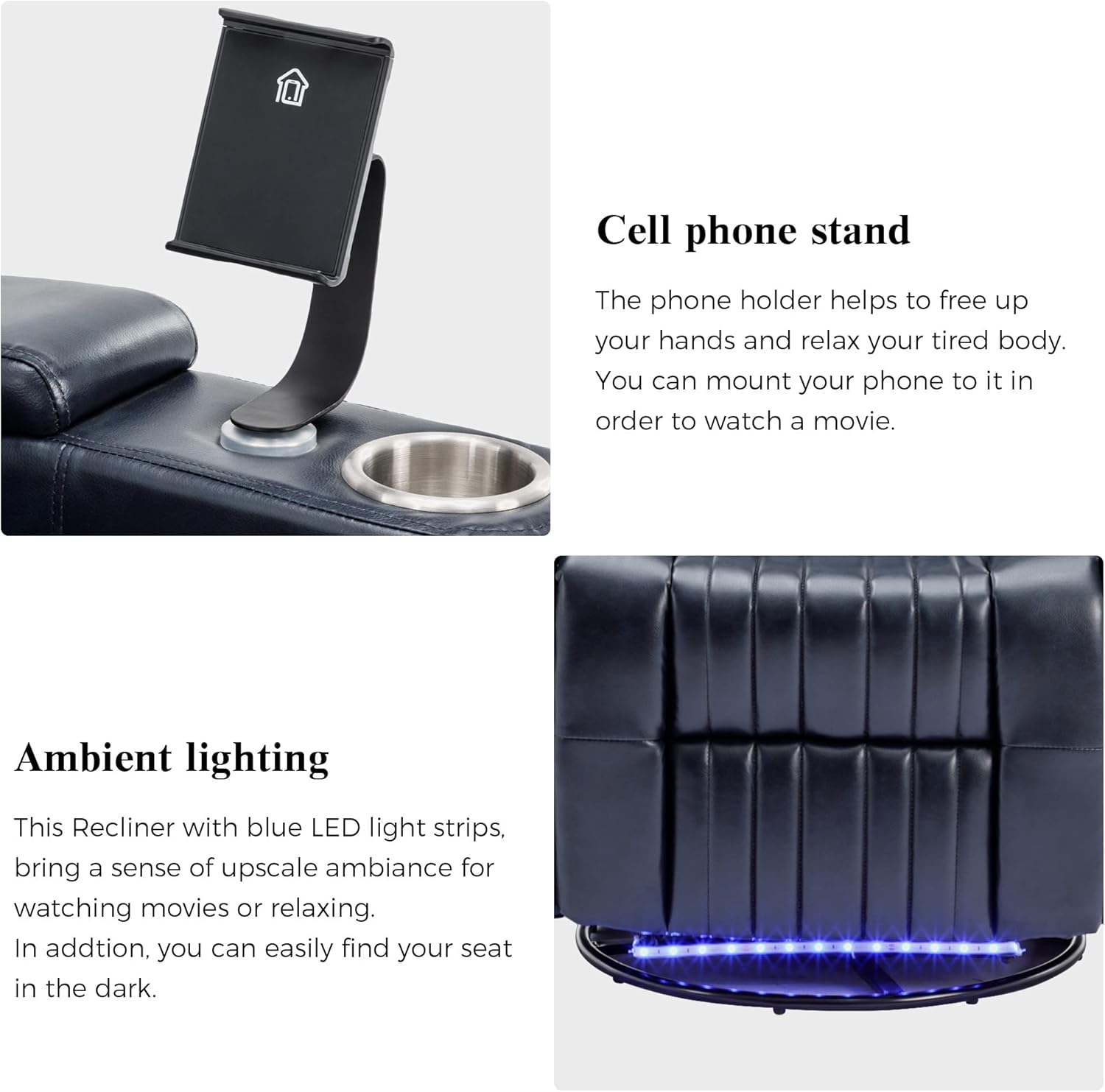
The recliner features an integrated blue LED light strip at the base.
- The LED light strip can be activated or deactivated via a dedicated button on the control panel.
- This feature provides ambient lighting and helps locate the chair in low-light conditions.
5.4 Swivel Tray Table and Cell Phone Holder
The integrated accessories enhance convenience.
- The 360-degree swivel tray table can be used for laptops, tablets, or snacks. Adjust its position as needed.
- The cell phone holder provides a hands-free viewing experience. Insert your device into the holder and adjust the angle.
5.5 USB Charging Port
A USB charging port is located on the control panel.
- Connect your USB charging cable to the port to charge compatible electronic devices.
5.6 Hidden Arm Storage
Each armrest features a hidden storage compartment.
- Lift the armrest cover to access the storage space for remotes, books, or other small items.
Video 1: Demonstration of the Merax Power Swivel Recliner's features, including recline, swivel, LED lighting, and accessory usage.
6. Maintenance
6.1 Cleaning
- Upholstery: The PU leather upholstery should be wiped clean with a soft, damp cloth. Avoid harsh chemicals or abrasive cleaners.
- Frame: Wipe the metal frame with a dry cloth.
6.2 General Care
- Regularly check all bolts and screws to ensure they remain tight.
- Avoid exposing the recliner to direct sunlight or extreme temperatures to prevent material degradation.
7. Troubleshooting
7.1 Recliner Not Operating
- Ensure the power adapter is securely plugged into both the recliner and a working wall outlet.
- Check if the wall outlet is receiving power by testing it with another device.
- Verify that all internal wiring connections are secure (refer to assembly steps if necessary).
7.2 Unusual Noises During Operation
- Ensure the recliner is on a level surface.
- Check for any obstructions around the moving parts of the recline mechanism or swivel base.
- Tighten any loose bolts or screws.
7.3 LED Light Not Functioning
- Ensure the recliner is powered on.
- Press the LED control button to toggle the light on/off.
- Check for any visible damage to the LED strip or its wiring.
8. Specifications
| Feature | Detail |
|---|---|
| Model Name | SG000750AAC-MZJ |
| Brand | Merax |
| Upholstery Material | PU Leather (Faux Leather) |
| Frame Material | Iron + MDF |
| Seat Construction | Foam + MDF |
| Leg Material | Metal |
| Weight Capacity (per seat) | 330 lbs (149 kg) |
| Product Dimensions | 31.6"D x 24.49"W x 20.9"H |
| Reclining Position Count | 2 to 5 (90 to 160 degrees) |
| Swivel Angle | 270 Degrees |
| Special Features | Power Swivel, Hidden Arm Storage, LED Light Strip, Cup Holder, 360-Degree Swivel Tray Table, Cell Phone Holder, USB Charging |
| Product Care Instructions | Wipe Clean |
| Assembly Required | Yes (approx. 30 minutes) |
9. Warranty and Support
For warranty information, technical support, or to order replacement parts, please contact Merax customer service. Refer to your purchase documentation for specific contact details and warranty terms.
Please have your model number (SG000750AAC-MZJ) and purchase date available when contacting support.


