
1. Introduction
Thank you for choosing the LETIANPAI 200FT Smart LED Strip Lights. This product features two 100ft rolls of high-bright 5050 RGB LEDs, designed to illuminate and decorate various indoor spaces. With 16 million color options and 29 dynamic modes, these lights offer versatile ambiance control. The system supports multiple control methods, including a Bluetooth mobile application and an infrared (IR) remote control, along with music synchronization and timing functions.
2. Package Contents
- 2 x 100FT LED Strip Lights
- 1 x Power Adapter
- 1 x IR Remote Control
- 1 x Control Box
3. Safety Information
- Ensure the power adapter is connected to a suitable power source (100-240V).
- The LED strip lights are designed for indoor use only. Avoid exposure to water or high humidity.
- Do not cover the power adapter or control box during operation to prevent overheating.
- The LED strips operate at a low temperature and consume low energy, ensuring safe usage.
- Only cut the LED strips at designated cutting marks to avoid damage.
4. Setup and Installation
Follow these steps to properly set up your LED strip lights:
- Unspool the Strips: Before powering on, fully unroll the LED strips to prevent overheating.
- Prepare the Surface: Ensure the installation surface is clean, dry, and smooth for optimal adhesion.
- Peel and Stick: Remove the protective backing from the 3M adhesive tape on the back of the LED strips and firmly press the strips onto the desired surface.
- Connect the Strips: Connect the two 100ft LED strips to the control box, ensuring the arrows on the connectors align.
- Connect Power: Plug the power adapter into the control box, then plug the power adapter into a wall outlet.
- App Download: Scan the QR code on the control box or visit the provided link to download the "Lotus Lantern" application for your smartphone (iOS/Android).
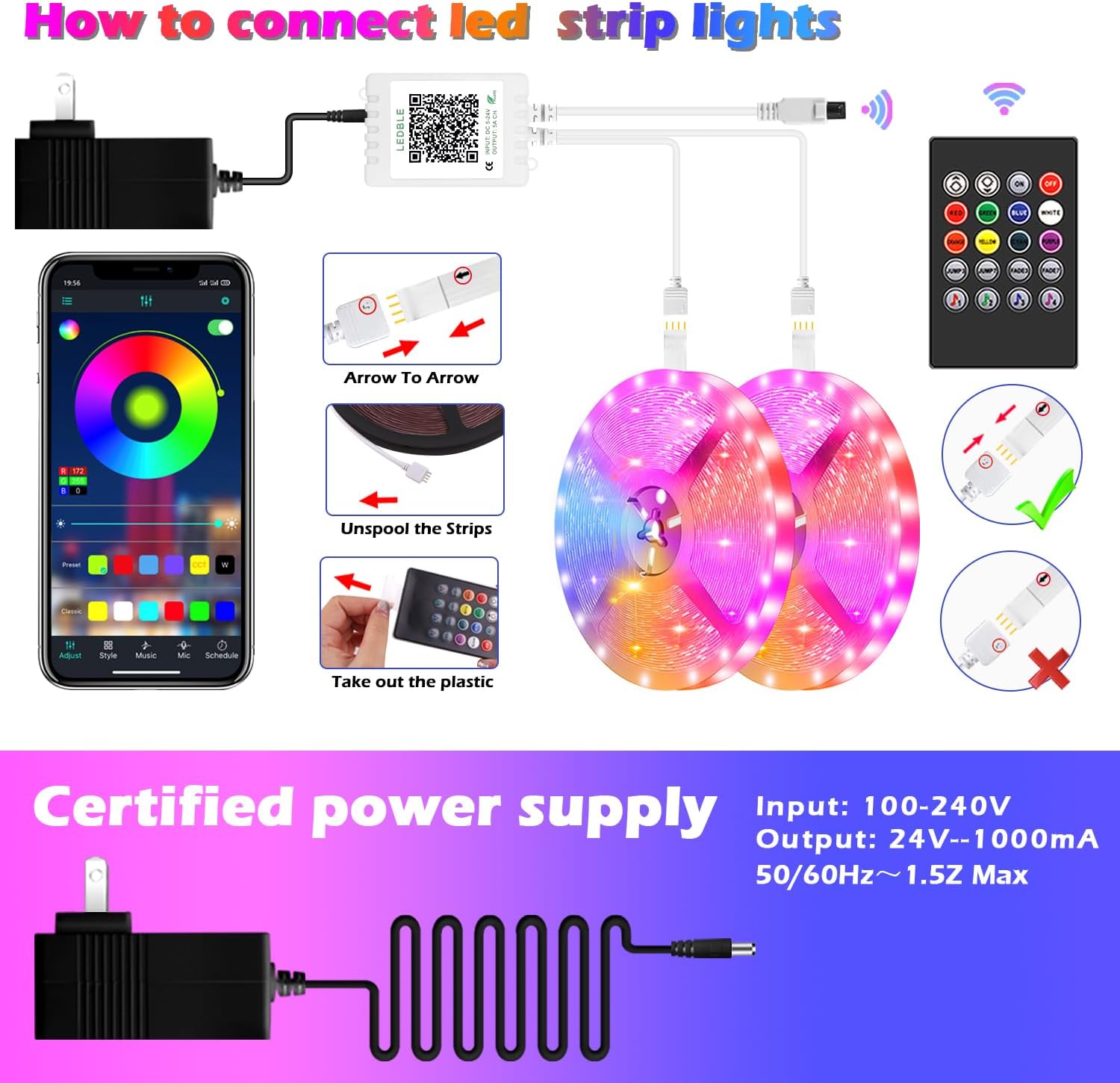
Figure 4.1: Connection Diagram for LED Strip Lights. Ensure 'Arrow to Arrow' alignment for proper connection.

Figure 4.2: Control Box with QR Code. Scan to download the 'Lotus Lantern' app. App download link: http://www.easytrack.net.cn/download/165JINGZEKONGGU
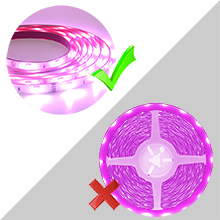
Figure 4.3: Applying the LED Strip. Peel the adhesive backing and press firmly onto a clean surface.
5. Operating Instructions
5.1. App Control (Lotus Lantern)
After downloading and installing the "Lotus Lantern" app, open it and connect to your LED strip lights via Bluetooth. The app provides comprehensive control features:
- Color Selection: Choose from 16 million vivid colors using the color wheel.
- Brightness Adjustment: Easily dim or brighten the lights from 0% to 100%.
- Dynamic Modes: Select from 29 pre-set dynamic modes (e.g., flash, rotate, fades).
- Music & MIC Mode: Sync the lights to music playing on your device or to ambient sounds detected by your phone's microphone. The lights will change color and pulsate with the rhythm.
- Timing Function: Set schedules for the lights to automatically turn on or off at specific times.
- Group Management: Control multiple sets of LED lights simultaneously or individually by organizing them into groups within the app.

Figure 5.1: App Control Interface. Adjust colors, brightness, and modes via the 'Lotus Lantern' app.

Figure 5.2: Music and MIC Mode in action. Lights sync with music or voice for an enhanced atmosphere.

Figure 5.3: Timing Function. Schedule automatic on/off times for convenience.
5.2. IR Remote Control
The included IR remote control provides quick access to essential functions:
- On/Off: Power the lights on or off.
- Brightness/Speed: Adjust the brightness of static colors or the speed of dynamic modes.
- Color Buttons: Select specific static colors (Red, Green, Blue, White, Orange, Yellow, Cyan, Purple).
- Dynamic Modes: Access pre-set modes like Jump3, Jump7, Fade3, Fade7.
- Music Modes: Activate 4 different music synchronization modes.

Figure 5.4: IR Remote Control. Use for convenient control of basic functions.
6. Maintenance
- Keep the LED strips and control box clean and free from dust. Use a soft, dry cloth for cleaning.
- Avoid exposing the lights to direct sunlight or extreme temperatures for extended periods.
- Do not immerse any part of the product in water.
- Regularly check connections to ensure they are secure.
7. Troubleshooting
- Lights not turning on: Check if the power adapter is securely plugged into both the control box and the wall outlet. Ensure the 'Arrow to Arrow' connection between the strips and control box is correct.
- Remote control not working: Ensure the remote has a clear line of sight to the control box. Check if the remote's battery needs replacement.
- App not connecting: Make sure Bluetooth is enabled on your smartphone and the app has permission to access Bluetooth. Restart the app and try reconnecting.
- Inconsistent colors: Verify all connections are secure. If strips were cut, ensure cuts were made at designated marks and re-connections are proper.
8. Specifications
| Model Number | 100FT |
| Brand | LETIANPAI |
| Item Length | 200 Feet (2 x 100ft rolls) |
| Light Source Type | LED (5050 RGB) |
| Light Color | RGB (Red, Green, Blue) |
| Voltage | 12 Volts |
| Wattage | 24 watts |
| Power Source | Corded Electric |
| Control Method | Bluetooth App, IR Remote Control |
| Indoor/Outdoor Usage | Indoor |
| Special Features | Cuttable, Low energy consumption, Music sync, Strong self-adhesive, Flexible |
| Material | Plastic |
| UPC | 785034516177 |
9. Warranty and Support
LETIANPAI is committed to providing high-quality products and customer satisfaction. All accessories included with your LED rope lights are officially certified, and the power adapter has undergone rigorous testing to ensure safety.
If you encounter any issues during installation or operation, please contact our customer support directly. We aim to resolve all inquiries within 24 hours. Full refunds or free replacements are provided for quality-related issues.