
1. Introduction
Thank you for choosing the VRURC 10000mAh Portable Charger. This device is designed for convenience, offering multiple charging options for your mobile devices on the go. It features built-in charging cables and an integrated AC wall plug for easy recharging of the power bank itself. This manual provides essential information for safe and efficient use of your portable charger.

Figure 1: VRURC 10000mAh Portable Charger (Orange)
2. Product Overview
2.1 Key Features
- Built-in Cables: Includes Micro-USB, USB-C, and Lightning cables for direct device charging.
- Integrated AC Wall Plug: Allows direct recharging of the power bank from a wall outlet.
- Additional Ports: Equipped with one USB-A and one USB-C port for external cable use.
- Digital LED Display: Shows the remaining power percentage at a glance.
- Compact Design: Slim and lightweight (5.9 x 2.8 x 0.7 inches, 8 oz) for portability.
2.2 Package Contents
Verify that your package contains the following items:
- 1x VRURC 10000mAh Portable Charger (Model T01)
- 1x User Manual

Figure 2: Package Contents
3. Setup
3.1 Initial Power Bank Charging
Before first use, fully charge your VRURC portable charger. The digital LED display will show the charging progress.
- Using the AC Wall Plug: Fold out the integrated AC wall plug and insert it directly into a standard wall outlet. The power bank will begin charging. This method typically takes approximately 6 hours for a full charge.
- Using a USB-C Adapter (Not Included): Alternatively, you can use a compatible 5V/2.6A USB-C power adapter and cable (not included) to charge the power bank via its USB-C input port. This method typically takes approximately 5 hours for a full charge.

Figure 3: Two Ways to Charge the Power Bank
4. Operating Instructions
4.1 Charging Your Devices
The VRURC portable charger offers versatile charging options for a wide range of devices:
- Using Built-in Cables: Extend the appropriate built-in cable (Micro-USB, USB-C, or Lightning) and connect it directly to your device.
- Using External Cables: Connect your device's charging cable to either the USB-A or USB-C output port on the power bank.
- Simultaneous Charging: The power bank supports charging multiple devices concurrently using a combination of built-in cables and external ports.

Figure 4: Simultaneous Device Charging
4.2 Pass-Through Charging
The power bank supports pass-through charging, allowing it to charge itself from a wall outlet while simultaneously charging connected devices. This feature is convenient for managing power for multiple devices from a single outlet.

Figure 5: Pass-Through Charging in action
4.3 Digital LED Display
Press the power button once to activate the digital LED display, which shows the current battery percentage of the power bank. This allows you to monitor the remaining charge accurately.
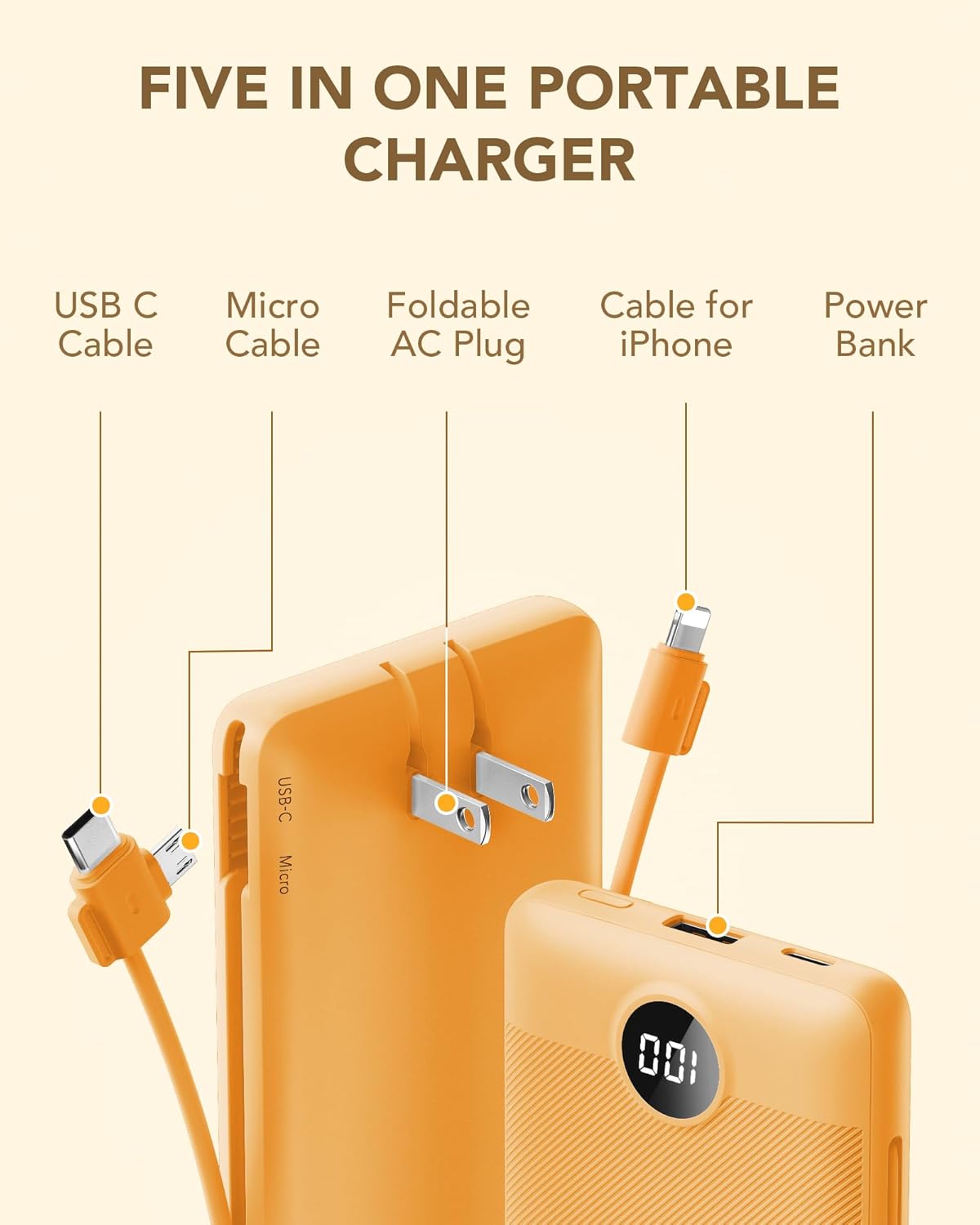
Figure 6: Digital LED Display
4.4 Wide Compatibility
The VRURC portable charger is compatible with a broad range of devices, including iPhones, Android smartphones, tablets, smartwatches, headphones, and other USB-powered gadgets.

Figure 7: Wide Device Compatibility
5. Maintenance
- Keep the charger away from water, moisture, and extreme temperatures.
- Avoid dropping or subjecting the charger to strong impacts.
- Clean the charger with a dry, soft cloth. Do not use harsh chemicals or abrasive materials.
- Store the charger in a cool, dry place when not in use.
6. Troubleshooting
6.1 Charger Not Powering On
- Ensure the power button is pressed firmly.
- Check if the power bank has sufficient charge. Recharge if necessary.
6.2 Device Not Charging
- Verify that the charging cable is securely connected to both the power bank and your device.
- Ensure the power bank has enough charge.
- Try a different charging cable or port on the power bank.
- Confirm your device is compatible with the charger.
6.3 Slow Charging
- Ensure you are using appropriate cables for fast charging, if supported by your device.
- Charging multiple devices simultaneously may reduce individual charging speeds.
7. Specifications
| Feature | Detail |
|---|---|
| Model Number | T01 |
| Battery Capacity | 10000mAh (38.5 Milliamp Hours) |
| Product Dimensions | 5.9 x 2.8 x 0.7 inches |
| Item Weight | 8 ounces |
| Special Features | Built-in Micro, USB-C, Lightning Cables, Integrated AC Wall Plug, Digital LED Display |
| Output Ports | USB-A, USB-C, Built-in Cables |
| Input Ports | AC Wall Plug, USB-C |
8. Warranty and Support
VRURC is committed to providing quality products and customer satisfaction. This product includes:
- 12-Month Care Plan: For product defects or issues under normal use.
- 30-Day Exchange Service: For eligible returns or exchanges.
- 24-Hour Friendly Customer Service: For assistance with any product-related inquiries.
For support, please refer to the contact information provided in your product packaging or visit the official VRURC website.
9. Official Product Video
Video 1: Overview of the VRURC Portable Charger's features, including built-in cables and AC wall plug.


