
1. Introduction
Thank you for purchasing the CIO SMARTCOBY TRIO 20000mAh 65W Mobile Battery. This device is designed to provide portable, high-speed charging for a wide range of electronic devices, from smartphones to laptops. Please read this manual carefully before use to ensure safe and optimal performance.

The CIO SMARTCOBY TRIO 20000mAh 65W Mobile Battery in white, showcasing its compact design and multiple ports.

An overview of the SMARTCOBY TRIO's key features, including its 20000mAh capacity, 67W max output, NovaIntelligence, and digital display.
2. Product Features
2.1. Ultra-Compact Card Size
Despite being a 20000mAh mobile battery, the SMARTCOBY TRIO achieves an overwhelmingly small card size, making it easy to hold and carry casually. Its high output and compact design allow it to charge various devices multiple times. For example, it can charge an iPhone 15 approximately 3.5 times, a Galaxy S23 approximately 3.0 times, an iPad Pro 11-inch approximately 1.5 times, and a MacBook Air approximately 0.8 times. Please note that the number of charges is an estimate and may vary depending on the device's power status and charging conditions.

The SMARTCOBY TRIO's compact size is demonstrated by its comparison to a standard credit card, highlighting its portability.

Visual representation of the 20000mAh capacity, showing approximate charge cycles for iPhone, Galaxy, iPad, and MacBook Air.
2.2. Single Port Max 67W High Output
This single mobile battery supports charging for various scenarios and devices. With a maximum single-port output of 67W via Type-C, it can charge not only earphones, smartwatches, smartphones (iPhone, Galaxy, Xperia, etc. Android phones), and tablets (iPad / iPad mini / iPad Pro), but also laptops (MacBook / MacBook Air / MacBook Pro, Lenovo, HP, and all other Windows PCs, etc.), and gaming consoles (Switch, etc.) at maximum output.

The SMARTCOBY TRIO connected to and charging an iPhone, iPad, Nintendo Switch, and MacBook, illustrating its versatility.
2.3. Supports Simultaneous Charging
Equipped with two USB Type-C ports and one USB-A port, it supports simultaneous charging of up to 3 devices. In addition to charging a smartphone + earphones + laptop, it is also possible to charge two laptops simultaneously*. When simultaneously charging only the two Type-C ports, it supports a total output of up to 65W. Depending on the combination of laptops, simultaneous charging of two devices may not be possible.

The SMARTCOBY TRIO's three ports (two USB-C, one USB-A) are visible, with an example of two laptops being charged simultaneously.
2.4. Equipped with CIO's Proprietary Control Technology NovaIntelligence
NovaIntelligence automatically adjusts power according to the connected device, eliminating the need to worry about port output when connecting devices. This allows for comfortable and stress-free charging even during simultaneous charging. With 65W high output, it supports charging from smartphones to laptops. Furthermore, CIO's Nova Intelligence automatically distributes the appropriate power to devices when charging two devices simultaneously. A compatible cable is required for high-output charging. Some devices may not be chargeable due to incompatible specifications.

An illustration of the NovaIntelligence technology, showing how the power bank intelligently distributes optimal power to connected devices.
2.5. Digital Remaining Battery Display
The remaining battery is displayed digitally in 1% increments, making it easy to see. You can quickly notice when the battery is low and charge it at the appropriate time. The numerical display provides peace of mind during use. The display flashes during charging.

A close-up of the SMARTCOBY TRIO's digital display, clearly showing the battery percentage.
2.6. Functional Exterior Design
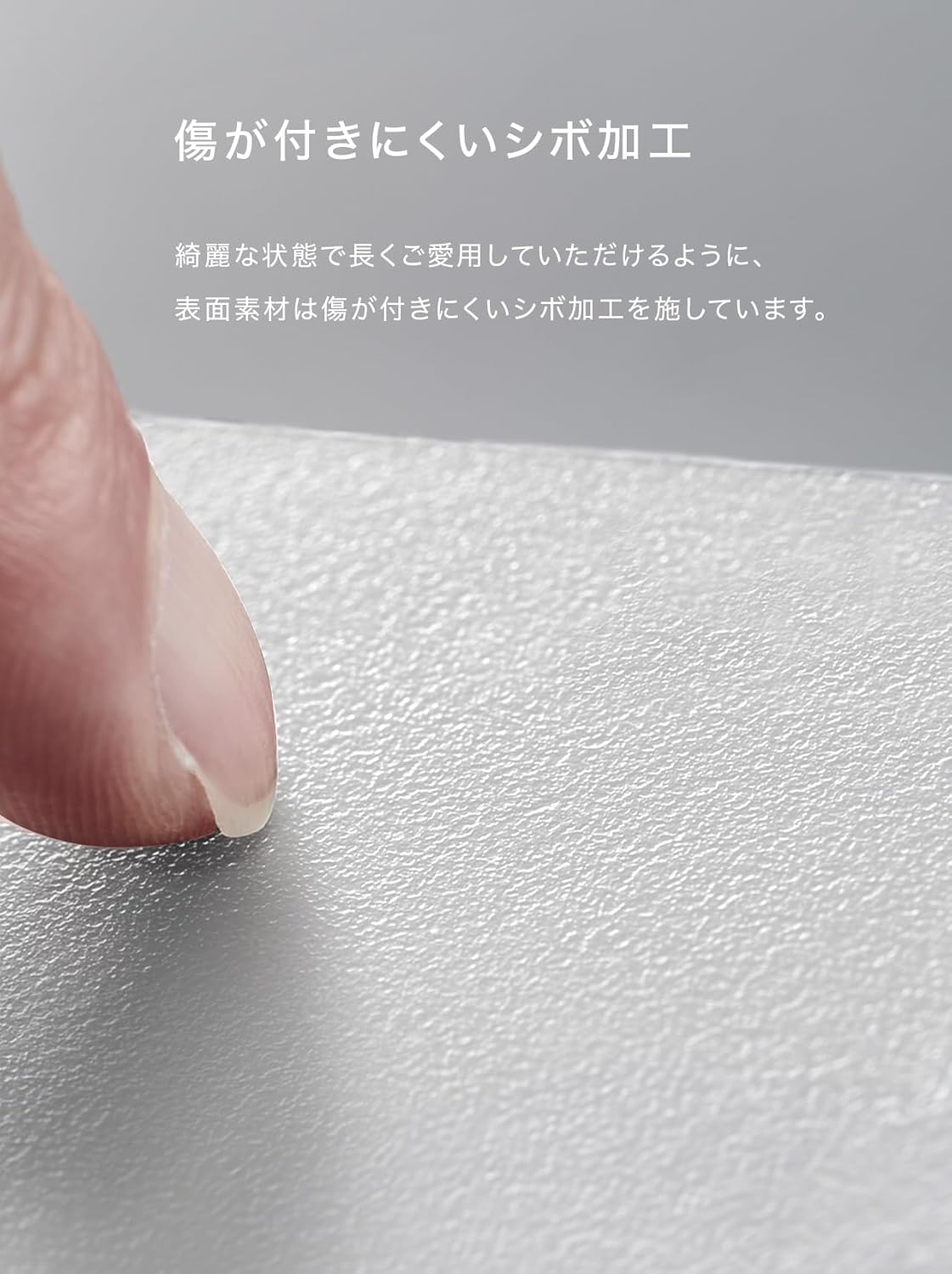
To ensure you can enjoy our product for a long time, we implemented a textured finish on the product surface, similar to the body of a DSLR camera. This makes it less prone to minor scratches, such as scuffs, when carried, allowing the product to be kept in a beautiful condition. We aimed for a sophisticated design that satisfies the desire for ownership.

A close-up view of the SMARTCOBY TRIO's textured surface, designed to be scratch-resistant and provide a good grip.
3. Setup
3.1. Unboxing and Initial Inspection
Upon receiving your SMARTCOBY TRIO, carefully open the packaging. The box contents include:
- CIO SMARTCOBY TRIO 20000mAh 65W Mobile Battery
- Charging cable (USB Type-C)
- Instruction manual (Japanese/English)
Inspect the device for any visible damage. While products are opened for operational inspection to ensure quality, rest assured that your product is new and unused.
3.2. Initial Charging of the Power Bank
Before first use, it is recommended to fully charge the SMARTCOBY TRIO. Connect the included USB Type-C cable to one of the USB-C input/output ports on the power bank and the other end to a compatible USB charger (a 67W output charger is recommended for fastest charging). The digital display will show the charging progress.
4. Operating Instructions
4.1. Charging Your Devices
To charge your electronic devices:
- Connect your device to one of the SMARTCOBY TRIO's output ports (USB-C or USB-A) using a compatible charging cable.
- The power bank will automatically detect your device and begin charging. The NovaIntelligence technology will optimize the power output for your device.
- Monitor the charging status on your device and the power bank's digital display.
4.2. Simultaneous Charging
The SMARTCOBY TRIO supports charging up to three devices simultaneously. Simply connect each device to an available port (two USB-C, one USB-A). The power bank will intelligently distribute power among the connected devices.
4.3. Pass-Through Charging
The SMARTCOBY TRIO supports pass-through charging, allowing you to charge the power bank itself while simultaneously charging your devices. This feature is particularly useful for charging laptops at maximum speed.
An illustration showing the SMARTCOBY TRIO being charged from a wall outlet while simultaneously charging a laptop, demonstrating pass-through charging.
5. Maintenance
To ensure the longevity and optimal performance of your SMARTCOBY TRIO, please follow these maintenance guidelines:
- Avoid High Temperatures: Do not store the power bank in high-temperature environments, such as direct sunlight or inside a hot car.
- Prevent Overcharging: Avoid prolonged overcharging. Once the power bank is fully charged, disconnect it from the power source.
- Regular Charging for Storage: If the power bank will not be used for a long period, it may experience natural discharge and fail to power on. It is recommended to charge it periodically (e.g., every 3-6 months) to maintain battery health.
- Clean USB Ports: Dirty USB ports can cause poor contact and prevent proper charging. If power is not supplied, gently clean the port area before trying again.
6. Troubleshooting
If you encounter issues with your SMARTCOBY TRIO, please refer to the following common troubleshooting tips:
- Device Not Charging:
- Ensure the charging cable is securely connected to both the power bank and your device.
- Check if the USB ports on both the power bank and your device are clean and free of debris.
- Verify that your device supports power supply from a mobile battery. Consult your device's manufacturer if unsure.
- Ensure you are using a PD/QC compatible cable for Power Delivery (PD) or Quick Charge (QC) charging.
- Power Bank Not Charging:
- Ensure you are using the USB-C port for charging the power bank itself, as the USB-A port does not support input.
- Verify that your USB charger is functioning correctly and provides sufficient output (a 67W output USB charger is required for maximum charging speed).
- If the power bank has been stored for a long period, it may require a brief period of charging to reactivate.
- Physical Damage: If the product is subjected to strong impact, such as dropping, before or during use, there is a possibility that the intended power supply may not be possible. In such cases, please contact customer support.
If the issue persists after trying these steps, please contact CIO customer support with your Amazon order number for assistance.
7. Specifications
Below are the detailed specifications for the CIO SMARTCOBY TRIO 20000mAh 65W Mobile Battery:
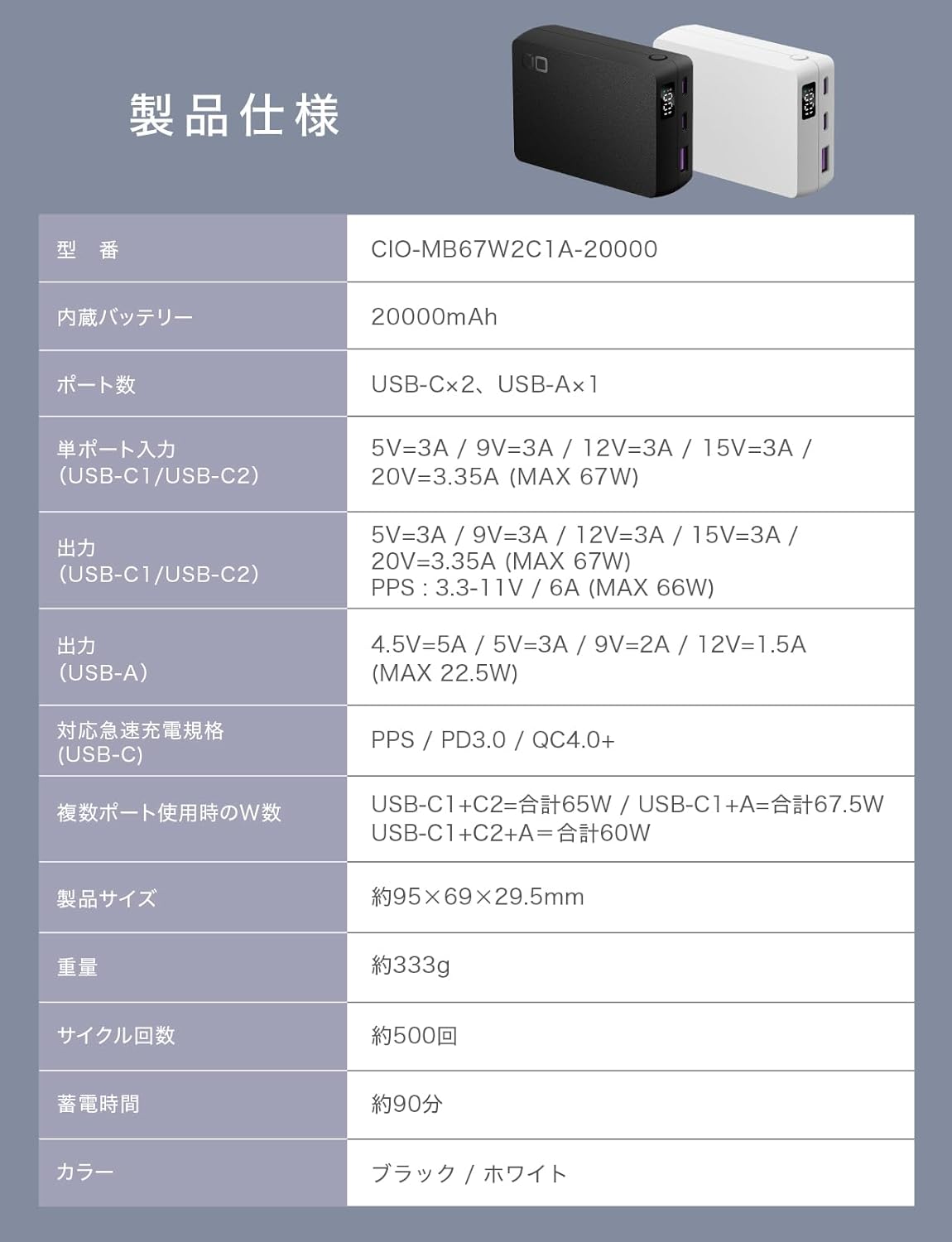
A detailed table outlining the technical specifications of the SMARTCOBY TRIO.
| Feature | Specification |
|---|---|
| Model Number | CIO-MB67W2C1A-20000 |
| Built-in Battery | 20000mAh |
| Number of Ports | USB-C x2, USB-A x1 |
| Single Port Input (USB-C1/USB-C2) | 5V=3A / 9V=3A / 12V=3A / 15V=3A / 20V=3.35A (MAX 67W) |
| Output (USB-C1/USB-C2) | 5V=3A / 9V=3A / 12V=3A / 15V=3A / 20V=3.35A (MAX 67W) PPS : 3.3-11V / 6A (MAX 66W) |
| Output (USB-A) | 4.5V=5A / 5V=3A / 9V=2A / 12V=1.5A (MAX 22.5W) |
| Supported Fast Charging Standards | PPS / PD3.0 / QC4.0+ |
| Total Wattage when Multiple Ports Used | USB-C1+C2=Total 65W / USB-C1+A=Total 67.5W / USB-C1+C2+A=Total 60W |
| Product Size | Approx. 95×69×29.5mm |
| Weight | Approx. 333g |
| Cycle Count | Approx. 500 cycles |
| Charging Time (Power Bank) | Approx. 90 minutes |
| Color | Black / White |
8. Warranty and Support
8.1. CIO Reliable Warranty Support
As a Japanese manufacturer, CIO is committed to properly addressing any operational defects. In case of initial defects or product defects during use, please contact us first. Providing your Amazon order number when contacting us will ensure a smoother process.
8.2. Mobile Battery Recycling Service
Due to the characteristics of lithium-ion batteries and recent news, we understand that many people are hesitant about handling mobile batteries, partly because they cannot be disposed of as general waste. At CIO, we believe our relationship with you begins after your purchase. Therefore, to ensure you can use 'SMARTCOBY TRIO' with greater peace of mind and comfort, we have joined the Japan Battery Recycling Center (JBRC). We collect unwanted mobile batteries manufactured by CIO, as well as products from other companies, at electronics retailers nationwide and at CIO's head office. If you are considering replacing your mobile battery, please apply via our official website for a discount coupon.


