
Introduction
This manual provides essential information for the safe and efficient operation of your TESSAN 65W 9-in-1 USB Charging Station. Please read it thoroughly before use and retain it for future reference.
Safety Instructions
- Do not expose the device to water or excessive moisture.
- Do not disassemble or attempt to repair the device.
- Use only with compatible voltage (125V AC).
- Avoid overloading the AC outlets beyond 1250W.
- Keep out of reach of children.
- Ensure proper ventilation around the charging station.
Package Contents
- 1 x TESSAN 65W 9-in-1 USB Charging Station (Model TS-CS01)
- 1 x Power Cord (5 feet)
- 1 x User Manual
Product Overview
The TESSAN 65W 9-in-1 USB Charging Station is designed to provide a centralized power solution for multiple electronic devices. It features a compact vertical design, GaN fast charging technology, and multiple port types.
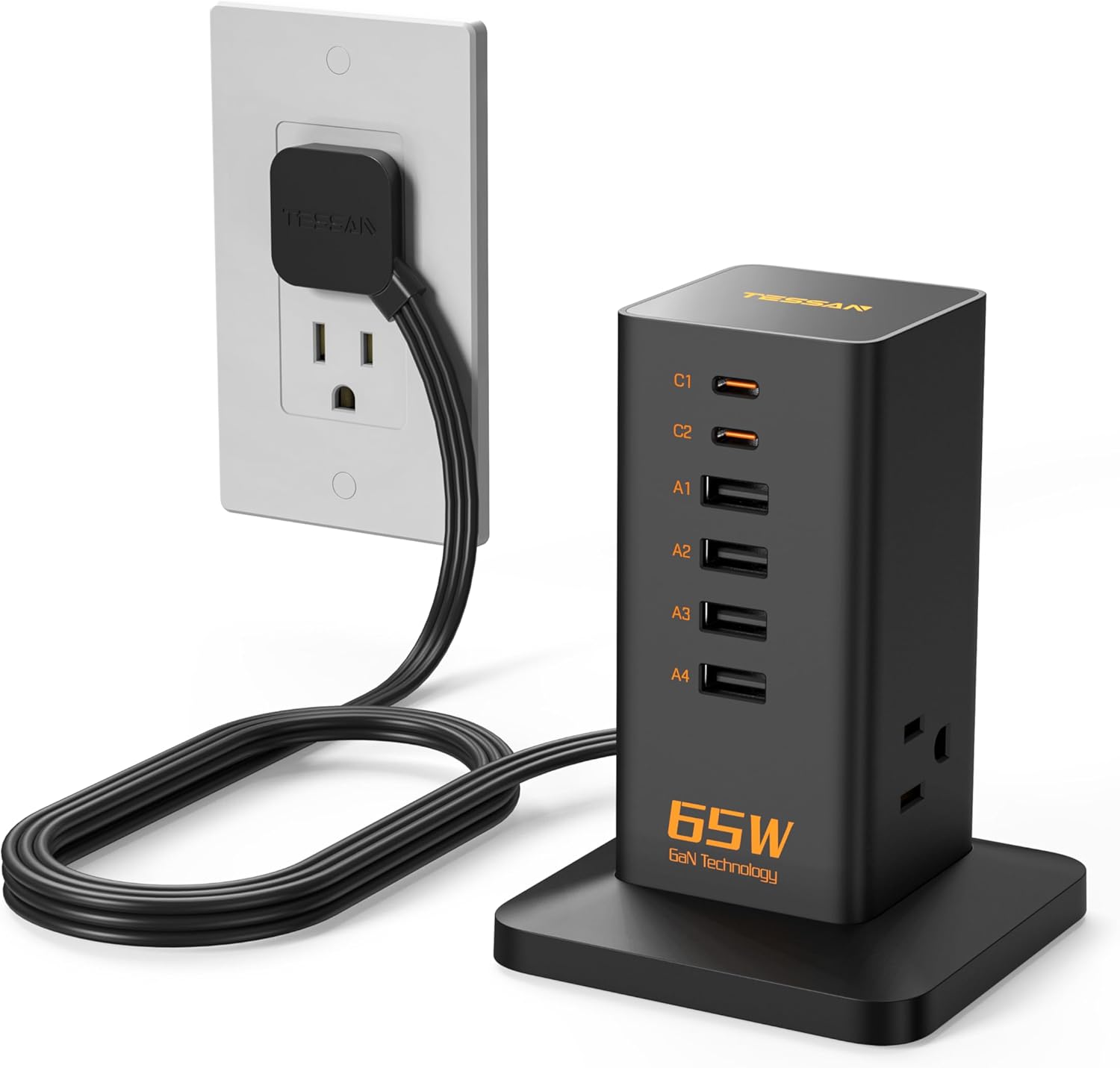
Image: The TESSAN 65W 9-in-1 USB Charging Station, black in color, connected to a wall outlet via its power cord. The station features multiple USB-A and USB-C ports, along with AC outlets on the side.
Setup
- Place the charging station on a stable, flat surface.
- Connect the integrated 5-foot power cord to a standard 125V AC wall outlet. The flat plug design allows for placement behind furniture.
- A blue indicator light on top of the station will illuminate, indicating it is powered on and ready for use.

Image: A visual comparison highlighting the ultra-thin flat plug of the TESSAN charging station, designed to fit in narrow spaces, next to a standard, bulkier plug.
Operating Instructions
Charging Devices
The charging station offers 9 power outputs: 3 AC outlets, 2 USB-C ports, and 4 USB-A ports.
- USB-C Ports (C1, C2): These ports support Power Delivery (PD) up to 65W, ideal for fast charging compatible smartphones, tablets, and laptops (e.g., MacBook, iPhone 15/16/17 series).
- USB-A Ports (A1, A2, A3, A4): These ports provide standard USB charging for a wide range of devices such as older smartphones, smartwatches, headphones, and other USB-powered accessories.
- AC Outlets: The three standard AC outlets (rated 1250W) can power larger electronics like laptops, lamps, or other small appliances.
Simply connect your device's charging cable to the appropriate port on the station. The station will automatically detect and deliver the optimal charging current.

Image: The TESSAN 65W charging station actively charging a MacBook Air 15 via a USB-C port and an iPhone via another USB-C port, demonstrating its fast-charging capabilities.

Image: A TESSAN 9-in-1 USB Charging Station on a desk, with various devices like a smartphone, headphones, and a laptop connected to its USB and AC ports, illustrating its multi-device charging capability.
GaN Technology
This charging station incorporates advanced Gallium Nitride (GaN) technology. GaN allows for smaller, more efficient chargers that generate less heat compared to traditional silicon-based chargers. This results in faster charging speeds and improved device longevity by reducing heat-related wear.
The PD 65W output can charge compatible phones from 0% to 80% in approximately 30 minutes.
Compatibility
The TESSAN 65W 9-in-1 USB Charging Station is compatible with a wide array of devices, including but not limited to:
- Smartphones: iPhone 17/16/15 Series, iPhone 14/14 Plus/14 Pro/14 Pro Max, iPhone 13/12/12pro/12mini/12pro max/SE/11/11 Pro/11 Pro Max/XS/XS Max/XR/X/8 Plus/8/7 Plus/7/6 Plus/6/6S, Samsung Galaxy S20/S10/S10+/S10e/S9/S9+/S8/S8+/Note 9/Note 8/A60/A50/A40/A30/A20e/A20/M30s/A30s/A50s/M40/M30/M20, Google Pixel 4 XL/4/3a/3 XL/3/2 XL/2, Nexus 5x/6p, LG G5/G6/G7/V20/V30/V40/V50/ThinQ Q70, HTC 10/U12+.
- Tablets: iPad Pro, iPad Air, iPad Mini, other Android tablets.
- Laptops: MacBook, MacBook Air, other USB-C compatible laptops.
- Wearables: Apple Watch, AirPods, smartwatches.
- Other Devices: Cameras, headphones, power banks, small home appliances (within 1250W limit).

Image: A graphic illustrating the wide compatibility of the TESSAN charging station, showing examples of devices that can be charged via its AC outlets (coffee machine, hair dryer), USB-A ports (USB camera, printer), and USB-C ports (mobile phones, laptops).
Maintenance
- Disconnect the power cord before cleaning.
- Wipe the device with a soft, dry cloth. Do not use liquid cleaners.
- Store in a cool, dry place when not in use.
Troubleshooting
Device not charging:
- Ensure the charging station is properly plugged into a live wall outlet and the indicator light is on.
- Check if the charging cable is securely connected to both the station and your device.
- Try a different port or cable to rule out a faulty connection.
- Verify your device is compatible with the charging port (e.g., USB-C for fast charging).
Slow charging:
- Ensure your device and cable support fast charging protocols (e.g., PD for USB-C).
- If multiple devices are connected, the total power output is shared. Disconnecting some devices may increase charging speed for others.
- Check the power requirements of your device against the station's output specifications.
Specifications
| Feature | Specification |
|---|---|
| Model Number | TS-CS01 |
| Input Voltage | 125V AC |
| Max AC Output | 1250W |
| USB-C Output | Up to 65W Power Delivery (PD) |
| USB-A Output | Standard Charging |
| Total USB Ports | 6 (2 USB-C, 4 USB-A) |
| AC Outlets | 3 |
| Special Feature | GaN Fast Charger Technology |
| Dimensions | 5.59 x 4.49 x 3.62 inches |
| Item Weight | 1.01 pounds |
Official Product Videos
Video: A detailed overview of the TESSAN 9-in-1 Charging Station, showcasing its features, multiple ports (USB-A, USB-C, AC outlets), and compact design. The video demonstrates how various devices can be charged simultaneously, highlighting the convenience and space-saving benefits.
Video: A quick look at the TESSAN 65W Fast-Charging Power Tower, emphasizing its ability to charge multiple devices rapidly and efficiently. The video highlights its compact form factor and the benefits of GaN technology for quick power delivery.
Warranty & Support
For warranty information and customer support, please refer to the official TESSAN website or contact their customer service directly. Details are typically provided on the product packaging or through the retailer.