
1. Introduction and Overview
The KONGTEN VICTOR/RuoShui VC97 is a stable and high-performance digital multimeter designed for accurate electrical measurements. This battery-powered instrument features a clear 42mm high LCD display, ensuring easy readability of measurements. It incorporates a backlight function for low-light conditions and robust overload protection for enhanced safety and durability. The VC97 is capable of measuring a wide range of electrical parameters, including DC voltage, AC voltage, DC current, AC current, resistance, capacitance, frequency, and temperature. Additionally, it supports transistor, diode, and continuity testing.

Image 1.1: Front view of the VICTOR/RuoShui VC97 Digital Multimeter, showing its orange casing and display.
2. Safety Information
Always observe safety precautions when using the multimeter. Ensure the correct function and range are selected before making any measurements. Do not exceed the maximum input values for each range. Always disconnect test leads from the circuit before changing functions or ranges. Replace batteries promptly when the low battery indicator appears to ensure accurate readings and proper operation. This device is rated for CAT IV 600V and CAT III 1000V.
3. Product Features and Components
The VC97 multimeter is equipped with several key features and components designed for ease of use and accuracy:
- LCD Display: A large, high-definition screen with 3999 counts (3 3/4 digits) for clear digital readings. Features auto polarity indication.
- Backlight Switch: Activates the display backlight for improved visibility in dimly lit environments. The backlight automatically turns off after 15 seconds to conserve battery.
- Accurate Gear Knob: A tactile and robust rotary switch for selecting measurement functions and ranges.
- Test Lead Jacks: Dedicated input jacks for connecting test leads, including 10A, mA, COM (Common), and VΩHzTemp inputs.
- Auto Power Off: Automatically powers off the device after a period of inactivity to save battery life.
- Overload Protection: Integrated protection to prevent damage to the meter from excessive input.
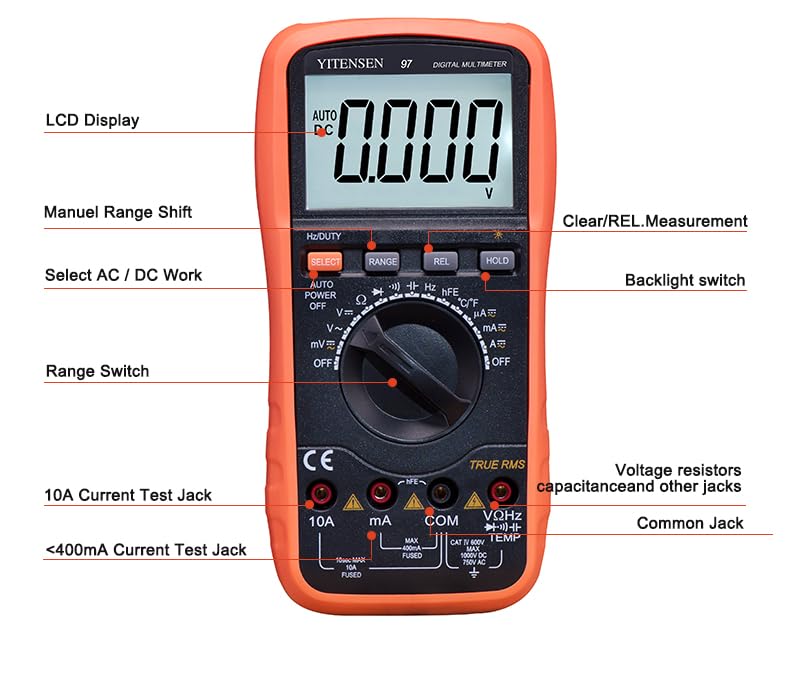
Image 3.1: Front view of the multimeter with key components labeled, including the LCD display, function knob, and input jacks.
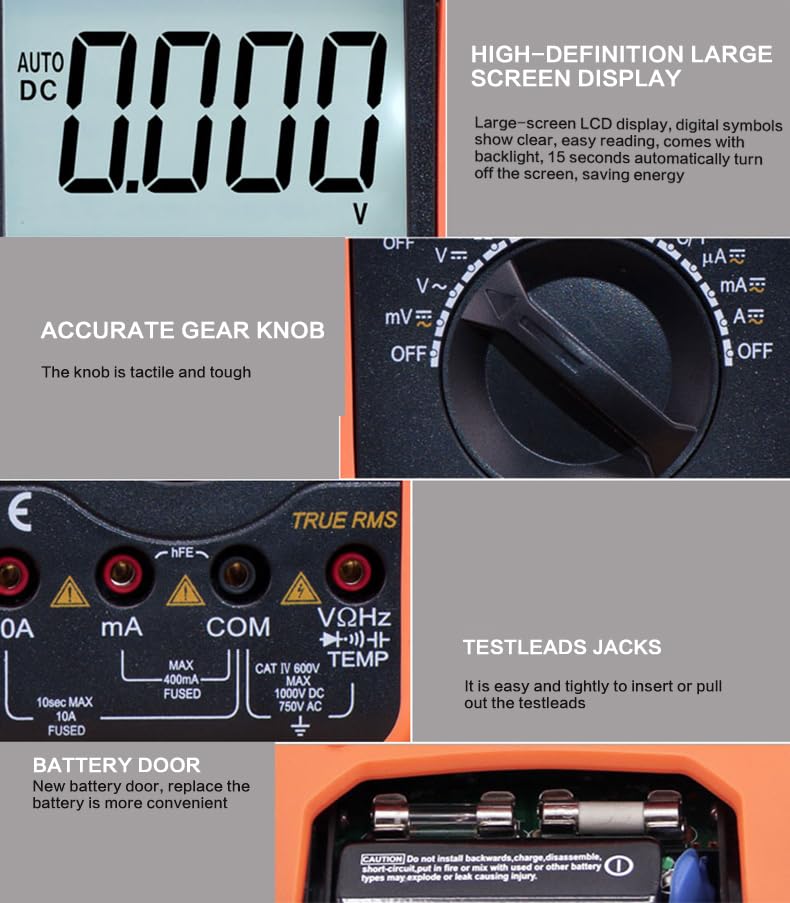
Image 3.2: Close-up views highlighting the high-definition LCD screen, accurate gear knob, test lead jacks, and the convenient battery door.
4. Setup
4.1. Battery Installation
The VC97 multimeter requires a standard 9-volt battery for operation. To install or replace the battery:
- Ensure the multimeter is powered off.
- Locate the battery door on the rear of the device.
- Open the battery door.
- Insert a new 9-volt battery, observing the correct polarity.
- Close the battery door securely.
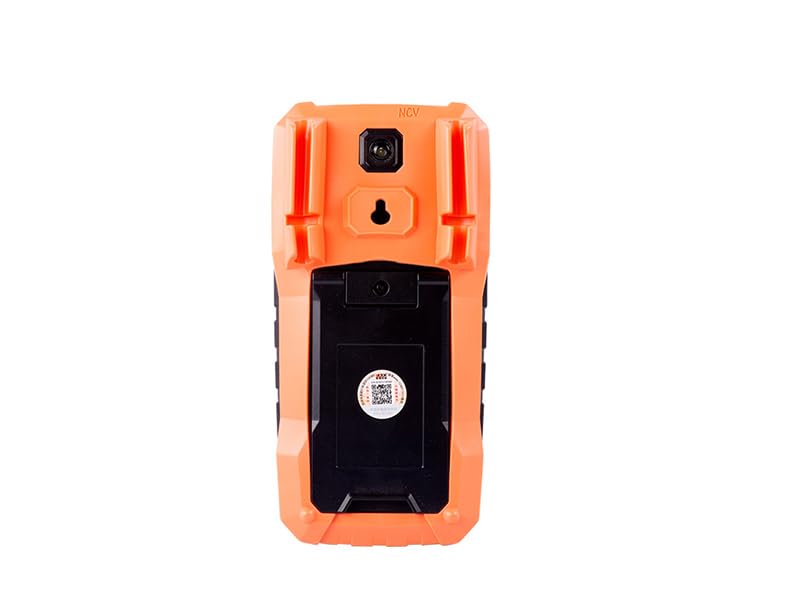
Image 4.1: Rear view of the multimeter, showing the battery compartment location.
4.2. Connecting Test Leads
Connect the included test leads to the appropriate input jacks on the multimeter. The black test lead typically connects to the 'COM' (Common) jack. The red test lead connects to the 'VΩHzTemp' jack for voltage, resistance, frequency, and temperature measurements, or to the 'mA' or '10A' jacks for current measurements, depending on the expected current level.

Image 4.2: Included accessories, showing the test leads and temperature probe.
5. Operating Instructions
The VC97 multimeter uses a dual-slope integrating A/D converter system with a sampling rate of approximately 3 times per second. It features auto-ranging for most functions, simplifying operation.
5.1. Basic Measurement Steps
- Turn the rotary switch to the desired measurement function (e.g., V∼ for AC Voltage, V− for DC Voltage, Ω for Resistance).
- Connect the test leads to the circuit or component under test.
- Read the measurement value on the LCD display.
- For functions with multiple ranges (e.g., current), ensure the red test lead is connected to the appropriate jack (mA or 10A).
5.2. Specific Functions
- DC/AC Voltage (V−/V∼): Select the appropriate voltage range. Connect test leads in parallel with the circuit.
- DC/AC Current (A−/A∼): Select the appropriate current range (mA or 10A). Connect test leads in series with the circuit.
- Resistance (Ω): Select the resistance range. Connect test leads across the component. Ensure the circuit is de-energized.
- Capacitance (F): Select the capacitance range. Connect test leads across the capacitor. Ensure the capacitor is discharged before testing.
- Frequency (Hz): Select the frequency range. Connect test leads to the signal source.
- Temperature (℃/℉): Connect the TP01 thermocouple to the dedicated temperature input jacks. Select the temperature function.
- Diode Test: Select the diode symbol function. Connect test leads across the diode.
- Continuity Test: Select the continuity symbol function. Connect test leads across the circuit. An audible tone indicates continuity.
6. Maintenance
6.1. Battery Replacement
When the low battery indicator appears on the display, replace the 9-volt battery as described in Section 4.1. Prompt battery replacement ensures continued accuracy and proper functioning of the multimeter.
6.2. Cleaning
To clean the multimeter, use a soft, damp cloth with a mild detergent. Do not use abrasive cleaners or solvents, as these may damage the casing or display. Ensure the device is powered off and disconnected from any circuits before cleaning.
7. Troubleshooting
- "OL" Indication: This indicates an over-range condition. The measured value exceeds the selected range. Switch to a higher range or ensure the input is within the meter's capabilities.
- Low Battery Display: If the low battery symbol appears, replace the 9-volt battery immediately to ensure accurate measurements.
- No Display/Power: Check battery installation and ensure the battery has sufficient charge.
- Inaccurate Readings: Verify test lead connections, ensure the correct function and range are selected, and check battery level.
8. Specifications
The VICTOR/RuoShui VC97 Digital Multimeter offers the following technical specifications:
| Basic Function | Range | Accuracy |
|---|---|---|
| DC Voltage | 400mV/4V/40V/400V/1000V | ±(0.5%+4) |
| AC Voltage | 4V/40V/400V/750V | ±(0.8%+10) |
| DC Current | 400uA/4000uA/40mA/400mA/10A | ±(1%+10) |
| AC Current | 400uA/4000uA/40mA/400mA/10A | ±(1.5%+10) |
| Resistance | 400Ω/4kΩ/40kΩ/400kΩ/4MΩ/40MΩ | ±(0.8%+4) |
| Capacitance | 10nF, 100nF/1uF/10uF/100uF, 1mF/10mF/100mF | ±(5%+20), ±(3.5%+8), ±(5.0%+10) |
| Frequency | 100Hz/1000Hz/10kHz/100kHz/1MHz/30MHz | ±(0.5%+10) |
| Temperature | (-20 ~ 1000)℃ / (-4 ~ 1832)℉ | ±(1.0%+5) |
General Specifications:
- Display: LCD, Max. indication 3999 (3 3/4 digits)
- Measuring Method: Dual-slope integrating A/D converter system
- Sampling Rate: Approx. 3 times/second
- Over Range Indication: "OL"
- Low Battery Display: Yes
- Operating Environment: Temperature (0 ~ 40)℃, Humidity < 80%RH
- Power: Double, standard 9-volt battery
- Dimensions: 190mm × 88.5mm × 27.5mm (7.48 x 3.48 x 1.08 inches)
- Item Weight: 0.7 Kilograms
- Included Components: Operation manual, holster, gift box, TP01 thermocouple, test leads, 9V battery
- Certifications: CE, FCC, ISO 9001, RoHS
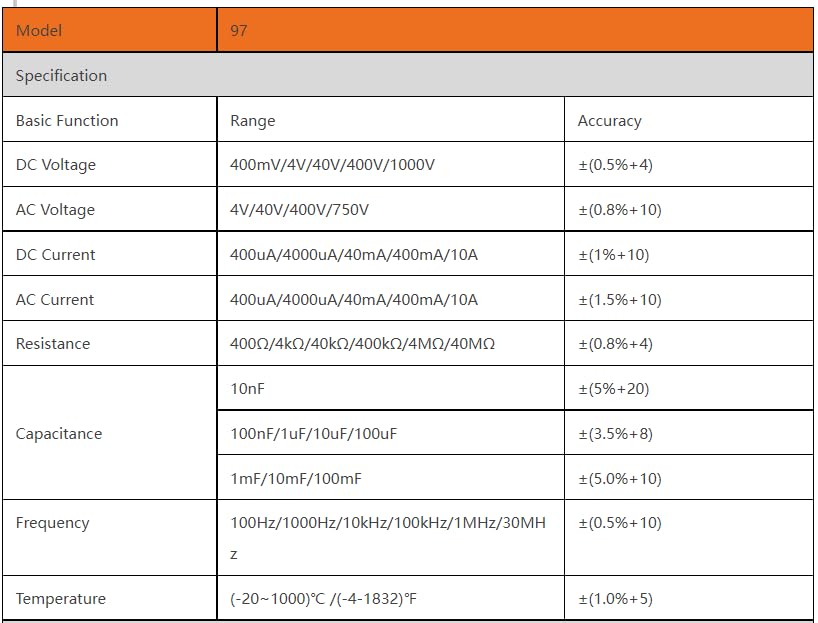
Image 8.1: Detailed table of technical specifications for the VC97 multimeter.
9. Warranty and Support
The KONGTEN VICTOR/RuoShui VC97 Digital Multimeter comes with a manufacturer's 1-year warranty. For warranty claims or technical support, please refer to the contact information provided with your purchase documentation.