1. Introduction
This instruction manual provides essential information for the proper installation, operation, maintenance, and troubleshooting of your NieKe Washing Machine Motherboard Control Board, model DC92-01768C. This control board is designed to be compatible with various Samsung washing machine models, including DC92-01768P, DC92-01768F, DC92-01768E, DC92-01768C, and DC92-01768B. Please read this manual thoroughly before attempting any installation or repair to ensure safety and optimal performance.
2. Safety Information
Always prioritize safety when working with electrical appliances. Improper installation or repair can lead to electric shock, fire, or damage to the appliance. If you are unsure about any step, consult a qualified technician.
- Disconnect Power: Always unplug the washing machine from the power outlet before beginning any installation, repair, or maintenance.
- Wear Protective Gear: Use appropriate personal protective equipment, such as gloves and safety glasses.
- Handle with Care: Electronic components are sensitive. Avoid static discharge by grounding yourself before handling the control board.
- Keep Dry: Ensure the work area and the control board remain dry. Moisture can cause damage or electrical hazards.
- Professional Assistance: If you are not confident in performing the installation or repair, seek assistance from a certified appliance repair technician.
3. Package Contents
Verify that all items are present and undamaged upon opening the package.
- NieKe Washing Machine Motherboard Control Board (Model DC92-01768C)
- Instruction Manual (this document)
4. Setup (Installation)
This section outlines the general steps for replacing a washing machine control board. Specific procedures may vary depending on your washing machine model. Refer to your washing machine's service manual for detailed instructions.
- Disconnect Power: Unplug the washing machine from the wall outlet. Turn off the water supply to the machine.
- Access the Control Board: Depending on your washing machine model, you may need to remove the top panel, back panel, or front control panel to access the existing control board. Use appropriate tools (e.g., screwdriver).
- Document Connections: Before disconnecting any wires, take clear photos or make a diagram of all wire connections to the old control board. This will be crucial for correct reassembly.
- Disconnect Wires: Carefully disconnect all wire harnesses and connectors from the old control board. Note any clips or locking mechanisms.
- Remove Old Board: Unscrew or unclip the old control board from its mounting brackets.
- Install New Board: Position the new NieKe control board (DC92-01768C) in the same location as the old one and secure it with screws or clips.
- Reconnect Wires: Using your photos or diagrams, carefully reconnect all wire harnesses and connectors to the new control board. Ensure all connections are secure and correctly seated.
- Reassemble Panels: Reattach any panels or covers that were removed to access the control board.
- Restore Power: Plug the washing machine back into the power outlet and turn on the water supply.
- Test Functionality: Run a short test cycle to ensure the washing machine operates correctly.
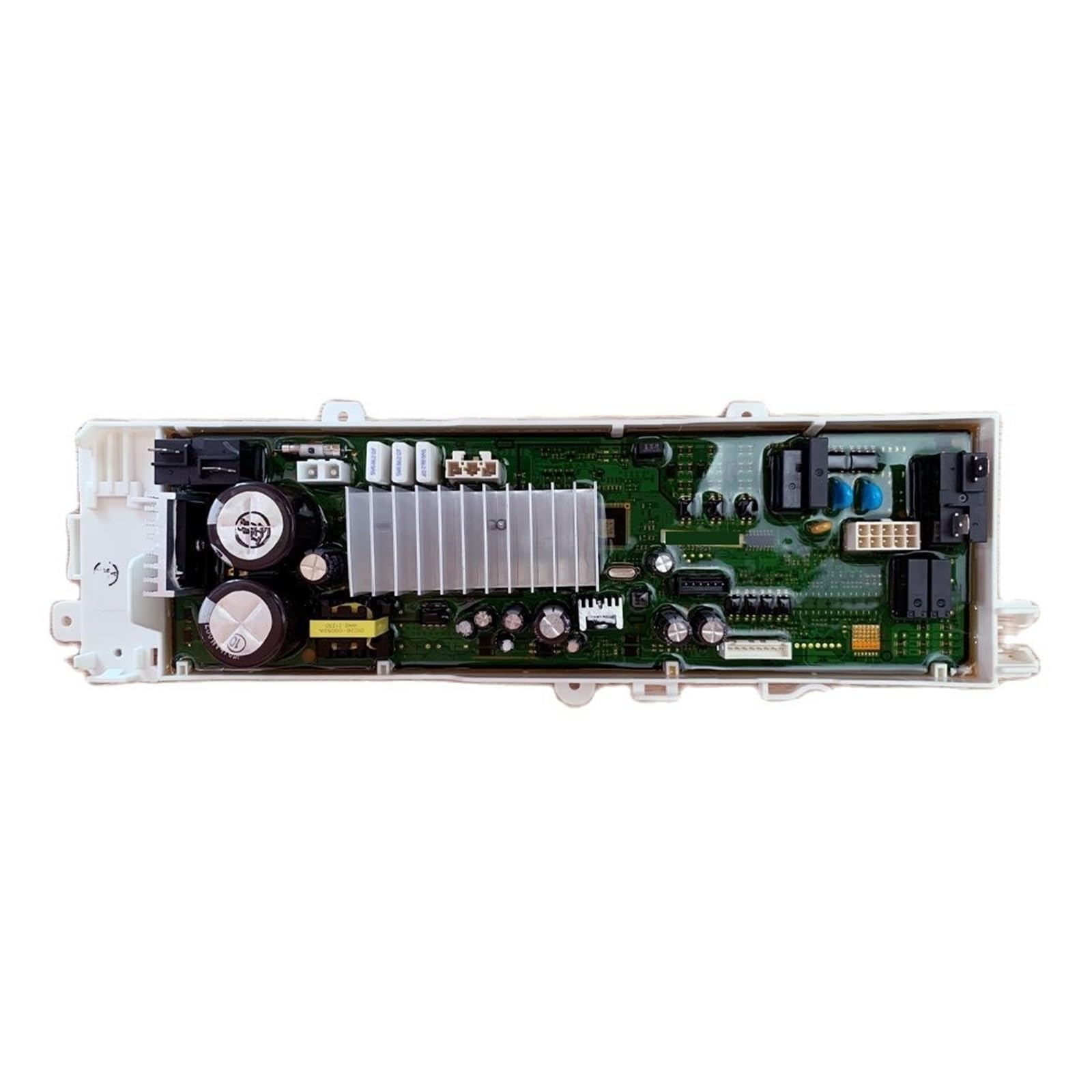
Image 1: NieKe Washing Machine Motherboard Control Board (DC92-01768C). This image shows the general appearance of the control board, highlighting its various connectors and components. It is crucial to match the new board's layout with the old one and ensure all connections are correctly made during installation.
5. Operating
The NieKe Washing Machine Motherboard Control Board (DC92-01768C) is an internal component responsible for managing the various functions of your washing machine. Once correctly installed, it enables the washing machine to operate as designed, controlling cycles, water levels, motor functions, and other programmed settings. There are no direct user operations for the control board itself; its functionality is integrated into the washing machine's user interface.
Refer to your washing machine's user manual for instructions on how to select wash cycles, adjust settings, and operate the appliance.
6. Maintenance
The control board itself requires minimal maintenance. However, following general appliance care practices can help prolong its lifespan and the overall performance of your washing machine.
- Keep Dry: Ensure the washing machine's environment is not excessively humid or prone to water leaks, which could affect electronic components.
- Clean Exterior: Regularly clean the exterior of your washing machine according to its manufacturer's guidelines to prevent dust and debris buildup that could potentially enter the control panel area.
- Avoid Overloading: Overloading the washing machine can strain its components, including the control board.
- Power Surges: Consider using a surge protector for your washing machine to protect sensitive electronics from power fluctuations.
7. Troubleshooting
If your washing machine is experiencing issues after installing the new control board, consider the following troubleshooting steps. Always disconnect power before inspecting internal components.
| Problem | Possible Cause | Solution |
|---|---|---|
| Washing machine does not power on. | Loose power connection, faulty outlet, incorrect board installation. | Check power cord, test outlet, verify all board connections are secure. |
| Specific functions (e.g., water fill, spin) not working. | Incorrect wire connection to the board, faulty sensor/component. | Review wiring diagrams, ensure correct connections. Inspect related components. |
| Error codes displayed. | Board malfunction, sensor issue, communication error. | Consult your washing machine's user manual for error code definitions. Recheck board installation. |
| Machine behaves erratically. | Loose connections, incompatible board, software issue. | Ensure all connections are tight. Verify board compatibility with your specific washing machine model. |
If troubleshooting steps do not resolve the issue, it is recommended to contact a qualified appliance repair technician for further diagnosis and repair.
8. Specifications
- Product Type: Washing Machine Motherboard Control Board
- Brand: NieKe
- Model: DC92-01768C
- Compatibility: Samsung DC92-01768P, DC92-01768F, DC92-01768E, DC92-01768C, DC92-01768B
- Item Weight: 1.76 ounces
- Package Dimensions: 0.39 x 0.39 x 0.39 inches
- Batteries Required: No
9. Warranty and Support
For information regarding warranty coverage and technical support for your NieKe Washing Machine Motherboard Control Board, please refer to the seller's policies or contact the point of purchase. Keep your purchase receipt as proof of purchase for any warranty claims.
For general inquiries or assistance, you may also refer to the NieKe brand's official support channels if available.


