
1. Introduction
This instruction manual provides detailed guidance for the installation, operation, and maintenance of your new Hampton Bay Altura 68" Ceiling Fan Remote Control Set. This set is a direct replacement for the existing Model MR77A receiver and includes the UC7301R-03 receiver and the UC7078T remote control. Designed for ease of use, this 'Plug & Play' system aims to restore full functionality to your ceiling fan.
2. Product Components
Your replacement set includes two primary components:
- UC7301R-03 Receiver: The internal unit that connects to your ceiling fan's wiring.
- UC7078T Remote Control: The handheld device used to operate the fan and light functions. Note that while the original remote may have been black, this replacement remote is white.
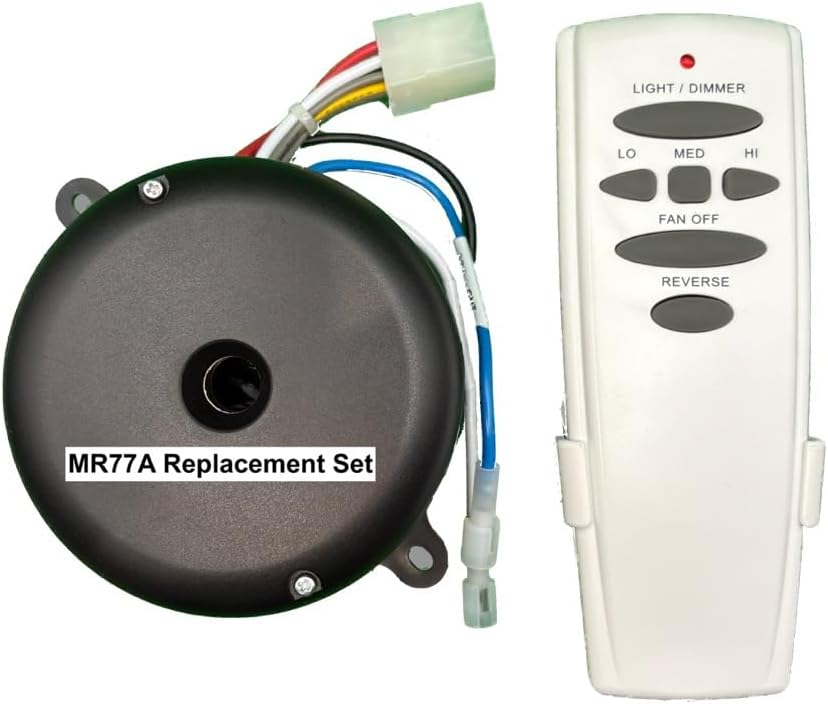
This image displays the MR77A replacement set, which includes the circular black receiver unit with its wiring harness and the rectangular white remote control. The remote features buttons for light/dimmer, fan speeds (LO, MED, HI), fan off, and reverse.
3. Safety Information
- Always disconnect power to the ceiling fan at the circuit breaker before attempting any installation or maintenance.
- Ensure all electrical connections are secure and comply with local electrical codes.
- If you are unsure about any part of the installation process, consult a qualified electrician.
4. Installation (Setup)
This replacement set is designed for 'Plug & Play' installation, meaning it should integrate seamlessly with your Hampton Bay Altura 68" ceiling fan. The design and fit are identical to the original MR77A components.
- Power Disconnection: Turn off the power to your ceiling fan at the main circuit breaker. Verify power is off before proceeding.
- Access Receiver: Carefully lower the canopy of your ceiling fan to access the existing receiver unit.
- Remove Old Receiver: Disconnect the wiring from the old MR77A receiver. Note the color coding of the wires for correct re-connection.
- Install New Receiver: Connect the UC7301R-03 receiver to the fan's wiring, matching the wire colors. Ensure all connections are firm.
- Secure Receiver: Place the new receiver within the fan canopy and re-secure the canopy.
- Restore Power: Turn the power back on at the circuit breaker.
- Test Remote: The UC7078T remote control should be pre-paired with the receiver. Test all functions to ensure proper operation. If the remote does not respond, refer to the troubleshooting section.
5. Operating Instructions
The UC7078T remote control provides convenient operation of your ceiling fan's functions:
- LIGHT / DIMMER: Press this button to turn the light on or off. Hold the button down to dim or brighten the light.
- LO, MED, HI: These buttons control the fan speed. Press 'LO' for low speed, 'MED' for medium speed, and 'HI' for high speed. The fan speeds will be consistent with the original MR77A unit.
- FAN OFF: Press this button to turn the fan off.
- REVERSE: This button changes the direction of the fan blades. This feature is useful for seasonal air circulation (downward airflow for cooling in summer, upward airflow for heat distribution in winter).
6. Maintenance
- Battery Replacement: The remote control requires batteries (typically AAA or 9V, check the battery compartment for specific type). Replace batteries when the remote's range decreases or it becomes unresponsive.
- Cleaning: Wipe the remote control with a soft, dry cloth. Do not use abrasive cleaners or allow moisture to enter the remote.
- Receiver: The receiver unit is maintenance-free once installed.
7. Troubleshooting
If your ceiling fan or remote control is not functioning as expected, try the following:
- No Response from Remote: Check and replace the batteries in the remote control. Ensure the remote is within range of the fan.
- Fan Not Turning On/Off: Verify that the power to the fan is on at the circuit breaker and wall switch (if applicable).
- Light Not Working: Check the light bulbs in the fan. Ensure they are securely screwed in and not burnt out.
- Intermittent Operation: Ensure all wiring connections to the receiver are secure. Power cycle the fan by turning off the circuit breaker for a minute, then turning it back on.
- Fan Not Moving Air Effectively: Check the fan's direction using the 'REVERSE' button. Ensure blades are clean and free of obstructions.
8. Specifications
| Feature | Detail |
|---|---|
| Product Dimensions | 5"W x 2"H (Remote) |
| Brand | Hampton Bay (Generic) |
| Power Connector Type | 3-Pin |
| Compatible Devices | Hampton Bay Altura 68" Ceiling Fan |
| Material | Plastic |
| Manufacturer | Rhine |
| Item Weight | 15 ounces (total set) |
| Model Number | MR77A (UC7301R-03 Receiver, UC7078T Remote) |
| Included Components | Receiver, Remote Control |
9. Warranty and Support
For warranty information and technical support, please refer to the documentation provided with your purchase or contact the seller directly. As this is a replacement part manufactured by Rhine, specific warranty details may vary. Ensure you retain your proof of purchase for any warranty claims.


