
1. Product Overview
The Starkey Premium Standard Charger is designed to provide convenient and reliable charging for compatible Starkey hearing aids. This charger features an on-board battery, allowing for portable charging without direct connection to a power outlet. It ensures your hearing aids are always ready for use.
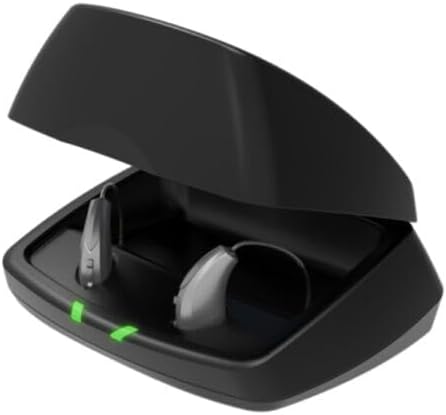
Image: Starkey Premium Standard Charger with hearing aids charging.
2. What's in the Box
Your Starkey Premium Standard Charger package includes:
- 1 x Standard Charger
- 1 x Wall Plug
- 1 x Micro USB Cord
- 1 x Dehumidifier Disk

Image: All components included in the charger package.
3. Compatibility
This charger is compatible with the following Starkey hearing aid models:
- Starkey Evolv AI
- Starkey Livio Edge AI
- Starkey Livio AI
- Starkey Livio RIC
- Starkey Muse IQ
Important Note:
- Compatible with RIC (Receiver-In-Canal) and BTE (Behind-The-Ear) hearing aids ONLY.
- NOT compatible with ITE (In-The-Ear), ITC (In-The-Canal), or CIC (Completely-In-Canal) hearing aids.
4. Setup
- Connect the Charger: Plug the micro USB cord into the charger's port and connect the wall plug to a power outlet.
- Initial Charge: For optimal performance, fully charge the charger's internal battery before first use. The LED indicators on the back of the charger will show the charge status (see Section 5.2).

Image: Open charger with empty slots.
5. Operating Instructions
5.1. Charging Hearing Aids
- Place Hearing Aids: Gently place your compatible Starkey hearing aids into the charging slots of the charger. Ensure they are correctly seated.
- Observe Indicators: The LED indicators on the charger will illuminate to show the charging status of your hearing aids.
- Glowing Green: Indicates the hearing aids are actively charging.
- Solid Green: Indicates the hearing aids are fully charged.
- Blinking Red: Indicates a fault state. Remove hearing aids from the charger, wait for LEDs to turn off, and re-insert. If the fault state continues, contact your hearing professional.
Video: Charger Reset Tutorial. This video demonstrates how to reset the charger if a fault state occurs.
5.2. Charger Battery Status (Premium Chargers Only)
The four LED lights on the back of the charger indicate the charge level of the charger's internal battery. These lights will turn off after 10 seconds when charging without the cord to conserve battery.
- 4 Solid Lights: Charger is plugged in and fully charged, or internal battery is > 75% charged.
- 3 Solid Lights: Internal battery is < 75% charged.
- 2 Solid Lights: Internal battery is < 50% charged.
- 1 Blinking Light: Internal battery charge is low.
- Glowing Green Lights (while charging): Indicates the charger's internal battery is charging.
- Solid Green Lights (when fully charged): Indicates the charger's internal battery is fully charged.
Video: Premium Charger Overview. This video provides a detailed overview of the charger's features and battery indicators.
6. Maintenance
- Cleaning: Use a clean, dry cloth to wipe the charger. Do not use water or cleaning solvents.
- Dehumidifier Disk: The included dehumidifier disk helps absorb moisture. Replace it periodically as needed to maintain effectiveness.
- Storage: Store the charger in a cool, dry place when not in use.

Image: Closed charger for storage.
7. Troubleshooting
- Hearing Aids Not Charging:
- Ensure hearing aids are correctly seated in the charging slots.
- Check if the charger is connected to a power source or if its internal battery has sufficient charge.
- If LEDs are blinking red, refer to Section 5.1 for reset instructions.
- Charger Not Charging:
- Verify the micro USB cord and wall plug connections are secure.
- Try a different power outlet.
- Ensure the micro USB cord is not damaged.
- Unusual Behavior: If the charger or hearing aids exhibit unexpected behavior, try resetting the charger by removing the hearing aids, unplugging the charger (if connected), waiting a few seconds, and then reconnecting/re-inserting. If issues persist, contact Starkey support.
8. Specifications
| Feature | Specification |
|---|---|
| Brand | Starkey |
| Connectivity Technology | USB |
| Connector Type | Micro USB |
| Input Voltage | 5 Volts |
| Amperage | 2.4 Amps |
| Item Weight | 11.3 ounces |
| Special Features | Fast Charging, Lightweight Design, On-board Battery |
9. Warranty and Support
For warranty information, technical support, or further assistance, please contact Starkey customer service or your authorized Starkey hearing professional. Refer to the packaging or official Starkey website for the most current contact details.
Starkey Official Website: www.starkey.com