
Ambrane Crest
Ambrane Crest Smart Watch User Manual
Model: Crest
Introduction
This user manual provides detailed instructions for the Ambrane Crest Smart Watch. Please read this manual carefully before using the device to ensure proper operation and to maximize its features. Keep this manual for future reference.
Safety Information
- Do not attempt to disassemble or modify the device. This may void the warranty and cause damage.
- Keep the device away from extreme temperatures, direct sunlight, and moisture.
- Use only the provided charging cable. Using incompatible chargers may damage the device.
- Consult a medical professional before starting any new exercise regimen or if you have pre-existing health conditions, especially when using health monitoring features.
- The device is IP68 water resistant, but it is not suitable for diving or high-pressure water activities. Avoid prolonged exposure to water.
- Keep out of reach of children.
What's in the Box
Upon unboxing your Ambrane Crest Smart Watch, ensure all the following items are present:
- Ambrane Crest Smart Watch (Black)
- Charging Cable
- User Manual (this document)
Product Overview

The Ambrane Crest Smart Watch features a rugged and sporty design with a premium metal case and a black strap.
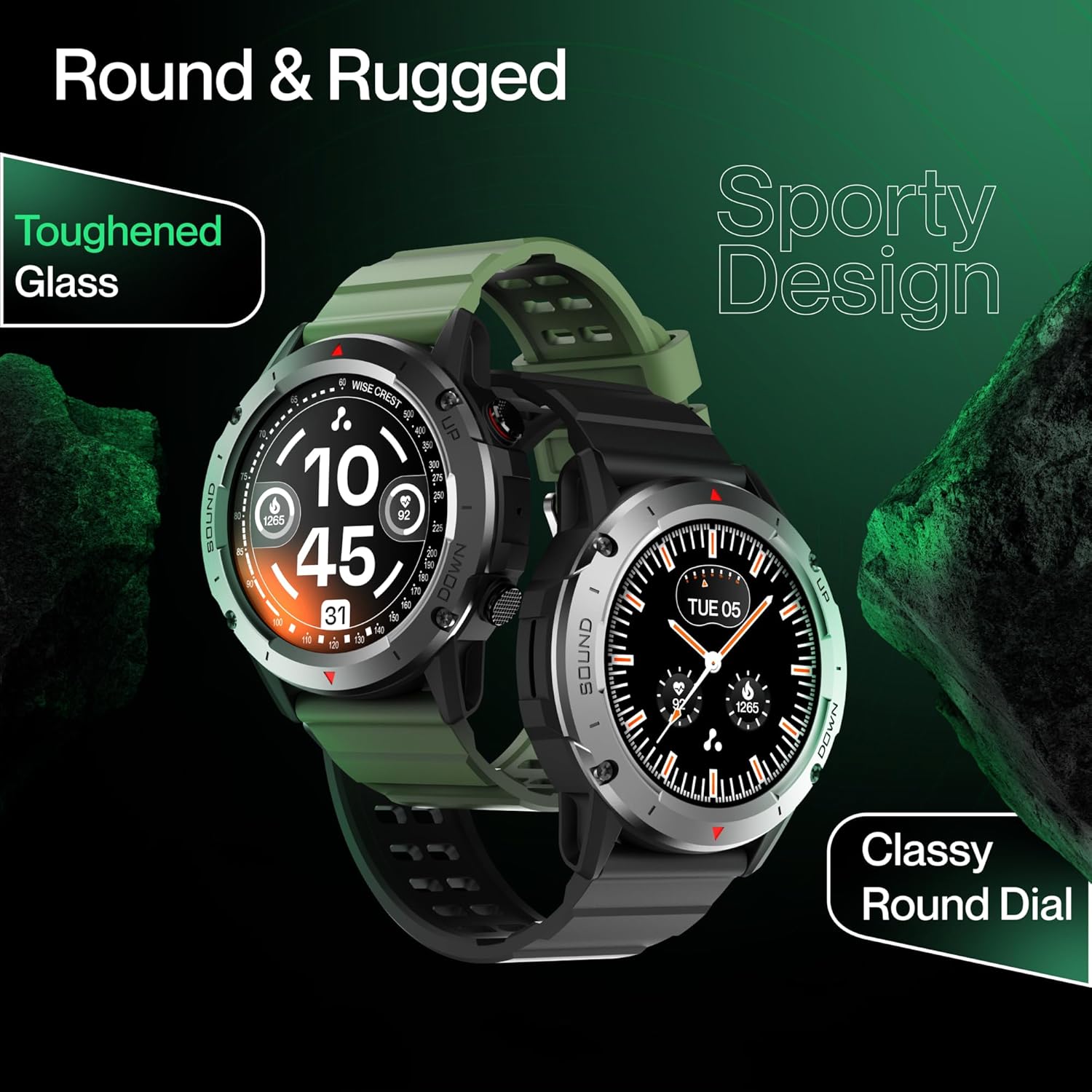
The watch boasts a round, rugged design with toughened glass and a classy round dial, available in multiple colors.
The Ambrane Crest Smart Watch is designed for durability and functionality. It features a 1.39-inch LucidDisplay with 360x360 pixel resolution and 500 Nits brightness for clear visibility even in sunlight. The watch includes an in-built speaker and microphone for Bluetooth calling, advanced sensors for health monitoring, and supports over 100 sports modes.
Setup
1. Charging the Smart Watch
Before first use, fully charge your Ambrane Crest Smart Watch. Connect the provided charging cable to the charging port on the back of the watch and plug the USB end into a power adapter (not included) or a computer's USB port.

The watch features a 400mAh battery, providing up to 10 days of battery life depending on usage.
The watch display will indicate charging status. A full charge typically takes approximately 2 hours.
2. Pairing with Your Smartphone
To unlock the full potential of your Ambrane Crest Smart Watch, pair it with your smartphone via Bluetooth and the dedicated Ambrane app.
- Download the App: Search for the official Ambrane fitness app on your smartphone's app store (Google Play Store for Android or Apple App Store for iOS) and install it.
- Enable Bluetooth: Ensure Bluetooth is enabled on your smartphone.
- Open the App: Launch the Ambrane app and follow the on-screen instructions to create an account or log in.
- Add Device: Within the app, navigate to the "Add Device" or "Pair Device" section.
- Select Your Watch: The app will scan for nearby devices. Select "Ambrane Crest" from the list.
- Confirm Pairing: A pairing request will appear on both your watch and smartphone. Confirm the pairing on both devices.
Once successfully paired, the watch will synchronize data with your phone, and you will receive notifications.
Operating Instructions
Basic Navigation
- Swipe Up/Down: Navigate through menus and notifications.
- Swipe Left/Right: Access quick functions or widgets.
- Tap: Select an item or confirm an action.
- Side Buttons: Use for power on/off, returning to the home screen, or accessing specific functions as configured.
Bluetooth Calling
The Ambrane Crest Smart Watch allows you to make and receive calls directly from your wrist.
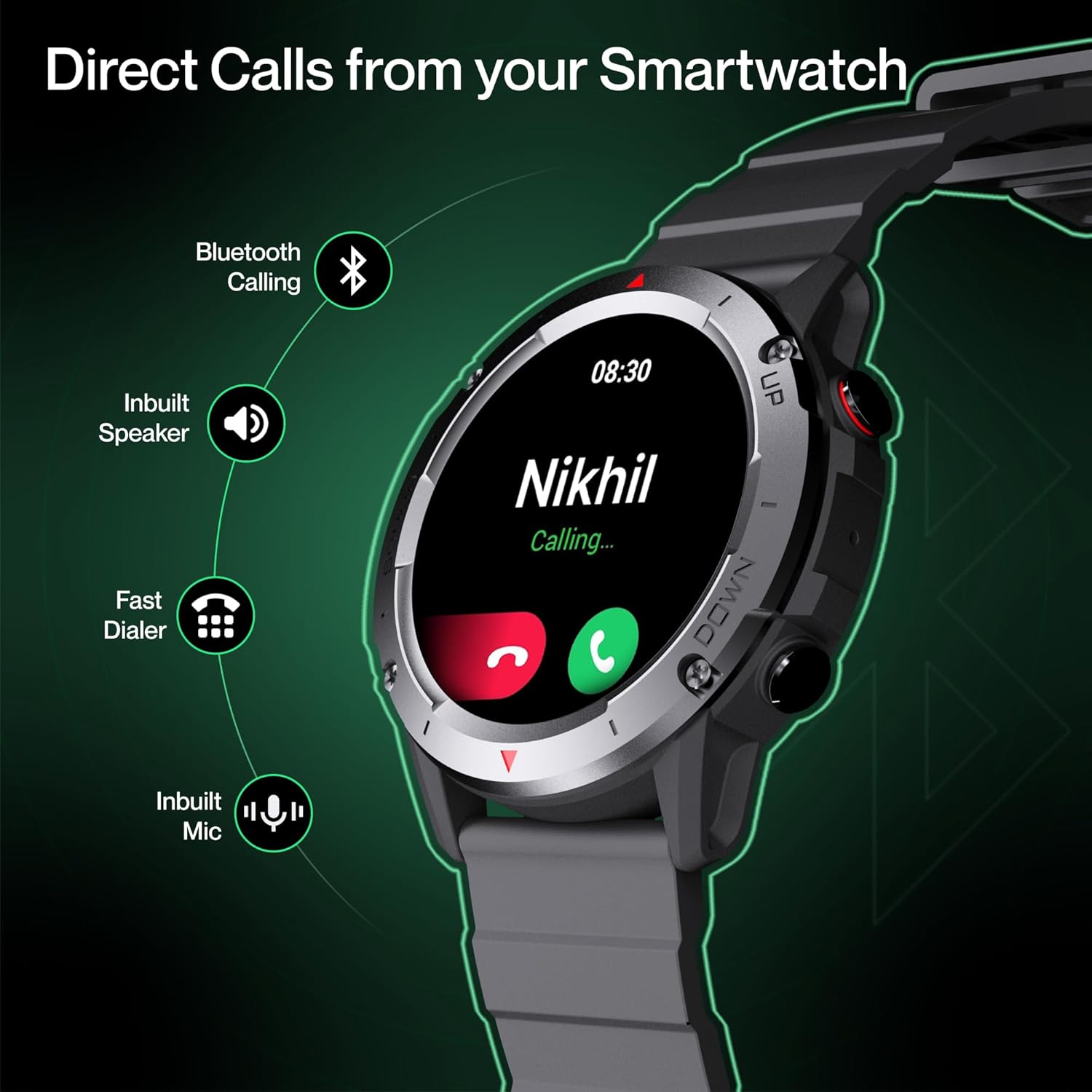
The watch supports Bluetooth calling with an inbuilt speaker, fast dialer, and inbuilt microphone for convenient communication.
- Making Calls: Access the dialer or contact list on your watch to initiate a call.
- Receiving Calls: When a call comes in, you can answer or reject it directly from the watch.
Health Monitoring
The watch is equipped with various health tracking features:
- SpO2 Tracking: Measures blood oxygen saturation levels.
- 24x7 Heart Rate Monitoring: Continuously tracks your heart rate and provides high heart rate alerts.
- Blood Pressure Monitoring: Provides estimates of blood pressure.
- Sleep Tracking: Monitors your sleep patterns, including deep sleep, light sleep, and awake times.
- Menstrual Tracking: Helps track menstrual cycles for female users.
Note: Health data provided by the watch is for reference only and should not be used for medical diagnosis or treatment.
Sports Modes
With over 100 sports modes, the Ambrane Crest Smart Watch is your ideal fitness companion. Select your activity from the sports mode menu to track duration, calories burned, heart rate, and other relevant metrics.

Designed to be an outdoor companion, the watch supports over 100 sports modes for comprehensive activity tracking.
Customizing Watch Faces
Personalize your watch with a variety of watch faces. You can choose from 100+ cloud-based watch faces or set your own custom wallpaper through the Ambrane app.

The 1.39-inch LucidDisplay with 360x360 resolution and 500 Nits brightness ensures a bright and clear view.
Smart Notifications
Receive notifications for incoming calls, text messages, and app alerts directly on your watch. Ensure your watch is paired with your smartphone and notification permissions are granted in the Ambrane app.
Other Features
The Ambrane Crest Smart Watch includes several utility features:

The watch offers a range of features including timer, alarm, find phone, weather forecast, password lock, voice assistance, and smart notifications.
- Music Control: Control music playback on your smartphone (play, pause, skip tracks).
- Camera Control: Use your watch as a remote shutter for your smartphone camera.
- Alarm Clock: Set alarms directly from the watch.
- Flashlight: Activate a simple flashlight function.
- Find Phone: Locate your paired smartphone by making it ring.
- Stopwatch & Timer: Utilize built-in timing functions.
- Sedentary Alert: Reminds you to move after periods of inactivity.
- Weather Forecast: Get real-time weather updates.
- Password Lock: Secure your watch with a password.
- Voice Assistance: Access your phone's voice assistant through the watch.
Maintenance
- Cleaning: Wipe the watch and strap regularly with a soft, dry cloth. For stubborn dirt, use a slightly damp cloth and dry thoroughly. Avoid harsh chemicals or abrasive materials.
- Water Resistance (IP68): The watch is IP68 rated, meaning it is protected against dust ingress and can withstand immersion in water up to 1.5 meters for up to 30 minutes. However, it is not recommended for swimming, showering with hot water, or diving. Always dry the watch thoroughly after exposure to water.
- Battery Care: To prolong battery life, avoid fully discharging the battery frequently. Charge the watch when the battery level is low. Store the watch in a cool, dry place if not used for extended periods.
Troubleshooting
| Problem | Possible Cause | Solution |
|---|---|---|
| Watch does not turn on. | Low battery. | Charge the watch for at least 30 minutes. |
| Cannot pair with smartphone. | Bluetooth off; app issue; watch not discoverable. | Ensure Bluetooth is on. Restart watch and phone. Reinstall app. Check app permissions. |
| Notifications not received. | Permissions not granted; app not running in background. | Check notification permissions in phone settings and Ambrane app. Ensure app is running. |
| Inaccurate health data. | Watch not worn correctly; movement during measurement. | Ensure watch is snug on wrist. Remain still during measurements. |
| Short battery life. | Frequent use of power-intensive features; high brightness. | Reduce screen brightness. Limit continuous heart rate monitoring. Turn off unnecessary features. |
Specifications
| Feature | Detail |
|---|---|
| Brand | Ambrane |
| Model | Crest |
| Display Size | 1.39 Inches |
| Display Resolution | 360 x 360 pixels |
| Brightness | 500 Nits |
| Battery Capacity | 400 mAh (Lithium Polymer) |
| Battery Life | Up to 10 Days (typical usage) |
| Connectivity | Bluetooth |
| Water Resistance | IP68 |
| Special Features | Bluetooth Calling, SpO2, Heart Rate, Blood Pressure, Sleep Tracking, 100+ Sports Modes, Custom Watch Faces, Smart Notifications, Alarm Clock, Flashlight, Find Phone, Stopwatch, Timer, Sedentary Alert, Weather Forecast, Password Lock, Voice Assistance, Music Control, Camera Control. |
| Product Dimensions | 6.9 x 11.7 x 11.9 cm |
| Item Weight | 40 g |
| Compatible Devices | Smartphone |
Warranty and Support
The Ambrane Crest Smart Watch comes with a 1 Year Warranty from the date of purchase. For warranty claims or technical support, please contact Ambrane customer service.
Contact Information:
- Email: care@ambraneindia.com
- Manufacturer: Ambrane
Please retain your purchase receipt as proof of purchase for warranty purposes.
Related documentsCrest


Ask a question about this manual
Ask about setup, troubleshooting, compatibility, parts, safety, or missing instructions. Manuals+ will review the question and use this page’s manual context to help answer it.