
1. Product Overview
The ICUIXIAN 4K HDMI Matrix 4x4 & Video Wall Controller is a versatile device designed for advanced audio-visual signal management. It integrates the functionalities of an HDMI matrix switcher and a video wall processor, offering flexible display solutions for various applications.
This unit supports 4K resolution at 60Hz input and provides seamless switching between multiple HDMI sources to multiple displays. It also features advanced video wall capabilities, including vertical splicing, image rotation, and edge blending, to create large-scale, dynamic visual presentations.

Figure 1: ICUIXIAN 4K HDMI Matrix 4x4 & Video Wall Controller (Model UD04) with remote control and example video wall setup.
2. What's in the Box
- 1x ICUIXIAN 4K HDMI Matrix 4x4 & Video Wall Controller (Model UD04)
- 1x Remote Control
- 1x Instruction Manual
- 1x Power Adapter
- 1x RS-232 Cable
Note: HDMI cables are not included and must be purchased separately.

Figure 2: Included items with the ICUIXIAN UD04 controller.
3. Product Features
- HDMI Matrix 4x4 & Video Wall 2x2: This device functions as both a 4-input, 4-output HDMI matrix switch and a 4K 2x2 video wall controller, allowing for flexible signal routing and display configurations.
- Video Wall Controller Vertical Mode: Supports 90-degree image rotation and various vertical splicing modes including 1x4, 4x1, 2x2, 1x3, 3x1, 1x2, and 2x1. All four 4K signal inputs can be switched to a large screen splicing display with synchronous audio and video output.
- HDMI Matrix Switch Mode: Enables random switching of inputs to any output screen with seamless transitions, ensuring no black screen or delay. It also supports a 4-screen preview function to display all four input pictures simultaneously on one monitor.
- 90-180-270° Rotation: Each display unit's image can be rotated by 90, 180, or 270 degrees. Supports reversal of the top LCD screen and side cover function for horizontal and vertical splicing modes (e.g., 4x1, 1x4, 3x1, 1x3) suitable for portrait and model exhibitions.
- Seamless Switching Function: Offers three control methods: infrared remote control, panel buttons, and RS232 software control. The HDMI Matrix 4x4 mode supports seamless switching and 4-screen split-screen display for each output.
4. Physical Description and Connections
4.1 Front Panel
The front panel features LED indicators for power and input/output status, along with buttons for selecting inputs for each output. An IR receiver window is also present for remote control operation.

Figure 3: Front panel overview and control methods.
4.2 Rear Panel
The rear panel houses all input and output ports, including HDMI inputs, HDMI outputs, RS232 control port, and the DC 12V power input.

Figure 4: Rear panel connections for inputs, outputs, and control.
- HDMI Inputs (IN 1-4): Connect up to four HDMI source devices (e.g., TV box, PC, mobile computer, game console).
- HDMI Outputs (OUT 1-4): Connect up to four HDMI display devices (e.g., TVs, monitors).
- 3.5mm Audio Output: For synchronous audio output to external audio systems.
- RS-232 Port: For software control via a computer.
- DC 12V Power Input: Connect the provided power adapter.
5. Setup Guide
- Connect HDMI Sources: Connect your HDMI source devices (e.g., PC, game console, media player) to the HDMI Input ports (IN 1-4) on the rear panel of the UD04 controller using high-quality HDMI cables.
- Connect HDMI Displays: Connect your HDMI display devices (e.g., TVs, monitors) to the HDMI Output ports (OUT 1-4) on the rear panel of the UD04 controller using high-quality HDMI cables. Ensure proper labeling of cables if setting up a video wall.
- Connect Power: Plug the provided 12V DC power adapter into the DC 12V input port on the rear panel and then into a standard wall outlet. The unit will perform a self-test, and the power LED on the front panel will illuminate when ready.
- Optional Audio Connection: If desired, connect external audio equipment to the 3.5mm Audio Output port.
- Optional RS-232 Control: For advanced control, connect a computer to the RS-232 port using the provided cable.
Figure 5: Simplified setup diagram for the ICUIXIAN UD04 controller.
6. Operating Modes
6.1 HDMI Matrix Mode
In HDMI Matrix Mode, any of the four input sources can be independently routed to any of the four output displays. This allows for flexible content distribution to multiple screens simultaneously.
- Use the front panel buttons, remote control, or RS232 software to select which input is displayed on each output.
- Supports seamless switching between sources without black screens or delays.
- Features a 4-screen preview function to monitor all inputs on a single display.
Figure 6: HDMI Matrix mode demonstrating seamless switching and multiple control options.
6.2 Video Wall Mode
In Video Wall Mode, a single input source is stretched across multiple displays to create a larger, unified image. The UD04 supports various splicing configurations and image manipulations.
- Splicing Modes: Supports vertical and horizontal splicing configurations such as 1x4, 4x1, 2x2, 1x3, 3x1, 1x2, and 2x1.
- Image Rotation: Images on individual display units can be rotated by 90, 180, or 270 degrees. This includes reversing the top LCD screen for minimizing gaps in vertical setups.
- Edge Blending/Masking: Corrects image edges to minimize physical frame gaps between displays, ensuring a more natural and life-like vision without blurring or stretching.
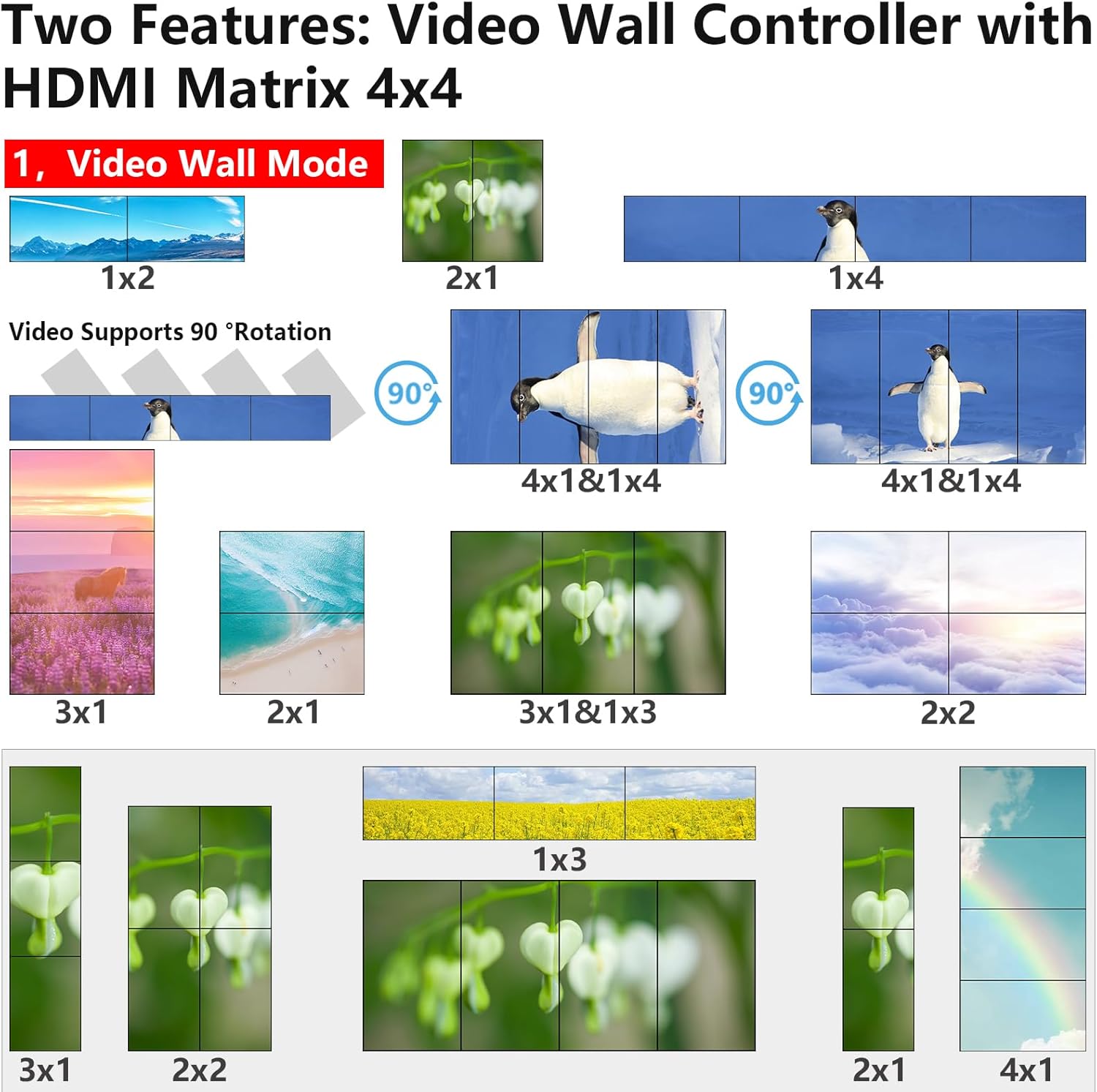
Figure 7: Examples of various video wall splicing modes supported by the controller.

Figure 8: Demonstration of 90-180-270 degree image rotation and edge blending features.

Figure 9: Illustration of edge mask correction for seamless video wall display.
7. Control Methods
The UD04 controller offers multiple ways to manage its functions:
- Infrared Remote Control: Use the provided remote to switch inputs, change operating modes, and adjust settings from a distance.
- Panel Buttons: Directly operate the device using the buttons on the front panel for quick adjustments.
- RS232 Software Control: Connect the unit to a computer via the RS232 port for comprehensive software-based control and configuration.

Figure 10: Overview of the three available control methods.
8. Specifications
| Specification | Value |
|---|---|
| Product Dimensions | 3.1 x 2.3 x 1.9 inches |
| Item Weight | 5.5 pounds |
| Item Model Number | UD04 |
| Brand | ICUIXIAN |
| Connector Type | DisplayPort, HDMI |
| Compatible Devices | Laptop, Projector, Television |
| Cable Type | HDMI |
9. Troubleshooting
If you encounter issues with your ICUIXIAN UD04 controller, please refer to the following common troubleshooting steps:
- No Signal: Ensure all HDMI cables are securely connected and are of high quality. Verify that input sources are powered on and output displays are set to the correct HDMI input.
- Image Distortion/Flickering: Check cable integrity and ensure all devices support the selected resolution and refresh rate. Try reducing the output resolution if issues persist.
- Control Issues: For remote control, ensure the IR receiver has a clear line of sight. For RS232 control, verify cable connection and software settings.
- Incorrect Splicing: In video wall mode, ensure displays are physically arranged according to the selected splicing mode and that output cables are connected to the correct ports (OUT1, OUT2, etc.) as per the manual's instructions for your desired layout.
10. Warranty and Support
ICUIXIAN products are designed for reliability and performance. For warranty information, please refer to the warranty card included in your package. For technical support or further assistance, please contact ICUIXIAN customer service through the vendor's official channels.
ICUIXIAN specializes in audio-visual signal transmission and commercial display video walls. All products are certified HDMI devices. Professional technical staff are available to assist with any product-related issues.
11. Official Product Videos
ICUIXIAN 4x4 Matrix Video Wall 2x2 Vertical 1x4-4x1
This video demonstrates the various matrix and video wall configurations, including vertical setups like 1x4 and 4x1, showcasing the flexibility of the ICUIXIAN UD04 controller.
Matrix Mode and Splicing Mode Switch at Will, 0-270 Rotation
This video illustrates the seamless switching between matrix and splicing modes, highlighting the 0-270 degree rotation capability for individual screens within a video wall setup.
Video Wall Controller 90-180-270 Degree Rotation Playback
A concise demonstration of the video wall controller's ability to rotate playback by 90, 180, and 270 degrees, offering dynamic display options for various content.
A Restaurant Uses Video Wall Controllers in a Shopping Mall
This video provides a real-world example of the ICUIXIAN video wall controller being used in a commercial setting, specifically a restaurant within a shopping mall, to enhance visual communication.
HDMI Matrix Video Wall Two Mode Operation Demonstration
A detailed demonstration of the two primary operation modes: HDMI Matrix and Video Wall, illustrating how to switch between them and their respective functionalities.