
MIRA 20 MAX Wands
Mira Fertility MAX Wands User Manual
For use with the Mira Analyzer
Introduction
The Mira Fertility Max Wands are designed to detect human Luteinizing Hormone (LH), Estrogen-3-Glucuronide (E3G), and Pregnanediol-3-Glucuronide (PdG) levels in urine. These test results are used to identify your fertility window and most fertile days in your cycle. PdG helps confirm ovulation. After testing, your hormone levels will be displayed on the Mira Analyzer and synced automatically to the Mira App. Combining these three hormones provides important information about your fertility.
Note:
Do not use the Mira Fertility Max Wands to test for other diagnostic purposes.
Package Contents
The Mira Fertility Max Wands package includes:
- Mira Fertility Max Wands (20 individually packaged tests)
- User Manual
- Urine Collection Container (collapsible silicone cup)

The package contains 20 individually sealed Mira Fertility Max Wands, a user manual, and a collapsible silicone urine collection cup for convenience.
Setup
Before first use, ensure you have the Mira Analyzer (sold separately) and the Mira App installed on your smartphone.
- Download the Mira App: Scan the QR code displayed on the Mira Analyzer screen or visit www.miracare.com/mira-app.
- Enable Bluetooth: Ensure Bluetooth is enabled on your smartphone.
- Pair Analyzer: Follow the instructions displayed in the Mira App to pair your Mira Analyzer.
- Confirm Connection: Press the Analyzer's power button to confirm the connection.
Disclaimer:
The Mira App does not change the product's intended use. The App stores and displays the testing data, not for diagnostic purposes.

This image illustrates the process of setting up your Mira Analyzer with the Mira App, from downloading the app to pairing your device for seamless data synchronization.
Operating Instructions
How to Test with Mira Fertility Max Wands
For best results, use your first morning urine for testing.
- Collect Urine Sample: Dip the test wand into your urine sample. Ensure the "Sample collecting" end of the wand is pointing down at all times after sampling urine. Do not shake it.
- Insert into Analyzer: Insert the test wand into the Mira Analyzer. Keep the Analyzer on a flat surface and horizontally while inserting the test wand.
- Read Results: The Mira Analyzer will provide real-time, numerical hormone concentrations and personalized insights in the Mira App.
Attention:
- Do not touch the Analyzer or the test wand during the countdown. If you pull out the test wand before the test is finished processing, re-insert it into the Analyzer immediately. The Mira Analyzer will then inform you if the test is still valid or not.
- The Mira Analyzer will automatically turn off if it remains idle for over 1 minute.
- Hold the power button for approximately 3 seconds to turn off the Analyzer manually. Note: If the Analyzer is testing and counting down, it won't enter the idle mode but automatically turns off the Analyzer's screen.
- Push and hold the power button for approximately 2 seconds to activate the Mira Analyzer if the screen has turned off.
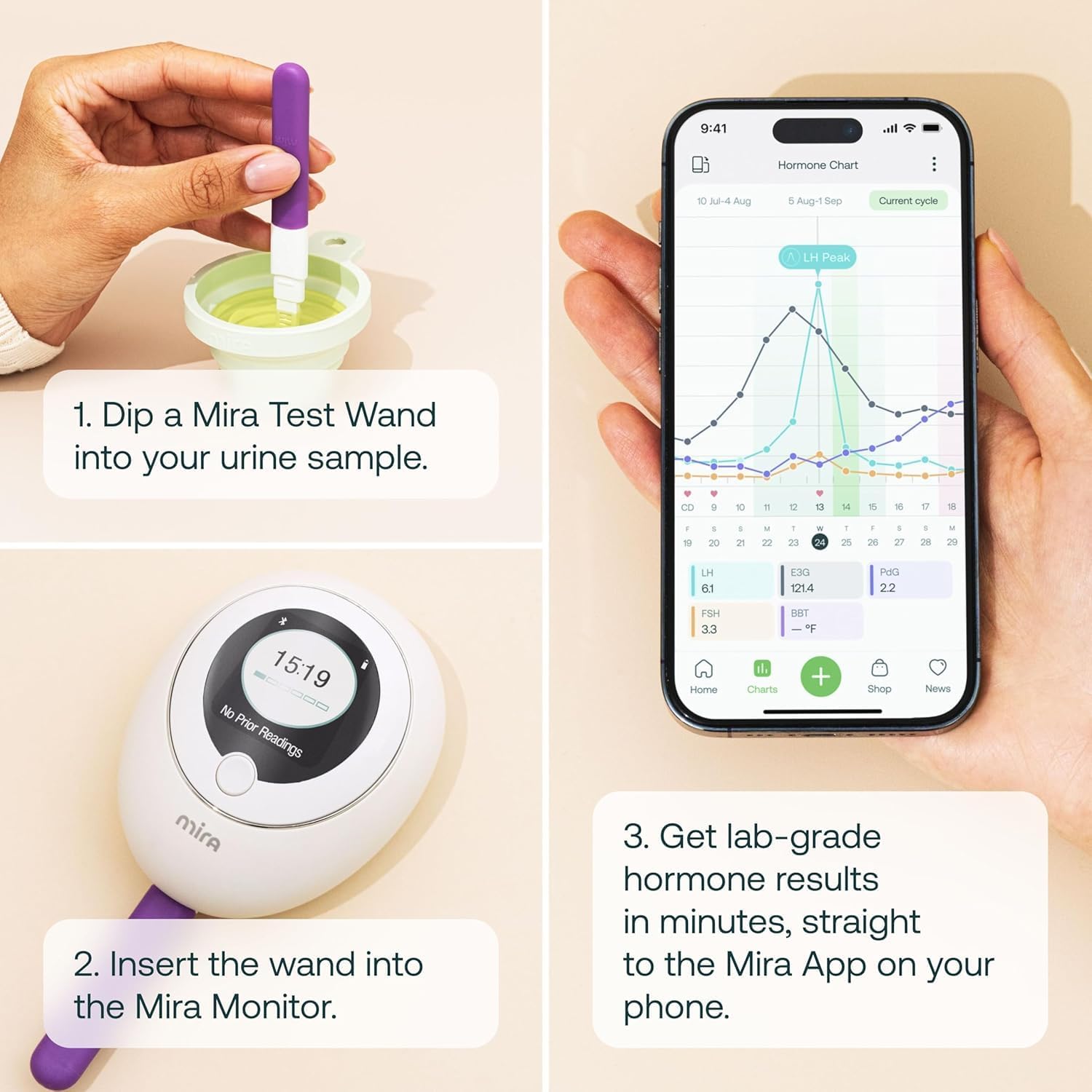
Follow these simple steps for accurate testing: first, dip the wand into a urine sample; second, insert it into the Mira Analyzer; and finally, view your detailed hormone results directly on the Mira App.
Understanding Your Test Results
The Mira Fertility Max Wands measure three key fertility hormones:
- E3G (Estradiol Metabolite): Helps predict your full 6-day fertile window.
- LH (Luteinizing Hormone): Helps predict your ovulation day.
- PdG (Pregnanediol-3-Glucuronide): Helps confirm that ovulation has occurred.
The Mira App learns your unique hormone patterns and provides highly personalized ovulation forecasts and fertility insights tailored to your body. This allows you to make informed decisions for your fertility journey.

This image highlights the three primary hormones measured by Mira Max Wands: E3G for fertile window prediction, LH for ovulation day prediction, and PdG for ovulation confirmation.

The Mira App provides comprehensive hormone charts, allowing you to visualize your hormone trends over time and share detailed reports with your healthcare provider.
Troubleshooting
Common Issues and Solutions
- "Used Wand" Error: This can occur if the wand is removed from the Analyzer before the test is complete. Re-insert immediately. Ensure the wand is new and properly sealed before use.
- Inaccurate Readings: Ensure the urine sample is collected correctly and the wand is inserted properly. For best results, use first morning urine.
- App Connectivity Issues:
- Verify Bluetooth is enabled on your smartphone.
- Ensure the Mira Analyzer is powered on.
- Try restarting both the Analyzer and your smartphone.
- Check for Mira App updates.
- Analyzer Not Turning On: Press and hold the power button for approximately 2 seconds. If the issue persists, ensure the Analyzer is charged.
For further assistance, please refer to the full user manual available for download or contact Mira customer support.
Maintenance
Storage
- Store Mira Fertility Max Wands in a dry place between 4°C and 30°C (39°F and 86°F).
- Keep away from direct sunlight.
- Do not freeze.
- Do not open the Mira Fertility Max Wand wrapper until you are ready to use it.
- Do not use if expired.
Cleaning
- The urine collection container is reusable and can be washed with soap and water after each use.
- The Mira Analyzer can be wiped clean with a soft, dry cloth. Do not immerse the Analyzer in water or use harsh chemicals.
Specifications
| Feature | Detail |
|---|---|
| Product Name | Mira Fertility MAX Wands |
| Model Number | 20 MAX Wands |
| Test Type | Fluorescent Immunoassay Test (LH, E3G, PdG) |
| Quantity | 20 Tests per box |
| Accuracy | 99% lab-quality accuracy |
| Compatibility | Mira Analyzer, Mira App (iOS 10.6+, Android 5.0+) |
| Storage Temperature | 4°C to 30°C (39°F to 86°F) |
| Manufacturer | Quanovate Tech |
Warranty and Support
Warranty Information
Please refer to the official Mira website or the full user manual for detailed warranty information regarding the Mira Fertility Max Wands and the Mira Analyzer.
Customer Support
For any questions, technical support, or assistance with your Mira products, please visit the official Mira website or contact their customer service team.
Online resources, FAQs, and contact details are typically available on the manufacturer's website: www.miracare.com.
Related documents20 MAX Wands


Ask a question about this manual
Ask about setup, troubleshooting, compatibility, parts, safety, or missing instructions. Manuals+ will review the question and use this page’s manual context to help answer it.